This thread has been locked.

If you have a related question, please click the "Ask a related question" button in the top right corner. The newly created question will be automatically linked to this question.

HELP: Verification failed when loading .out file into ARM core

Other Parts Discussed in Thread: 66AK2H12, SYSBIOS

I just tried to build and run example program from TI resource explorer based on guide (processors.wiki.ti.com/.../Processor_SDK_RTOS_Examples
I used 66AK2H12 to run the program on CCSv6.2. When I load the .out file on ARM_A15_0 after connecting the core, the error shows:

arm_A15_0: File Loader: Verification failed: Values at address 0x80000000 do not match Please verify target memory and memory map.
arm_A15_0: GEL: File: /project/workspace_v6_2/hello_66AK2H12_CortexA/Debug/hello_66AK2H12_CortexA.out: a data verification error occurred, file load failed.
arm_A15_0: Unable to terminate memory download: NULL buffer pointer at 0x3aa4

Is this the issue about gel file (no GEL files loaded in CCS now) OR miss some option setting?

Thanks in advance!!

  • Hello,
    Please see the below wiki article about data verification errors:
    processors.wiki.ti.com/.../Troubleshooting_CCS_-_Data_Verification_Errors

    In your case, confirm that address 0x80000000 represents a valid, writable memory region at the time when the debugger tries to load the program.

    Thanks
    ki
  • Ki, yes, I've checked the URL you posted.
    I'm very fresh at EVM product and I'm afraid I didn't know well about which memory shall be set.
    I just run the Hello example from resouce explorer and I though everything should be OK to just build and run simply.
    I guess this issue is caused by not specify the gel file. I tried to use "/opt/ti-processor-sdk-linux-k2hk-evm-03.00.00.04/bin/program_evm/gel/xtcievmk2x.gel" but issue stiil existed.
    Is there any default gel file to set the memory map? Or do I have to set memory map by myself?
    Thanks!!
  • Hello,
    Sorry, but I don't know enough about the device myself to give any concrete answers. But yes, often a startup GEL file is used to do some target initialization when the debugger is connected to the target. And a common target initialization is to initialize external memory so that it can be accessed. If you were not using a startup GEL file, then likely the debugger memory map was not blocking access but that it is more of a target initialization issue. Open a memory view at that address and see if your can read/write values to it. If not, that memory is not accessible. I would also suggest asking in the keystone forums for advice. The experts there will be very knowledgeable about the device.

    Thanks
    ki
  • hao yang95 said:
    I tried to use "/opt/ti-processor-sdk-linux-k2hk-evm-03.00.00.04/bin/program_evm/gel/xtcievmk2x.gel" but issue stiil existed.

    The xtcievmk2x.gel file is for the C66x DSP cores on the 66AK2H12

    For the Cortex-A15 cores use the xtcievmk2x_arm.gel file.

  • Chester, thanks for your indication.

    I just do the following actions but no output is found:

    1. Launch the target configuration and the debug window is opened.
    2. Connect "Texas Instruments XDS2xx USB Onboard Debug Probe_0/arm_A15_0" in Debug window and its state turns into "Suspended"
    3. Right click "Texas Instruments XDS2xx USB Onboard Debug Probe_0/arm_A15_0" and select "Open GEL Files View"
    4. In GEL file view, load GEL file "xtcievmk2x_arm.gel(/opt/ti/ccsv6/ccs_base/emulation/boards/xtcievmk2x/gel)"
    5. Load program (.out file) into arm_A15_0
    6. The "Texas Instruments XDS2xx USB Onboard Debug Probe_0/arm_A15_0" state turns into "Running"

    After step 6, I didn't see any output (shall be "hello world") in console window besides the following things:

    arm_A15_0: GEL Output: Disabling MMU
    arm_A15_0: GEL Output: Disabling Caches
    arm_A15_0: GEL Output: Invalidate Instruction Caches
    arm_A15_0: GEL Output: Enabling non-secure access to cp10 and cp11
    arm_A15_0: GEL Output: Enabled non-secure access to cp10 and cp11
    arm_A15_0: GEL Output: Enabling SMP bit in ACTLR
    arm_A15_0: GEL Output: Enabled SMP bit in ACTLR
    arm_A15_0: GEL Output: Entering NonSecure Mode
    arm_A15_0: GEL Output: Entered NonSecure Mode
    arm_A15_0: GEL Output: Disabling MMU
    arm_A15_0: GEL Output: Disabling Caches
    arm_A15_0: GEL Output: Invalidate Instruction Caches
    arm_A15_0: GEL Output: No initialization performed since bootmode = 0x00000002
    arm_A15_0: GEL Output: You can manually initialize with GlobalDefaultSetup

    Is there any mistake for the above steps? Where the output goes..

  • Thanks for help anyway!
  • hao yang95 said:
    Is there any mistake for the above steps? Where the output goes..

    Did you follow step 8 in http://processors.wiki.ti.com/index.php/Processor_SDK_RTOS_Examples#ARM_Cortex-A15, which is required to make the hello example use semi-hosting to enable the output to the CCS CIO console window.

    Alternatively use the "Semi-Hosting Example" rather than the "Hello" example, since the "Semi-Hosting Example" should produce the output to the CCS CIO console without having to modify the example (see https://e2e.ti.com/support/dsp/c6000_multi-core_dsps/f/639/t/492432#pi316458=2)

  • Yes. I added "var SemiHostSupport = xdc.useModule('ti.sysbios.rts.gnu.SemiHostSupport');" into hello.cfg very earlier.

    Besides this I had also added link option "-lrdimon --specs=rdimon.specs" to clear link error "undefined reference to 'initial_xxxxx'"

    Just now I try to remove "--specs=rdimon.specs" the compilation is still passed.

    Now I go a little further on debugging:

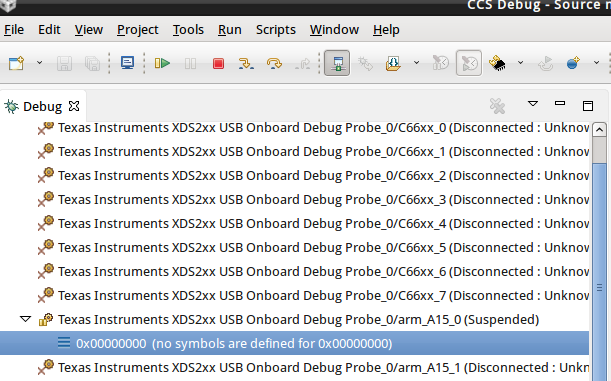
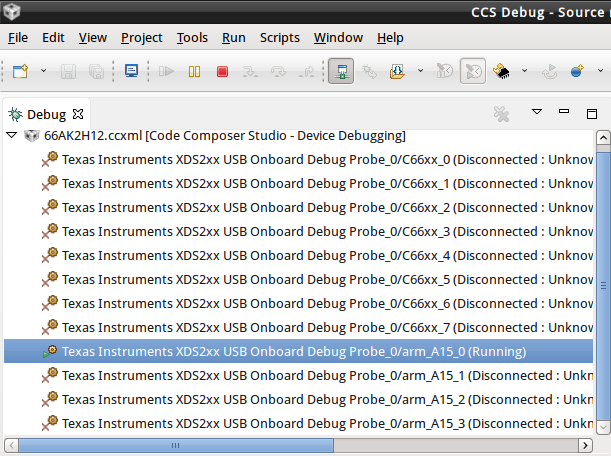
    This time I load GEL file first and then connect ARM_0 (see 1.png). I click 'load' button to load out file here, then arm_A15_0 shows "running" (see 2.png).

    Then I cllck "Suspend" button. The state of arm_A15_0 became original state - "Suspended" (see 1.png).

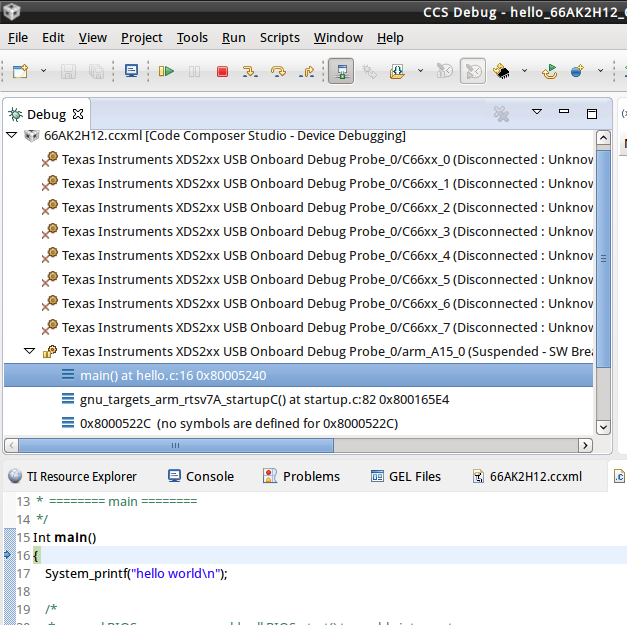
    Then I click "Restart" button, "main() xxxxx" shows under arm_A15_0 and I can also see a cursor point at entry of main() in "hello.c" window (see 3.png).

    I think at this moment the debugging on hello.c is really starting. If I press F6, the cursor move forward for 1 line.

    But what makes me so upset is that if I click "Resume" button the whole thing turns into running state as same as 2.png.

    What else I miss during the whole process?

    1.png:

    2.png:

    3.png:

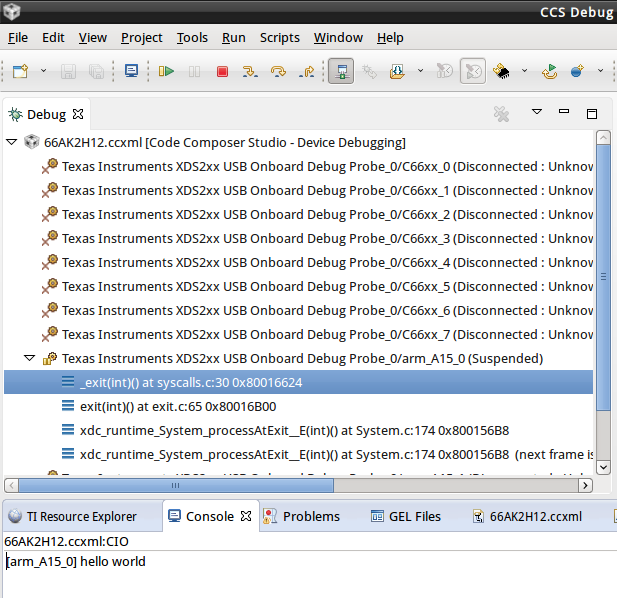
  • Finally, I tried lots of time and main.c could run and the output shows normally, although I really don't know why it works!

    The steps are as follows:

    --connect arm_A15_0

    --load GEL file

    --resume the program (equal to start the program)

    The program runs to the end normally!