This thread has been locked.

If you have a related question, please click the "Ask a related question" button in the top right corner. The newly created question will be automatically linked to this question.

CCS/TM4C1231H6PM: How to unlock Tiva C Flash via XDS110

Part Number: TM4C1231H6PM
Other Parts Discussed in Thread: UNIFLASH,

Tool/software: Code Composer Studio

Hello,

When I choose XDS110 as debug tool, the "unlock" is not shown in CCS configuration
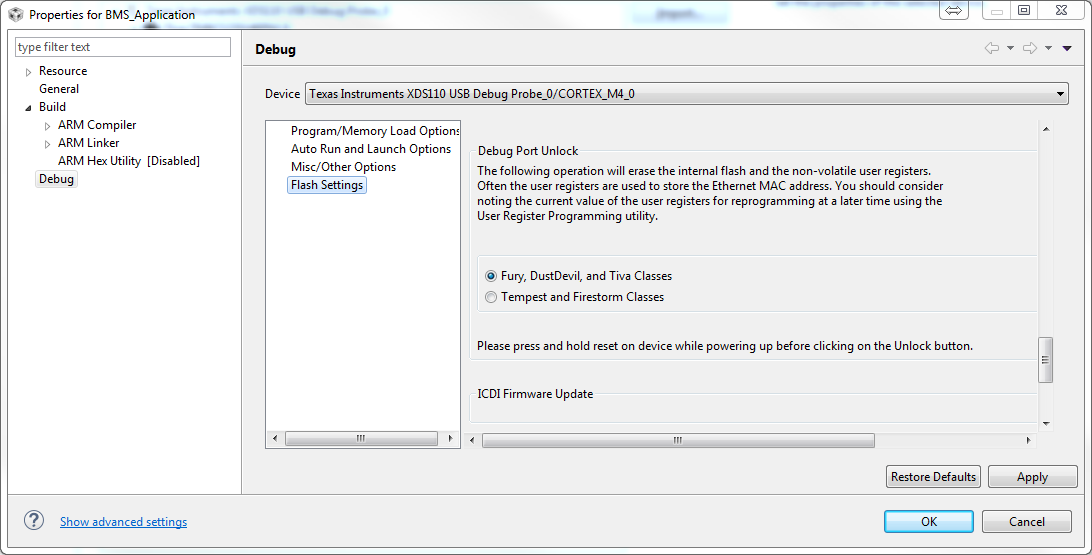
  

and, I cannot find unlock function in "Uniflash" online tool.

Is there any tool which I can use XDS110 to unlock flash?

  • Hi,

    What version of CCS are you using? The reason is that in my CCSv7.2.0, CCSv7.3.0 and CCSv7.4.0 the buttons show ok to me.

    I am using the following component versions (you can check them under menu Help → Installation Details)

    CCSv7.2.0 uses TI Emulators component version 7.0.48.0, while CCSv7.3.0 and 7.4.0 use version 7.0.100.1

    All versions use the Tiva C/E Series ARM MCUs version 2.1.1.15071

    If you have an older version, please try a newer version of CCS (you can install many version in parallel). If not, perhaps something is missing from your setup or it is a glitch of the interface. Check sections 4 and 6 of the Troubleshooting page below:

    http://processors.wiki.ti.com/index.php/Troubleshooting_CCSv7 

    Regards,

    Rafael

  • Hello Rafael,

    The version I used is v7.3.0.

    I think the page you post can be shown when the CCS with connection status with target.

    But my target has already locked by existed code, so I cannot enter this page.

    is there any way to find unlock operation page without connection.

    Many thanks,

    Way

  • Way,

    I see now the issue. You can manually launch the debugger and, without connecting to the TM4C core, try to see if the options show up. 

    Otherwise, you can try to issue a command similar to what is shown in this post.

    dbgjtag -f @xds110 -Y unlock,mode=tiva

    The command above can be run from a DOS command prompt at the directory ccsv7/ccs_base/common/uscif

    Hope this helps,

    Rafael

  • Hello Desouza,

    Many thanks to your detail explanation. I can find the "unlock" button.

    My new problem is that I cannot unlock my device. However, if I use  Stellaris ICDI, it works.

    The follow message I got when I hold reset pin before power and then press "unlock",

    CORTEX_M4_0: Starting Debug Port Unlock operation...
    CORTEX_M4_0: Error: Failed unlocking device!

    I have ever try to test the connection with target, and I got

    [Start: Texas Instruments XDS110 USB Debug Probe_0]

    Execute the command:

    %ccs_base%/common/uscif/dbgjtag -f %boarddatafile% -rv -o -S integrity

    [Result]


    -----[Print the board config pathname(s)]------------------------------------

    C:\Users\way.hsu\AppData\Local\TEXASI~1\
    CCS\ti\0\0\BrdDat\testBoard.dat

    -----[Print the reset-command software log-file]-----------------------------

    This utility has selected a 100- or 510-class product.
    This utility will load the adapter 'jioxds110.dll'.
    The library build date was 'Dec 11 2017'.
    The library build time was '12:04:14'.
    The library package version is '7.0.100.1'.
    The library component version is '35.35.0.0'.
    The controller does not use a programmable FPGA.
    The controller has a version number of '5' (0x00000005).
    The controller has an insertion length of '0' (0x00000000).
    This utility will attempt to reset the controller.
    This utility has successfully reset the controller.

    -----[Print the reset-command hardware log-file]-----------------------------

    The scan-path will be reset by toggling the JTAG TRST signal.
    The controller is the XDS110 with USB interface.
    The link from controller to target is direct (without cable).
    The software is configured for XDS110 features.
    The controller cannot monitor the value on the EMU[0] pin.
    The controller cannot monitor the value on the EMU[1] pin.
    The controller cannot control the timing on output pins.
    The controller cannot control the timing on input pins.
    The scan-path link-delay has been set to exactly '0' (0x0000).

    -----[An error has occurred and this utility has aborted]--------------------

    This error is generated by TI's USCIF driver or utilities.

    The value is '-233' (0xffffff17).
    The title is 'SC_ERR_PATH_BROKEN'.

    The explanation is:
    The JTAG IR and DR scan-paths cannot circulate bits, they may be broken.
    An attempt to scan the JTAG scan-path has failed.
    The target's JTAG scan-path appears to be broken
    with a stuck-at-ones or stuck-at-zero fault.

    [End: Texas Instruments XDS110 USB Debug Probe_0]

    The reset pin on TM4C1231H6PM is connected with 10K Ohm between 3.3V, and connected 0.01 uF between GND.

    Is there any potential reason could induce these error messages?

    Many thanks,

    Way

  • attach my ccxml file

    <?xml version="1.0" encoding="UTF-8" standalone="no"?>
    <configurations XML_version="1.2" id="configurations_0">
    <configuration XML_version="1.2" id="Texas Instruments XDS110 USB Debug Probe_0">
            <instance XML_version="1.2" desc="Texas Instruments XDS110 USB Debug Probe_0" href="connections/TIXDS110_Connection.xml" id="Texas Instruments XDS110 USB Debug Probe_0" xml="TIXDS110_Connection.xml" xmlpath="connections"/>
            <connection XML_version="1.2" id="Texas Instruments XDS110 USB Debug Probe_0">
                <instance XML_version="1.2" href="drivers/tixds510cs_dap.xml" id="drivers" xml="tixds510cs_dap.xml" xmlpath="drivers"/>
                <instance XML_version="1.2" href="drivers/tixds510cortexM.xml" id="drivers" xml="tixds510cortexM.xml" xmlpath="drivers"/>
                <property Type="choicelist" Value="0" id="Power Selection">
                    <choice Name="Target supplied power" value="0">
                        <property Type="choicelist" Value="1" id="Voltage Selection">
                            <choice Name="User specified value" value="1">
                                <property Type="stringfield" Value="3.3V" id="Voltage Level"/>
                            </choice>
                        </property>
                    </choice>
                </property>
                <property Type="choicelist" Value="1" id="The JTAG TCLK Frequency (MHz)"/>
                <platform XML_version="1.2" id="platform_0">
                    <instance XML_version="1.2" desc="Tiva TM4C1231H6PM_0" href="devices/tm4c1231h6pm.xml" id="Tiva TM4C1231H6PM_0" xml="tm4c1231h6pm.xml" xmlpath="devices"/>
                </platform>
            </connection>
        </configuration>
    </configurations>
    

  • Way,

    At first glance your target configuration is ok, therefore I am suspicious if the device is in fact configured to operate in JTAG mode - the error you are getting seems to show the JTAG path is broken, which can be caused by the hardware to be wired to SWD.

    Can you use the configuration below that sets the XDS110 to operate in SWD mode? That may help you overcome this.

    <?xml version="1.0" encoding="UTF-8" standalone="no"?>
    <configurations XML_version="1.2" id="configurations_0">
        <configuration XML_version="1.2" id="Texas Instruments XDS110 USB Debug Probe_0">
            <instance XML_version="1.2" desc="Texas Instruments XDS110 USB Debug Probe_0" href="connections/TIXDS110_Connection.xml" id="Texas Instruments XDS110 USB Debug Probe_0" xml="TIXDS110_Connection.xml" xmlpath="connections"/>
            <connection XML_version="1.2" id="Texas Instruments XDS110 USB Debug Probe_0">
                <instance XML_version="1.2" href="drivers/tixds510cs_dap.xml" id="drivers" xml="tixds510cs_dap.xml" xmlpath="drivers"/>
                <instance XML_version="1.2" href="drivers/tixds510cortexM.xml" id="drivers" xml="tixds510cortexM.xml" xmlpath="drivers"/>
                <property Type="choicelist" Value="1" id="SWD Mode Settings"/>
                <platform XML_version="1.2" id="platform_0">
                    <instance XML_version="1.2" desc="Tiva TM4C1231H6PM_0" href="devices/tm4c1231h6pm.xml" id="Tiva TM4C1231H6PM_0" xml="tm4c1231h6pm.xml" xmlpath="devices"/>
                </platform>
            </connection>
        </configuration>
    </configurations>
    

    Hope this helps,

    Rafael

  • Way,

    Did my last post help you overcome the issue you were having?

    I am running out of ideas short of a failed XDS110.

    Regards,
    Rafael