This thread has been locked.

If you have a related question, please click the "Ask a related question" button in the top right corner. The newly created question will be automatically linked to this question.

CCS/CODECOMPOSER: Project Explorer not showing active project configuration for 1 CCS project, but is for others

Part Number: CODECOMPOSER


Tool/software: Code Composer Studio

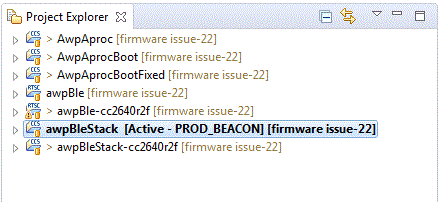
I have an instance of CCSv7.4.0 running that has 7 projects imported into it. When I click on most of the projects, it shows the active build configuration, followed by the git repo and branch that is currently checked out:
However, if I click on the last project in the list, the active build configuration does not show up:
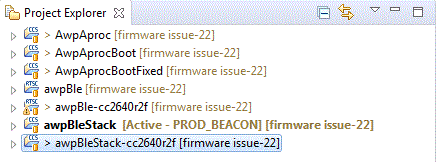
I don't see any obvious CCS settings that controls this, and I'm not sure if this indicates something is wrong with the project. Any idea what may be going on?

  • Hi Ed,
    Sometimes I have observed flakey UI behavior where the project is indeed active, but not highlighted as such. If you then press the build button, it will actually build the selected project. Is this the case for you?

    Other strange behavior is that library projects do not get highlighted. Is your project a library project?

    Thanks
    ki
  • Thank you Ki - the project in question is indeed a library project. Are the aspects of the UI documented somewhere?

    Thanks for your help!
    -Ed
  • This behavior (regarding the library) is not documented. I will add a note to add it somewhere.

    The reason for this behavior is that since library projects are not "debuggable" by themselves, they can not be specified as "active". Hence this is by design. But I think it does add to confusion regarding which project has context for things like build.

    Thanks
    ki