This thread has been locked.

If you have a related question, please click the "Ask a related question" button in the top right corner. The newly created question will be automatically linked to this question.

CCS/AM5728: Using native gdb with CCS7

Part Number: AM5728
Other Parts Discussed in Thread: BEAGLEBOARD-X15, DRA71XEVM

Tool/software: Code Composer Studio

Hi 

I'd like to use native arm GDB (bundled with gnu compiler) on top of XDS100v2 or XDS200. Similar to Segger GDB server or OpenOCD.

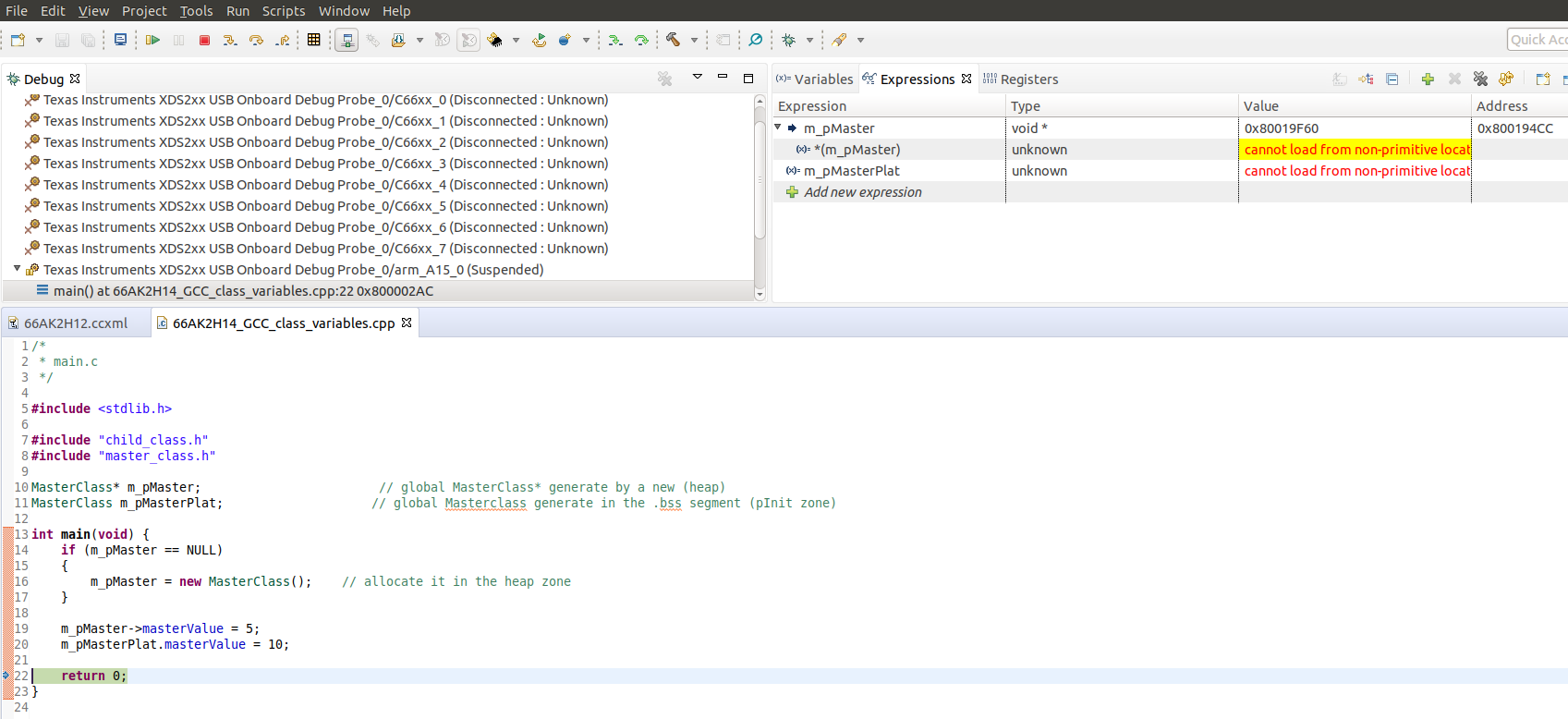
Motivation: stock CCS debugger does not always show members of C++ classes.

I'd like to use gdb bundled with gnu tools instead.

Thanks

Rasty

  • I did some research on e2e and found similar problem, without solution as far as I can see

    I  also found some information about gdb_agent_console.exe

    Unfortunately it returns error (below) with board-file created by CCS

    C:\ti\ccsv7\ccs_base\common\uscif>gdb_agent_console.exe testBoard.dat

    No CPUs that support GDB are defined in configuration file

    C:\ti\ccsv7\ccs_base\common\uscif>

    So problem is narrowed down to operation of gdb_agent_console.exe with XDS100v or XDS200,

    Thanks

    Rasty

  • Rasty Slutsker said:
    Motivation: stock CCS debugger does not always show members of C++ classes.

    Which version of CCS are you using?

    I tried my AM335_GCC_class_variables example on the thread you referenced with CCS 8.3, and with that particular example the CCS 8.3 debugger is now correctly showing the members of C++ classes.

  • I use ccs 7.4.0.
    Visibility problems in methods in derived classes defined in header.
    If load executable in gdb, I see all members.
  • Rasty Slutsker said:
    I use ccs 7.4.0.
    Visibility problems in methods in derived classes defined in header.

    Can you try with CCS 8.3?

    Using CCS 7.4.0.00015 there is a problem with the display of C++ classes:

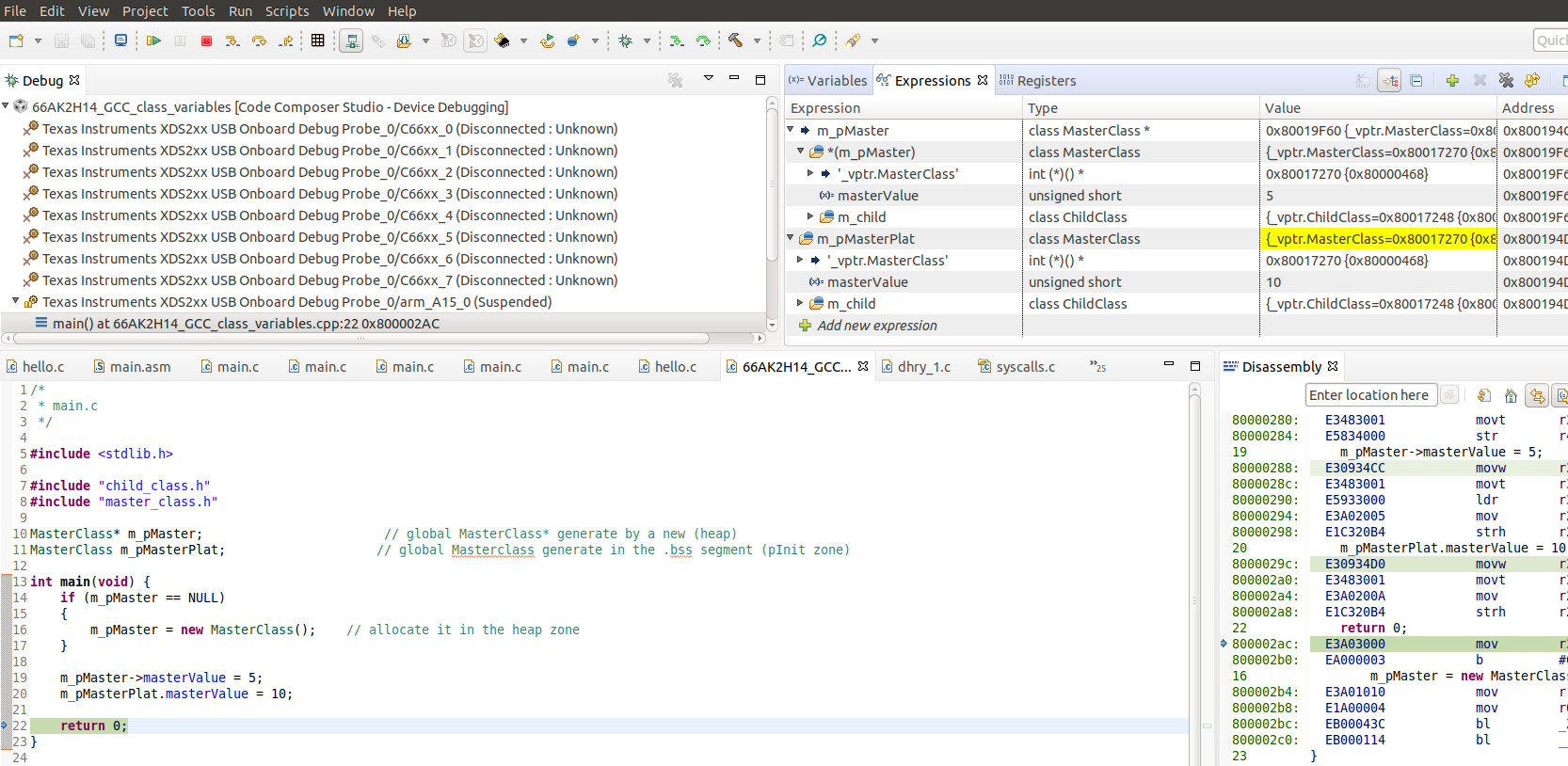
    Whereas with the same program in CCS 8.3.0.00009 the class variables are displayed:

    For this test the program was compiled with GCC v6.3.1 for a Cortex-A15.

    Note that looking at the release notes for CCS 8 I can't any explicit mention of defect fixes for the handling of C++ in the CCS debugger.

  • Rasty Slutsker said:

    Unfortunately it returns error (below) with board-file created by CCS

    C:\ti\ccsv7\ccs_base\common\uscif>gdb_agent_console.exe testBoard.dat

    No CPUs that support GDB are defined in configuration file

    I tried the gdb_agent_console from CCS 8.3, with an AM5728 connected to a BlackHawk USB560M. With CCS 8.3 under Windows 10 the gdb_agent_console.exe got the same "No CPUs that support GDB are defined in configuration file" error.

    When tried the CCS 8.3 gdb_agent_console under Unbuntu 18.04 LTS got further in that the GDB agent initialised, but then failed with errors when connected from the GDB installed by CCS. The output from gdb_agent_console was:

    ~/ti/ccs830/ccsv8/ccs_base/common/uscif/gdb_agent_console ~/.ti/ccs830/0/0/BrdDat/testBoard.dat
    CPU Name             Port
    --------             ----
    c66xx_dsp1          :55000
    c66xx_dsp2          :55001
    cortex_m4_ipu1_c0   :55002
    cortex_m4_ipu1_c1   :55003
    cortex_m4_ipu2_c0   :55004
    cortex_m4_ipu2_c1   :55005
    cortexa15_0         :55006
    cortexa15_1         :55007
    
    Starting all cores
    CPU Name             Status
    --------             ------
    cortex_m4_ipu2_c0    Waiting for client
    cortex_m4_ipu1_c0    Waiting for client
    cortexa15_1          Waiting for client
    c66xx_dsp1           Waiting for client
    c66xx_dsp2           Waiting for client
    cortex_m4_ipu1_c1    Waiting for client
    cortex_m4_ipu2_c1    Waiting for client
    cortexa15_0          Waiting for client
    cortexa15_1          Client connected...Connecting to Target
    Unknown device id: 0x75805400 (1d6,15,0,0)
    Unknown device id: 0x0 (0,0,0,0)
    cortexa15_1 - Processor type =UNKNOWN (Big endian)
    cortexa15_1 - Target device is connected
    Using ctools hardware breakpoint support.
    Target connected...Starting server
    FAILED! GTI_READEMEM_BLK(hpid=0x1de9b70,addr=0,count=4)=ffffffff
    (Error -1205 @ 0x0)
    Device memory bus has an error and may be hung. Verify that the memory address is in valid memory. If error persists, confirm configuration, power-cycle board, and/or try more reliable JTAG settings (e.g. lower TCLK).
    (Emulation package 8.0.903.4)

    And the output from GDB was:

    ~/ti/ccs830/ccsv8/tools/compiler/gcc-arm-none-eabi-6-2017-q1-update/bin/arm-none-eabi-gdb 
    GNU gdb (GNU Tools for ARM Embedded Processors 6-2017-q1-update) 7.12.1.20170215-git
    Copyright (C) 2017 Free Software Foundation, Inc.
    License GPLv3+: GNU GPL version 3 or later <gnu.org/.../gpl.html>
    This is free software: you are free to change and redistribute it.
    There is NO WARRANTY, to the extent permitted by law.  Type "show copying"
    and "show warranty" for details.
    This GDB was configured as "--host=x86_64-linux-gnu --target=arm-none-eabi".
    Type "show configuration" for configuration details.
    For bug reporting instructions, please see:
    <www.gnu.org/.../>.
    Find the GDB manual and other documentation resources online at:
    <www.gnu.org/.../>.
    For help, type "help".
    Type "apropos word" to search for commands related to "word".
    (gdb) target remote localhost:55007
    Remote debugging using localhost:55007
    warning: No executable has been specified and target does not support
    determining executable automatically.  Try using the "file" command.
    0x00000000 in ?? ()
    (gdb) 

    Therefore, updating to CCS 8.3 won't help you to use the GDB server with a native GDB.

  • Hi Chester,
    It look promising!
    When you connect with gdb you should load symbol/exec file and issue some low level commands like "monitor halt", then download file via GDB.

    Would you please generate dat files for xds100v2 and xds200, check if it works with gdb_agent_console and upload all 3 (including file for BlackHawk )

    Best regards
    Rasty
  • Rasty Slutsker said:
    Would you please generate dat files for xds100v2 and xds200, check if it works with gdb_agent_console and upload all 3 (including file for BlackHawk )

    OK, I have got something to work with CCS 7.4 under Windows, when using a BlackHawk USB560-M connected to a BeagleBoard-X15. I haven't been able to test with a xds100v2 since currently don't have the required 14-pin to 20 pin cTI adapter, and also don't have a standalone xds200.

    I found that when starting the gdb_agent_console you must give an absolute path to the board data file to avoid the "No CPUs that support GDB are defined in configuration file" error. I have reported that in CCS/BEAGLEBOARD-X15: CCS 7.4 gdb_agent_console reports "No CPUs that support GDB are defined in configuration file" if a relative path to the board data file is given

    The attached zip file contains the test project used:

    a. A C++ test program for which the CCS 7.4 debugger fails to display class variables.

    b. targetConfigs\testBoard_bh560usbm.dat is the board data file generated by a CCS test connection.

    c. targetConfigs\gdbinit is a GDB script to perform the following actions:

    - Connect to the gdb_agent_console on the port for the cortexa15_0 core.

    - monitor halt, to stop any running program.

    - Modify the CPSR register to set the processor to ARM mode and Supervisor mode. This is part of the function AM57xxStartState() from ccs_base\emulation\boards\am572x\gel\AM572x_startup_common.gel GEL script. This is to facilitate code loading and debug by putting the processor in a known state. Note that the AM57xxStartState() GEL function also disables the MMU, but the GDB script doesn't disable the MMU as I haven't yet determined how to modify the REG_CTXA15_CP15_C1_SCTLR register from a GDB script.

    - Load the program.

    - Set a breakpoint at main.

    - Continue execution, which should hit the breakpoint at main.

    The sequence of test steps were:

    1. Reset the BeagleBoard-X15 and press space to to pause at U-Boot (i.e. before Linux is loaded).

    2. Start the gdb_agent_console, as above giving an absolute path to the board data file:

    C:\Users\mr_halfword\E2E_example_projects\AM5728_GCC_class_variables>c:\ti\ccs740\ccsv7\ccs_base\common\uscif\gdb_agent_console.exe c:\Users\mr_halfword\E2E_example_projects\AM5728_GCC_class_variables\targetConfigs\testBoard_bh560usbm.dat
    CPU Name             Port
    --------             ----
    c66xx_dsp1          :55000
    c66xx_dsp2          :55001
    cortex_m4_ipu1_c0   :55002
    cortex_m4_ipu1_c1   :55003
    cortex_m4_ipu2_c0   :55004
    cortex_m4_ipu2_c1   :55005
    cortexa15_0         :55006
    cortexa15_1         :55007
    
    Starting all cores
    CPU Name             Status
    --------             ------
    cortex_m4_ipu1_c0    Waiting for client
    c66xx_dsp2           Waiting for client
    cortex_m4_ipu2_c1    Waiting for client
    cortex_m4_ipu2_c0    Waiting for client
    cortexa15_0          Waiting for client
    cortexa15_1          Waiting for client
    c66xx_dsp1           Waiting for client
    cortex_m4_ipu1_c1    Waiting for client

    3. Start GDB, giving the init script and the program to load. This loads the program, but doesn't hit the breakpoint at main:

    C:\Users\mr_halfword\E2E_example_projects\AM5728_GCC_class_variables>c:\ti\ccs740\ccsv7\tools\compiler\gcc-arm-none-eabi-6-2017-q1-update\bin\arm-none-eabi-gdb.exe --command=targetConfigs\gdbinit Debug\AM5728_GCC_class_variables.out
    GNU gdb (GNU Tools for ARM Embedded Processors 6-2017-q1-update) 7.12.1.20170215-git
    Copyright (C) 2017 Free Software Foundation, Inc.
    License GPLv3+: GNU GPL version 3 or later <gnu.org/.../gpl.html>
    This is free software: you are free to change and redistribute it.
    There is NO WARRANTY, to the extent permitted by law.  Type "show copying"
    and "show warranty" for details.
    This GDB was configured as "--host=i686-w64-mingw32 --target=arm-none-eabi".
    Type "show configuration" for configuration details.
    For bug reporting instructions, please see:
    <www.gnu.org/.../>.
    Find the GDB manual and other documentation resources online at:
    <www.gnu.org/.../>.
    For help, type "help".
    Type "apropos word" to search for commands related to "word"...
    Reading symbols from Debug\AM5728_GCC_class_variables.out...done.
    0x00000000 in ?? ()
    CPU has been halted
    $1 = 0xfa010040
    $2 = 0xfa010053
    Loading section .rsthand, size 0x70 lma 0x40300000
    Loading section .text, size 0x11918 lma 0x40300070
    Loading section .ARM.extab, size 0x120 lma 0x40311988
    Loading section .ARM.exidx, size 0x1c0 lma 0x40311aa8
    Loading section .data, size 0x9cc lma 0x40311c68
    Loading section .jcr, size 0x4 lma 0x40312634
    Start address 0x40300050, load size 75320
    Transfer rate: 1501 KB/sec, 918 bytes/write.
    Breakpoint 1 at 0x403001bc: file ../66AK2H14_GCC_class_variables.cpp, line 13.

    Suspect the reason why the first attempt to run the program fails to reach main is that the GDB init script isn't disabling the MMU (or possibly some other actions which are performed by the CCS GEL scripts when attaching to a A15 core).

    Since the program hasn't reached main, use Ctrl-C to interrupt GDB and then exit:

    Program received signal SIGTRAP, Trace/breakpoint trap.
    0x0c000000 in ?? ()
    (gdb) quit
    A debugging session is active.
    
            Inferior 1 [Remote target] will be detached.
    
    Quit anyway? (y or n) y
    Detaching from program: C:\Users\mr_halfword\E2E_example_projects\AM5728_GCC_class_variables\Debug\AM5728_GCC_class_variables.out, Remote target
    Ending remote debugging.

    4. Start GDB for a second time, which this time runs to the breakpoint on main:

    C:\Users\mr_halfword\E2E_example_projects\AM5728_GCC_class_variables>c:\ti\ccs740\ccsv7\tools\compiler\gcc-arm-none-eabi-6-2017-q1-update\bin\arm-none-eabi-gdb.exe --command=targetConfigs\gdbinit Debug\AM5728_GCC_class_variables.out
    GNU gdb (GNU Tools for ARM Embedded Processors 6-2017-q1-update) 7.12.1.20170215-git
    Copyright (C) 2017 Free Software Foundation, Inc.
    License GPLv3+: GNU GPL version 3 or later <gnu.org/.../gpl.html>
    This is free software: you are free to change and redistribute it.
    There is NO WARRANTY, to the extent permitted by law.  Type "show copying"
    and "show warranty" for details.
    This GDB was configured as "--host=i686-w64-mingw32 --target=arm-none-eabi".
    Type "show configuration" for configuration details.
    For bug reporting instructions, please see:
    <www.gnu.org/.../>.
    Find the GDB manual and other documentation resources online at:
    <www.gnu.org/.../>.
    For help, type "help".
    Type "apropos word" to search for commands related to "word"...
    Reading symbols from Debug\AM5728_GCC_class_variables.out...done.
    0x0000000c in ?? ()
    CPU has been halted
    $1 = 0x500001da
    $2 = 0x500001d3
    Loading section .rsthand, size 0x70 lma 0x40300000
    Loading section .text, size 0x11918 lma 0x40300070
    Loading section .ARM.extab, size 0x120 lma 0x40311988
    Loading section .ARM.exidx, size 0x1c0 lma 0x40311aa8
    Loading section .data, size 0x9cc lma 0x40311c68
    Loading section .jcr, size 0x4 lma 0x40312634
    Start address 0x40300050, load size 75320
    Transfer rate: 1387 KB/sec, 918 bytes/write.
    Breakpoint 1 at 0x403001bc: file ../66AK2H14_GCC_class_variables.cpp, line 13.
    
    Breakpoint 1, main () at ../66AK2H14_GCC_class_variables.cpp:13
    13      int main(void) {
    (gdb)

    5. The C++ program can now be stepped in GDB, and can display the class variables which the CCS 7.4 debugger fails to:

    (gdb) step
    14          if (m_pMaster == NULL)
    (gdb) step
    16              m_pMaster = new MasterClass();    // allocate it in the heap zone
    (gdb) step
    MasterClass::MasterClass (this=0x403130e0) at ../master_class.cpp:11
    11      MasterClass::MasterClass()
    (gdb) step
    ChildClass::ChildClass (this=0x403130e8) at ../child_class.cpp:10
    10      ChildClass::ChildClass()
    (gdb) print *this
    $3 = {_vptr.ChildClass = 0x40310380 <vtable for ChildClass+8>, value0 = 0, value1 = 9}
    (gdb) step
    13      }
    (gdb) step
    MasterClass::MasterClass (this=0x403130e0) at ../master_class.cpp:14
    14      }
    (gdb) step
    main () at ../66AK2H14_GCC_class_variables.cpp:19
    19          m_pMaster->masterValue = 5;
    (gdb) step
    20          m_pMasterPlat.masterValue = 10;
    (gdb) step
    23      }
    (gdb) print *m_pMaster
    $4 = {_vptr.MasterClass = 0x403103a8 <vtable for MasterClass+8>, masterValue = 5, m_child = {
        _vptr.ChildClass = 0x40310380 <vtable for ChildClass+8>, value0 = 0, value1 = 9}}
    (gdb) print m_pMasterPlat
    $5 = {_vptr.MasterClass = 0x403103a8 <vtable for MasterClass+8>, masterValue = 10, m_child = {
        _vptr.ChildClass = 0x40310380 <vtable for ChildClass+8>, value0 = 0, value1 = 0}}
    (gdb)

    Note that while this simple example which runs in on-chip RAM was successfully debugged, given the following errors which are reported by the gdb_agent_console when a program is loaded not sure how stable debugging will be for a more complex program:

    cortexa15_0          Client connected...Connecting to Target
    Unknown device id: 0x75805400 (1d6,15,0,0)
    Unknown device id: 0x0 (0,0,0,0)
    cortexa15_0 - Processor type =UNKNOWN (Little endian)
    cortexa15_0 - Target device is connected
    Using ctools hardware breakpoint support.
    Target connected...Starting server
    FAILED! GTI_READEMEM_BLK(hpid=00800348,addr=403012d0,count=2)=ffffffff
    (Error -1205 @ 0x403012D0)
    Device memory bus has an error and may be hung. Verify that the memory address is in valid memory. If error persists, confirm configuration, power-cycle board, and/or try more reliable JTAG settings (e.g. lower TCLK).
    (Emulation package 7.0.100.0)
    
    FAILED! GTI_READEMEM_BLK(hpid=00800348,addr=40308190,count=2)=ffffffff
    (Error -1205 @ 0x40308190)
    Device memory bus has an error and may be hung. Verify that the memory address is in valid memory. If error persists, confirm configuration, power-cycle board, and/or try more reliable JTAG settings (e.g. lower TCLK).
    (Emulation package 7.0.100.0)
    
    FAILED! GTI_READEMEM_BLK(hpid=00800348,addr=4031035c,count=4)=ffffffff
    (Error -1205 @ 0x4031035C)
    Device memory bus has an error and may be hung. Verify that the memory address is in valid memory. If error persists, confirm configuration, power-cycle board, and/or try more reliable JTAG settings (e.g. lower TCLK).
    (Emulation package 7.0.100.0)

    The thread CCS/DRA71XEVM: xds100v3 gdb agent for dra71x evm notes than OpenOCD support is more active, and OpenOCD supports XDS100 probes. However, as of openocd-0.10.0 there are no scripts to support an AM572x chip so you would have to create your own.

    AM5728_GCC_class_variables.zip

  • Hi Chester,
    Thank you very much for example.
    You do not need working xds100 or xds200. Just create target configuration and click on "test", jtag test will fail, but you get target files that I can check.

    I constantly follow openocd - it is my first choose for ARM. Unfortunately it does not support (yet) am572x.
    I miss GDB console in CCS.

    Best regards
    Rasty
  • Rasty Slutsker said:
    You do not need working xds100 or xds200. Just create target configuration and click on "test", jtag test will fail, but you get target files that I can check.

    OK, the target files are attached. testBoard_xds100v2.zip

    I just checked if the gdb_agent_console accepted the target files:

    1. The CCS 7.4 gdb_agent_console accepted the testBoard_xds200.dat file.

    2. However, the CCS 7.4 gdb_agent_console rejected the testBoard_xds100v2.dat file even when a full path was used:

    C:\Users\mr_halfword\E2E_example_projects\AM5728_GCC_class_variables>c:\ti\ccs740\ccsv7\ccs_base\common\uscif\gdb_agent_console.exe c:\Users\mr_halfword\E2E_example_projects\AM5728_GCC_class_variables\targetConfigs\testBoard_xds100v2.dat
    No CPUs that support GDB are defined in configuration file

    Whereas when reverted to the CCS 6.2 gdb_agent_console the file was then accepted:

    C:\Users\mr_halfword\E2E_example_projects\AM5728_GCC_class_variables>c:\ti\ccs620\ccsv6\ccs_base\common\uscif\gdb_agent_console.exe c:\Users\mr_halfword\E2E_example_projects\AM5728_GCC_class_variables\targetConfigs\testBoard_xds100v2.dat
    Successfully configured c:\Users\mr_halfword\E2E_example_projects\AM5728_GCC_class_variables\targetConfigs\testBoard_xds100v2.dat
    CPU Name             Port
    --------             ----
    cortex_m4_ipu1_c0   :55002
    cortex_m4_ipu1_c1   :55003
    cortex_m4_ipu2_c0   :55004
    cortex_m4_ipu2_c1   :55005
    cortexa15_0         :55006
    cortexa15_1         :55007
    
    Starting all cores
    CPU Name             Status
    --------             ------
    cortex_m4_ipu2_c0    Waiting for client
    cortex_m4_ipu1_c1    Waiting for client
    cortex_m4_ipu1_c0    Waiting for client
    cortex_m4_ipu2_c1    Waiting for client
    cortexa15_1          Waiting for client
    cortexa15_0          Waiting for client

    This is the bug DBGTRC-3927 which was reported in the above referenced thread CCS/DRA71XEVM: xds100v3 gdb agent for dra71x evm, whereby:

    XDS GDB Agent fails to properly recognize multi-core devices when used with XDS100 and XDS110-class Debug probes.

  • Hi Chester,
    XDS200 configuration file and gdbinit from e2e.ti.com/.../AM5728_5F00_GCC_5F00_class_5F00_variables.zip

    target remote localhost:55006
    monitor halt
    #set to ARM mode
    p/x $cpsr
    set $cpsr = $cpsr & ~0x20
    #set to privledged mode
    set $cpsr = ($cpsr & ~0x1F) | 0x13
    p/x $cpsr
    load
    b main
    continue


    made the trick.
    I still have some problem with Eclipse setup. I'll sort this out later.

    Thank you very much.