This thread has been locked.

If you have a related question, please click the "Ask a related question" button in the top right corner. The newly created question will be automatically linked to this question.

CCS/TM4C1294KCPDT: How do I get the stack unwound in exception handlers?

Part Number: TM4C1294KCPDT
Other Parts Discussed in Thread: TM4C1294NCPDT

Tool/software: Code Composer Studio

I have added BKPT instructions at the start of the various exception handlers provided in startup_ccs.c so that the handler typically look like:

static void FaultISR()
   {
   /* Various hardware and memory access errors arrive here.

   Did you remember to turn it on? Use code like:

      SysCtlPeripheralEnable(SYSCTL_PERIPH_GPIOA);

   Is there enough heap and stack space? Check CPP_FEShim.cmd. Check for
   recursion or large local buffers etc.

   Is startup ordering correct? (Look for statics with constructors.)
   Null pointer dereferencing can end up here some time after the event!
   Check for references to members in bogus (low - flash) memory
   See spma043 Diagnosing Software Faults in Stellaris.pdf
   */
   __asm("    BKPT #2");

   while(1)
     ;
   }

However when the debugger stops on the break point the debug stack shows only two stack entries:

  1. FaultISR() at startup_cpp.c:275 0x00019EE0
  2. 0xFFFFFFF8 (no symbols are defined)

The 0xFFFFFFF8 looks like the link register value with its low bit reset.

I can get a sane stack by restoring LR from the event frame and adding 0x68 to the SP (the LR value says the FP registers were pushed). Is there some reason that process can't be followed by the debugger to show the fully unwound stack?

  • Hi Peter,

    A few questions:

    -What version of CCS are you using?

    -Are you using SYS/BIOS

    -Which compiler - TI or GCC?

    Thanks

    ki

  • -What version of CCS are you using? 9.0.1.00004. I've been using versions of CCS since 6.x with no change in behavior.

    -Are you using SYS/BIOS? Not so far as I know. How do I tell? There is nothing in CCS Build Dependencies

    -Which compiler - TI or GCC? TI v 18.12.1.LTS. I've previously used TI v 18.1.1.x.LTS with the same result

  • Peter Jaquiery said:
    -Are you using SYS/BIOS? Not so far as I know. How do I tell? There is nothing in CCS Build Dependencies

    Probably the easiest way to tell is if you have a SYS/BIOS *.cfg file as part of the project, or the project folder has the words "RTSC" instead of "CCS":

    I was asking about SYS/BIOS because there was a known issue with the stack trace for SYS/BIOS projects built with the GCC compiler. But based on your answers, your issue is not related to that.

    Still investigating. Sorry for the delay

    ki

  • Peter - sorry for the delay. This fell off my radar and I am looking at it now. I don't have much of an update other than I can reproduce a similar issue. I'll need to pull in some experts and I will keep you posted.

    Thanks

    ki

  • I've added the comment

       /* To restore stack frame note the LR value and
          LR = [SP + 0x16]
          SP += 0x20 if LR == 0xFFFFFFE1 or
          SP += 0x68 if LR == 0xFFFFFFE9
    
       PC can be restored from the original SP + 0x18
       All other registers should not have been disturbed at this point.
       */
    

    to my static void FaultISR() handler which helps, but sure ain't as nice as having the debugger do the heavy lifting. I'm looking forward to a fix. :-D

    Just noticed I can switch to HTML mode in this benighted editor. Nasty formatting due to misplaced </pre> fixed.

  • Sorry about the garbage formatting in my previous post. This on line editor is rubbish and I'm giving up fighting it. There aren't enough hours in the day to waste trying to second guess stupid "What You See Is Completely Unrelated To What You Get" editors.

  • Peter Jaquiery said:
    to my static void FaultISR() handler which helps, but sure ain't as nice as having the debugger do the heavy lifting. I'm looking forward to a fix.

    You can use GEL scripts to automate such tests.

    The attached project for a TM4C1294NCPDT contains a modified version of the CortexM3_util.gel from the CCS 9.1 installation in which:

    a. The Unwind_Exception function unwinds the stack after an exception, after first verifying that the LR contains an EXC_RETURN value. The function adjusts the SP value according to if floating point state was saved. A message is output to the console to indicate when the exception stack has been unwound.

    b. Unwind_Exception is connected to the Scripts -> Exception CCS menu item, so can be manually run.

    c. The OnFileLoaded() and OnHalt() functions take the following action:
    - On loading a program automatically set a breakpoint on the FaultISR function.
    - When the breakpoint on FaultISR is hit automatically unwind the stack after an exception.

    This means by making use of the GEL file the debugger is set so if the FaultISR function is called the program is automatically stopped and the exception backtrace unwound.

    The attach project can generate a hard fault with and without floating point state saved on the exception stack by setting the exception_enabled and use_floating_point global variables from the debugger expression view.

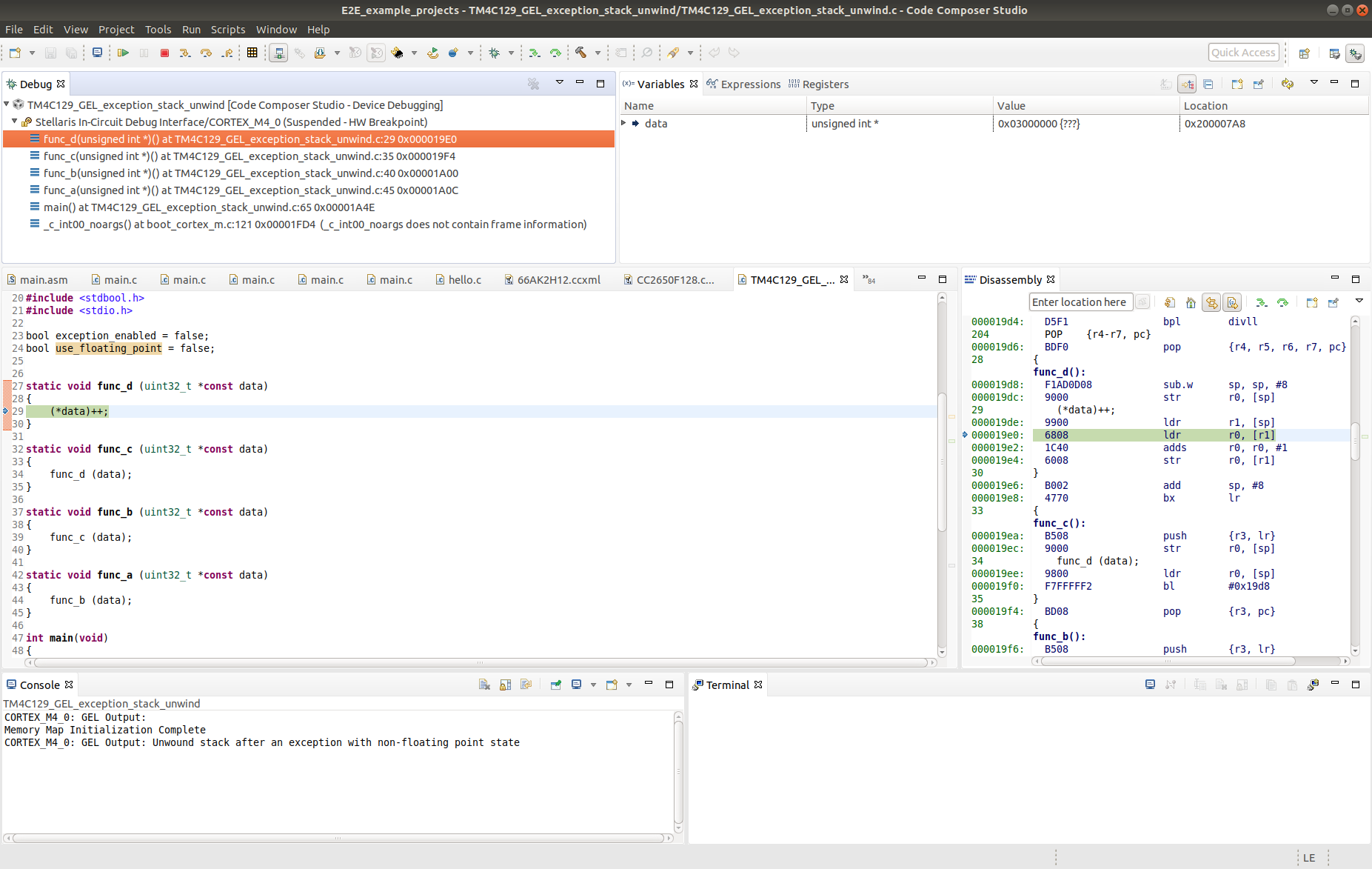
    The following is the result when a hard fault was generated with no floating point state saved:

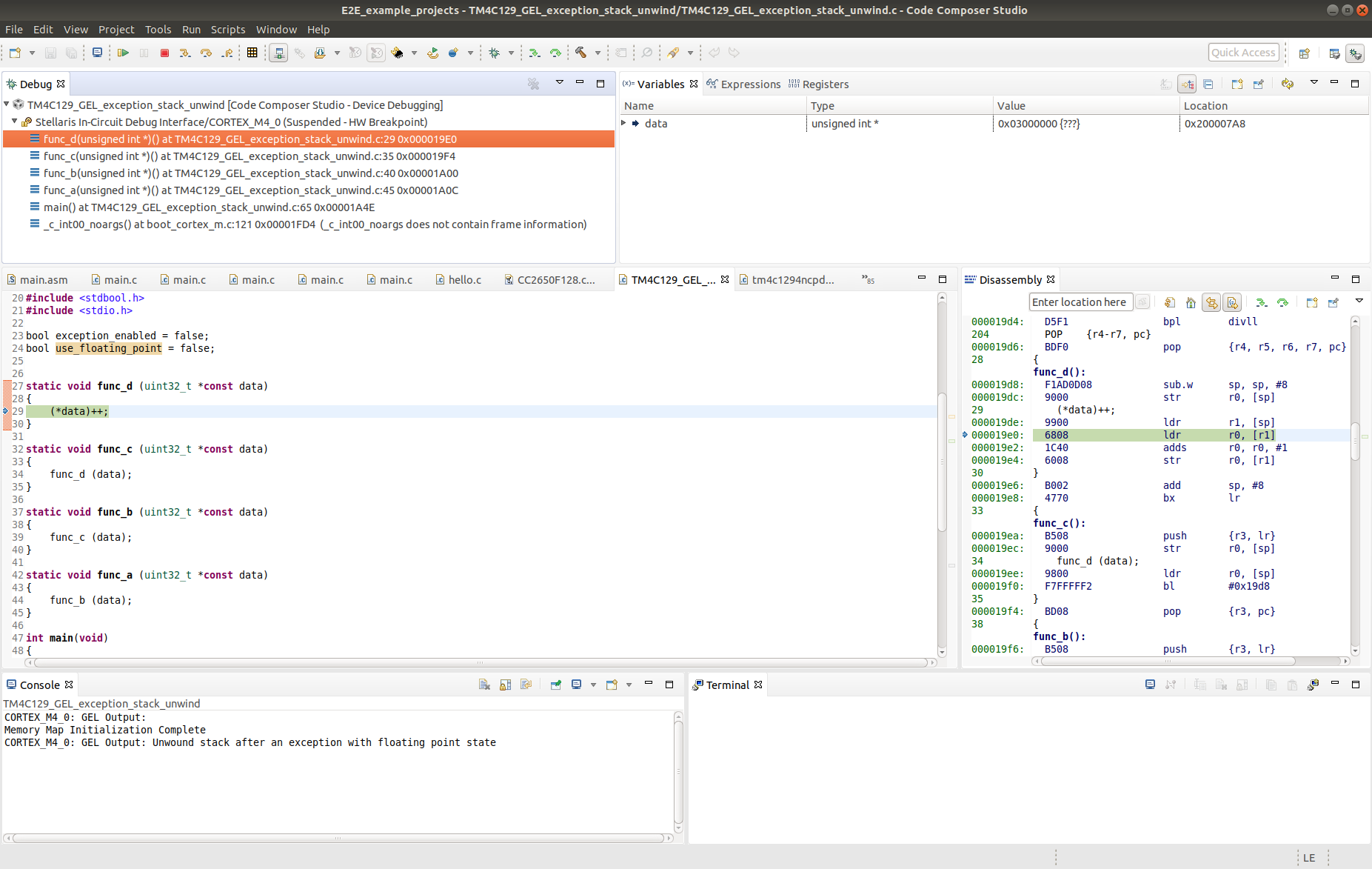
    And a hard fault with the floating point state saved:

    This shows that the exception state has been unwound to show the program state at which the hard fault occurred.

    For this example project the modified CortexM3_util.gel and unmodified tm4c1294ncpdt.gel are in the project root directory, with the target configuration file set to use the GEL files in the project.

    If you copied the modified CortexM3_util.gel into the CCS installation under <ccs_install_root>/ccs/ccs_base/emulation/gel all project should use the modified GEL file.

    TM4C129_GEL_exception_stack_unwind.zip

  • Chester - thank you for the great analysis on the issue and the workaround. 

    A bug has been filed for this issue to implement a proper fix in the debugger. The tracking ID is: CCBT-2471

    Thanks

    ki