This thread has been locked.

If you have a related question, please click the "Ask a related question" button in the top right corner. The newly created question will be automatically linked to this question.

CCS/IWR6843ISK-ODS: IWR6843 ISK - ODS: TRYING TO GET UART DATA

Part Number: IWR6843ISK-ODS
Other Parts Discussed in Thread: IWR6843,

Tool/software: Code Composer Studio

Hi,

I am trying to get the UART data from the oob-parser gui file.

It is reading the configuration files but it doesnt shown that is done and also providing the zero values in UART data.

Please guide me which configuration file(.cfg) should use, since i am using iwr6843 isk-ods device assisst me the configuration file. Tried with both the file (ISK _6m_default.cfg & ODS_6m_default.cfg) and also with mmw_pplcount_demo_default.cfg 

Connected
file read sucessfull
b'sensorStop\n'
b''
b'flushCfg\n'
b''
b'dfeDataOutputMode 1\n'
b''
b'channelCfg 15 7 0\n'
b''
b'adcCfg 2 1\n'
b''
b'adcbufCfg -1 0 1 1 1\n'
b''
b'lowPower 0 0\n'
b''
b'profileCfg 0 60.75 7 741.10 0 0 54.71 1 9 2950.00 0 0 24 \n'
b''
b'chirpCfg 0 0 0 0 0 0 01\n'
b''
b'chirpCfg 1 1 0 0 0 0 02\n'
b''
b'chirpCfg 2 2 0 0 0 0 04\n'
b''
b'frameCfg 0 2 96 0 501 0\n'
b''
b'dynamicRACfarCfg -1 4 2 4 8 16 4 4 4.00 4.0 0.50 1 1\n'
b''
b'staticRACfarCfg -1 4 42 4 8 16 4 6 8.00 13.0 0.30 0 0\n'
b''
b'dynamicRangeAngleCfg - 0.75 0.0010 1 0\n'
b''
b'dynamic2DAngleCfg -1 15 0.0300 1 0 1 0.50 085 8.00\n'
b''
b'staticRangeAngleCfg -11 8 4\n'
b''
b'antGeometry0 0 0 -1 -1-2 -2 -3 -3 -2 -2 -3 3\n'
b''
b'antGeometry1 0 -1 -1 00 -1 -1 0 -2 -3 -3 -2\n'
b''
b'antPhaseRot 1 -1 -1 1 -1 -1 1 1 -1 -1 1\n'
b''
b'fovCfg -1 70.0 20.0\n'
b''
b'compRangeBiasAndRxChanhase 0 1 0 1 0 1 0 1 1 0 1 0 1 0 1 0 1 0 0 1 0 1 0 \n'
b''
b'staticBoundaryBox -2 21 8.5 -2 2\n'
b''
b'boundaryBox -2.5 2.5 05 9 -2.5 2.5\n'
b''
b'sensorPosition 2 0 10\n'
b''
b'gatingParam 3 1.5 1.5 0\n'
b''
b'stateParam 3 3 10 40 5600\n'
b''
b'allocationParam 200 80 0.1 15 0.5 20\n'
b''
b'maxAcceleration 0.1 0. 0.1\n'
b''
b'trackingCfg 1 2 1000 2 67 105 50\n'
b''
b'sensorStart\n'
b''
Confing Sent
(array([[0., 0., 0., ..., 0., 0., 0.],
[0., 0., 0., ..., 0., 0., 0.],
[0., 0., 0., ..., 0., 0., 0.],
[0., 0., 0., ..., 0., 0., 0.],
[0., 0., 0., ..., 0., 0., 0.]]), array([[0.],
[0.],
[0.],
[0.],
[0.],
[0.],
[0.],
[0.],
[0.],
[0.],
[0.],
[0.]]), [], 0, 0, 0, 1, [])
{'PeopleCount': 0}


Help me to resolve this issue..

-Thanks,

Priyanka.S 

  • Hi Priyanka,

    For the IWR6843ISK-ODS EVM, you should use the ODS_default_6m.cfg file. Please check the following:

    1. The device has been flashed with the 3D People Counting software

    2. The device works with the default visualizer

    If the above 2 are good, then double check the parsing script. If you are using the python parser provided by TI, please ensure that you are initializing it properly. For running with the 3D People Counting lab, the initialization line is as follows:

    from oob_parser import uartParserSDK

    parser = uartParserSDK(type ='3D People Counting') #3D People Counting labs (68xx)

    Regards,

    Justin

  • Hi,

    As u sugessted i changed the parser type and still the cfg file & uart data o/p are remains same 

    Can you please check whether this parsing logic is correct :

    from oob_parser import uartParserSDK

    parser = uartParserSDK(type ='3D People Counting')
    parser.frameTime = 50 #50 ms frame time
    try:
    uartCom = "/dev/ttyACM0"
    dataCom = "/dev/ttyACM1"
    parser.connectComPorts(uartCom, dataCom)
    except Exception as E:
    print(E)
    print('Com port connection failed')

    #open config file
    fname = '/home/pi/R2/PplCount/ODS_6m_default.cfg'
    cfg_file = open(fname, 'r')
    #print(cfg_file.readlines())
    cfg = cfg_file.readlines()
    print("file read sucessfull")
    print(cfg)
    parser.sendCfg(cfg)
    print("Confing Sent")

    while(1):
    time.sleep(.05) #50 ms
    data = parser.readAndParseUart()
    #print("uart data")
    print(data)
    #peoplecount={"PeopleCount":data[4]}
    #print(peoplecount)


    --Regards, 
    Priyanka

  • Hi Priyanka,

    The logic is correct. Please note that the parser in your example will fall behind the device, as you will read a frame every 50 ms + the parsing time. Device will send a frame every 50ms, so it will be faster than the parser. I suggest this:

    while(1):

    sTime = getTImemSeconds() #this is a pseudo code function

    data = parser.readAndParseUart()

    print(data)

    eTime = getTImemSeconds()

    time.sleep(eTime-sTime)

    However, that will be more helpful after we get this working. 

    From the text you provided, the device is not sending acks after the command is sent from the pc. After each command, you should see 'Done' returned on the command line - however, you only get '' - no response. This means the device is not booting properly.  Please do the following:

    1. Confirm that you have an ES2.0 device
    2. Confirm that you have flashed the device with the 3D People Counting demo
    3. Confirm that you have taken the device out of debug mode and put it in standalone mode.
    4. Try running the Out of Box demo (also found in the Toolbox) to confirm that there are no hardware issues.

    Since you are running on linux, please check that the serial communication library, pyserial, works with your OS.

    If you have to correct any of the above, please try running your script again. If you step through those and don't have any problems, please do the following:

    1. Confirm that the demo works when using the visualizer as provided.
    2. View the command line when you run the script - you should see each command sent to the device, and the device should reply with "Done"
    3. If the script is returning 0,0,0 etc., can you use a utility like tera term or putty to check that there is data coming from the device? We want to see a stream of random characters coming over the DATA COM Port
    4. The parser returns a success or fail value (this should probably be documented in the future). This is data[6].
      1. Fail = data[6]
      2. if (Fail == 1): print ('read failed')

    Let me know if you have any questions.

    Regards,

    Justin

  • Hi,

    Try running the Out of Box demo (also found in the Toolbox) to confirm that there are no hardware issues

    Device Name : IWR 6843 ISK - ODS

    1.Yes, device is ES2.0


    2. Flashed 3D People Counting demo to the device 

    3.changed the device to stand-alone mode 

    Trying the 3D demo GUI from the path C:\ti\mmwave_industrial_toolbox_4_1_0\labs\people_counting\68xx_3D_people_counting\gui\mmWave_People_Counting_GUI. In this windows GUI application also, ISK - ODS not providing the acknowledgment as done for the configurations.

    4.Please guide me the steps to run the out of box demo (from the toolbox) to sort out whether this is due to hardware issues.

    Thanks for guiding me this much..

    Please help me out to resolve this issues. 

    -Thanks,
    Priyanka.S

  • Hi Priyanka,

    1. You can find the OOB binary in the SDK at: C:\ti\mmwave_sdk_03_03_00_03\packages\ti\demo\xwr68xx\mmw\xwr68xx_mmw_demo.bin
    2. Flash device with this binary
    3. Go to the online visualizer here: https://dev.ti.com/gallery/view/mmwave/mmWave_Demo_Visualizer/ver/3.3.0/
    4. Use the options menu to connect to the device
    5. Select IWR6843 
    6. Select 4 Rx 3 Tx
    7. Load the default configuration
    8. Console on the right will display the sent commands and the "Done" acks from the device

    More detailed instructions are here in the quickstart section: http://dev.ti.com/tirex/explore/node?node=AM1kRI3l5vvDUDVn-RHrxQ__VLyFKFf__LATEST

    Regards,

    Justin

  • Hi Justin,

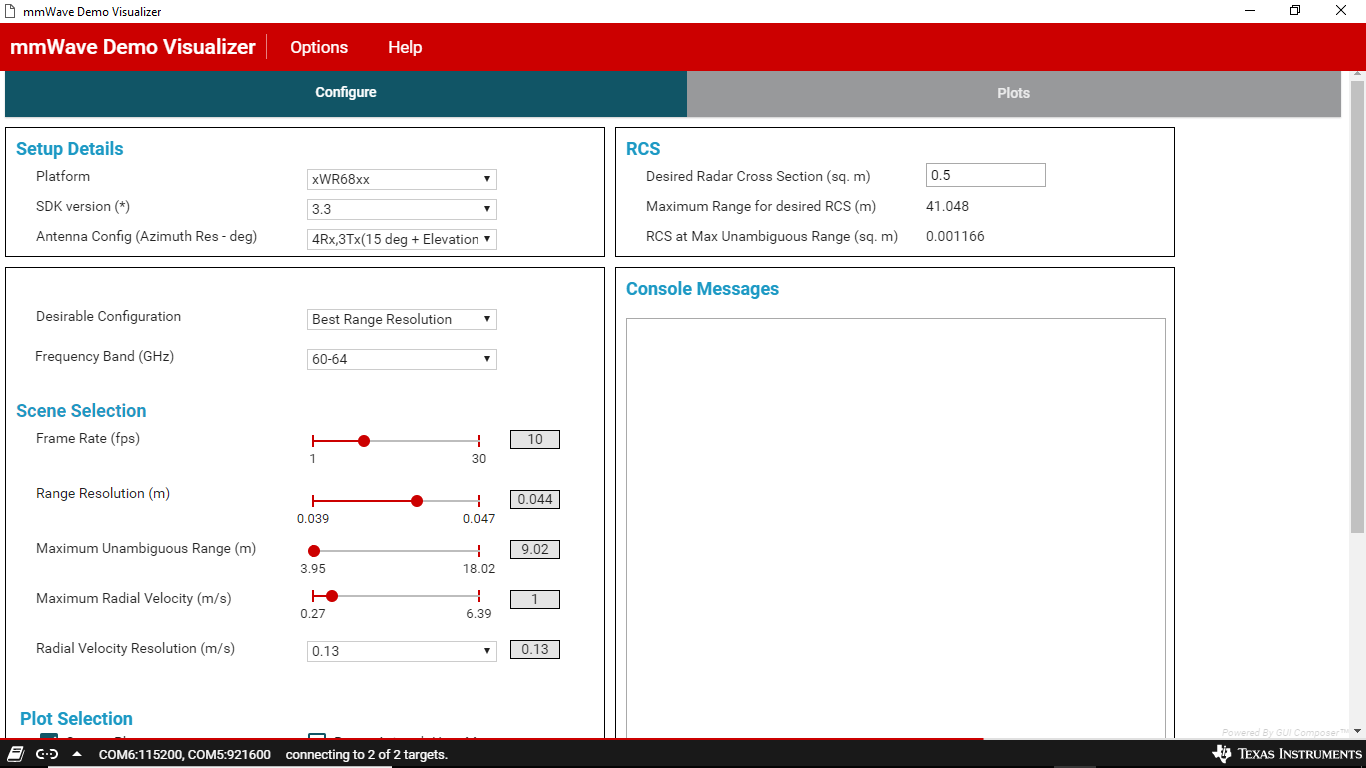
    As you suggested the above steps has done with mmWave Demo Visualizer 3.3.0, there UART PORT is connected but DATA PORT was waiting to connect (i.e. in connecting state). I attached the image also for your reference..

    Once both(DATA & UART) the ports got connected then only it show the console with its acknowledgement..
    I got stucked with this part only from starting...

    But I have Loaded the configuration file and given send config also ..

    Please help me to resolve this issue..

    --Regards,

    Priyanka. S

  • Hi,

    Device name : IWR 6843ISK - ODS

    Flashed image from the path : C:\ti\mmwave_industrial_toolbox_4_1_0\labs\people_counting\68xx_overhead_people_counting\Pre-compiled Binary\ODS\ ods_pplcount_lab_68xx.bin 

    Configuration file from path: C:\ti\mmwave_industrial_toolbox_4_1_0\labs\people_counting\68xx_overhead_people_counting\GUI_A_base_no_logic\ mmw_pplcount_demo_default.cfg provides me the acknowledgement but UART DATA is still provides me 0,0,0,0,0...

    I am using the image and configuration as mentioned above, when i load the configuration file and try to start & stop the sensor i am not getting the required ack.

    can you please help out how to resolve the issue


    (env) C:\Users\spriyanka\env\PplCount>python oob_parser_app.py
    Connected
    file read sucessfull
    b'sensorStop\n'
    b'sensorStartsensorStop' is not recognized as a CLI command\nb'\rmmwDemo:/>flushCfg\n'
    b'Done\n'
    b'\rmmwDemo:/>dfeDataOutputMode 1\n'
    b'Done\n'
    b'\rmmwDemo:/>channelCfg 15 7 0\n'
    b'Done\n'
    b'\rmmwDemo:/>adcCfg 2 1\n'
    b'Done\n'
    b'\rmmwDemo:/>adcbufCfg -1 0 0 1 1\n'
    b'Done\n'
    b'\rmmwDemo:/>profileCfg 0 60.6 100 7 40 0 0 82 1 128 5300 0 0 48\n'
    b'Done\n'
    b'\rmmwDemo:/>chirpCfg 0 0 0 0 0 0 0 1\n'
    b'Done\n'
    b'\rmmwDemo:/>chirpCfg 1 1 0 0 0 0 0 2\n'
    b'Done\n'
    b'\rmmwDemo:/>chirpCfg 2 2 0 0 0 0 0 4\n'
    b'Done\n'
    b'\rmmwDemo:/>frameCfg 0 2 64 0 50 1 0\n'
    b'Done\n'
    b'\rmmwDemo:/>lowPower 0 0\n'
    b'Done\n'
    b'\rmmwDemo:/>cfarCfg -1 0 0 8 4 4 0 7120\n'
    b'Done\n'
    b'\rmmwDemo:/>cfarCfg -1 1 0 4 2 3 0 7120\n'
    b'Done\n'
    b'\rmmwDemo:/>SceneryParam -4.0 4 0.1 8 -4 4\n'
    b'Done\n'
    b'\rmmwDemo:/>GatingParam 3 2 2 2 12\n'
    b'Done\n'
    b'\rmmwDemo:/>AllocationParam 100 120 0.1 20 2 20\n'
    b'Done\n'
    b'\rmmwDemo:/>StateParam 10 5 10 100 5\n'
    b'Done\n'
    b'\rmmwDemo:/>VariationParam 0.2887 0.2887 1 1\n'
    b'Done\n'
    b'\rmmwDemo:/>MaxAcceleration 0.1 0.1 0.1\n'
    b'Done\n'
    b'\rmmwDemo:/>AllocZone 0 1\n'
    b"'AllocZone' is not recognized as a CLI command\n"
    b'\rmmwDemo:/>CloudPersistence 0\n'
    b'Done\n'
    b'\rmmwDemo:/>trackingCfg 1 2 250 10 200 100 90\n'
    b'Done\n'
    b'\rmmwDemo:/>sensorStart'
    b''
    Confing Sent
    uart data
    (array([[0., 0., 0., ..., 0., 0., 0.],
           [0., 0., 0., ..., 0., 0., 0.],
           [0., 0., 0., ..., 0., 0., 0.],
           [0., 0., 0., ..., 0., 0., 0.],
           [0., 0., 0., ..., 0., 0., 0.]]), array([[0., 0., 0., 0., 0., 0., 0., 0., 0., 0., 0., 0., 0., 0., 0., 0.,
            0., 0., 0., 0.],
           [0., 0., 0., 0., 0., 0., 0., 0., 0., 0., 0., 0., 0., 0., 0., 0.,
            0., 0., 0., 0.],
           [0., 0., 0., 0., 0., 0., 0., 0., 0., 0., 0., 0., 0., 0., 0., 0.,
            0., 0., 0., 0.],
           [0., 0., 0., 0., 0., 0., 0., 0., 0., 0., 0., 0., 0., 0., 0., 0.,
            0., 0., 0., 0.],
           [0., 0., 0., 0., 0., 0., 0., 0., 0., 0., 0., 0., 0., 0., 0., 0.,
            0., 0., 0., 0.],
           [0., 0., 0., 0., 0., 0., 0., 0., 0., 0., 0., 0., 0., 0., 0., 0.,
            0., 0., 0., 0.],
           [0., 0., 0., 0., 0., 0., 0., 0., 0., 0., 0., 0., 0., 0., 0., 0.,
            0., 0., 0., 0.],
           [0., 0., 0., 0., 0., 0., 0., 0., 0., 0., 0., 0., 0., 0., 0., 0.,
            0., 0., 0., 0.],
           [0., 0., 0., 0., 0., 0., 0., 0., 0., 0., 0., 0., 0., 0., 0., 0.,
            0., 0., 0., 0.],
           [0., 0., 0., 0., 0., 0., 0., 0., 0., 0., 0., 0., 0., 0., 0., 0.,
            0., 0., 0., 0.],
           [0., 0., 0., 0., 0., 0., 0., 0., 0., 0., 0., 0., 0., 0., 0., 0.,
            0., 0., 0., 0.],
           [0., 0., 0., 0., 0., 0., 0., 0., 0., 0., 0., 0., 0., 0., 0., 0.,
            0., 0., 0., 0.],
           [0., 0., 0., 0., 0., 0., 0., 0., 0., 0., 0., 0., 0., 0., 0., 0.,
            0., 0., 0., 0.]]), [], 0, 0, 0, 1, [])


    --Regards & Thanks,
    Priyanka.S


  • Hi Priyanka,

    It seems like the device is not working with either the OOB demo or the People Counting demo - is that correct? Since there is typically a day between our replies, I will outline some steps.

    First, a sanity check:

    1. Ensure the SOP pins and switches are in the correct locations as described in the user's guide.
    2. Ensure the micro-usb is connected to the bottom micro-usb port (XDS110)
    3. Please send a picture of the mmWave device (black chip, not EVM)
    4. Confirm you have SDK 3.3.0.3 installed on your machine

    I will pull in a hardware engineer to determine other debug steps.

    Regards,

    Justin

  • Hi,

    1. SOP pins connections:
         Flashing mode - SOP0 & SOP2 are high (closed jumpers)
         Functional mode - SOP0 is high

    SWITCHES - 1,8,9 are OFF state 

    2.Yes, USB is connected in XDS110 (micro usb port)

    4. Yes SDK version - 3.3.0.3 installed and using that SDK only..

    --Regards,
    Priyanka.S
         

  • Hi,

    One more information is the parser is returning the failure value..

    Sorry for mentioning it late..

    PARSING LOGIC:

    def readAndParseUart(self):
    self.fail = 0
    if (self.replay):
    return self.replayHist()
    numBytes = 4666
    data = self.dataCom.read(numBytes)
    if (self.byteData is None):
    self.byteData = data
    print (self.byteData)
    else:
    self.byteData += data
    self.oldData += data
    try:
    if (self.SDK3xPointCloud == 1):
    self.byteData = self.sdk3xTLVHeader(self.byteData)
    elif (self.SDK3xPC == 1):
    self.byteData = self.sdk3xPCHeader(self.byteData)
    elif (self.capon3D == 1):
    self.byteData = self.Capon3DHeader(self.byteData)
    else:
    self.byteData = self.tlvHeader(self.byteData)
    except:
    self.fail = 1
    print('Failed to get data')
    #return data after parsing and save to replay file
    if (self.fail):
    return self.pcBufPing, self.targetBufPing, self.indexes, self.numDetectedObj, self.numDetectedTarget, self.frameNum, self.fail, self.classifierOutput
    if (self.saveBinary):
    if (self.frameNum%1000 == 0):
    toSave = bytes(self.oldData)
    fileName = 'binData/pHistBytes_'+str(self.saveNum)+'.bin'
    self.saveNum += 1
    bfile = open(fileName, 'wb')
    bfile.write(toSave)
    self.oldData = []
    print ('Missed Frames ' + str(self.missedFrames/1000))
    self.missedFrames = 0
    parseEnd = int(round(time.time()*1000))
    print('TargetData')
    print (self.numDetectedTarget)
    print (self.numDetectedObj)
    return self.pcBufPing, self.targetBufPing, self.indexes, self.numDetectedObj, self.numDetectedTarget, self.frameNum, self.fail, self.classifierOutput


    Please guide me to resolve this 


    -Regards,
    Priyanka. S


  • Hi,

    Device name : IWR 6843ISK - ODS

    Flashed image from the path : C:\ti\mmwave_industrial_toolbox_4_1_0\labs\people_counting\68xx_overhead_people_counting\Pre-compiled Binary\ODS\ ods_pplcount_lab_68xx.bin 

    Configuration file from path: C:\ti\mmwave_industrial_toolbox_4_1_0\labs\people_counting\68xx_overhead_people_counting\GUI_A_base_no_logic\ mmw_pplcount_demo_default.cfg provides me the acknowledgement but UART DATA is still provides me 0,0,0,0,0...

    I am using the image and configuration as mentioned above, when i load the configuration file and try to start & stop the sensor i am not getting the required ack.

    can you please help out how to resolve the issue


    (env) C:\Users\spriyanka\env\PplCount>python oob_parser_app.py
    Connected
    file read sucessfull
    b'sensorStop\n'
    b'sensorStartsensorStop' is not recognized as a CLI command\nb'\rmmwDemo:/>flushCfg\n'
    b'Done\n'
    b'\rmmwDemo:/>dfeDataOutputMode 1\n'
    b'Done\n'
    b'\rmmwDemo:/>channelCfg 15 7 0\n'
    b'Done\n'
    b'\rmmwDemo:/>adcCfg 2 1\n'
    b'Done\n'
    b'\rmmwDemo:/>adcbufCfg -1 0 0 1 1\n'
    b'Done\n'
    b'\rmmwDemo:/>profileCfg 0 60.6 100 7 40 0 0 82 1 128 5300 0 0 48\n'
    b'Done\n'
    b'\rmmwDemo:/>chirpCfg 0 0 0 0 0 0 0 1\n'
    b'Done\n'
    b'\rmmwDemo:/>chirpCfg 1 1 0 0 0 0 0 2\n'
    b'Done\n'
    b'\rmmwDemo:/>chirpCfg 2 2 0 0 0 0 0 4\n'
    b'Done\n'
    b'\rmmwDemo:/>frameCfg 0 2 64 0 50 1 0\n'
    b'Done\n'
    b'\rmmwDemo:/>lowPower 0 0\n'
    b'Done\n'
    b'\rmmwDemo:/>cfarCfg -1 0 0 8 4 4 0 7120\n'
    b'Done\n'
    b'\rmmwDemo:/>cfarCfg -1 1 0 4 2 3 0 7120\n'
    b'Done\n'
    b'\rmmwDemo:/>SceneryParam -4.0 4 0.1 8 -4 4\n'
    b'Done\n'
    b'\rmmwDemo:/>GatingParam 3 2 2 2 12\n'
    b'Done\n'
    b'\rmmwDemo:/>AllocationParam 100 120 0.1 20 2 20\n'
    b'Done\n'
    b'\rmmwDemo:/>StateParam 10 5 10 100 5\n'
    b'Done\n'
    b'\rmmwDemo:/>VariationParam 0.2887 0.2887 1 1\n'
    b'Done\n'
    b'\rmmwDemo:/>MaxAcceleration 0.1 0.1 0.1\n'
    b'Done\n'
    b'\rmmwDemo:/>AllocZone 0 1\n'
    b"'AllocZone' is not recognized as a CLI command\n"
    b'\rmmwDemo:/>CloudPersistence 0\n'
    b'Done\n'
    b'\rmmwDemo:/>trackingCfg 1 2 250 10 200 100 90\n'
    b'Done\n'
    b'\rmmwDemo:/>sensorStart'
    b''
    Confing Sent
    uart data
    (array([[0., 0., 0., ..., 0., 0., 0.],
           [0., 0., 0., ..., 0., 0., 0.],
           [0., 0., 0., ..., 0., 0., 0.],
           [0., 0., 0., ..., 0., 0., 0.],
           [0., 0., 0., ..., 0., 0., 0.]]), array([[0., 0., 0., 0., 0., 0., 0., 0., 0., 0., 0., 0., 0., 0., 0., 0.,
            0., 0., 0., 0.],
           [0., 0., 0., 0., 0., 0., 0., 0., 0., 0., 0., 0., 0., 0., 0., 0.,
            0., 0., 0., 0.],
           [0., 0., 0., 0., 0., 0., 0., 0., 0., 0., 0., 0., 0., 0., 0., 0.,
            0., 0., 0., 0.],
           [0., 0., 0., 0., 0., 0., 0., 0., 0., 0., 0., 0., 0., 0., 0., 0.,
            0., 0., 0., 0.],
           [0., 0., 0., 0., 0., 0., 0., 0., 0., 0., 0., 0., 0., 0., 0., 0.,
            0., 0., 0., 0.],
           [0., 0., 0., 0., 0., 0., 0., 0., 0., 0., 0., 0., 0., 0., 0., 0.,
            0., 0., 0., 0.],
           [0., 0., 0., 0., 0., 0., 0., 0., 0., 0., 0., 0., 0., 0., 0., 0.,
            0., 0., 0., 0.],
           [0., 0., 0., 0., 0., 0., 0., 0., 0., 0., 0., 0., 0., 0., 0., 0.,
            0., 0., 0., 0.],
           [0., 0., 0., 0., 0., 0., 0., 0., 0., 0., 0., 0., 0., 0., 0., 0.,
            0., 0., 0., 0.],
           [0., 0., 0., 0., 0., 0., 0., 0., 0., 0., 0., 0., 0., 0., 0., 0.,
            0., 0., 0., 0.],
           [0., 0., 0., 0., 0., 0., 0., 0., 0., 0., 0., 0., 0., 0., 0., 0.,
            0., 0., 0., 0.],
           [0., 0., 0., 0., 0., 0., 0., 0., 0., 0., 0., 0., 0., 0., 0., 0.,
            0., 0., 0., 0.],
           [0., 0., 0., 0., 0., 0., 0., 0., 0., 0., 0., 0., 0., 0., 0., 0.,
            0., 0., 0., 0.]]), [], 0, 0, 0, 1, [])


    --Regards & Thanks,
    Priyanka.S

  • Hi,

    When you run the OOB, it will only show connected to 2 of 2 after sending the configuration.

    when you clicked on "send config to mmwave device" did it fail to show point clouds?

    Also can you share a picture of your setup?

    BR,

    Charles O

  • The device is ES1.0, can you guide me which configuration file wants to load..

    Is it possibile to work with the oobparser.py file with this ES1.0.

    My confusion is this ES1.0, will accept the latest SDK 3.3.0.3 version or not??

    --Regards,

    Priyanka. S

  • Hi Priyanka,

    Since the device is ES1, you will need to use SDK 3.2.1.2.  The major difference is the BSS firmware, which is different for ES1 and ES2 devices. There are also some API changes in SDK function calls. 

    You can use the oob_parser.py file, it is compatible with the out of box demo for and SDK 3.x. Correct initialiation for OOB is:

    parser = uartParserSDK(type ='SDK Out of Box Demo') -> see oob_parser.py line 39.

    You can still use 3D People Counting, but you will have to recompile for SDK 3.2.1.2. To do this:

    1. In the project properties tab, change the SDK product to SDK 3.2.1.2 (make sure to download this SDK)
      1. Do this for both DSS and MSS
    2. Recompile
      1. There will be errors, as some APIs have changed.
    3. Modify code to remove the errors, if a variable does not exist, just comment the line.

    Regards,

    Justin

  • Hi,

     1.As suggested, receiving data stream from oob_parser.py using the out of box demo in mmwave_industrial_toolbox_4.1.0. (ods_point_cloud_68xx_es1) 

     (env) C:\Users\spriyanka\env\PplCount>python oob_parser_app.py
    Connected
    file read sucessfull
    b'sensorStop\n'
    b'Done\n'
    b'\rmmwDemo:/>flushCfg\n'
    b'Done\n'
    b'\rmmwDemo:/>dfeDataOutputMode 1\n'
    b'Done\n'
    b'\rmmwDemo:/>channelCfg 15 7 0\n'
    b'Done\n'
    b'\rmmwDemo:/>adcCfg 2 1\n'
    b'Done\n'
    b'\rmmwDemo:/>adcbufCfg -1 0 1 1 1\n'
    b'Done\n'
    b'\rmmwDemo:/>lowPower 0 0\n'
    b'Done\n'
    b'\rmmwDemo:/>profileCfg 0 60 7 3 24 0 0 156 1 256 12500 0 0 30\n'
    b'Done\n'
    b'\rmmwDemo:/>chirpCfg 0 0 0 0 0 0 0 1\n'
    b'Done\n'
    b'\rmmwDemo:/>chirpCfg 1 1 0 0 0 0 0 2\n'
    b'Done\n'
    b'\rmmwDemo:/>chirpCfg 2 2 0 0 0 0 0 4\n'
    b'Done\n'
    b'\rmmwDemo:/>frameCfg 0 2 32 0 100 1 0\n'
    b'Done\n'
    b'\rmmwDemo:/>guiMonitor -1 1 1 1 0 0 1\n'
    b'Done\n'
    b'\rmmwDemo:/>cfarCfg -1 0 2 8 4 3 0 15.0 0\n'
    b'Done\n'
    b'\rmmwDemo:/>cfarCfg -1 1 0 4 2 3 1 15.0 0\n'
    b'Done\n'
    b'\rmmwDemo:/>multiObjBeamForming -1 1 0.5\n'
    b'Done\n'
    b'\rmmwDemo:/>calibDcRangeSig -1 0 -5 8 256\n'
    b'Done\n'
    b'\rmmwDemo:/>clutterRemoval -1 0\n'
    b'Done\n'
    b'\rmmwDemo:/>\n'
    b'mmwDemo:/>'
    b'compRangeBiasAndRxChanPhase 0.0 -1 0 1 0 1 0 -1 0 -1 0 1 0 1 0 -1 0 -1 0 1 0 1 0 -1 0\n'
    b'Done\n'
    b'\rmmwDemo:/>measureRangeBiasAndRxChanPhase 0 1. 0.2\n'
    b'Done\n'
    b'\rmmwDemo:/>\n'
    b'mmwDemo:/>'
    b'aoaFovCfg -1 -90 90 -90 90\n'
    b'Done\n'
    b'\rmmwDemo:/>cfarFovCfg -1 0 0.25 15\n'
    b'Done\n'
    b'\rmmwDemo:/>cfarFovCfg -1 1 -13.39 13.39\n'
    b'Done\n'
    b'\rmmwDemo:/>extendedMaxVelocity -1 0\n'
    b'Done\n'
    b'\rmmwDemo:/>\n'
    b'mmwDemo:/>'
    b'CQRxSatMonitor 0 3 4 63 0\n'
    b'Done\n'
    b'\rmmwDemo:/>CQSigImgMonitor 0 127 4\n'
    b'Done\n'
    b'\rmmwDemo:/>analogMonitor 0 0\n'
    b'Done\n'
    b'\rmmwDemo:/>lvdsStreamCfg -1 0 0 0\n'
    b'Done\n'
    b'\rmmwDemo:/>sensorStart\n'
    b'Done\n'
    Confing Sent
    (array([[-1.10045046e-01, -1.49661273e-01, -4.22573000e-01,
             3.16929758e-01, -4.57787395e-01,  3.43340546e-01,
             5.98645031e-01,  2.24491894e-01,  5.54627001e-01,
             2.90518910e-01,  5.28216213e-02, -1.11512311e-01,
             4.46049243e-01,  4.18171167e-01,  4.69525516e-01,
             3.81489486e-01, -7.62978971e-01,  4.93001819e-01,
            -1.23250455e-01,  3.08126152e-01,  9.68396366e-02,
             2.81715333e-01,  4.57787424e-01,  1.32054061e-01,
             1.34988591e-01,  1.37923121e-01,  1.40857667e-01,
             1.43792197e-01,  0.00000000e+00, -4.48983788e-01,
            -5.34085333e-01, -5.44356167e-01, -9.50789213e-01,
             8.55710316e+00, -6.41782713e+00,  8.59231758e+00,
            -6.08622456e+00,  6.23588610e+00,  5.52426100e+00,
             5.17651892e+00,  5.19706059e+00,  5.59028816e+00,
             5.96297407e+00,  5.98645067e+00,  6.73475695e+00,
            -2.61907220e+00, -1.10045046e-01, -1.49661273e-01,
            -4.22573000e-01,  2.99322546e-01, -4.76861894e-01,
             3.43340546e-01,  5.98645031e-01,  2.24491894e-01,
             5.54627001e-01,  2.90518910e-01,  5.28216243e-01,
             4.46049243e-01,  4.18171167e-01, -1.39390394e-01,
             4.69525516e-01,  3.81489486e-01, -7.62978971e-01,
             5.23814440e-01, -1.54063076e-01,  3.08126152e-01,
             6.45597577e-02,  2.36230031e-01,  1.32054061e-01,
             1.34988591e-01,  1.37923121e-01,  1.40857667e-01,
             1.43792197e-01, -7.33633637e-02, -4.48983788e-01,
            -5.34085333e-01, -5.44356167e-01,  8.55710316e+00,
             8.55710316e+00, -6.41782713e+00,  8.23430347e+00,
            -6.44423771e+00,  4.73046970e+00,  6.57629204e+00,
             5.86906910e+00,  5.52426100e+00,  5.17651892e+00,
             5.19706059e+00,  5.59028816e+00,  5.59028816e+00,
             5.98645067e+00,  6.36060381e+00, -2.61907220e+00,
            -1.58318138e+00,  9.74265456e-01, -1.60225594e+00,
            -1.62133038e+00, -1.58318138e+00, -1.72550631e+00,
            -1.10045046e-01, -1.49661273e-01, -4.22573000e-01,
             3.16929758e-01, -4.57787395e-01,  3.43340546e-01,
            -4.93001819e-01,  4.10834849e-01,  5.98645031e-01,
             5.54627001e-01,  3.16929728e-01,  5.28216243e-01,
             4.46049243e-01, -1.11512311e-01,  4.46049243e-01,
             4.69525516e-01,  3.81489486e-01, -7.62978971e-01,
             5.23814440e-01, -1.23250455e-01,  3.08126152e-01,
             2.36230031e-01,  2.69977182e-01,  1.32054061e-01,
             1.34988591e-01,  2.06884682e-01,  2.11286500e-01,
             1.43792197e-01,  0.00000000e+00, -4.48983788e-01,
            -5.34085333e-01, -5.44356167e-01, -8.71556759e-01,
             8.91364861e+00, -6.06128120e+00,  8.59231758e+00,
            -6.08622456e+00,  6.23588610e+00,  5.52426100e+00,
             5.17651892e+00,  5.19706059e+00,  5.59028816e+00,
             5.98645067e+00,  7.10891008e+00, -2.61907220e+00],

    2. Now I coldnt able to run the same cfg file(profile_iwr6843_ods_3d) with demo visualizer, giving errors while loading the cfg it's showing invalid no.of arguments in "compRangeBiasAndRxChanPhase  0.0 1 0 1 0 1 0 1 0 1 0 1 0 1 0 1 0 1 0 1 0 1 0 1 0" ..

    And when I give sendcfg it shows that " xwr68xx is not matching to xwr68xx_AOP"


    3. Also GUI is not providing the target points and it doesn't showing any plots..

     CFG FILE -- C:\ti\mmwave_industrial_toolbox_4_1_0\labs\out_of_box_demo\68xx_ods_point_cloud_demo\chirp_configs\profile_iwr6843_ods_3d


    Please guide me on this issue. 


    -Regards,

    Priyanka. S


  • Closing this thread as its duplicate is here.

    Regards,

    Justin