This thread has been locked.

If you have a related question, please click the "Ask a related question" button in the top right corner. The newly created question will be automatically linked to this question.

CCS/AM5718: Problem in .out file to image conversion of SBL

Part Number: AM5718

Tool/software: Code Composer Studio

Hi
I am using AM5718 , My goal is to boot from SD Card RTOS. I converted SBL . out file to .bin then to .ti_bin( using tool tiimage.exe ),But the board is not booting.I am able to enter towards application by debugging SBL file using JTAG but i couldn't able to boot using the same SBL file. I followed the link below for converting .out file to image.

link:software-dl.ti.com/.../index_Foundational_Components.html

tiimage.exe 0x40331000 mmcsd sbl.bin sbl_ti.bin

Regards

Sreehari M S

  • Hi Sreehari,

    Can you try the below:

    tiimage.exe 0x40300000 LE sbl.bin sbl.tiimage


    Rename sbl.tiimage to SD card and rename as MLO.

    Regards,

    Rishabh

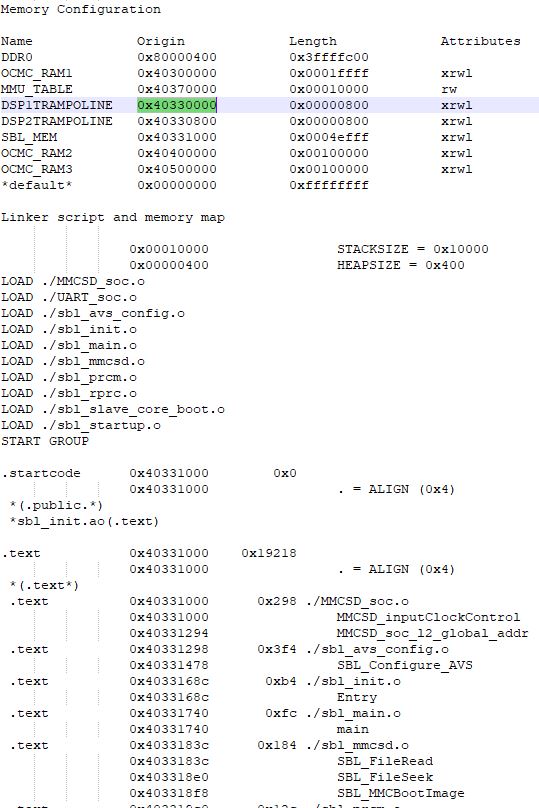
  • Hi i have done the command you mentioned but its still not working the load address SBL_MEM  mentioned in the map is 

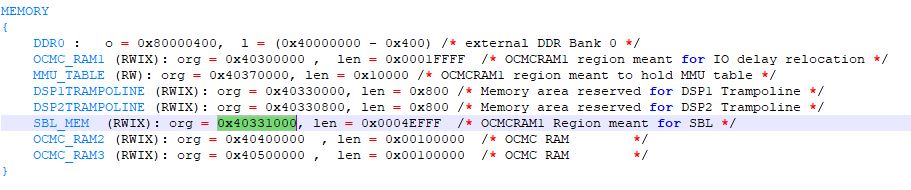
    Also the address mentioned in linker file is

    Please Review

    Regards,

    Sreehari M S 

  • Hi Sreehari,

    It is most likely the SD card format issue. You will need to use the HP SD card format tool (https://download.cnet.com/HP-USB-Disk-Storage-Format-Tool/3000-2094_4-10974082.html) to format the SD card.

    If it is still not working, you can try to use the img file C:\ti_am5_610\processor_sdk_rtos_am57xx_6_01_00_08\prebuilt-sdcards\evmAM572x\sd_card_img\sd_card.img.gz to make your bootable SD card.

    Ming

  • Hi Ming,

     I have followed what you have  instructed but the output is still the same, the board is not booting.

    Ming Wei said:
    If it is still not working, you can try to use the img file C:\ti_am5_610\processor_sdk_rtos_am57xx_6_01_00_08\prebuilt-sdcards\evmAM572x\sd_card_img\sd_card.img.gz to make your bootable SD card.

    I have been using this method from the beginning. I am able to boot from your default .out file provided in location( C:\ti\pdk_am57xx_1_0_13\packages\ti\boot\sbl\binary\idkAM571x\mmcsd\bin), I think its not a problem of the SD card.  

    Kindly advise on how to processed further.

    Regards,

    Sreehari M S 

  • Hi Sreehari,

    If the default bootable image works for you, wht-y do you need to re-build the SBL (MLO)? You just need to change the app on the SD card for your own application program and use the MLO in the default bootable image.

    Ming

  • Hi Ming,


    Ming Wei said:
    wht-y do you need to re-build the SBL (MLO)?

    I have changed the DDR configuration on my custom board therefore i need to change the default SBL, Currently i am trying to replace the default SBL with the custom one. Prior to that I need to ensure that it properly works on the evm board.

    Regards,

    Sreehari M S


  • Hi Sreehari,

    The only difference between the SBL boot from SD card and executing from JTAG is the usage of GEL file. Please check your settings in GEL file that were missing in the SBL.

    Ming

  • Hi Ming,

    I am able to run  SBL without GEL file successfully entered to the app image. I think its not booting because of GEL file. Is it possible to  build .out file by running makefile. Kindly advise on how to proceed further ,Thank You

    Regards,

    Sreehari M S

  • Hi Sreehari,

    Yes, you can certainly build the SBL by following the instructions in http://software-dl.ti.com/processor-sdk-rtos/esd/docs/latest/rtos/index_Foundational_Components.html#boot, section 4.6.3.2.5. Building the SBL for AM57xx.

    You can add UART_printf in SBL to pin point where the problem might be when using SD boot. 

    Ming 

  • Hi Ming,

    Ming Wei said:

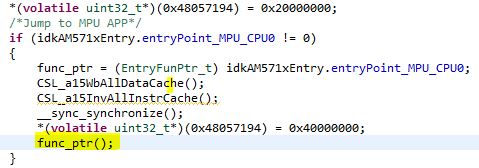
    I have followed what you have mentioned,but i think the problem lies in size of OUT file that's too large above 800 KB and the program execution hanged at UART print in SBL, I think its due to internal memory that is not sufficient, So i just commented the portion of UART printf   and its entered successfully to the line func_ptr(); in SBL and i confirmed it by toggling an LED similar to the image below.

    Now the problem is its not entering to the application( APP Image), Kindly advice how to proceed further.

    Regards, 

    Sreehari M S

  • Hi Sreehari,

    Did you check the value of func_ptr? does it match your app entry point? If yes, can you single step into func_ptr?

    After fail to go to app, if you halt the CPU, where it stops (the PC value)?

    Ming

  • Hi Ming,

    Ming Wei said:

    Did you check the value of func_ptr? does it match your app entry point?

    I have checked the func ptr which matched with App entry point(staring address 0x80000294, My app image is your default test image thats from location:   C:\ti\processor_sdk_rtos_am57xx_6_01_00_08\prebuilt-sdcards\idkAM571x\sd_card_img ).

    Ming Wei said:

    If yes, can you single step into func_ptr? After fail to go to app


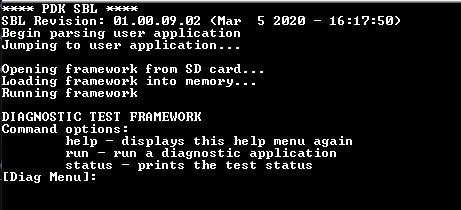
    I can step into app as per you mentioned earlier. I compared it with the working evaluation board and it is noted that the app image  always hangs at the Address 0X80000330  but in evaluation board at this point gives :


     I have noted the following things:

    • clock initialization in the application hangs in  while loop after SBL clock initialization. It was verified by running the application without any gel file.

    while(CSL_IPU_CM_CORE_AON_CM_IPU1_IPU1_CLKCTRL_REG_IDLEST_FUNC != CSL_FEXT(ipuCmReg->CM_IPU1_IPU1_CLKCTRL_REG,                                                                                                                    IPU_CM_CORE_AON_CM_IPU1_IPU1_CLKCTRL_REG_IDLEST));

    I commented this portion in your clock configuration file. Was there any problem by  not ensuring this clock is turned on??

    • DDR Configurations

    One of my custom board have only two DDRs and Board_DDR3Init(); always returns errorcode(-7) . (there is no problem of DDR3 initialization on my custom board with 3 DDR)

    What do i need to change in your DDR configuration, to compensate this change??

    Regards ,

    Sreehari M S

  • Hi Sreehari,

    In my Processor SDK RTOS 6.1.0, in Board_moduleClockInit(), we have:

    /*
        while(CSL_IPU_CM_CORE_AON_CM_IPU1_IPU1_CLKCTRL_REG_IDLEST_FUNC !=
           CSL_FEXT(ipuCmReg->CM_IPU1_IPU1_CLKCTRL_REG,
            IPU_CM_CORE_AON_CM_IPU1_IPU1_CLKCTRL_REG_IDLEST));
    */

    so my guess is that to comment out this session is OK.

    Ming

  • Hi Ming,

    Ming Wei said:

    For DDR configuration please refer to the following document:

    http://www.ti.com/lit/an/sprac36e/sprac36e.pdf

    Problem of DDR is solved by porting gel file to c. Now  I am able to boot your default test application, but couldn't boot my custom application in both evm and custom board. I think its due to out to image conversion, I followed the link :

    http://software-dl.ti.com/processor-sdk-rtos/esd/docs/latest/rtos/index_Foundational_Components.html#am57x 

    • cd C:\ti\pdk_am57xx_1_0_13\packages
    • run pdksetupenv.bat
    • cd C:\ti\pdk_am57xx_1_0_13\packages\ti\boot\sbl
    • gmake example BOARD=idkAM571x SOC=AM571x 
    • set TOOLS_PATH=C:\ti\pdk_am57xx_1_0_13\packages\ti\boot\sbl\tools
    • set BIN_PATH=C:\AM571x_PJCT_SCRIPT\BINARY_FILE
    • set App_MPU_CPU0=C:\AM571x_PJCT_SCRIPT\OUT_FILE\My_App.out
    • set App_DSP1=
    • set App_DSP2=
    • set App_IPU1_CPU0=
    • set App_IPU2_CPU0=
    • cd C:\ti\pdk_am57xx_1_0_13\packages\ti\boot\sbl\tools\scripts
    • run AM57xImageGen.bat

    and also  i  followed your post build step from this link :

    e2e.ti.com/.../866964

    and an app was generated but the problem remains the same as below:

    Kindly advise on how to proceed further.

    Regards,

    Sreehari M S 


  • Hi Sreehari,

    Glad to see you have solved the SBL issue.

    To debug you app issue, there are a few steps:

    1. Make sure your app run OK via JTAG without gel file

    2. Print on UART when you first get into the main() of your app

    3. Make sure the Task size and the heap size are suffucuent

    Ming

  • Hi Ming,

    Ming Wei said:
    3. Make sure the Task size and the heap size are suffucuent

    Thank you so much for your valuable information ,the problem was in heap size now we are able to boot successfully.

    Regards ,

    Sreehari M S