This thread has been locked.

If you have a related question, please click the "Ask a related question" button in the top right corner. The newly created question will be automatically linked to this question.

CCS v3.3, Windows 7 UNC/Network access problems


I'm trying to open folders that are in a network location.  However, the only drives that appear are C: and D:, which are local drives.  This in on Windows 7, running in administrator mode.  Any help is appreciated. 

Thanks!

S.

  • Hi Suresh,

    Why don't you copy the folders available on the network to your local drive and then navigate?

    Unless you're talking about the network license file.

    Regards,

    Gautam

  • Hi Gautam,

         The baseline is pointing to a shared drive, for users who are working in differently remote locations in our source control software.  The baseline isn't being worked on anymore, but we are migrating an older Windows XP machine to Windows 7.  We need the binary outputs to stay the same and our funding allows for only small changes.  There are several projects that need to be changed to point to a C drive, which is prohibitively expensive due to demonstrating the binary did not change performance and functionality...a lengthy process of testing is involved. 

    Has anyone else seen this issue?     

    Thanks,

    Suresh

  • Hi Suresh,

    If you map the remote location to a drive letter, you should see it appear in the list. (I have a 'U' drive mapped to a remote folder and it appears on my Win 7 PC).

    If it does not appear, you can simply type in the remote path in the file name field:

    ex:

    U:\path

    \\myremotemachine\path

    Thanks

    ki

  • Ki,

      Thank you.   I tried typing the letter in, 'L:\', and got an error.  If you are able to do this in CCS V.3.3 and Windows 7, I'll try to post the error.  Thanks for checking.


    S. 


  • Yes that works for me. Please post a screenshot of your error

    Thanks

    ki

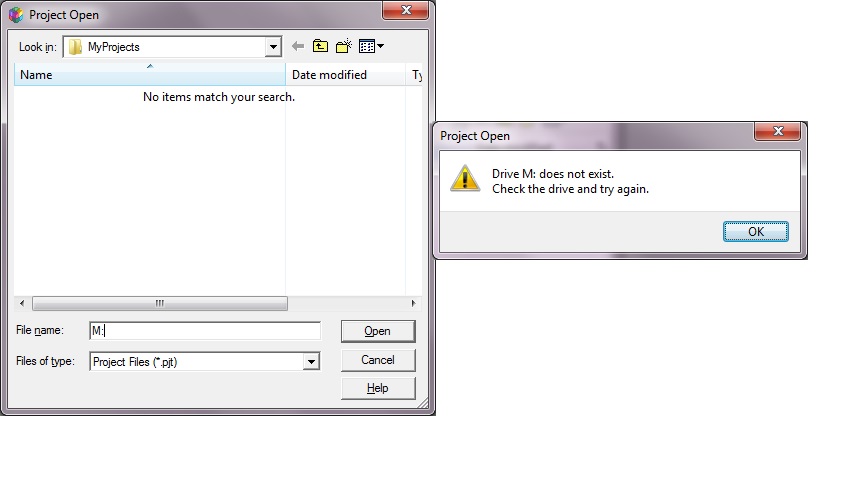
  • Ki, Here is the screenshots and error.  Each network drive I have mapped states "Drive X: does not exist".  Adding paths does not work (e.g., "M:\BSP" instead of "M:" or "M:\").   Also, C and D drives are the only visible still. 

    Steps to recreate:

    1.  Start CCS v.3.3 in administrator mode.

    2.  Login with admin priveleges. 

    3.   Select "Project"->"Open" in the Code Composer v.3.3 IDE. 

    4.  Browse for a network share.

    5.   If #4 fails (it does), type in network drive letters, paths, etc.  Fails 

     6.  Note: For the CCS v.3.3 install and first execution of the program,I ensured all options for the Windows Firewall were turned on  to allow for public, private, etc.


  • Please show me a screenshot of your mapped drives (usually a screenshot of the 'Computer' desktop icon). CCS does not think you have any mapped drives.

  • Ki,

         Thank you.  I solved the problem.  We can't have administrator rights in our individual accounts on the domain, so we have a special administrator account that is only valid for a short time that we have to log into for starting Code Composer.  My shares exist on my personal account, but not the administrator user account.  Therefore, if I run as a different user (administrator) in Windows 7, these shares don't show up or are accessible.  

          Thanks for your help.  The solution is to try to get my personal account administrative privs.   

    <solved>

    Regards,

    S.