This thread has been locked.

If you have a related question, please click the "Ask a related question" button in the top right corner. The newly created question will be automatically linked to this question.

CCS Floating License not working on different locations

One of my customer has purchased floating license of CCSv5. They have purchased a floating license, but are facing issues working at different locations. We are following the steps as per the mentioned stpes in below link: http://processors.wiki.ti.com/index.php/License_Server_Administration_for_CCS

 But for this installation, one browser window should open as intermediate steps, but it is not openeing. So, we are not able to go ahead from step4.


  • Hi,

    Additional information about the error messages they are getting, the environment they are using (Linux, Windows) would be useful to have an idea on what may be happening. Also, what exactly do you mean by "browser window"? Step 4 of all the graphical procedures shown at the wiki page you sent does not have a web browser involved.

    Regards,
    Rafael
  • Hi Rafael,

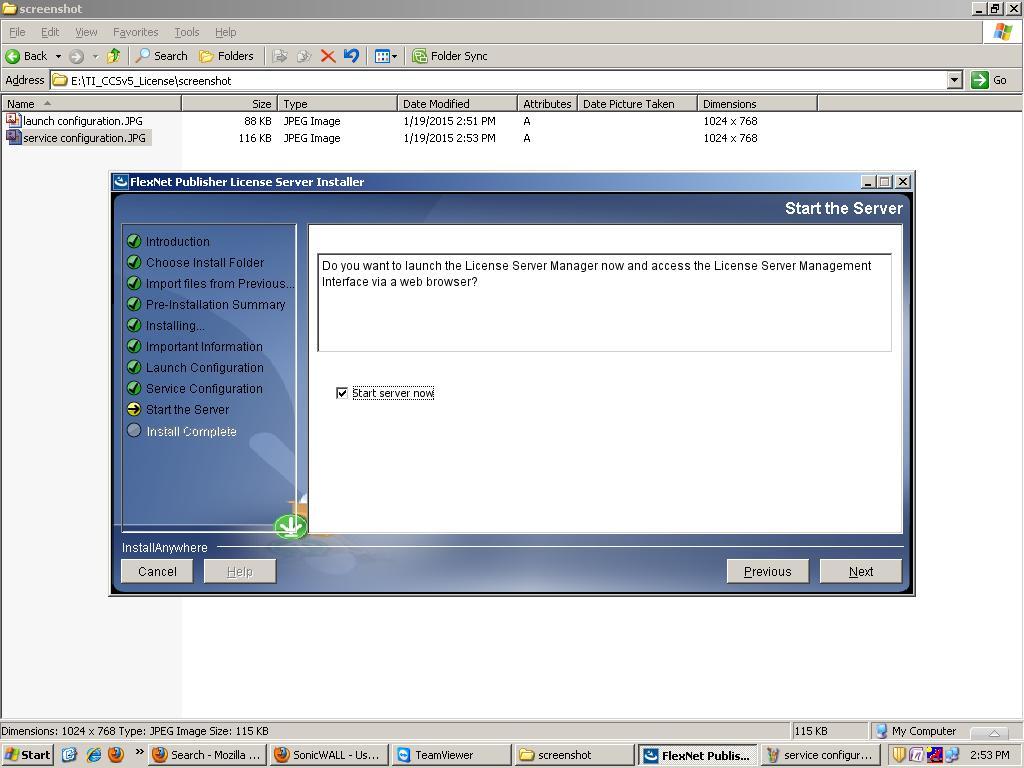
    I am working with Aniket for this customer. The issue is being seen on a Windows machine. The problem that is being described here is the Step4 of License Server setup as described in the wiki page. The customer runs the lmadmin setup. It seems to work correctly till the last step wherein we have to check the 'Start Server Now' box and click Next (snapshot included below). After this step, a browser window should open with main license manager GUI. However, this browser window is not opening up for the customer. Customer has tried running the setup multiple times, but this browser window never opens up.

    Please provide your feedback as to what could be the issue.

    Regards

  • Nishant,

    Thanks for the additional details.

    Due to the diversity of the installed applications and browsers available, I can't precisely tell why the browser was not properly launched by the license server setup routine. However, I added a remark to step 4 of the Windows procedure to manually open the web browser and access the license server GUI.

    Please ask your customer to try and see if they can access the license server administrator properly.

    Hope this helps,
    Rafael