Hello Everyone,
I need to integrate (or trying to) lauterbach's trace32 with CCS 6. In Eclipse, as lauterbach claims to be this task straightforward, this is not simple for CCS.
I am particularly interested to know the steps or direction to obtain this.
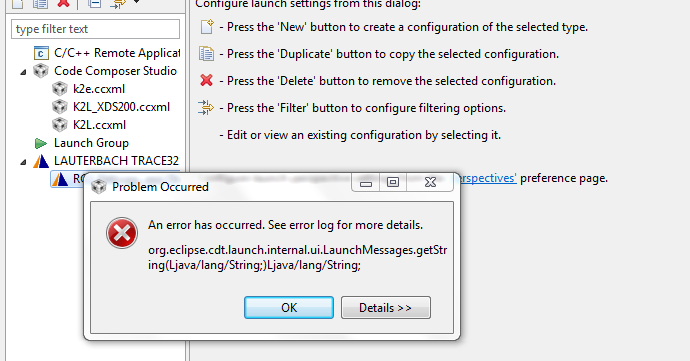
After downloading plug-ins from "Install new softwares" for lauterbach, I can see trace32 button in "Debug Configurations". But if I click on this to create an instance, I see below errors.
!ENTRY org.eclipse.jface 4 2 2015-02-12 22:08:07.239
!MESSAGE Problems occurred when invoking code from plug-in: "org.eclipse.jface".
!STACK 0
java.lang.NoSuchMethodError: org.eclipse.cdt.launch.internal.ui.LaunchMessages.getString(Ljava/lang/String;)Ljava/lang/String;
at org.eclipse.cdt.launch.internal2.ui.AbstractCDebuggerTab.getName(AbstractCDebuggerTab.java:264)
at org.eclipse.debug.internal.ui.launchConfigurations.LaunchConfigurationTabGroupViewer.showInstanceTabsFor(LaunchConfigurationTabGroupViewer.java:797)
at org.eclipse.debug.internal.ui.launchConfigurations.LaunchConfigurationTabGroupViewer.displayInstanceTabs(LaunchConfigurationTabGroupViewer.java:739)
at org.eclipse.debug.internal.ui.launchConfigurations.LaunchConfigurationTabGroupViewer$8.run(LaunchConfigurationTabGroupViewer.java:626)
at org.eclipse.swt.custom.BusyIndicator.showWhile(BusyIndicator.java:70)
at org.eclipse.debug.internal.ui.launchConfigurations.LaunchConfigurationTabGroupViewer.inputChanged(LaunchConfigurationTabGroupViewer.java:643)
at org.eclipse.debug.internal.ui.launchConfigurations.LaunchConfigurationTabGroupViewer.setInput0(LaunchConfigurationTabGroupViewer.java:605)
at org.eclipse.debug.internal.ui.launchConfigurations.LaunchConfigurationTabGroupViewer.setInput(LaunchConfigurationTabGroupViewer.java:581)
at org.eclipse.debug.internal.ui.launchConfigurations.LaunchConfigurationsDialog.handleLaunchConfigurationSelectionChanged(LaunchConfigurationsDialog.java:943)
at org.eclipse.debug.internal.ui.launchConfigurations.LaunchConfigurationsDialog$3.selectionChanged(LaunchConfigurationsDialog.java:562)
at org.eclipse.jface.viewers.StructuredViewer$3.run(StructuredViewer.java:888)
at org.eclipse.core.runtime.SafeRunner.run(SafeRunner.java:42)
at org.eclipse.ui.internal.JFaceUtil$1.run(JFaceUtil.java:49)
at org.eclipse.jface.util.SafeRunnable.run(SafeRunnable.java:175)
at org.eclipse.jface.viewers.StructuredViewer.firePostSelectionChanged(StructuredViewer.java:886)
at org.eclipse.jface.viewers.StructuredViewer.setSelection(StructuredViewer.java:1726)
at org.eclipse.jface.viewers.TreeViewer.setSelection(TreeViewer.java:1139)
at org.eclipse.debug.internal.ui.launchConfigurations.LaunchConfigurationView.handleConfigurationAdded(LaunchConfigurationView.java:283)
at org.eclipse.debug.internal.ui.launchConfigurations.LaunchConfigurationView.access$1(LaunchConfigurationView.java:272)
at org.eclipse.debug.internal.ui.launchConfigurations.LaunchConfigurationView$2.run(LaunchConfigurationView.java:261)
at org.eclipse.swt.widgets.RunnableLock.run(RunnableLock.java:35)
at org.eclipse.swt.widgets.Synchronizer.runAsyncMessages(Synchronizer.java:135)
at org.eclipse.swt.widgets.Display.runAsyncMessages(Display.java:4145)
at org.eclipse.swt.widgets.Display.readAndDispatch(Display.java:3762)
at org.eclipse.jface.window.Window.runEventLoop(Window.java:826)
at org.eclipse.jface.window.Window.open(Window.java:802)
at org.eclipse.debug.internal.ui.launchConfigurations.LaunchConfigurationsDialog.open(LaunchConfigurationsDialog.java:1134)
at org.eclipse.debug.ui.DebugUITools$2.run(DebugUITools.java:604)
at org.eclipse.swt.custom.BusyIndicator.showWhile(BusyIndicator.java:70)
at org.eclipse.debug.ui.DebugUITools.openLaunchConfigurationDialogOnGroup(DebugUITools.java:612)
at org.eclipse.debug.ui.DebugUITools.openLaunchConfigurationDialogOnGroup(DebugUITools.java:546)
at org.eclipse.debug.ui.actions.OpenLaunchDialogAction.run(OpenLaunchDialogAction.java:81)
at org.eclipse.jface.action.Action.runWithEvent(Action.java:499)
at org.eclipse.jface.action.ActionContributionItem.handleWidgetSelection(ActionContributionItem.java:584)
at org.eclipse.jface.action.ActionContributionItem.access$2(ActionContributionItem.java:501)
at org.eclipse.jface.action.ActionContributionItem$5.handleEvent(ActionContributionItem.java:411)
at org.eclipse.swt.widgets.EventTable.sendEvent(EventTable.java:84)
at org.eclipse.swt.widgets.Widget.sendEvent(Widget.java:1057)
at org.eclipse.swt.widgets.Display.runDeferredEvents(Display.java:4170)
at org.eclipse.swt.widgets.Display.readAndDispatch(Display.java:3759)
at org.eclipse.e4.ui.internal.workbench.swt.PartRenderingEngine$9.run(PartRenderingEngine.java:1113)
at org.eclipse.core.databinding.observable.Realm.runWithDefault(Realm.java:332)
at org.eclipse.e4.ui.internal.workbench.swt.PartRenderingEngine.run(PartRenderingEngine.java:997)
at org.eclipse.e4.ui.internal.workbench.E4Workbench.createAndRunUI(E4Workbench.java:138)
at org.eclipse.ui.internal.Workbench$5.run(Workbench.java:610)
at org.eclipse.core.databinding.observable.Realm.runWithDefault(Realm.java:332)
at org.eclipse.ui.internal.Workbench.createAndRunWorkbench(Workbench.java:567)
at org.eclipse.ui.PlatformUI.createAndRunWorkbench(PlatformUI.java:150)
at org.eclipse.ui.internal.ide.application.IDEApplication.start(IDEApplication.java:124)
at org.eclipse.equinox.internal.app.EclipseAppHandle.run(EclipseAppHandle.java:196)
at org.eclipse.core.runtime.internal.adaptor.EclipseAppLauncher.runApplication(EclipseAppLauncher.java:110)
at org.eclipse.core.runtime.internal.adaptor.EclipseAppLauncher.start(EclipseAppLauncher.java:79)
at org.eclipse.core.runtime.adaptor.EclipseStarter.run(EclipseStarter.java:354)
at org.eclipse.core.runtime.adaptor.EclipseStarter.run(EclipseStarter.java:181)
at sun.reflect.NativeMethodAccessorImpl.invoke0(Native Method)
at sun.reflect.NativeMethodAccessorImpl.invoke(Unknown Source)
at sun.reflect.DelegatingMethodAccessorImpl.invoke(Unknown Source)
at java.lang.reflect.Method.invoke(Unknown Source)
at org.eclipse.equinox.launcher.Main.invokeFramework(Main.java:636)
at org.eclipse.equinox.launcher.Main.basicRun(Main.java:591)
at org.eclipse.equinox.launcher.Main.run(Main.java:1450)
I will be more than happy if someone can guide me from here!
Thanks in advance,
Kushal