This thread has been locked.

If you have a related question, please click the "Ask a related question" button in the top right corner. The newly created question will be automatically linked to this question.

MPS-FET programming device

Other Parts Discussed in Thread: MSP-FET, MSP430F2013

I just have a basic question. I have an MPS-FET using code composerV6. I am getting a device an error connnecting to target, unknown device. is there some setup i need ot do. everything i am seeing it is just plug and play. i cannot find any setting in the manual about setting this or that in order to connect and program. The MODE LED goes on and off so i guess that is a goo dsign i have some sort of connectivity.

am i missing somethign or do i have a broke connection somewhere and while it can connect to the MPS-FET it cannot connect to the chip i want to program. 

Also cani connect just to the debu8gger or do i need a chip attached.

Edit: GOt it to program. after all my testing and such it boiled down to the wires were too long i shorten the length of wire to 5 inches and it programmed. 

Edit Reason: got it to program

  • Hi Dominic,

    Is this a custom board? If so then did you follow/refer any of the MSP launchpads for JTAG connectivity part?

    Regards,
    Gautam
  • Yes this is a custom PCB. I made an adapter PCB which is a go between since i only need 4 wires to program, Vcc GND TST and RST. I just wanted to make sure there wasnt something simple inside code composer that i needed to set in order to have it look for the MSP-FET. Or if htere was some Baud setting i needed to do in order to communicate properly with the programmer.

    I was asking if i could connect to programmer alone, because then i could at least eliminate the PCB from the equation and make sure i can at least communicate with the MPS-FET itself.

    And yes i followed the recommended connection of the JTAG communication described in the TI documentation.

    However i was looking and i may be trying to draw too much power. I was limited on test equipment yesterday but i had an LED. i think my PCB is not getting a good 3.3V so my chip cannot be powered. Looks like i will have to wait for my 3.3V regulator to come in the mail because the module cannot supply enough power for my PCB
  • . Looks like i will have to wait for my 3.3V regulator to come in the mail because the module cannot supply enough power for my PCB

    Keep us informed.

    Regards,
    Gautam
  • OK got the 3.3V regulator in today and it still gives me same error.

    i am doing nothing except trying to program the chip atm.

    here is a line diagram of my program circuit.

    Code Composer Computer USB -> MSP-FET -> 14P to 4P 4W[Vcc, GND, TST, RST] program converter PCB -> MSP430F2013 target PCB

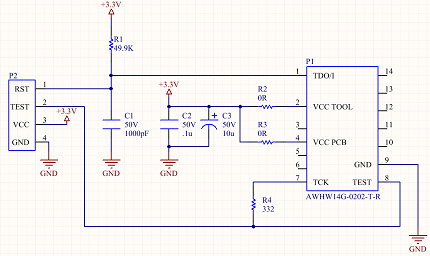
    here is schematic for my 14P to 4P converter PCB

    I was basing that on the diagram found in TI Literature Number SLAU278V MSP430 Hardware Tools User's Guide pg. 26. i do not populate R2. When i try to debug without the Target PCB connected i do get a low voltage error like the programmer does not have enough voltage, which seems ot me like the programmer is responding correctly.

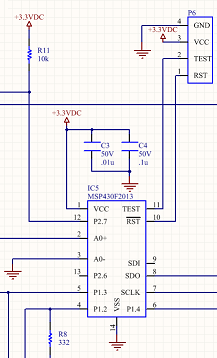
    Here is the connection to the Taget PCB

    On the PCB itself all the proper connection are made. Also my 4P cable to connect 14P to 4P converter to the target PCB is 6-8inches long if that matters.

    in Code Composer i am just hitting F11 to run debug mode and it tells me eror connecting/unknown device.

    If there is some help you could give i am going to go and try and scope the RST/TST pins to see what i can see. i am writing this in case there is somethign i completely missed in order to program.

    Edit: noticed i had 2 of the same schematics showing

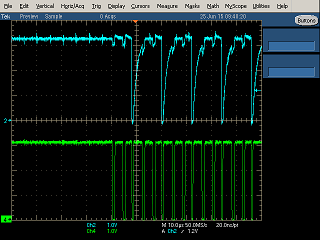
  • I got around to doing the scope and i see what may be the problem but i am not sure what the issue is. 

    there are what appears 5 stages 

    first a slow communication stage

    4 high speed communication stages

    i did not get a reading from the slow speed because i think the problem is in the final 4 high speed stages

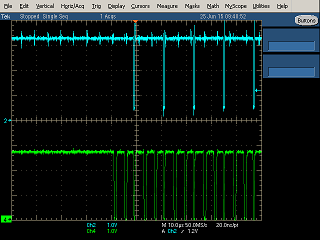
    this is stage 2. the first high speed stage after the slow communication. I can get a good solid 3.3V spike but then it doesnt give a solid 3.3V for a large portion. is this how the JTAG communication is supposed to look? Number 2[white] signal is RST and the number 4[yellow] is TST. i tried to focus the time scale and it looks the same.

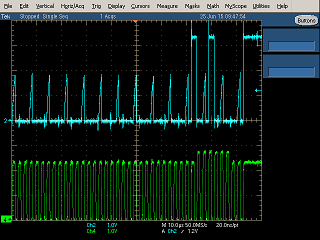
    Here is stage 3 of the program cycle. after the stage 2 sequence, then stage 3 begins. this one however can cause the RST line to get up to 3.3V.

    Here is stage 4. failure for RST to get to 3.3V again

    Here is stage 5. semi failure. it seems to be able to hit 3.3V just not well.

    In my previous post i gave the schematics of my system. i removed C1 so now i have a direct connection between RST between the 2 PCBs. is this the signals I should be seeing. or does anyone know what these signals are indicative of? did i blow out my chip? or is the programmer broke? i will replace the chip, but any help would be appreciated. 

  • Also. the MSP430 has multiple ways to program. i have it set up per the documention using a spy bi wire setup using RST and TST. is my problem with my setup. i cannot find documentation to tell it i want to program using 2w instead of 4w. is it trying ot program via 4 wire and that is why it is all screwy signals?
  • I tried using another programmer. FET-Pro 430 instead of code composer. FET-Pro at least allows me to see a visbile change that i am trying to program with 2W not 4W. however, even though it says it works with MSP-FET, it is trying to update the MSP-FET to the V3 firmware of the predecessor MSP-FETUIF. so the FET-Pro software wants to update to v# firmware and the code composer wants to update to version 1.0. What firmware should the MSP-FET programmer be running?
  • Dominic,

    Glad you were able to solve your issue by shortening the wires between the programmer and your board. The SBW interface is timing based and to much impedance in the line can cause issues. In regards to 2wire (SBW) vs 4wire (Normal JTAG), the debugger + CCS will automatically detect the method to use. You can actually force the FET-PRO430 SW to program in either mode. As to firmware version on the FET. The program controlling the FET will try to re-program it to the known good firmware the program knows. The latest version of the FET firmware will automatically be downloaded to the FET if using CCS and CCS is up to date. If you know you have the latest FET firmware, you can cancel the automatic FET Firmware download and program normally.

    Regards,
    JH