This thread has been locked.

If you have a related question, please click the "Ask a related question" button in the top right corner. The newly created question will be automatically linked to this question.

CCS/TMDSHVMTRPFCKIT: Frequency Calculation from CCS Graphics

Part Number: TMDSHVMTRPFCKIT


Tool/software: Code Composer Studio

Hello All,

I am a bit confused about calculating the period or the frequency of a signal from debug Graphics of CCS. For example below is the signal of rotor position:

Now, my calculation as follows:

One period of the signal above takes 50 samples to complete. Since the sampling period 0.1mS (10kHz), The period of one cycle is

50 x 0.1 = 5mS. This is the period of the signal above and it makes 200Hz.

Am I right up to here? If yes, here is the messy part:

Since this signal indicates the rotor position, it means electrical speed 200Hz, my pmsm motor has 8 poles. So mechanical speed is 200/8/2=50Hz.

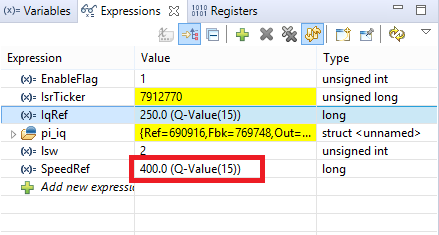
50Hz equals to 3000RPM (In one second, rotates 50 times, In a minute  it rotates 3000RPM). But my reference speed is adjusted to 400RPM as seen in figure below:
What do you think? 

Any response will be appriciated. Thanks in advance.

  • Hi,

    fatih bayir said:
    Am I right up to here?

    Yes, you are absolutely right. 

    fatih bayir said:
    But my reference speed is adjusted to 400RPM as seen in figure below:

    Given this is highly dependent on your code (I really am not very well versed in the example code for this development kit), I will refer this thread to the C2000 experts that will be able to provide more knowledgeable insights about this. 

    Regards,

    Rafael

  • Thank you for your reply Rafael, I will be waiting for more details form experts you mentioned. By the way II use the code called HVPM_Sensorless in the control suite.

  • The graph tool is just for showing the waveform of the variables, that can't be used for measuring frequency since the data are saved in RAM buffer and transmit them to CCS via emulator, not including any time information. You should add a function in your project to do this if you want.