This thread has been locked.

If you have a related question, please click the "Ask a related question" button in the top right corner. The newly created question will be automatically linked to this question.

CCS/CC1312R: Unable to access DAP error, on debug

Part Number: CC1312R
Other Parts Discussed in Thread: TIDA-010024, CC1350

Tool/software: Code Composer Studio

Hello,

I am trying to debug the 6lowpan code on our custom board having CC1312R. When I debug the example code of UART echo the UART works fine. When I try to send a string from the 6lowpan example(TIDA-010024) the debugger crashes with unable to access DAP error. I think it maybe because the UART is being used for the debugger and the code. Is there any workaround for this? UART2 pins are unavailable in our schematic so I cannot use uart2 to transmit data. 

Regards,

Sabin

  • Sabin,

    Sabin John said:
    the UART is being used for the debugger and the code.

    I am unsure what you mean by that. If the TI design has a fully furnished XDS110 Debug Probe (which seems to be the case), it has several endpoints which should not interfere with each other. In other words, if the Windows device drivers are properly installed and instantiated, Code Composer Studio will not select the UART channel to transfer Debug data - the contrary is also true: if you are getting correct data from a UART channel, the Debug connection with Code Composer Studio should not influence that. 

    I suspect you already checked the hardware connections, right? Other details could well be crosstalk between the UART and the JTAG lines that go from the Debug Probe and the device, but I think the chances of this happening should be very minimal. At any rate, you could try to reduce the TCLK speed of the JTAG connection and see if the situation improves.

    At this moment I am unsure what else to suggest, but I will certainly return to this thread in case I find any additional information. 

    Regards,

    Rafael


    (edit) Earlier this morning I was just made aware there is a reported issue where a specific combination of factors may cause the connection to be lost.

    http://e2e.ti.com/support/wireless-connectivity/bluetooth/f/538/p/875870/3243366 

    I will keep investigating and probably submit a bug report for analysis.

  • Hello Rafael, 

    Thank you for your response. I am referring to this part in the GPIO init table. This can be found in the CC1312R1_LAUNCHXL.C file. 

    const PIN_Config BoardGpioInitTable[] = {

    CC1312R1_LAUNCHXL_PIN_RLED | PIN_GPIO_OUTPUT_EN | PIN_GPIO_LOW | PIN_PUSHPULL | PIN_DRVSTR_MAX, /* LED initially off */
    CC1312R1_LAUNCHXL_PIN_GLED | PIN_GPIO_OUTPUT_EN | PIN_GPIO_LOW | PIN_PUSHPULL | PIN_DRVSTR_MAX, /* LED initially off */
    CC1312R1_LAUNCHXL_PIN_BTN1 | PIN_INPUT_EN | PIN_PULLUP | PIN_IRQ_BOTHEDGES | PIN_HYSTERESIS, /* Button is active low */
    CC1312R1_LAUNCHXL_PIN_BTN2 | PIN_INPUT_EN | PIN_PULLUP | PIN_IRQ_BOTHEDGES | PIN_HYSTERESIS, /* Button is active low */
    CC1312R1_LAUNCHXL_SPI_FLASH_CS | PIN_GPIO_OUTPUT_EN | PIN_GPIO_HIGH | PIN_PUSHPULL | PIN_DRVSTR_MIN, /* External flash chip select */
    CC1312R1_LAUNCHXL_UART_RX | PIN_INPUT_EN | PIN_PULLDOWN, /* UART RX via debugger back channel */
    CC1312R1_LAUNCHXL_UART_TX | PIN_GPIO_OUTPUT_EN | PIN_GPIO_HIGH | PIN_PUSHPULL, /* UART TX via debugger back channel */
    CC1312R1_LAUNCHXL_SPI0_MOSI | PIN_INPUT_EN | PIN_PULLDOWN, /* SPI master out - slave in */
    CC1312R1_LAUNCHXL_SPI0_MISO | PIN_INPUT_EN | PIN_PULLDOWN,

    Is this causing an issue with the normal operation of the UART.

    I am using CCS 9.3 and the debug probe is XDS110

    This is a snippet of the error i get

    Cortex_M4_0: Trouble Halting Target CPU: (Error -2064 @ 0x0) Unable to read device status. Reset the device, and retry the operation. If error persists, confirm configuration, power-cycle the board, and/or try more reliable JTAG settings (e.g. lower TCLK). (Emulation package 8.4.0.00006)
    Cortex_M4_0: Unable to determine target status after 20 attempts
    Cortex_M4_0: Failed to remove the debug state from the target before disconnecting. There may still be breakpoint op-codes embedded in program memory. It is recommended that you reset the emulator before you connect and reload your program before you continue debugging

    Meanwhile I will try to debug by lowering the TCLK and let you know if it works.

    Regards,

    Sabin

  • Hello Rafael,

    I did lower the CLK and tried debugging it but it did not succeed. Here are some more inputs that may help you pinpoint the issue. The CC1312 are on our custom boards. I am programming/debugging them via jumper cables from the cc1350 launchpad board that i have. The code that I am trying to debug is the TIDA-010024. When I debug the code as is, the debugger works. I can also get data on the uart, but the data I get on the uart is garbage. When I change the MACRO which changes the PHY iD from 915 to 433Mhz and then debug the code, the debugger halts with the above error messages. Hope you will be able to reproduce it at your end with these inputs. Let me know if you need any more inputs from my end.

    Regards,

    Sabin   

  • Sabin,

    We were able to reproduce in the CC1312 Launchpad. Despite this, we are not entirely sure the root cause is a problem on the XDS110 itself or code changes are causing the UART to step on the JTAG's toes, thus I will consult with the device experts.

    One datapoint that adds strength to this theory is that we were able to reproduce this particular problem in CCSv7.4.0, 8.3.1 and 9.3.0 - thus spanning years of software versions. If there was an outstanding bug, chances are quite small this wouldn't manifest (sometimes it happens, though). 

    Regards,

    Rafael

  • Sabin,

    The DAP error could be due to multiple reasons. One of them being memory corruption. First step would be to do ROV analysis as mentioned in the design guide (section 3.1.2.2.3.2 ROV Analysis) of TIDA-010024. 

    With Regards,

  • Sabin,

    Sabin John said:
    When I try to send a string from the 6lowpan example(TIDA-010024) the debugger crashes with unable to access DAP error.

    Where are you calling the UART_write? I initally was able to reproduce the same issue you saw when I had a UART_write call in the main function. But when I moved it to the task function, the issue went away (the UART_print call was successful and the debugger did not crash at all. 

    Also, are you building with BOARD_DISPLAY_USE_UART defined?

    Thanks

    ki

  • Hey Ki,

    This was when I was initially trying to debug the code.

    Later I reverted back to the original example project as is and only changed the PHY settings to 433MHz. So the UART part in the code is untouched by me. But I still had the issue. Sorry I don't have any more inputs to add to this right now. However if I find time in the coming week I may be able to dig in more.

    Thanks,

    Sabin

  • hmm... the original project as-is works for me. 

    Can you try loading/running the attached executable?

    /cfs-file/__key/communityserver-discussions-components-files/81/6lowpan_5F00_mesh_5F00_ti_5F00_15_5F00_4_5F00_cc1312_5F00_tirtos_5F00_ccs.out

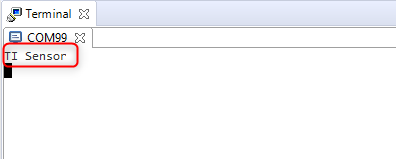
    It should print out "TI Sensor" in your terminal program:

    Thanks

    ki