This thread has been locked.

If you have a related question, please click the "Ask a related question" button in the top right corner. The newly created question will be automatically linked to this question.

Compiler: how to creat ***.oe674 files?

Tool/software: TI C/C++ Compiler

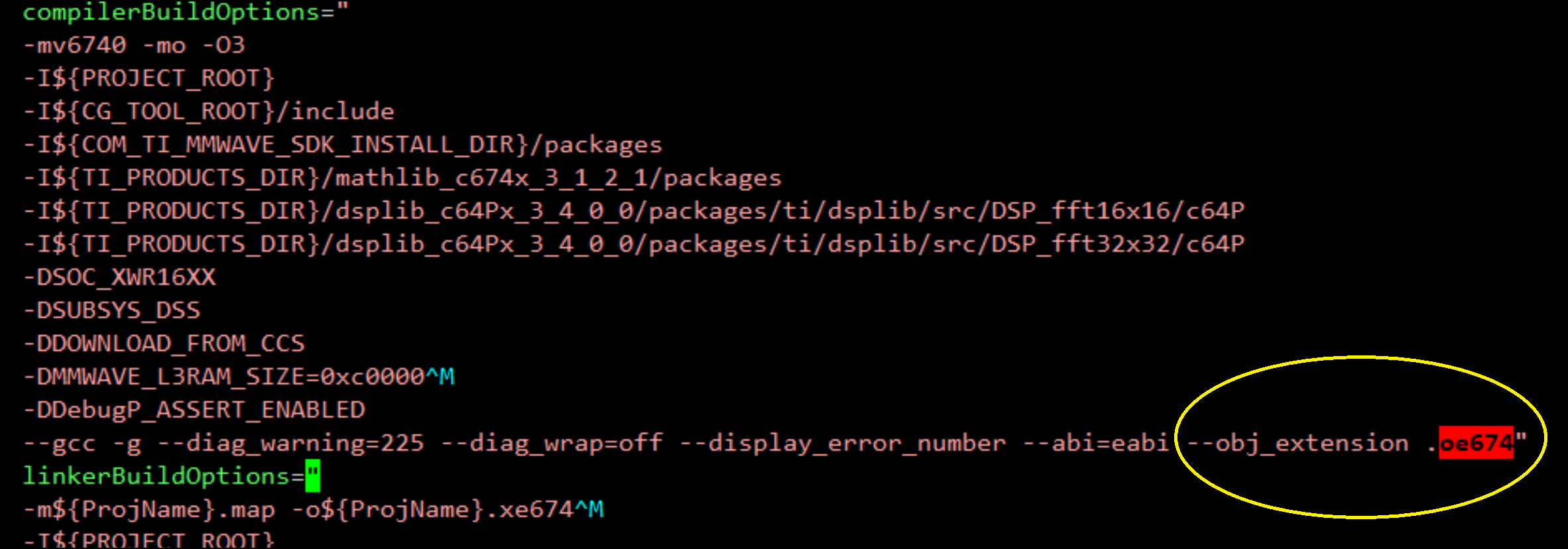
Hello,TI's engineers.I use ti's IWR1642BOOST and use ccs9.2.0 ide.When i compile the srr-80 demo code,i find the ***.oe674 files(such as dss_data_path.oe674 etc...);But when i creat a new ccs project and compile it,i find it doesn't creat any .oe674 files ,only .obj file.I read the demo cmd file, which can take the dss_data_path.oe674(.test:MmwDemo_processChirp) to .fastCode(L1 PRAM).So i want to know how to creat the .oe674 file(any .c files), how to set the ccs configurateion?

  • Hello,

    .oe674 is just a custom file name extension we use for the generated object files in our C674x DSP (i.e. DSS) projects. By default, the compiler generates object files with the .obj extension as you get in your own CCS projects, but you can specify the desired file extension using the obj_extension attribute in compiler options as shown below. Note that it's still the same object file, just named with a different extension.

    Similarly, we use .oer4f for object file extension in Cortex R4F (i.e. MSS) projects, and it is specified using the -eo=.oer4f attribute (the SRR example does not appear to be using this attribute in the MSS project so the object files are generated with the default .obj extension)  

    Refer: C:\ti\mmwave_automotive_toolbox_2_9_1\labs\lab0002_short_range_radar\src\

    Thanks

    -Nitin