This thread has been locked.

If you have a related question, please click the "Ask a related question" button in the top right corner. The newly created question will be automatically linked to this question.

CCS/TMS320C6713B: Issues when debugging using Blackhawk XDS560v2-LAN System Trace Emulator

Part Number: TMS320C6713B


Tool/software: Code Composer Studio

Hi folks,

I'm struggling to get a stable debug connection using Code Composer Studio 5.5.0.00077. Like many in these Corona times: I'm working remotely from the emulator, today with a Ping value of around "time=10ms TTL=62". 

I press debug,

(A) Sometimes the program loads ans starts running (not stopping at main() though, as it has before). I can confirm that the processor is running and interacts with peripherals as expected. The graph CPU load is however NOT updating. From experience I have learned that this is not a good sign. I pause (press Suspend) and the processor stops as expected at a code line. I set a breakpoint and start running, but the processor does not stop at the breakpoint even though I know that it passes that code line. 

(B) Other times it fails "TMS320C671X: Error connecting to the target: (Error -1060 @ 0x0) Device is not responding to the request. Reset the device, and retry the operation. If error persists, confirm configuration, power-cycle the board, and/or try more reliable JTAG settings (e.g. lower TCLK). (Emulation package 5.1.641.0) "

I use these settings ("Test connection" works fine).

Does any one have a clue on how to solve these issues? I would be greatful!

  • Hi,

    Thanks for sending the details; I see that you are using adaptive clock, but the DSP only uses fixed clock and adaptive will be extremely unreliable. In this case, I would start with setting the clock to Automatic with legacy 10.368MHz limit. If that fails consistently, I would then set this parameter to Fixed with user specified faster value and set the clock speed to something lower. Use the Test connection button to be sure that at least the basic connection is working before you launch the debug session, but don't forget this only performs a low throughput data transfer - when connecting, loading code and debugging, the data throughput is much higher and therefore chances for disconnection and delay are higher. 

    If the only practical TCLK setting is too low, unfortunately this is a drawback of long networked environments that is compounded by the constraints of trying to perform real-time control of hardware. I had reports of coworkers trying to connect to remote hardware with varying degrees of success. The TTL and the latency do not seem too bad, but another drawback is that the C6713 device has a very long JTAG chain (67 bits on the IR path, if I recall correctly) and can require a more reliable connection when compared to a device with a smaller length.  

    Hope this helps,

    Rafael

  • Hi Rafael,

    Thanks a a lot for your reply.

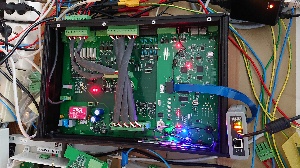
    Could it be an EMC-problem? I have tried putting an ferrite-core around the flat cable from the Emulator, but that didn't help. Should I try alu-foil and sticky tape around the flat cable? Seems like a long shot... This is what my setup looks like:

    I tried some more settings:

    1. Connecting via Ethernet

    1A. Automatic with legacy 10.368MHz limit. - "Test Connection" OK
    Does not halt after upload. The "CPU load" graph does not update (it has in the past and that was a good indication that the connection was fine). Sometimes when I pause it stops on a code line but eventually after a few pause/run I get this error message:

    "TMS320C671X: Trouble Halting Target CPU: (Error -1060 @ 0x0) Device is not responding to the request. Reset the device, and retry the operation. If error persists, confirm configuration, power-cycle the board, and/or try more reliable JTAG settings (e.g. lower TCLK). (Emulation package 5.1.641.0) "

    1B. Fixed with user specified faster values (10MHz) - "Test Connection" OK - Same as above

    1C. Fixed with user specified faster values (2MHz) - "Test Connection" OK - Same as above


    2 Connecting via USB:

    2A. Fixed with user specified slower value (100kHz) - "Test Connection" OK - Same as above and very slow program upload.
    2B. Automatic with user specified limit (2MHz) - "Test Connection" OK - Halted on main() after upload. CPU graph updates. That success only happened once in 5 trials.

    PS. In my case "Test Connection" reports "The JTAG IR instruction path-length is 46 bits."

  • Hi,

    Thanks for sending the additional details; unfortunately the photograph does not have enough resolution to see all the details, but I can tell it is a busy environment.

    At any rate, it seems the USB is your best bet and I would carefully trim the TCLK speed around 2MHz - keep in mind that too slow of a TCLK may also bring very frequent timeouts, especially on such long IR path. However I have a question: how are you connecting via USB? Is it via a Citrix or a Remote Desktop type of application (VNC, Windows, etc.)? I would not expect such issues in the latter scenario. 

    One last aspect that may be influencing the connection is a ground loop or excessive noise at the physical setup - this is only applicable in case a true local connection also fails.

    As you can suspect, I am really running out of ideas on how to improve this scenario - despite broadband internet access is quite stable these days, the involved latencies can make or break the connection. I will try to find some additional details and report back if I find anything. 

    Hope this helps,

    Rafael