This thread has been locked.

If you have a related question, please click the "Ask a related question" button in the top right corner. The newly created question will be automatically linked to this question.

CCS/CC3235MODASF: Code Composer Studio™ forum

Part Number: CC3235MODASF

Tool/software: Code Composer Studio

Hi, 

I am trying to implement logging in my program using ROV on a cc3235modasf.

I have activated Sysmin in debug.cfg:

var SysMin = xdc.useModule('xdc.runtime.SysMin');
SysMin.bufSize = 1024;
System.SupportProxy = SysMin;

ROV works fine, for instance I can see the tasks being updated. However I do not see SysMin anywhere and there are modules which I do not use like Mailbox.
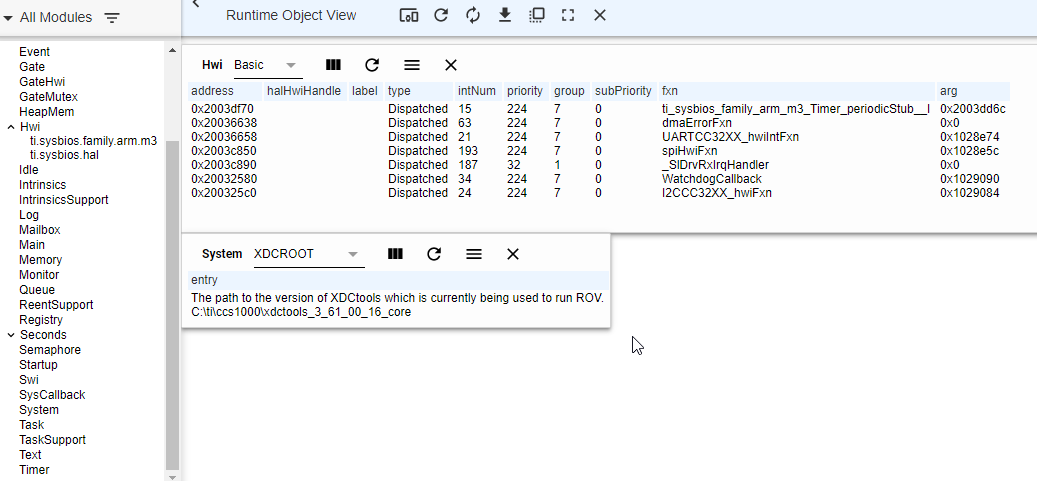
Do you have any idea what I am doing wrong?

The versions:

XDC tools: 3.61

Simplelink 4.10

CCS 10

  • Hi Cedric,

    Based on the ROV picture, the System.SupportProxy is set to SysCallback, so it's probably one of two things.

    1. Please make sure there is not another System.SupportProxy assignment in the .cfg file. If there are more than one assignments, the last one wins.

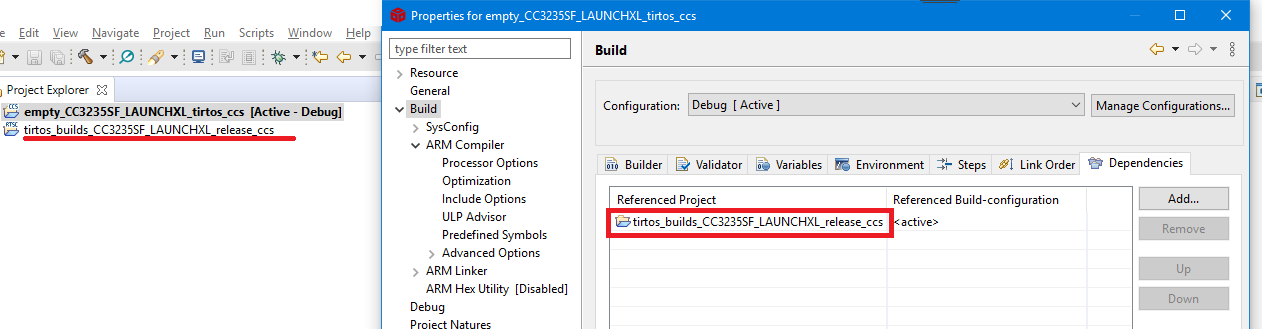
    2. I'm assuming your application does not have the .cfg in the application project. Instead it is dependent upon a kernel project. Please make sure you are changing the .cfg in the application that the application project is dependent upon. For example:

    Out of curiosity, where did you get the debug.cfg? The SDK ships a Release kernel project (which is the default for the SDK examples) and Debug kernel project. The Debug kernel project uses SysMin already. Please refer to the SDK User Guide for more details on the two different kernel projects.

    Todd

  • Oh yeah! It was actually number 2. But in a misleading way...

    I have a project built as a static library which is used in three different projects. It includes the .cfg file.

    In the project which using the lib project as a dependancy, I also have a .cfg file. When I build I get the warning:

    "This project supports RTSC content but also references one or more RTSC Configuration projects. Only the project's own RTSC content has been used in building this project."

    But it's actually the opposite of the message which happens ^^

    If I exclude the .cfg file, I get the error:

    "This project does not contain a buildable RTSC Configuration (.cfg) file. In order for it to build, this project must contain one RTSC Configuration file that is not excluded from build."

    And I cannot remove xdc tools from the products. 

    Anyway now that I know how it works it's fine. Thanks for your help Todd!

    Not sure where I got the debug.cfg file, it's actually the exact same content as release.cfg. It's probably a leftover from one of our older projects on the cc3220?

    If I may, I have a related question:

    In the console, there are now all the log entries (and in a more readable format than in ROV). However it's output only when doing a System_flush();  Is there a trick to have it printed in "realtime" without adding a lot of System_flush()?

    Also It seems that doing a System_flush() removes all entries from SysMin. Is there a way to output it to the console without emptying the SysMin buffer?

    Thanks,

    Cédric

  • Hi Cédric

    Glad you got it working. Once a .cfg is added to a CCS project, the project is converted to a "RTSC" project and cannot be reversed.

    You can use xdc.runtime.SysStd instead of xdc.runtime.SysMin in the .cfg file. Then System_printf essentially becomes printf (and goes to the CCS Console). Please note this is bad for real-time performance. When printf is called, it writes into a CIO buffer. When that buffer is full or contains a '\n' character, the target pauses, allows CCS to read the contents and then CCS resumes the target. That's why we have SysMin. It allows the application to control when to flush the contents of the internal SysMin buffer to CIO. 

    Todd

  • Hi Todd,

    Thanks for the feedback!

    I will have a look at this. As it's only for debugging, the performance impact shall not be a big issue.

    Cédric