This thread has been locked.

If you have a related question, please click the "Ask a related question" button in the top right corner. The newly created question will be automatically linked to this question.

What's the best practice to use CCS (v7) to manage project ?

Tool/software: Code Composer Studio

I'm using CCSv7 to develop for CC26xx / CC13xx LaunchPad. But I don't know what's the best practice to use CCS to manage project.

Following is my current usage and problem

I shall start a new project, for example, using simplelink_cc13x0_sdk_1_00_00_13, because all examples in SDK using relative link location. So for new project, I copy the whole simplelink_cc13x0_sdk_1_00_00_13 to a new location for my project. in the same level, I set the the workspace path for CCS. like the screen shot:

Then I decide to use sensor project under ti15.4 as a starter project. then I copy the sensor project as mysensor project

Question 1: when I import the mysensor project, it still shows sensor_cc1310lp, it will conflict with original sensor project (same name sensor_cc1310lp in CCS). So I must change the project name by hand in sensor_cc1310lp.projectspec manually ?

However even if I changed the project name, all files in new mysensor project are still linked into original sensor project.

Question 2: So what's the correct way to create a new project by copying from a original example ?

Currently I'm using a similar method described in link, I replace all "sensor" related directory with my project directory in a text editor

If I import sensor project , then use copy & paste of sensor project to mysensor project in CCS, it only copy project structure in workspace, not the whole project files, and all files in mysensor project are all linked to original sensor project files.

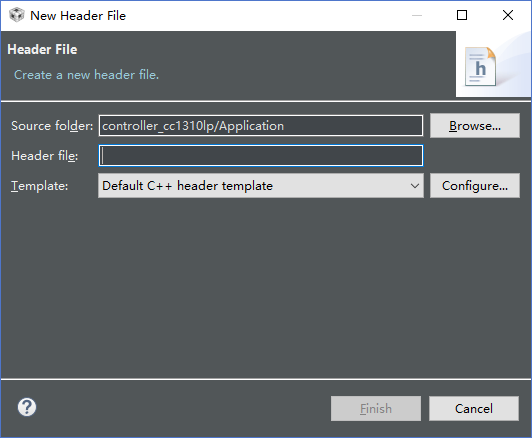
all files in the project are all linked / virtual folder. the directory structure is reflected into CCS workspace, not the real file system layout in project directory. If I import sensor (sensor_cc1310lp) project, I want to add new header/source files into project, but the new files will show under workspace/sensor_cc1310lp/Application (which is the virtual folder in project explorer in CCS).

Question 3:  What is the correct way to add new files in CCS into a project ?
  • Hello

    Yang Hong bo said:
    Question 1: when I import the mysensor project, it still shows sensor_cc1310lp, it will conflict with original sensor project (same name sensor_cc1310lp in CCS). So I must change the project name by hand in sensor_cc1310lp.projectspec manually ?

    As you realized, you cannot have projects of the same name inside the same workspace. I would recommend renaming the existing project. You can do this from inside the CCS Project Explorer (right-click on project and select 'Rename' in the context menu).

    Yang Hong bo said:
    However even if I changed the project name, all files in new mysensor project are still linked into original sensor project.

    This is likely because the project is created using existing linked resource path variables that point to the original installation location of the SDK. You would need to update these variables.

    Yang Hong bo said:

    Question 2: So what's the correct way to create a new project by copying from a original example ?

    Currently I'm using a similar method described in link, I replace all "sensor" related directory with my project directory in a text editor

    If I import sensor project , then use copy & paste of sensor project to mysensor project in CCS, it only copy project structure in workspace, not the whole project files, and all files in mysensor project are all linked to original sensor project files.

    If the project uses a lot of linked files, those files would not get copied. You are essentially making a copy of the project folder, which would contain the project metadata files along with any source files physically inside the project folder. the linked files would be pointing to the same location (files) as the original project you copied from. So yes, the behavior you see is the expected behavior.

    Yang Hong bo said:
    all files in the project are all linked / virtual folder. the directory structure is reflected into CCS workspace, not the real file system layout in project directory. If I import sensor (sensor_cc1310lp) project, I want to add new header/source files into project, but the new files will show under workspace/sensor_cc1310lp/Application (which is the virtual folder in project explorer in CCS).

    If you add new source/header files and use the option to physically "add" files to the workspace, then yes, those files will physically exist inside the project folder.

    Yang Hong bo said:
    Question 3:  What is the correct way to add new files in CCS into a project ?

    It depends if you want to add or link a file to the project.

    http://processors.wiki.ti.com/index.php/Projects_and_Build_Handbook_for_CCS#Adding_or_linking_source_files_and_folders_to_project

    Thanks

    ki