This thread has been locked.

If you have a related question, please click the "Ask a related question" button in the top right corner. The newly created question will be automatically linked to this question.

CCS: installing & using C2000 tools in CCS v6.20 (versus v7.1)

Other Parts Discussed in Thread: CONTROLSUITE, MOTORWARE

Tool/software: Code Composer Studio

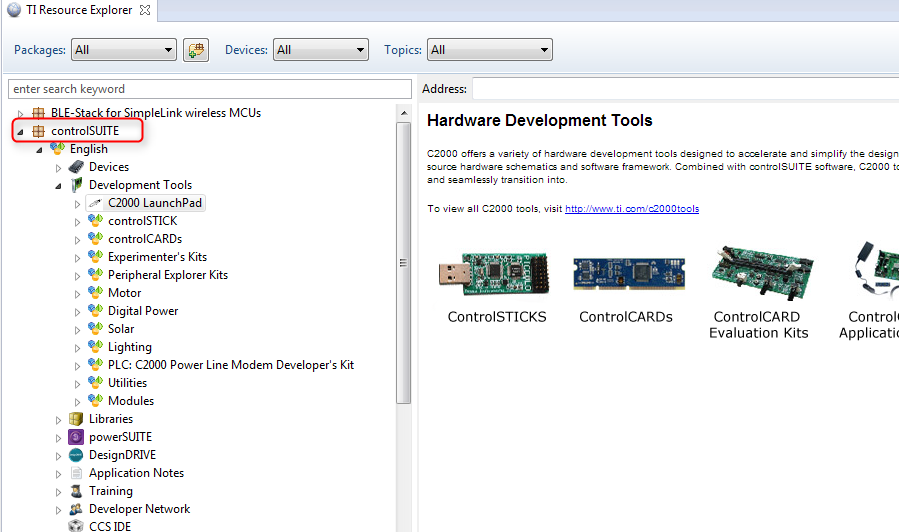
I started with CCS v7, but after getting to some Simulink Embedded Coder (2016b) projects that 'seemed' to only support the TI toolchain up through CCS v6, I did a clean uninstall of CCSv7, Motorware & Controlsuite. I rebooted, then installed CCSv6 and tools and used the now-free license. The 'Resource Explorer' in v6 is Beta and doesn't show any of the C2000 devices, development kits, or documentation, like the v7 Resource Explorer (see attached screenshots). It seems to show only the MSP430 stuff I've installed. Is there a way to fix the Resource Explorer in v6? Can someone comment on compatibility of CCS v7 with recent Simulink Hardware support examples using current TI C2000 eval boards?

A couple of the boards I'm working with are the DRV8301-F28069M_KIT, DRV8302-HC-C2-CC2803X-KIT, and the DRV8312-C2-CC2803X-KIT

  • Hi Kevin,

    You can download controlSUITE separately and use "Resource Explorer Classic" in CCSv6.2.0 to browse the contents of it.

    Kevin Spahr said:
    Can someone comment on compatibility of CCS v7 with recent Simulink Hardware support examples using current TI C2000 eval boards?

    It is best to contact Mathworks support for the most current status for this.

    Thanks

    ki

  • Hi Kevin,

    MathWorks development is actively working on adding support for CCSv7, it should be available in our next release R2017b. CCSv7 came out in Dec 2016, which was too late in our R2017a development cycle to get it added for that release.

    For now I am using CCSv6 + R2017a.

    -Brian
  • thanks Brian... is it simple a matter of setting up Embedder Coder C2000 tools to point to the correct compiler path, or is CCS 'compatibility' more complex than this?
  • Thank Ki...
    For a variety of reasons, I did a clean sweep of ccs6.2, and went back to 7.2, but unfortunately fought with the proxy issue discovered in 7.2.0.00012 - then discovered 7.2.0.00013. Install was clean and fast. However at initial launch I got the normal 'Getting Started' page, but for subsequent launches my GS page is blank and I got this 'Problem Occurred' dialog - any thoughts?

    "An internal error has occurred.
    Failed to send message. Channel is already closed. SetDragDropEnabledMessage{type=SetDragDropEnabled, uid=21, enabled=false"
  • Found the issue. Initial install runs under admin privileges and initial CCS launch inherits those rights and runs/displays correctly. Desktop app icon does not run process with admin rights, and therefore has a number of issues, especially since the default location (C:\TI) is a non-standard installation location (from a user privilege standpoint). Once I changed the icon compatibility settings to always run as admin, everything works fine now. BTW, the CCS tools (CCS, Motorware, ControlSuite) are bent on using the c:\ti root directory, and even if you pick a different initial install directory for CCS, other parts of the tools/toolchain end up in a c:\ti directory anyway. This was the case for v7.1 and v6.2.