This thread has been locked.

If you have a related question, please click the "Ask a related question" button in the top right corner. The newly created question will be automatically linked to this question.

CCS/TMS320F28027F: JTAG problem

Part Number: TMS320F28027F
Other Parts Discussed in Thread: TMS320F28027

Tool/software: Code Composer Studio

Hello Everyone ,

Recently I Bought a new C2000 LaunchPad XL TMS320F28027,but i am facing a flashing/debugging problem Every time I connect my  Board to laptop the test connection is working successfully but as when flashing/debugging is done the following error comes up:-

IcePick_C_0: Error connecting to the target: (Error -2131 @ 0x0) Unable to access device register. Reset the device, and retry the operation. If error persists, confirm configuration, power-cycle the board, and/or try more reliable JTAG settings (e.g. lower TCLK). (Emulation package 8.3.0.00003)

Any help will be Great .

Thanks In Advance 

Regards

Rahul

  • Rahul,

    I suspect the configuration being launched is different than the F28027. The reason is that the error message is coming from the JTAG Router named ICEPICK, but the device does not have this router. 

    Can you double check and see if the configuration used is set to the cousin devices F2837x or F2838x, for example? (these have the ICEPICK)

    Hope this helps,

    Rafael

  • Hey Rafael,

    I think the configuration setup is set for F28027 ,for your reference I have attached the screenshot of the configuration below and also for the successful test connection,After your post i have reset the configuration but the error happens to br the same.

    Can you Please suggest what should I do to solve this problem

    Thanks in Advance 

    Rahul


  • Rahul,

    Thanks for sending the pictures. Can you launch the configuration manually?

    - In the Target Configurations view, right click on the F28027.ccxml file and select Launch Selected Configuration. 
    - After launch, right click on the core "Texas Instruments XDS100v2 USB Debug Probe_0/C28xx" and select Connect. At this point the core should connect and be halted at a certain point in the Flash. 

    If that is not happening, what is the error message? Also, can you send a photo of your board? I just want to be sure how it is connected. 

    If that works, can you try to load a different project to the device? My suspicion is that there is something wrong going on with the project that is causing the processor to fail immediately after loading - usually the project runs to main after loading but, if the project is somehow misconfigured, the Debug Probe will lose control over the device. 

    Regards,

    Rafael

  • Hey Rafael,

    As you suggested I followed each step as you suggested as this the result which i got is as following:-

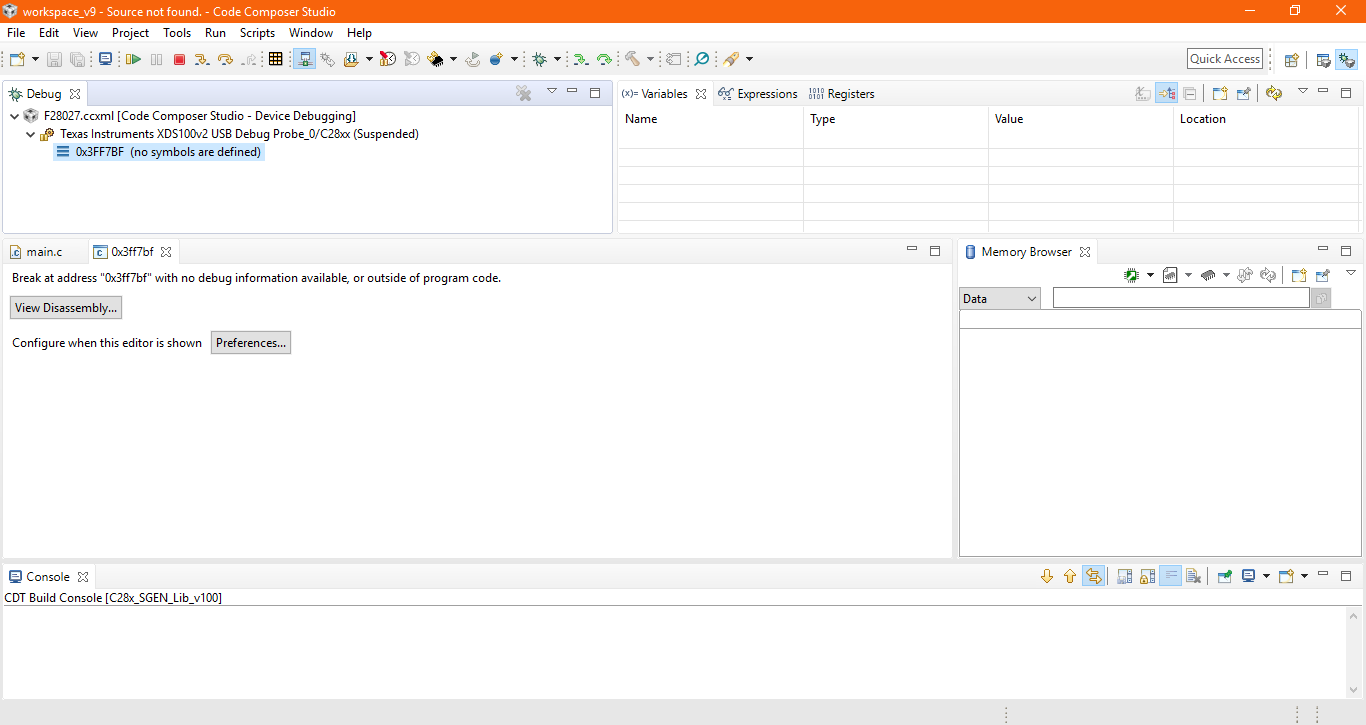
    1.Launching the configuration manually,didn't show any error message rather the breakpoint message showed up ,image of the same is attached below.

    2.After the above step I tried to load the program from control suite named Example_F2802xGpioToggle and Example_2802xEPwmTimerIntwithout making any changes in the code but the I got the same error message.image which I have uploaded below.


    3. Also below I have attached the image of board connected setting with computer,hope this will help.

    Hope this will be helpful in finding out the solution.

    Thanks in Advance 

    Regards 

    Rahul

  • Rahul,

    Thanks for sending the additional details. 

    1. The message shown is normal. It shouldn't affect the ability to load code to the device. At this point the device is stable and properly connected.

    2. How are you loading code? I am doing the following (discard the error; it is expected as the first project puts the device in low power run mode): 

    At this point I am strongly suspecting that either the debug configuration or the workspace may have something out of the ordinary. With no active debug sessions running, go to menu Run --> Debug Configurations and locate the entry F28027.ccxml on the tree and delete it. Then retry to launch the debug session and reload code. 

    Apart from that, I really can't think of anything else that could be causing this issue, apart from a problem on the board or connection to it.  

    Hope this helps,

    Rafael