This thread has been locked.

If you have a related question, please click the "Ask a related question" button in the top right corner. The newly created question will be automatically linked to this question.

CCS/TDC1000-C2000EVM: Communication between TDC1000 and C2000

Part Number: TDC1000-C2000EVM
Other Parts Discussed in Thread: TDC1000,

Tool/software: Code Composer Studio

Hello,

I have been working on a project with the TDC100-C2000EVM to identify when there is a change in liquid concentration inside a vessel. In my test set up, I have two ultrasonic transducers connected across from each other. I can see a change in the Time of Flight (TOF) in real time when I turn on the TDC1000-C2000 GUI and start the graph.

My goal for this project is to write the values out from the C2000 microcontroller to an Arduino to read the TOF values via the Arduino’s serial monitor feature. I am having trouble figuring out how to have the TDC1000 and the C2000 communicate to each other. I purchased the XDS110 Debug Probe and downloaded code composer studio to try to debug the C2000 so that I could get this to work.

There are 8 GPIOs available to hook up to directly. Each has a specific output peripheral it can be switched to. Below is the code I made for this:

// Enable GPIO0 as EPWM1A - ePWM1 output A (O)
           //
 GpioCtrlRegs.GPAPUD.bit.GPIO0 = 0;   // Enable pullup on GPIO0
 GpioDataRegs.GPASET.bit.GPIO0 = 1;   // Load output latch
 GpioCtrlRegs.GPAMUX1.bit.GPIO0 = 1;  // GPIO0 = EPWM1A - ePWM1 output B(O)
 GpioCtrlRegs.GPADIR.bit.GPIO0 = 1;   // GPIO0 = output

       //
// Enable GPIO1 as EPWM1B - ePWM1 output B (O)

                    //
GpioCtrlRegs.GPAPUD.bit.GPIO1 = 0;   // Enable pullup on GPIO1 GpioDataRegs.GPASET.bit.GPIO1 = 1;   // Load output latch
GpioCtrlRegs.GPAMUX1.bit.GPIO1 = 0;  // GPIO1 = EPWM1B - ePWM1 output B (O)
GpioCtrlRegs.GPADIR.bit.GPIO1 = 1;   // GPIO1 = output

       //
// Enable GPIO3 as EPWM2B - ePWM2 output B (O)
                            //
GpioCtrlRegs.GPAPUD.bit.GPIO3 = 0;   // Enable pullup on GPIO3
GpioDataRegs.GPASET.bit.GPIO3 = 1;   // Load output latch
GpioCtrlRegs.GPAMUX1.bit.GPIO3 = 0;  // GPIO3 = EPWM2B - ePWM2 output B (O)
GpioCtrlRegs.GPADIR.bit.GPIO3 = 1;   // GPIO1 = output

       //
// Enable GPIO7 as EPWM4B - ePWM4 output B (O)
                                     //
GpioCtrlRegs.GPAPUD.bit.GPIO7 = 0;   // Enable pullup on GPIO7
GpioDataRegs.GPASET.bit.GPIO7 = 1;   // Load output latch
GpioCtrlRegs.GPAMUX1.bit.GPIO7 = 0;  // GPIO7 = EPWM4B - ePWM4 output B (O)
GpioCtrlRegs.GPADIR.bit.GPIO7 = 1;   // GPIO7 = output

       //
// EGPIO30 only has input peripherals

//  GpioCtrlRegs.GPAPUD.bit.GPIO30 = 0;   // Enable pullup on GPIO30
//  GpioDataRegs.GPASET.bit.GPIO30 = 1;   // Load output latch
//  GpioCtrlRegs.GPAMUX1.bit.GPIO30 = 0;// GPIO30 = GPIO30
// GpioCtrlRegs.GPADIR.bit.GPIO30 = 1;   //

//
// Enable GPIO31 as CANTXA - eCAN-A transmit (O)
                                         //
GpioCtrlRegs.GPAPUD.bit.GPIO31 = 0;   // Enable pullup on GPIO31
GpioDataRegs.GPASET.bit.GPIO31 = 1;   // Load output latch
GpioCtrlRegs.GPAMUX2.bit.GPIO31 = 1;  // GPIO31 = CANTXA - eCAN-A transmit (O)
GpioCtrlRegs.GPADIR.bit.GPIO31 = 1;   // GPIO31 = output

//
// Enable GPIO32 as ADCSOCAO - ADC start-of-conversion A (O)
                                                 //
GpioCtrlRegs.GPBPUD.bit.GPIO32 = 0;   // Enable pullup on GPIO32
GpioDataRegs.GPBSET.bit.GPIO32 = 1;   // Load output latch
GpioCtrlRegs.GPBMUX1.bit.GPIO32 = 4;  // GPIO32 = ADCSOCAO - ADC start-of-conversion A (O)
GpioCtrlRegs.GPBDIR.bit.GPIO32 = 1;  // GPIO32 = output


// Enable  GPIO33 as GPIO33 = ADCSOCBO - ADC start-of-conversion B (O)
                                                     //
GpioCtrlRegs.GPBPUD.bit.GPIO33 = 0;   // Enable pullup on GPIO33
GpioDataRegs.GPBSET.bit.GPIO33 = 1;   // Load output latch
GpioCtrlRegs.GPBMUX1.bit.GPIO33 = 4;  // GPIO33 = ADCSOCBO - ADC start-of-conversion B (O)
GpioCtrlRegs.GPBDIR.bit.GPIO33 = 1;  // GPIO33 = output

Once these GPIOs are set to their respected output types (ePWM, CANTX, ADC start-of-conversion), I don’t know what these values are outputting when reading them on the Arduino. If I disconnect the transducer from TX1, the value does not change. If I comment out the GPIO code, I read 0 on the Arduino. I am reading something from the board, but don’t know what.

Under the source code: "C:\Program Files (x86)\Texas Instruments\TDC1000_C2000\Firmware\TDC1000_C2000EVM_FW-Source-v1.42.zip".

I was able to find a file that said main_level.c. Below is a snippet of that code.

void TI_LMP91400_reg_init(void)
{

  // 1MHz test cell (green)
#if 0
    TI_LMP91400_SPIWriteReg(TI_LMP91400_CONFIG0_REG, 0x44); // 4pulses
    TI_LMP91400_SPIWriteReg(TI_LMP91400_CONFIG1_REG, 0x41); // -> 44 to 40 (1stop)
    TI_LMP91400_SPIWriteReg(TI_LMP91400_CONFIG2_REG, 0x04); // tx2 is 04, tx1 is 0
    TI_LMP91400_SPIWriteReg(TI_LMP91400_CONFIG3_REG, 0x0C); // enable blanking, 320mv threshold
    TI_LMP91400_SPIWriteReg(TI_LMP91400_CONFIG4_REG, 0x5F); // 5e (group) -> 1e (edge mode)
    TI_LMP91400_SPIWriteReg(TI_LMP91400_TOF1_REG, 0x40);
    TI_LMP91400_SPIWriteReg(TI_LMP91400_TOF0_REG, 0x1E);
    TI_LMP91400_SPIWriteReg(TI_LMP91400_ERROR_FLAGS_REG, 0x01);
    TI_LMP91400_SPIWriteReg(TI_LMP91400_TIMEOUT_REG, 0x23);
    TI_LMP91400_SPIWriteReg(TI_LMP91400_CLOCK_RATE_REG, 0x01);
#endif
}

I am not sure what this TI_LMP91400 is but this is the only time I have seen the TOF0, TOF1 and other registers from the TDC1000. I need to figure out how to get these registers to output from the GPIOs.

If there is a better way to output these values, please let me know.

Thanks,

Colin

  • I found a similar thread of what I am trying to do but they used the TDC1000-TDC7200EVM: https://e2e.ti.com/support/sensors/f/1023/t/720185?CCS-TDC1000-TDC7200EVM-Using-the-board-regardless-GUI 

    He used UART via GPIO3 to write the value onto his Arduino. GPIO12 and GPIO29 use SCI (which is UART) but I cannot hook up to them directly. I am going to try to use GPIO31 and flip it to CANTXA and see if that will work if I can get the code debugged. 

    When I try to download the source code to the TSM320f28035 microcontroller I get error after error. I am also confused as to why the TI_LMP91400 is in the source code of the TDC1000-C2000EVM a lot when it's not even on the board.

  • Colin,

    it looks like the EVM utilizes the LMP91400 drivers to communicate with the TDC1000.

    I think you're trying to do too many things at once. The code should compile and run without issue out of the box. Go download a fresh unedited copy of the code and run that to test your hardware configuration with the GUI.

    Once you get that working you can begin incrementally modifying the code to add other features that you want.

    Regards,
    Cody 

  • Cody, 

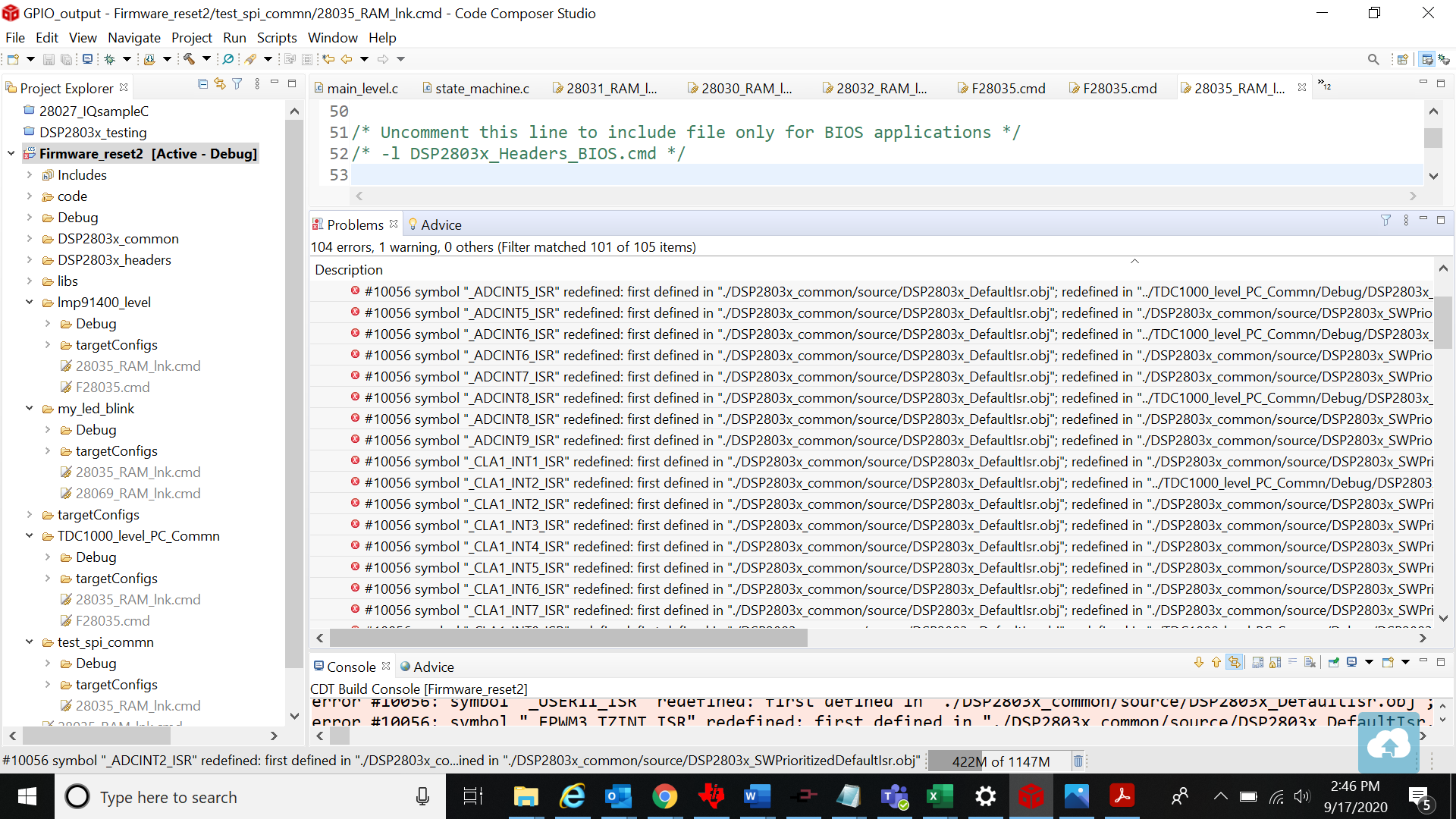
    Can you explain how to do this? I have tried this several times but every time I try this I get several errors right of the bat. I fix those errors just to get more  errors and so on. Something tells me I'm not doing something right from the beginning... I have attached a picture of what my screen looks like at the moment.

    Thanks,

    Colin 

  • Colin,

    it looks like you are having linking errors. Those comments are telling you that you have defined "xxyy" twice. And then it is pointing to the locations where that definition is happening.

    The forums should have several posts about how to correct linking errors. Additionally the c2000 workshop covers how to correctly link files together.

    https://training.ti.com/c2000-f2803x-microcontroller-workshop?context=1137791-1137784 

    Regards,
    Cody 

  • Cody,

    I made a new ccs project and tried downloading the firmware but every time I do I get errors. I usually tried adding the whole firmware file but this time I instead just added the code and header files from TDC1000_level_PC_Commn and lmp_91400_level files. 

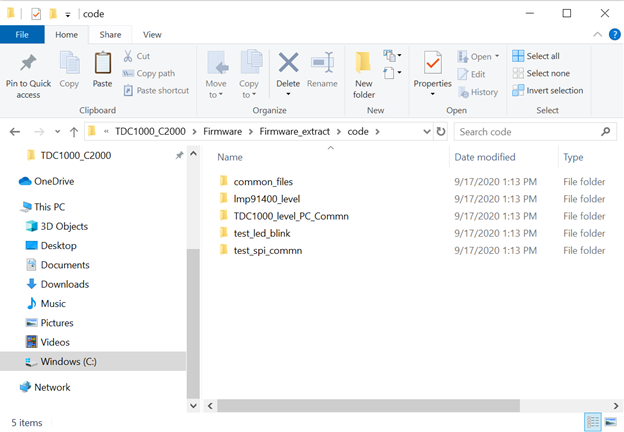
    Below is the all the files available in the firmware:

    These are the files under code:

    This is what my CCS looks like at the moment. I opened both of the main_level.c files from TDC1000_level_PC_Commn and lmp_91400_level and am confused as to which one to use. The lmp level is on left and the TDC level is on the right.

    Do I need to add anymore files from the firmware?

    I am also having errors with the TDC1000 host_interface.c and main_level.c. It is not allowing me to make changes to these files and save them. I think it has something to do with a copyright issue.

    Thanks,

    Colin

  • Colin,

    can you extract the files? If not rename the .zip file to .piz then copy that file into another file directory in windows. Then rename the file to .zip and you should be able to extract the files.

    Please let me know if that is the issue you are having with not being able to edit the files. These files should be editable.

    Regards,
    Cody

  • Cody, 

    I was able to extract the files and saved it as firmware_extract as seen in the above pictures. When I import this file and try to build it, I get a bunch of errors. I think there ends up being too many files because I have to exclude a lot of them from the build to fix the errors. I don't know if I'm excluding the proper files. 

    Can you also touch base on the difference between the TDC1000_level_PC_Commn and lmp_91400_level files? They are both located in the firmware file but no where does it describe the difference. I also cannot find the lmp91400 anywhere on the board. 

    Thanks, 

    Colin 

  • Colin,

    I recognize this is probably pretty frustrating for you so to help close this issue more quickly I imported and built the TDC1000_level_PC_Commn  project.

    In doing so I found 3 issues.

    1. The linking was done using absolute file paths.
      1. There are two ways to fix this, correct this to use relative file paths or just update the absolute file paths to where you have located the files in your file system.
        1. Right click on the project name in the project explorer and click on ""properties"
        2. Navigate to "Build"-> "C2000 compilier" -> "include options"
        3. replace "C:\Users\a0415888\Documents\pwd\GIT_REPOS\C2000\c2000_lmp91400" with the file path on your system for each of the include
    2. //#include <cstring> was causing a compile error
      1. To fix: replace all instances (3 if I remember correctly) with " #include <string.h> " 

    3. IQmath.lib wasn't found
      1. You can link to this or "add" it to the project.
        1. Right click on the project name in the project explorer and click on "add files"
        2. Navigate to "TDC1000_C2000EVM_FW-Source-v1.42\libs\math\IQmath\v160\lib"
        3. Select IQmath.lib.
        4. Linking or copying the file is OK

    I am not sure why the LMP files are included, but as far as I know you only need the TDC files.


    Regards,
    Cody