This thread has been locked.

If you have a related question, please click the "Ask a related question" button in the top right corner. The newly created question will be automatically linked to this question.

PSpice for TI installation unsuccess

Other Parts Discussed in Thread: PSPICE-FOR-TI

Dear TI,

I want to use PSpice for TI on 2 PCs. If I understand correct I can use it up to 3 PCs.

I managed to install on one of my laptops but on other one I received the following error:

I tried to run the installer as administrator but I received the same message.

What is the problem?

Thanks for your help.

  • Balint,

    Thank you for your post, and thank you for your interest in Pspice for TI.

    It could be firewall or anti-virus software preventing download of the installation files.
    If you have those running, please disable them and try the installation again.

    If those turn out to not be the issue, please attach the installation logs to this thread using the paperclip icon.

    You can find the log at %APPDATA%\Cadence\PSpiceTIInstall\cdsPspiceTIlog.txt

    Regards,
    John

  • Hi John,

    Thanks for the tip. Unfortunately it did not work. I turned off both the firewall and the anti-virus SW.

    I use Microsoft Defender Antivirus and Firewall.

    19:37:35 2020. szeptember 8., kedd : Deleting file : C:\Users\Bálint\AppData\Roaming\Cadence\PspiceTIInstall\TI_URLs.txt
    19:37:35 2020. szeptember 8., kedd : Response Content length = 1527
    19:37:35 2020. szeptember 8., kedd : C:\Users\Bálint\AppData\Roaming\Cadence\PspiceTIInstall\TI_URLs.txt bytes downloaded = 1527
    19:37:35 2020. szeptember 8., kedd : Reading Json URL File
    19:37:35 2020. szeptember 8., kedd : Setting TI Library URL from Json URL File
    19:37:35 2020. szeptember 8., kedd : Reading Json URL File
    19:37:35 2020. szeptember 8., kedd : setting media download server URL from Json File
    19:37:35 2020. szeptember 8., kedd : Reading Json URL File
    19:37:35 2020. szeptember 8., kedd : setting Dll path from Json File
    19:37:35 2020. szeptember 8., kedd : Chws URL is: https://cdsplicwc.cadence.com/chws/b2c/v1
    19:37:35 2020. szeptember 8., kedd : DownloadServerPath is: https://software-dl.ti.com/pspice/esd/installer
    19:37:35 2020. szeptember 8., kedd : TILibPath is: https://software-dl.ti.com/pspice/esd/models/library/library.zip
    19:37:35 2020. szeptember 8., kedd : parameter count = 2
    19:37:35 2020. szeptember 8., kedd : -wrapper
    19:37:35 2020. szeptember 8., kedd : -CMDLINE=
    19:37:36 2020. szeptember 8., kedd : ReleaseVersion in XML: 17.40.003 InstalledVersion on system: 
    19:37:48 2020. szeptember 8., kedd : error_code cdsVblRegisterInstallation: VblDiskWriteError
    19:37:48 2020. szeptember 8., kedd : strErrorMsgDesc: Unable to write to disk. Check Permissions.
    19:38:35 2020. szeptember 8., kedd : error_code cdsVblRegisterInstallation: VblDiskWriteError
    19:38:35 2020. szeptember 8., kedd : strErrorMsgDesc: Unable to write to disk. Check Permissions.

    This is the log.

    Balint

  • Balint,

    Thanks for the log file.
    It says there was a disk write error:

    error_code cdsVblRegisterInstallation: VblDiskWriteError
    strErrorMsgDesc: Unable to write to disk. Check Permissions.
    error_code cdsVblRegisterInstallation: VblDiskWriteError
    strErrorMsgDesc: Unable to write to disk. Check Permissions.

    Is it possible that your Windows permissions are preventing the installation?

    Regards,
    John

  • John,

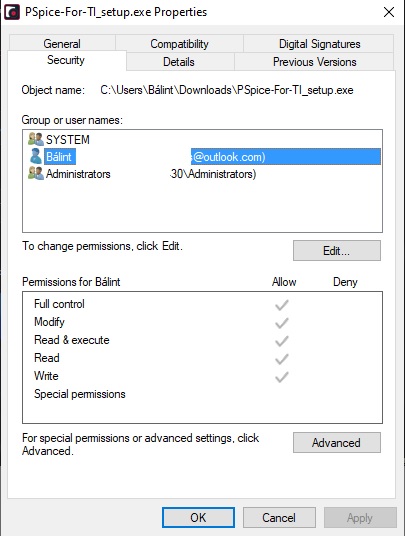
    I am administrator on both my personal and official PC.

    The only difference between the 2 is that I use W10Pro at home while I use W10Enterprise in the office.

    These permission are allowed for all users.

    I have tried the hint from this ticket:

    I already had the SPB_Data library from a previous installation (Cadence Orcad 17.4 Trial) but it contained only ini files. 

    I deleted this SPB_Data library but I still got the "Unable to write to disk. Check Permissions." error message.

  • Thank you Balint.

    I will open a ticket with the Pspice for TI vendor to get their feedback.
    Thank you for your patience.

    Regards,
    John

  • Balint,

    I have opened a ticket with the vendor.
    While we wait for their response, could you try one more thing?
    Would you please confirm you are entering the correct access code, and aren't entering any additional characters, like spaces?

    Regards,

    John

  • Hi John,

    I have already tried it. In this case (extra or missing character) I received the following:

    "Access key entered is not in expected format. Please go to http://e2e.ti.com for further assistance."

    But, I copied and pasted the access key from the email I had received. I did not type it.

    Let me check if I type the access key will it work or not.

    Regards,

    Bálint

  • Hi John,

    I checked what would happen if I type the key.

    The result is the same (Unable to write to disk. Check Permissions.)

    Regards,

    Balint

  • Thank you Balint.
    The Pspice for TI vendor has already replied to the ticket submission and are checking the logs you provided.

    They will most likely have some follow-up questions.

    Thanks again.

    Regards,
    John

  • Balint,

    The Pspice for TI vendor has suggested the following:

    1)  Start PSpice-For-TI_setup.exe with Run as Administrator, if that helps.

    2)  Clean TEMP/TMP and restart the system and perform PSpice-For-TI_setup.exe with Run as Administrator.

    Please give them a try and let me know how it goes.

    Regards,
    John

  • Hi John,

    I tried to start the exe with Run as admin previously and now again. No success.

    I deleted everything from the AppData\Local\Temp\ folder and restarted the windows without success.

    Meanwhile I managed to install Orcad 17.2-2016 Lite without any problem. I know it is a different SW somehow but I guess the Vendor is the same and it is also a 64-bit program.

    Maybe my windows 10 version is not OK. 

    I use W10Pro, Version 2004, OS build 19041.508.

    I ran out of ideas.

    Regards,

    Bálint

  • Balint,

    The Pspice for TI vendor just replied with an additional comment:

    Please check for permission to create the directory and write a file to this directory: “%APPDATA%\Cadence\VBL\TI_PSpice_174\license”

    Please give this, and the previous suggestions a try and let me know how it goes.

    Regards,
    John

  • Hello John, 

    Sorry for the late answer.

    I have all permissions for the folder you mentioned above.

    Balint

  • Thank you Balint.

    I will forward this to the Pspice for TI vendor for their feedback.

    Regards,
    John

  • Balint,

    The vendor suspects that the problem is with the user name in the path %APPDATA%.

    Do you have a way to change that?

    Thanks,
    JC