This thread has been locked.

If you have a related question, please click the "Ask a related question" button in the top right corner. The newly created question will be automatically linked to this question.

LP-CC2652R7: Energytrace

Part Number: LP-CC2652R7
Other Parts Discussed in Thread: ENERGYTRACE, , CC2652R7

Hi,

I'm using the LP-CC2652R7 and energytrace. When will the board be calibrated? Is it once at USB connection? Can I perform a calibration?

Best Regards
Sebastian

  • Hi Sebastian,

    No calibration is required by the developer.

    The debugger generates software-controlled DCDC pulses, which power the target device. Measurements of these pulses result in final calculation of current consumption.

    For more details, please refer to section 3.1 "Energy Measurement Method" of this document: https://www.ti.com/lit/an/slaa603/slaa603.pdf
    (
    Although this is a MSP430 document, the "EnergyTrace" concepts should apply to other platforms which enable EnergyTrace.)

    Thanks,
    Toby

  • I'm asking because I have two LaunchPads and want to measure current in the uA range. If I do some measurements I see with the two boards results from 1.5uA - 2.5uA. Is this wide range normal? It also happens once that I measure arround 4uA. If I disconnect and connect the board again I see normal results again. Is this also normal?

    Therefore I asked if it is possible to trigger a calibration.

  • Depending on how long of a time interval you're measuring, this range is possible.

    For my own measurements, I will usually do a power cycle (such as disconnecting/reconnecting the USB cable) and also exit/start EnergyTrace.

    As a sanity check, can you confirm the items in https://dev.ti.com/tirex/content/simplelink_cc13xx_cc26xx_sdk_7_10_01_24/docs/zigbee/html/energy-trace/energy-trace.html ?

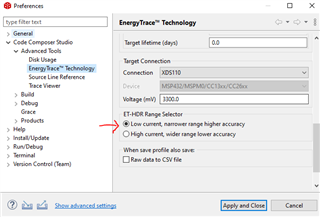
    - your EnergyTrace Preferences are set to "Low current, narrower range higher accuracy"?

    - the launchpad has only the necessary jumpers required for EnergyTrace

    Thanks,
    Toby

  • I have tried it with "--range=lo" but it doesn't change or improve the result. If I disconnect and connect USB again the result will change. If I repeat this and do measurements I get results from 1uA to 2uA... sometimes 3uA, 6uA... seems that there is something with the connection... do you also see this? From my point of view it's not very reliable.

  • I tried this out with CCS 12.3 on LP_CC2652R7, with FW that enters Standby for 1000 seconds.

    After multiple runs of EnergyTrace (entering it once, start a run, get result, start another run, ..., exit EnergyTrace), with each run spanning 5 sec. The device is connected via USB directly to a USB port on my laptop. All jumpers are removed from the LP except GND, 5V, 3V3, and XDS110 Power.

    I see a relatively consistent average current consumption, ranging from 0.0009 mA to 0.0012 mA.
    So, some variation can be expected, but staying within reasonable range of datasheet.

    What FW are you running on your device? Is it guaranteed to stay in Standby for a very long period of time (relative to the total measurement time in EnergyTrace)?

    Here is attached the FW image I used:
    https://e2e.ti.com/cfs-file/__key/communityserver-discussions-components-files/538/gpiostandby_5F00_LP_5F00_CC2652R7_5F00_tirtos7_5F00_ticlang.out

    Can you try this FW, along with the other setup described above, to see if you get same results?

  • I'm using an external HW and FW. I removed all jumpers beside the XDS110. The 3.3V and GND is connected to the HW.

    There is no big differene if I run 1s, 5s or 10s. If it is "wrong" then it is relatively consistent. Have you tried multiple times to disconnect and connect the USB cable from the board and run a measurement?

    I will try it with your FW and provide the results.

  • Have you tried multiple times to disconnect and connect the USB cable from the board and run a measurement

    I tried this in a single EnergyTrace session (only opening the tool once, then leaving it open).

    I see the same average power consumption as in my previous reply.

    One other thought, on re-connecting the USB, there is an LED indicator. It should at first be steady green, then shortly after toggle red for a bit of time, then stay steady state green. Please make sure this sequence is completed before starting any measurements in EnergyTrace.

  • If I do a USB connection once and run measurementsmultiple times I also get nearly the same results.

    After USB connection the LED is after some seconds green. There is no toggle red... I have two board here with same behaviour.

  • If I do a USB connection once and run measurementsmultiple times I also get nearly the same results.

    Is this with my FW?

    After USB connection the LED is after some seconds green. There is no toggle red... I have two board here with same behaviour.

    The toggle red here should indicate that the host (e.g. PC running CCS/EnergyTrace) is detecting the board. Maybe on your side it is happening quickly enough on your  machine that the red LED toggle is imperceivable.
    In any case, it seems that you are able to load FW to your board and run EnergyTrace, so maybe this point is unrelated.