Part Number: LP-EM-CC2340R5
This thread has been locked.
If you have a related question, please click the "Ask a related question" button in the top right corner. The newly created question will be automatically linked to this question.
Part Number: LP-EM-CC2340R5
Hi Ali,
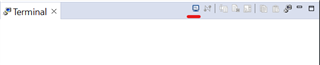
To open the Serial Terminal in the Code Composer Studio, press CTRL+ALT+SHIFT+T or within the CCS App: View > Terminal, a small window should open at the side/bottom of the app and if you click on the small icon on the right as shown below a window should open to configure the Serial Terminal settings.


Useful resource that can help you get started with our launchpad is by using our SimpleLink Academy CC23xx in our Resource Explorer. In the SimpleLink Academy link, it shows the setup guide.
Regards
Ivan