This thread has been locked.

If you have a related question, please click the "Ask a related question" button in the top right corner. The newly created question will be automatically linked to this question.

Cann't Read CC2540 Attribute value using MATLAB

Other Parts Discussed in Thread: CC2540

Hi all,

I'm trying to develop a MATLAB GUI that is communicating with a BLE module based on CC2540. I was able to connect to the USB dongle, control it to search for the BLE module and then establish a connection with the BLE module. (Works fine).
Then, I have tried to call the temperature Attribute (0xFFE1) but I received the following packet:
04 FF 06 7F 06 02 B4 FD 00
instead of
04 FF 06 7F 06 00 B4 FD 00

which means the attribute cannot be read.
The same if I tried to call the battery level attribute.

Do I have to enable some authorization setting or something else?

If yes, how do I do it?

But, if it has nothing to do with the authorization, I'll double check my MATLAB code.

Regards,
Asiya

  • Hello again,

    let me ask this question again.

    I can successfully connect the USB dongle with MATLAB using serial communication.

    Then, I did scan for the OLP425i BLE module and it was detected and the connection link was established.

    However when I try to acquire the attributes (temperature value or battery level), I receive an error status (04 FF 06 7F 06 02 B4 FD 00) which corresponds to 

    #define INVALIDPARAMETER          0x02  --> from /*** Generic Status Return Values ***/ at comdef.h

    Do you have any idea why?

    I can do that using BTool normally.

    Looking forward for your help.

  • I am also interested in an answer to this

  • Jeff Forsyth said:

    I am also interested in an answer to this

    Actually, I wasn't aware that the connection was not established correctly because I did send one wrong byte in the packet. 

    Then, I did send the same packets as it suppose to be sent using BTool and it works fine.

    Check the packets you send. There was nothing wrong with the serial communication as I thought.  

    Regards,

    Asiya

  • I am new to BLE, if I want to communicate with the usb dongle using matlab ,I have to write HCI command?
  • Hi,
    Yes, you can simply use BTool to see the command chain which you would have to replicate (or base on) in MATLAB.

    Best Regards
    Joakim
  • Hi,

    Using BTOOL you can see the received and transmitted packets. Using Matlab try to send the same packets visualized by BTool after establishing a serial connection with the USB dongle.

    To initialize the USB dongle, the following packets are sent by Matlab to the USB dongle:

    %[2]--------Send GAP_Device_Init -------------%
    GAP_initialise=['01';'00';'FE';'26';'08';'03';'00';'00';'00';'00';'00';'00';'00'
    '00';'00';'00';'00';'00';'00';'00';'00';'00';'00';'00';'00';'00'
    '00';'00';'00';'00';'00';'00';'00';'00';'00';'00';'00';'00';'01'
    '00';'00';'00']; 
    dec=hex2dec(GAP_initialise);
    
    fwrite(handles.serConn, char(dec)');
    
    %[3] Receive GAP_HCI_ExtentionCommandsStatus (9 Bytes)
    [R,count] = fread(handles.serConn,9);

    Then after reading the received packets and making sure that they are correct, send the Scan packet to look for the BLE sensor. Send a request to it and then establish a connection. 

    Regards

  • Hi, Asia Al-Busaidi!

    Could you, please, share the experience of establishing connection between Matlab and BLE module (I'm using BLE113 from Bluegiga) or give the link were it is explained? My device is visible from Matlab but I can't establish connection having this message in the command window:

    >> bt=Bluetooth('Device',1);

    >> fopen(bt);
    Error using icinterface/fopen (line 83)
    Unsuccessful open: Cannot connect to the device. Possible
    reasons are another application is connected
    or the device is not available.

    I'm sure that none application is connected to the device so the error is not clear for me. The device is advertising and works fine as I can connect to it using BLE Tool mobile app with no problems.

    Thanks a lot in advance!

    Regards,
    Dmitry.
  • Dear Dmitry,

    Try to establish the connection with your Bluetooth model as a serial port by using (serialPorts = instrhwinfo('serial'); ) and then open it by (fopen(serConn);).

    In my case the BLE USB stick acts as a serial port and I send to it packets in order to send them to the BLE sensor. 

    If you  already have BLE in your PC I'm not sure how to communicate with it through Matlab. I have not used Bluetooth() function but according to the error you get I recommend you to use a software that shows the packets while establishing connection like BTOOL I'm using. 

    Let me know if you still have the problem and I'll try to check if I can use Bluetooth function using different computer.

    Regards,

    Asiya

  • Dear Asiya,

    Thanks for your reply!

    I've created serial object but I've no idea what to do next. Should I scan for the available device and then write and read values to/from avalable GATT-characteristics? Scanning didn't give the effect:

    >> s = serial('COM30','BaudRate',57600);

    >> fopen(s)
    >> fscanf(s)
    Warning: Unsuccessful read: A timeout occurred before the
    Terminator was reached.

    I'm using external ASUS USB-BT400 adaptor.

    BLE113 module is connected to the custom microcontroller based device using UART. I'm able to transfer bytes and arrays from my device to the smartphone via BLE module as well as send bytes to my device. Now I need to implement more complex functionality such as firmware update so I need desktop application where I can create custom program. Recentely I worked with another bluetooth module from Bluegiga which is Bluetooth 2.0 and I could establish connection and write the script in Matlab with no problems. Now when I try to do the same with Bluetooth 4.0 I faced with the problems that I mentioned in my previous post. 

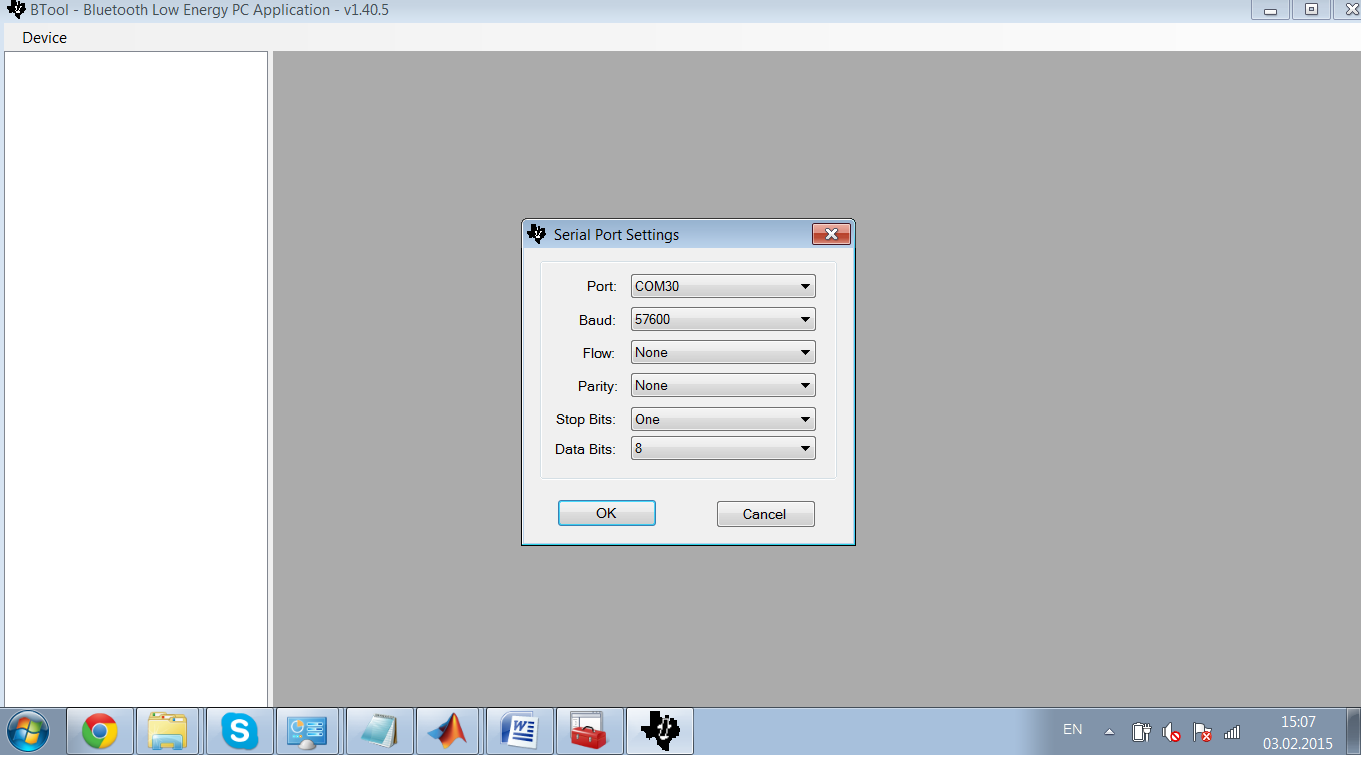
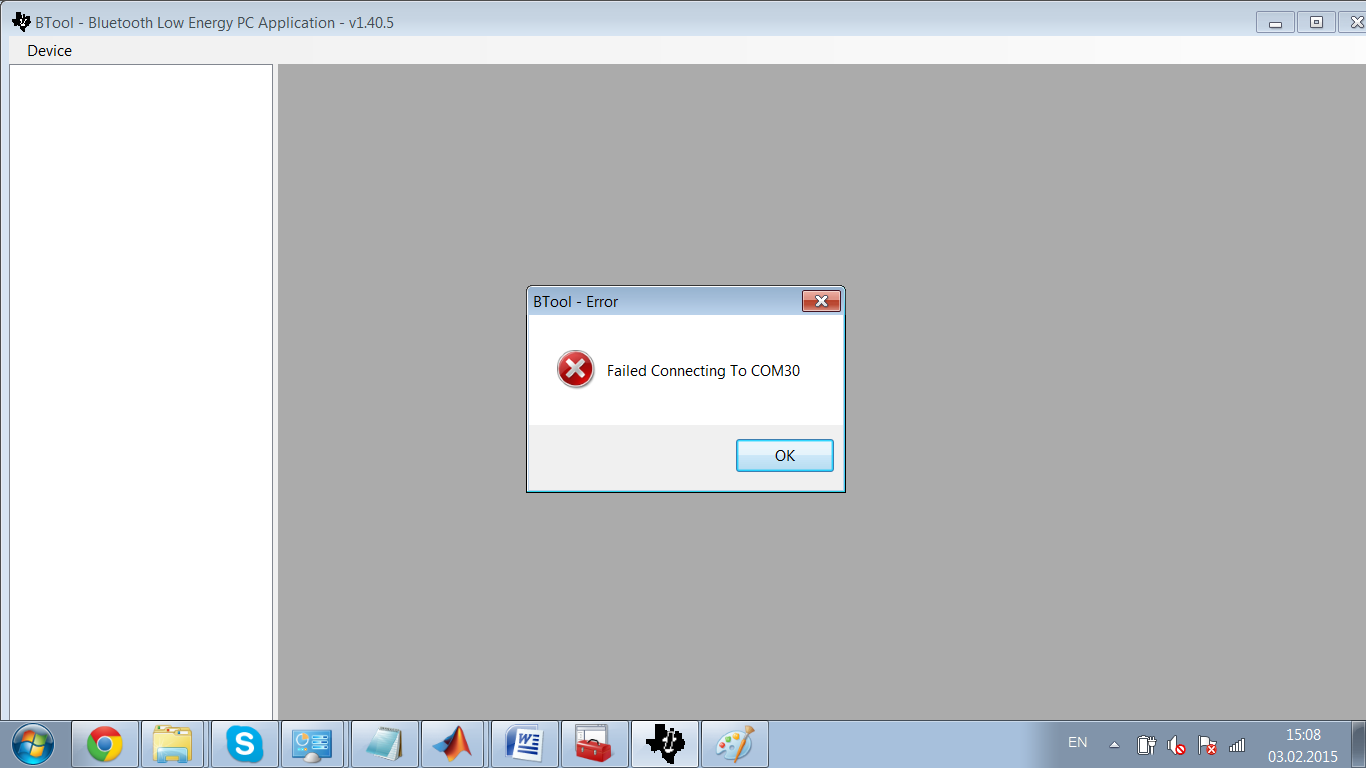
    BTW, I've installed BTool from TI and I couldn't create new device (you can see the images below).

    I hope for your help!

    Regards,

    Dmitry.

  • Hi... May I ask if you succeeded in the end? And if so, how?

    Thanks :)