This thread has been locked.

If you have a related question, please click the "Ask a related question" button in the top right corner. The newly created question will be automatically linked to this question.

RTOS/CC2640R2F: Could not detect UIA configuration

Part Number: CC2640R2F
Other Parts Discussed in Thread: CC2640,

Tool/software: TI-RTOS

I am developing a wireless project using the CC2640R2 LaunchPad. I started with the simple_peripheral exampleand have made changes to it to create my own Gatt profile. All is working fine. Now, I want to add UIA to the project so I can use RTOS Analyzer but I get the "Could not detect UIA configuration" error dialog. I have read multiple posts about this error and tried many of the solutions including using LoggingSetup, with no success. My cfg file, which I cloned from cc2640_r2_csdk.cfg is attached.

I am using:

CCS 7.3.0.00019

SDK 1.50.0.58

XDC 3.50.3.33

Any help in solving this is greatly appreciated.

Peter

ZZiesta.cfg

  • Hi Peter,

    I will warn you that is overhead in terms of RAM and Flash that are incurred when using logging. Depending on your project configuration and build settings you may or may not have enough space for this on CC2640R2F.

    here is a known working snippet from a CFG file that we are using

    /*
    * LoggingSetup configures TI-RTOS modules to capture user-specified information
    * such as CPU Load, Task Load and Task Execution so that it can be
    * displayed by System Analyzer.
    *
    * loadLogging: (default = true) If true, LoggingSetup will add the kernel's
    * load module, which measure the CPU load. See the BIOS API
    * documentation for usage details
    */
    var LoggingSetup = xdc.useModule('ti.uia.sysbios.LoggingSetup');
    LoggingSetup.loadLogging = false;
    //LoggingSetup.loadLoggerSize = 256;
    LoggingSetup.mainLoggerSize = 512;
    LoggingSetup.sysbiosLoggerSize = 2048;
    LoggingSetup.sysbiosSwiLogging = true;
    LoggingSetup.sysbiosHwiLogging = false;
    LoggingSetup.sysbiosSemaphoreLogging = true;


    Note that this requires that you are using the kernel in flash, you can do this by setting NO_ROM=1 in your cfgArgs or just comment references to ROM in the cfg.

  • Hi Sean,

    I set NO_ROM=1 in the cfgArgs, and used the above snippet as my entire cfg file, relying on everything else to be default, and I still get the error.

    I appreciate that this may take up a lot of overhead, but I intend to use it only for debugging.  

    Thanks for your help.

    Peter

  • I forgot to mention that I also added the snippet to my existing cfg file with the same results.
  • Hi Sean,

    Any thoughts on how to proceed with this?  I tried creating a new workspace and importing the simple_peripheral_cc2640r2lp_app, creating a new RTSC file which contains only the items you mentioned, and set NO_ROM=1 in cfgArgs, and I get the same results.

    I'm really stuck on this and could use some help.

    Thanks,

    Peter

  • I finally resolved this on my own, by creating a custom UIA config file.

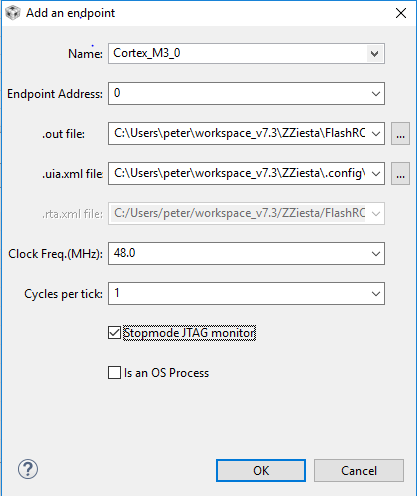
    When the error dialog displays, check the Custom UIA Configuration file check box, and then click on Create UAI Config File.  This presents the UIA Config dialog.  Click on add endpoint and fill out the Add and endpoint dialog. 

    Select a name, in my case Cortex_M3_0, 

    Leave Endpoint Address 0

    If it does not find your out file, browse for it

    I had to browse for the uia.xml file whcih is what actually solved the problem

    Set the clock freq, in my case 48.0 

    And I checked Stopmode JTAG monitor

    I hope this helps anyone else who has been having this problem

  • Hi
    Where do you find the uia.xml or rta.xml file, that was not supplied with project Zero (BLE)
  • I'm not using Project Zero, but I found mine by searching in Windows Explorer for any file name with uia or rta in it.

  • Can you source this file to me, riscy00 at gmail.com