This thread has been locked.

If you have a related question, please click the "Ask a related question" button in the top right corner. The newly created question will be automatically linked to this question.

CC2640: How to achieve highest speed of GPIO?

Part Number: CC2640
Other Parts Discussed in Thread: CC2650

Hi all, 

I am using CC2640 as my main processor with 24MHz crystal. 

In my application, I need high-speed IO's for sending and receiving digital pattern. (The pattern might be 10101110011..., which is not regular.)


1. For output pin, I hope I can sending my pattern with 10MHz clock. (Every 100ns, I can change high/low state.)

I tried using PIN_setOutputValue() and direct register access method.PIN_setOutputValue() seems it needs 1us to send out 1 sample.(1MHz)

Direct register access is like:

*(uint32_t*)((void*)0x40022010) |= 0x01;

*(uint32_t*)((void*)0x40022010) &= ~0x01;

which makes my output pin high or low. But speed of this method can only supply about 4-5MHz speed.


2. For input pin, I need sampling rate = 10MHz.

I tried PIN_getInputValue() function, but this function can only supply a little higher than 1MHz(sampling period is about 0.8us).

Is there any other method to increase IO rate? or...are these speed specifications is achievable?

I found in datasheet(page 2) the clock rate of main frequency is from RC oscillator(=48MHz), so I thought this level of clock rate should be achievable. (But not sure.)

"The CC2640 device contains a 32-bit ARM Cortex-M3 processor that runs at 48 MHz as the main processor and a rich peripheral feature set that includes a unique ultralow power sensor controller."

Does anyone know any method that can push maximum IO speed? Please give me some hints, Thanks!

  • I suppose you should use PWM to do such output. However, I don't think it's feasible to do 10M Hz sampling rate for digital input.

  • Hi YiKai,

    Thank you for reply.
    I agree PWM is a good option. But, is PWM module able to be programmed to output irregular pattern? (eg, 10110001101...).
    I used PWM for buzzer and LED blinking. I set frequency and duty cycle, and PWM generate a clock (10101010...) output pattern with specified frequency and duty cycle.
    However, I don't know how to change clock output pattern from 10101010... clock output to my custom output (10110001101...) or any other pattern.

    In the other hand, PWM can not be an input source I guess.
  • No, PWM cannot output irregular pattern.
  • Hi Jammy,

    Having a 10 MHz sampling rate by using a "bit-bang" approach for output/input could be tricky. Just to throw some other ideas into the mix, have you looked at the sensor controller?
  • Hi M-W,

    No. Actually I have not tried sensor controller since I started this project.
    I used BLE SDK/TIRTOS driver with IAR and did not use any other tool from TI.

    Could you please tell me more about it?

    Many thanks,
    Jammy
  • Hi Jammy,

    The sensor controller is a small programmable processor that exist alongside the ARM core. You could use this for various number of things, such as doing ultra low-power sensing. I would recommend you download Sensor Controller Studio and try out some of the SimpleLink Academy training on how to use this.

    This one is for CC2650, but there should be no major difference other then you using the CC2640 platform instead:
    software-dl.ti.com/.../sc_01_project_from_scratch.html
  • Hi M-W, 

    I followed tutorial of Sensor Controller Studio to control sensor controller on CC2640 and it works.

    (software-dl.ti.com/.../sc_01_project_from_scratch.html)

    From task 1 - task 3 in this tutorial, I connected my XDS emulator to run sensor controller.

    I wrote some testing pseudo code to test GPIO speed. AUXIO_O_DIN0 is my input pin = DIO27; AUXIO_O_HIGH is my output pin = DIO30. 

    In "Execution Code", I wrote: 

    U16 signal;
    
    gpioSetOutput(AUXIO_O_HIGH);
    gpioGetInputValue(AUXIO_I_DIN0; signal);
    gpioClearOutput(AUXIO_O_HIGH);
    
    // Schedule the next execution
    fwScheduleTask(1);

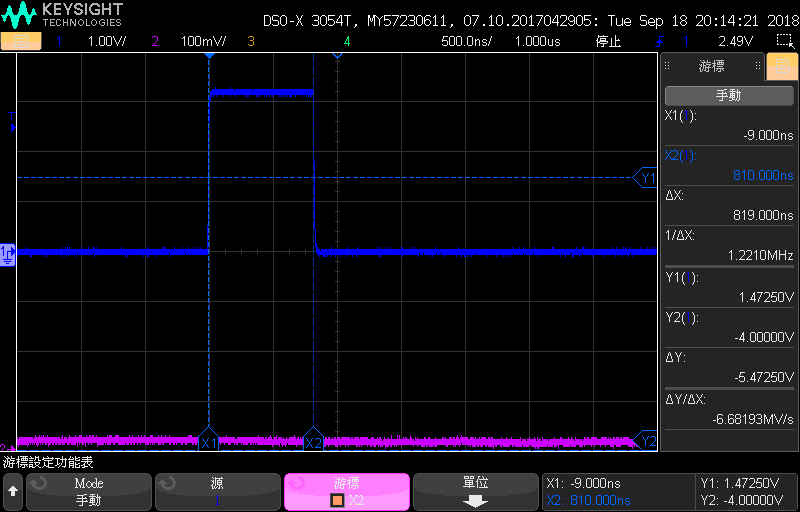
    And I got waveform like this.

    The delta x should be the (sampling period) + (output period) = 819ns.

    To clarify the amount of each parts, I wrote another pseudo code:

    U16 signal;
    
    gpioSetOutput(AUXIO_O_HIGH);
    gpioClearOutput(AUXIO_O_HIGH);
    
    // Schedule the next execution
    fwScheduleTask(1);

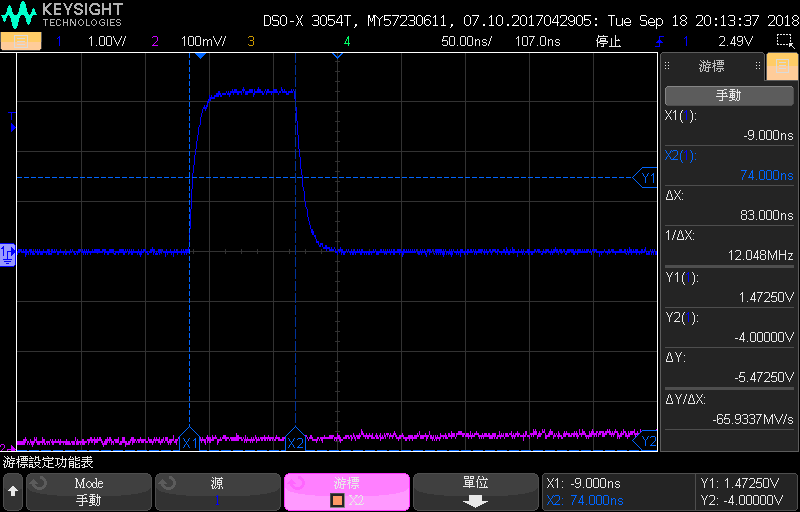
    And I got the waveform like this, 

    delta x should be only output period = 83ns. (12MHz).

    From output period, I can calculate the input period = 736ns. (1.4MHz).

    So I think this is the highest speed of GPIO on sensor controller. (output 12MHz, input 1.4MHz)

    Could you please help me to confirm from hardware spec? I am not sure if there is something ignored.

    Thanks, 

    Jammy

  • Hi Jammy,

    That seems about right, looking at the assembly for the input function you have roughly 9 instructions at a total of 18 cycles.

    You could implement your own version of the input function to speed it up a bit, the best I have managed so far is 3 instructions (or 6 cycles). This would give you a ~4 MHz rate.

    I have attached my version of a gpioGetInputValueFast, you can add the file to the "proc_defs" folder inside the SCS installation folder. After a restart, you should have access to the function.

    /cfs-file/__key/communityserver-discussions-components-files/538/gpio_5F00_get_5F00_input_5F00_value_5F00_fast.prd

  • Hi M-W,
    Thank you very much for help.
    I just verified the speed of gpioGetInputValueFast() and it made sense.
    gpioGetInputValue speed is 1.34MHz, and gpioGetInputValueFast speed is 4MHz, which matches the number of instructions.
    Now I am going to integrate SC into my main application.

    Thanks,
    Jammy