This thread has been locked.

If you have a related question, please click the "Ask a related question" button in the top right corner. The newly created question will be automatically linked to this question.

CCS/TIDC-CC2650STK-SENSORTAG: Contiki-ng build error with Code Composer Studio for simplelink platform - ieee-settings.h not found

Part Number: TIDC-CC2650STK-SENSORTAG
Other Parts Discussed in Thread: CC2652RB, CC2650

Tool/software: Code Composer Studio

Hi all,

I'm looking forward to get my Hands On contiki-ng for the first time, but I immediatly got stuck setting up Code Composer IDE as described in Wiki:

https://github.com/contiki-ng/contiki-ng/wiki/Platform-simplelink#setup-contiki-ng-in-Code-Composer-Studio

I'm getting always the same Build error for each and every ti simplelink target.

I already updated the SDK and I'm an the latest develop branch of contiki-ng. Further I added the Path to the missing referenced ieee-settings.h file to the project includes, since this didn't help either I removed it.

As the HowTo says I have also disabled automatic Makefile generation for the project.

Please find attached my ccs project - I guess the only thing which has to be done is to point to the downloaded contiki-ng sources (${CONTIKI_ROOT} variable)

any help is appreciated 

Best Christian
 contiki-ng-lp-cc2652rb.zip

  • Christian,

    Looks like the \contiki-ng folder is linked to the project using a variable.  

    I would try changing the value of that variable in the project properties to match where the folder is located on your machine.  I am having an issue uploading the second picture showing where to do that.  If you go to the project properties, expand resource at the top of the tree.  Under that you can find Linked Resources.  There you can edit the value of that variable.

    Regards,

    John

  • Hey John,

    thank you for your suggestion, On my local machine that is already the case.

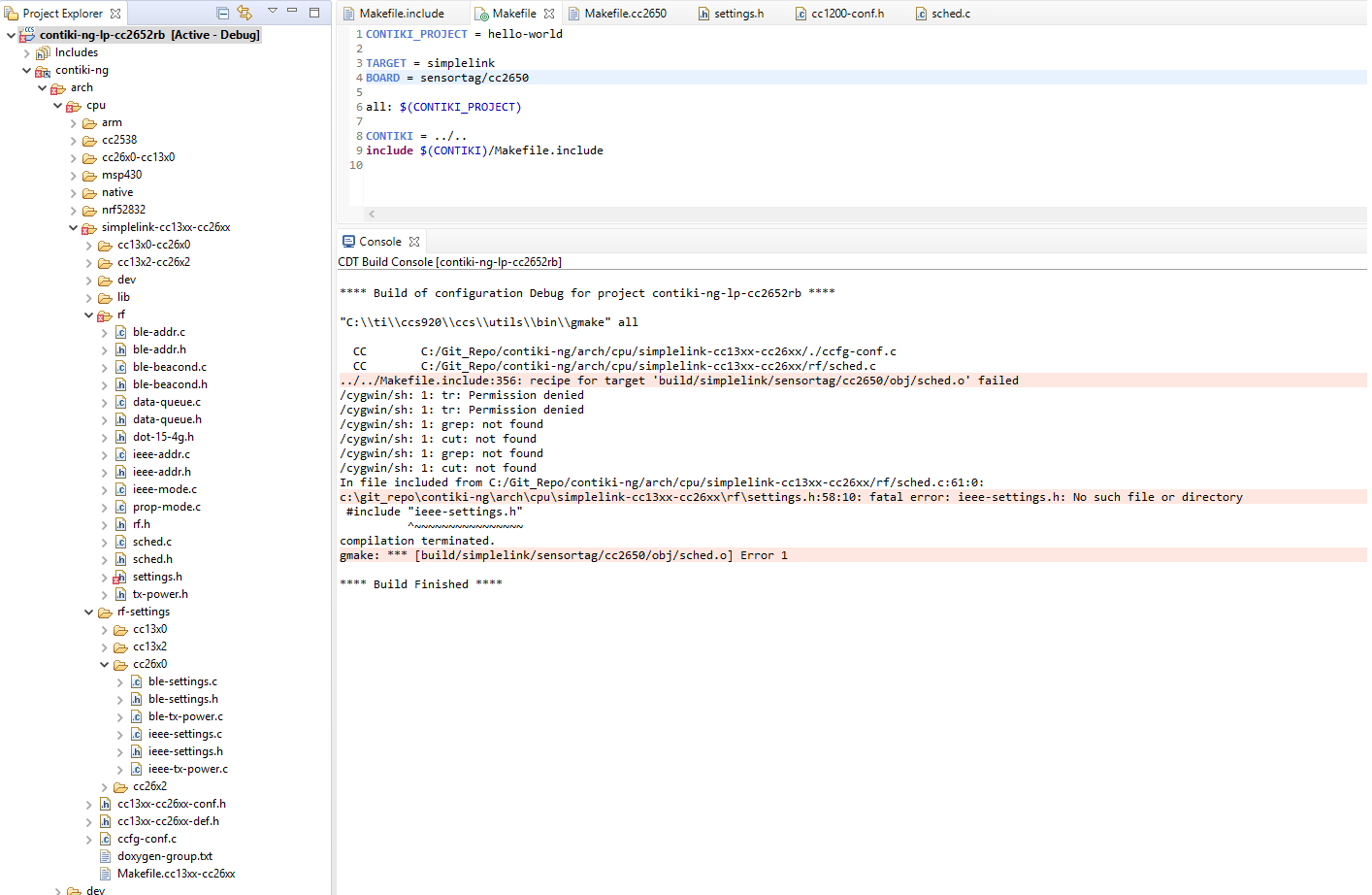
    In the meanwhile I started to investigate the issue further. After analyzing the Makefiles in depth it turned out that some Variables could not be assigned since CCS with its cygwin integration does not support commands like tr, cut and grep.

    This can been seen in the posted screenshot as well.

    In Makefile.cc13xx-26xx for instance we have those two statements:

    DEVICE_LC := $(shell echo "$(DEVICE)" | tr A-Z a-z)

    DEVICE_FAMILY_LC := $(shell echo "$(DEVICE_FAMILY)" | tr A-Z a-z)

    That's the cause for the failing build as per my understanding. 

  • Christian,

    I guess I am confused.  How would those commands be in there if this is a CCS Project created via the instructions on that wiki?  Is that something you added manually?  With a CCS project the makefiles are supposed to be generated vs edited.

    John

  • John,

    The Wiki says:


    Setup Contiki-NG in Code Composer Studio

    [...]

    Download the necessary software:

    • TI's Code Composer Studio (CCS) with support for CC13xx/CC26xx devices installed.
    • The ARM GCC add-on in CCS. In CCS:
      • Navigate to View → CCS App Center.
      • Search for ARM GCC and click Select.

    [...]

    5. Adjust build settings to correctly invoke the Contiki-NG makefile. In CCS:

    • In the Project View, right click project → Properties.
    • Make sure advanced settings are selected in the bottom left corner.
    • Navigate to CCS Build → Builder.
    • Unselect Generate Makefiles automatically.

    Since the contiki-ng environment comes with its own makefiles using autogeneration of them will crash the whole thing from the beginning.

    If cygwin which is installed under C:\ti\ccs920\ccs\utils\cygwin is not part of the standard installation than I assume it comes with ARM GCC addon.

    Christian

  • That Cygwin folder is part of our standard installation.  Looking at older releases I cannot see that we ever shipped tr.  Maybe Contiki assumes that you have those utilities installed and part of your system path?

  • John, I tried to get those file from an dedicated cygwin installation an add to the TI's cygwin folder unfortunately that does not work either. 

    Finally I opend up Discussion on the contiki-ng Forum let's see if there are additional proposals. I will come back here if I have more insights.

  • Christian,

    Any luck on the contiki-ng forum?

    John

  • I suppose you can try to use "TARGET = cc26x0-cc13x0" instead of "TARGET = simplelink" to see if it fixes your issue.

    CONTIKI_PROJECT = hello-world

    TARGET = cc26x0-cc13x0
    BOARD = sensortag/cc2650
    CFLAGS += -g

    all: $(CONTIKI_PROJECT)

    CONTIKI = ../..
    include $(CONTIKI)/Makefile.include

  • Hey ,

    Using these options works, the only open issue which remains open is the .elf to .hex conversion of the binary output. I guess that should not be a major issue since that might be only configuration. 

    @ John 

    I got the same proposal today as reply to my issue - may another alias of YK.

    So I guess we can close the discussion here and I raise a request in the contiki-ng community. 

    Thank you guys.

  • For elf to hex conversion, you will need to put srecord into your C:\Program Files\Git\bin