This thread has been locked.

If you have a related question, please click the "Ask a related question" button in the top right corner. The newly created question will be automatically linked to this question.

CCS/CC2640: SC_ERR_ROUTER_SECURE_SUBPATH error when starting a debug session using XDS110 on CC2650 Lanchpad

Part Number: CC2640
Other Parts Discussed in Thread: CC2650, UNIFLASH, FLASH-PROGRAMMER, CCSTUDIO

Tool/software: Code Composer Studio

I am trying to use the XDS110 on a CC2650 Launchpad to debug a PCB I created 3 years ago that uses a CC2640 daughterboard with firmware I put together back then.

The projects come from an archive file which may have had some corruption issues (see https://e2e.ti.com/support/tools/ccs/f/81/p/965702/3568311  )

1. When I first connected the Launchpad, I was told that new firmware was needed and the new firmware loaded fine.

2. I am able to write hex files to my PCB using SmartRF Fash Programmer 2 software when connected like this:
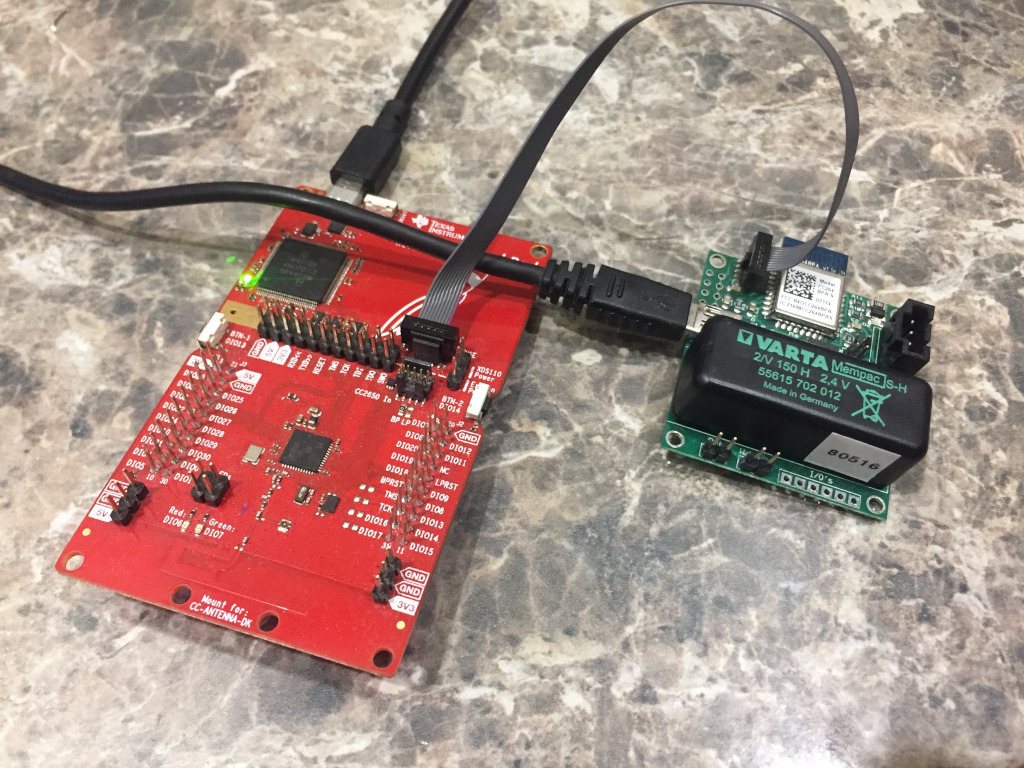
3. When I try to verify my debug path in the CCS General tab, a SC_ERR_ROUTER_SECURE_SUBPATH error is reported:
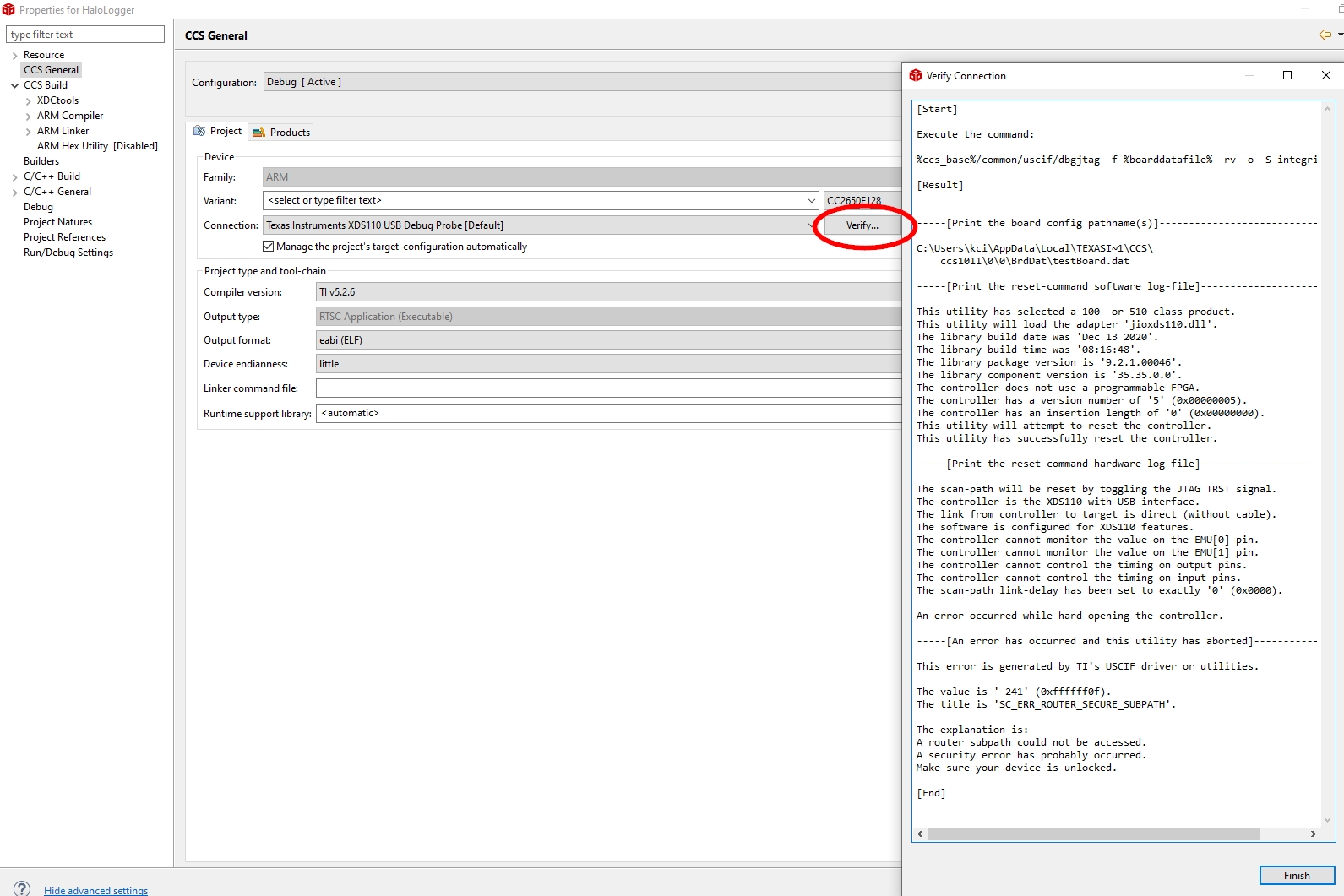
4. Same SC_ERR_ROUTER_SECURE_SUBPATH error when "Manage the project's target-configuration automatically" option is NOT checked.

5. Same SC_ERR_ROUTER_SECURE_SUBPATH error after restoring  the original .ccxml target configuration from the backup.

All help with this error resolution will be appreciated :)

Dale

  • Hi Dale,

    You may be locked out of the device:

    https://e2e.ti.com/support/tools/ccs/f/81/t/518464
    https://e2e.ti.com/support/tools/ccs/f/81/t/518464

    Have you tried interacting with this board through FLASH-PROGRAMMER or UNIFLASH as well?

    Regards,
    Ryan

  • Ryan Brown1 said:

    You may be locked out of the device:

    https://e2e.ti.com/support/tools/ccs/f/81/t/518464

    Yes I saw this thread but there was never a real resolution to it from TI.

    Ryan Brown1 said:
    Have you tried interacting with this board through FLASH-PROGRAMMER or UNIFLASH as well?

    My item 2. says that I can write hex files to it using SmartRF Flash Programmer 2 software

  • You are correct, I had not seen that you've verified communication through FLASH-PROGRAMMER.  This means the device is not locked and that there is an error with your CCS configuration.  What is your target device on the custom PCB?  Make sure that the CCS project variant matches, your description indicates a CC2640 but the project settings expect CC2650 from what I can see on the screenshot.

    Regards,
    Ryan

  • I understood that the CC2640 and CC2650 were code compatible, but yes the PCB has CC2640F128 on it.

    In any case, whether I select CC2650F128 or CC2640F128 as the variant, I still get the SC_ERR_ROUTER_SECURE_SUBPATH error when I try to verify the debug connection.

    EDIT: The error listing talks about not being able to monitor EMU pins or control timing on input and output pins, I assume that is with respect to the XDS110 chip, wouldn't you?

  • The code can be compatible but the XDS110 still need to know which specific device variant it is interfacing with.  Have you tried using an empty CC2640 project?  What is your CCS version?

    Regards,
    Ryan

  • This whole project was written and built 3 years ago and thousands of PCBs are in use.  

    It has taken this long for a need to change the firmware a little to arise and I am pretty sure that I used this debug path back then.  Just not sure why it is not working now.

    I am now using the most recent CCS10 as recommended in the forum topic I linked in 1st post.

    I have not tried empty CC2640 project but how would that be any different than modifying this already proven project slightly. (There is a long thread (see link in first post) about how this projects CCS directory structure may have been corrupted slightly)

    EDIT: The error listing talks about not being able to monitor EMU pins or control timing on input and output pins, I assume that is with respect to the XDS110 chip, wouldn't you?

  • I am wondering if the difference in CCS versions with a ported project is causing issues.  Something else to consider is the older TI compiler is being used and its compatibility with CCSTUDIO, although this should not affect the XDS110 connection.  An empty project directly from CCS 10 would confirm whether the device can be interfaced with through the debugger and if some error occurred while porting the project.

    Regards,
    Ryan

  • Now that was a GREAT idea!!!!

    The debugger verification works on an empty project for the CC26XX variants in the latest CCS10.

    It still complains about it can't monitor EMU pins or control timing on the I/O pins:

    Now how do we change my precious project to make it work there?

    Thanks,

    Dale

    EDIT: AHA, I did not realize that dependent projects would have the need to have the same variant specified.

    When I change the BLE stack project also to CC2640F128, the debug connection verifies.  Great catch on the variant nuance...

    Can you edit your post that I just marked as the answer accordingly so it is a complete answer?

    You were really helpful, thanks a lot :)

  • That's great to hear, can you compare the difference between the .ccxml (target configuration) file of the two projects?  Perhaps the CCS project properties as well (.ccsproject/.cproject files in the workspace's project folder)

    Regards,
    Ryan

  • See my simultaneous edit of my previous post...

  • I may have spoke too soon.

    In my old project, I can now verify the debugger with verify output that matches the empty CC2640F128 project (there are complaints still but not sure if they are what is causing this new below error).

    BUT, when I debug an error free build I get a 'Make sure your device is unlocked' error:

    Any ideas on this one?

    Dale 

  • And without consciously doing anything (maybe it was the clean and build I did), that error changed to this:

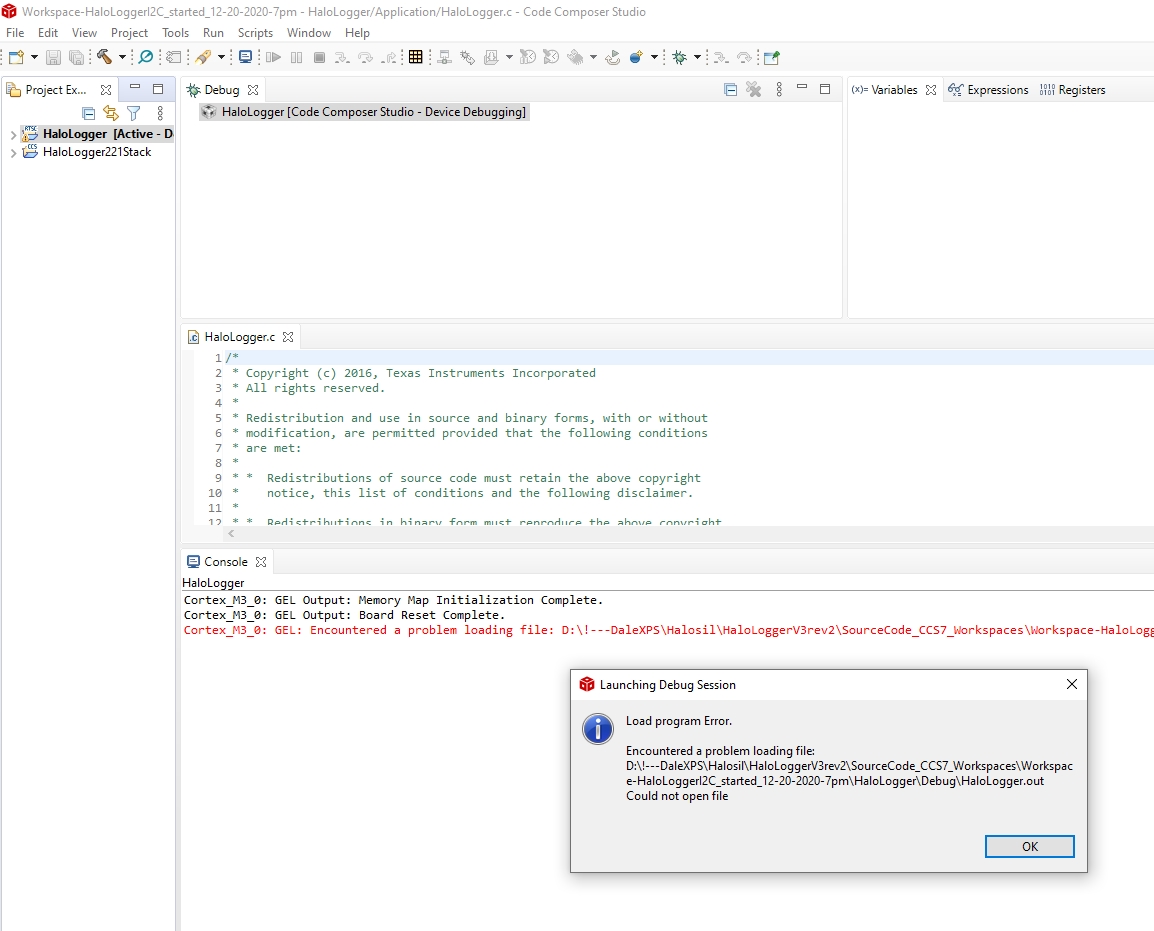
    What can cause the .out file to not write to the disk (I should know this one but my head is spinning again ;)) ?

    EDIT: The HaloLogger.out file is being created (build finishes with no errors) yet I get this strange error starting a Debug session saying it has a problem loading the .out file...

  • I gathered some further information from a co-worker:

    • CC2640 and CC2650 are identical from a JTAG perspective. In other words, the change between devices does not affect the ability to connect.
    • The concern about the EMU or I/O control pin messages is an inherent property of the XDS110 technology. This Debug Probe does not have the hardware to control or monitor the EMU pins.
    • The unmodified old project could have invalid settings for the JTAG clock speed in the target configuration file (.ccxml), which may cause problems especially due to the length of the connection used (bridged between the LP and the target board). By creating a new project, the new target configuration file (.ccxml) may have more conservative values and therefore a connection became successful.
    • Error -241 can be found at the Debugging JTAG page – just search for the error code.
    • His last published error (missing the .out file) may be due to the special characters on the path. A simpler directory (I usually use C:\Workspaces\<workspace>) usually yields less headaches.
    • I would probably try to re-create the original development environment. Updating component versions (TI-RTOS, compiler, etc.) in code already tried in the field is a risky proposition.

    Let me know if any of this helps,

    Ryan

  • WOW, your research was a lot of help. Thanks. I have an error free build and a working debug path to my PCB :)

    The last piece of the puzzle was the exclamation mark (!) in workspace path.

    I have used ! as the first character in my personal data folders on my data drives for as long as I can remember (don't ask me how long that is, the reason for my senility will be revealed).  I do this so in windows explorer instances, my folders are always at the top of the list ;).

    I now see that the XP computer which was used 3 years ago (which now has a failing hard drive, more is lost every time I boot from it but I backed it up before too much was lost), did not have the workspaces resting in my "!" directory, perhaps I suspected potential errors back then.  

    I also highly suspect that the ! mark added to the many strange issues I have had in the past week in my quest to re-build and debug my precious project.  I suspect if I go through my wifes' many old backup drives (she does that without me having asking her to do it for almost twenty years now :) ) and find a copy she made of the workspaces in 2017 that I would have been able to get where I am now much more easily.