This thread has been locked.

If you have a related question, please click the "Ask a related question" button in the top right corner. The newly created question will be automatically linked to this question.

Linux/CC2650: Building 6LBR for customized platform

Part Number: CC2650

Tool/software: Linux

HI Team,

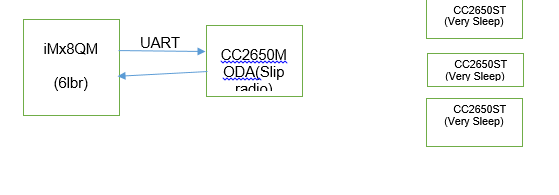
We are using CC2650MODA and CC2650ST to set up 6LOWPA network. We have assumed following-

CC2650MODA- Slip firmware, we are able to build and flash.

CC2650ST- Very Sleep mode, we are able to build and flash

IMx8QM EVK - we want to set it as 6LBR, but we are not able to do so.

Request you to please suggest how can we set up 6LBR for the iMx8QM. Please find below our set up image


Thanks & Regards,

Ravi Pichholiya


  • Have you tried to follow the installation guide on 6lbr's wiki?

    github.com/.../Other-Linux-Software-Configuration
  • Hi Severin,

    Thanks for your reply.

    Meanwhile we are also trying to make our ubuntu machine as 6LBR we followed below steps-

    apt-get install libncurses5-dev bridge-utils

    1. git clone https://github.com/cetic/6lbr
    2. cd 6lbr
    3. git submodule update --init --recursive
    4. cd examples/6lbr
      1. make all
      2. make plugins
      3. make tool
        1. make install
        2. make plugins-install
    5. update-rc.d 6lbr defaults
      Below is content of my /etc/6lbr/6lbr.conf file-
      1. MODE=ROUTER
      2. DEV_ETH=eno0
      3. RAW_ETH_FCS=0
      4. BRIDGE=1
      5. DEV_BRIDGE=br0
      6. DEV_RADIO=/dev/ttyUSB0
      7. LOG_LEVEL=3
      service 6lbr start
      After starting services I am getting error in var/log.6lowpan.log as below-  (fetching MAC address)
      Wed Jan 30 14:50:32 IST 2019 : Starting 6LBR
      /usr/lib/6lbr/bin/cetic_6lbr_router -c /etc/6lbr/nvm.dat -F /etc/6lbr/factory.dat -o /etc/6lbr/nvm.conf -s /dev/ttyUSB0 -R -t tap0  -U /usr/lib/6lbr/6lbr-ifup -D /usr/lib/6lbr/6lbr-ifdown -w /usr/lib/6lbr/www   -W /var/log/6lbr.timestamp -P 60 -C /var/log/6lbr.ip  -m /usr/lib/6lbr/plugins   
      Contiki-contiki-6lbr-1.5.0-2545-g2d8e080 started with IPV6, RPL
      Rime started with address 1.2.3.4.5.6.7.8
      MAC multi-radio RDC br-rdc SEC nullsec NETWORK sicslowpan
      2019-01-30 14:50:32.396921: NOTICE: 6LBR: Starting 6LBR version 1.5.x (Contiki-contiki-6lbr-1.5.0-2545-g2d8e080)
      2019-01-30 14:50:32.396976: INFO: SLIP: Allocated slip device 0 -> 0
      2019-01-30 14:50:32.396984: INFO: ETH: 6LBR watchdog started (interval: 60)
      2019-01-30 14:50:32.397151: INFO: PLUGIN: Loading /usr/lib/6lbr/plugins/lwm2m.so
      2019-01-30 14:50:32.397392: INFO: PLUGIN: Initialising lwm2m-client
      2019-01-30 14:50:32.397398: INFO: PLUGIN: Loading /usr/lib/6lbr/plugins/dummy.so
      2019-01-30 14:50:32.397779: INFO: NVM: NVM Magic : 2009
      2019-01-30 14:50:32.397784: INFO: NVM: NVM Version : 6
      2019-01-30 14:50:32.397789: INFO: CONFIG: Loading configuration : /etc/6lbr/nvm.conf
      2019-01-30 14:50:32.397794: WARN: CONFIG: Can not open /etc/6lbr/nvm.conf : No such file or directory
      2019-01-30 14:50:32.397798: NOTICE: 6LBR: Log level: 30 (services: ffffffff)
      2019-01-30 14:50:32.397800: INFO: FRAMER: Using 802.15.4 framer
      2019-01-30 14:50:32.397802: INFO: MAC: Using 'csma' mac driver
      2019-01-30 14:50:32.398171: INFO: SLIP: SLIP started on /dev/ttyUSB0
      2019-01-30 14:50:32.408581: INFO: SCMD: Started br-cmd process
      2019-01-30 14:50:32.408589: INFO: BR-RDC: SLIP RADIO configured as RADIO
      2019-01-30 14:50:32.408592: INFO: BR-RDC: Configuring SLIP RADIO 0 (API: 1.0)
      2019-01-30 14:50:32.408595: INFO: BR-RDC: Reset SLIP Radio
      2019-01-30 14:50:32.408597: INFO: BR-RDC: Fetching MAC address
      2019-01-30 14:50:33.408356: INFO: BR-RDC: Fetching MAC address
      2019-01-30 14:50:34.408342: INFO: BR-RDC: Fetching MAC address
      2019-01-30 14:50:35.408359: INFO: BR-RDC: Fetching MAC address
      2019-01-30 14:50:36.408322: INFO: BR-RDC: Fetching MAC address
      2019-01-30 14:50:37.408349: INFO: BR-RDC: Fetching MAC address
      2019-01-30 14:50:38.408358: INFO: BR-RDC: Fetching MAC address
      2019-01-30 14:50:39.408362: INFO: BR-RDC: Fetching MAC address
      2019-01-30 14:50:40.408340: INFO: BR-RDC: Fetching MAC address
      2019-01-30 14:50:41.408336: INFO: BR-RDC: Fetching MAC address
      2019-01-30 14:50:42.408354: INFO: BR-RDC: Fetching MAC address
      2019-01-30 14:50:43.408343: INFO: BR-RDC: Fetching MAC address
      2019-01-30 14:50:44.408337: INFO: BR-RDC: Fetching MAC address
      2019-01-30 14:50:45.408333: INFO: BR-RDC: Fetching MAC address
      2019-01-30 14:50:46.408326: INFO: BR-RDC: Fetching MAC address

      I have flashed our CC2650 Module booster pack with Slip Radio and connected at ttyUSB0 port of our PC.
      Request you to please suggest how to overcome this.
      Thanks & Regards,
      Ravi Pichholiya

  • Have you built the slip-radio firmware correctly? github.com/.../6LBR-Slip-Radio
  • Hi Severin,

    As we are using cc2650 booster pack, so we have give below command to get slip-radio.bin-

    root@airbus1049:/home/airbus/ubuntu/6lbr/examples/ipv6/slip-radio# make TARGET=srf06-cc26xx BOARD=srf06/cc26xx all slip-radio.bin

    Please let me know if any change is required in above command.

    Thanks & Regards,

    Ravi Pichholiya

  • Try to change the following two lines

    #define BOARD_IOID_UART_RX IOID_2
    #define BOARD_IOID_UART_TX IOID_3

    to

    #define BOARD_IOID_UART_RX IOID_1
    #define BOARD_IOID_UART_TX IOID_0

    in platform/srf06-cc26xx/srf06/cc26xx/board.h and rebuild slip radio to test again.
  • Hi Yikai,

    Thank you for your reply.

    As per your suggestion I changed the UART Rx Tx, but not able to solve the issue.

    Below is the content of 6lbr.log file for your kind reference-

    on Feb 4 17:22:40 IST 2019 : Starting 6LBR
    /usr/lib/6lbr/bin/cetic_6lbr_router -c /etc/6lbr/nvm.dat -F /etc/6lbr/factory.dat -o /etc/6lbr/nvm.conf -s /dev/ttyUSB0 -R -t tap0 -U /usr/lib/6lbr/6lbr-ifup -D /usr/lib/6lbr/6lbr-ifdown -w /usr/lib/6lbr/www -W /var/log/6lbr.timestamp -P 60 -C /var/log/6lbr.ip -m /usr/lib/6lbr/plugins
    Contiki-contiki-6lbr-1.5.0-2545-g2d8e080 started with IPV6, RPL
    Rime started with address 1.2.3.4.5.6.7.8
    MAC multi-radio RDC br-rdc SEC nullsec NETWORK sicslowpan
    2019-02-04 17:22:40.222217: NOTICE: 6LBR: Starting 6LBR version 1.5.x (Contiki-contiki-6lbr-1.5.0-2545-g2d8e080)
    2019-02-04 17:22:40.222328: INFO: SLIP: Allocated slip device 0 -> 0
    2019-02-04 17:22:40.222366: INFO: ETH: 6LBR watchdog started (interval: 60)
    2019-02-04 17:22:40.222492: INFO: PLUGIN: Loading /usr/lib/6lbr/plugins/lwm2m.so
    2019-02-04 17:22:40.222666: INFO: PLUGIN: Initialising lwm2m-client
    2019-02-04 17:22:40.222689: INFO: PLUGIN: Loading /usr/lib/6lbr/plugins/dummy.so
    2019-02-04 17:22:40.222820: INFO: NVM: NVM Magic : 2009
    2019-02-04 17:22:40.222837: INFO: NVM: NVM Version : 6
    2019-02-04 17:22:40.222848: INFO: CONFIG: Loading configuration : /etc/6lbr/nvm.conf
    2019-02-04 17:22:40.222864: WARN: CONFIG: Can not open /etc/6lbr/nvm.conf : No such file or directory
    2019-02-04 17:22:40.222879: NOTICE: 6LBR: Log level: 30 (services: ffffffff)
    2019-02-04 17:22:40.222889: INFO: FRAMER: Using 802.15.4 framer
    2019-02-04 17:22:40.222899: INFO: MAC: Using 'csma' mac driver
    2019-02-04 17:22:40.223713: INFO: SLIP: SLIP started on /dev/ttyUSB0
    2019-02-04 17:22:40.223934: FATAL: SLIP: ioctl() : Input/output error


    Please suggest how can I overcome this?


    Thanks & Regards,
    Ravi Pichholiya
  • Try to do “git checkout ff69ae4214407eeec4c71f87589ac4bc7d3a8a49” on 6lbr folder and rebuild 6lbr to test again
  • Hi Yikai,

    As per your above suggestion I checkout the particluar commit, but while building the slip radio we are getting below errors-

    CC        slip-net.c
      CC        no-framer.c
      CC        ../../../apps/slip-cmd/cmd.c
      CC        ../../../apps/slip-cmd/packetutils.c
      CC        ../../../platform/srf06-cc26xx/./contiki-main.c
      CC        ../../../core/lib/sensors.c
      CC        ../../../core/dev/leds.c
      CC        ../../../platform/srf06-cc26xx/srf06/leds-arch.c
    ../../../platform/srf06-cc26xx/srf06/leds-arch.c: In function 'leds_arch_init':
    ../../../platform/srf06-cc26xx/srf06/leds-arch.c:59:3: warning: implicit declaration of function 'GPIOPinWrite' [-Wimplicit-function-declaration]
       ti_lib_gpio_pin_write(BOARD_LED_ALL, 0);
       ^
      CC        ../../../platform/srf06-cc26xx/srf06/srf06-sensors.c
      CC        ../../../platform/srf06-cc26xx/srf06/button-sensor.c
    ../../../platform/srf06-cc26xx/srf06/button-sensor.c: In function 'button_press_handler':
    ../../../platform/srf06-cc26xx/srf06/button-sensor.c:90:5: warning: implicit declaration of function 'GPIOPinRead' [-Wimplicit-function-declaration]
         if(ti_lib_gpio_pin_read(BOARD_KEY_SELECT) == 0) {
         ^
    ../../../platform/srf06-cc26xx/srf06/button-sensor.c: In function 'config_buttons':
    ../../../platform/srf06-cc26xx/srf06/button-sensor.c:196:5: warning: implicit declaration of function 'GPIOEventClear' [-Wimplicit-function-declaration]
         ti_lib_gpio_event_clear(1 << key);
         ^
    ../../../platform/srf06-cc26xx/srf06/button-sensor.c:198:5: warning: implicit declaration of function 'GPIODirModeSet' [-Wimplicit-function-declaration]
         ti_lib_gpio_dir_mode_set((1 << key), GPIO_DIR_MODE_IN);
         ^
    In file included from ../../../platform/srf06-cc26xx/srf06/button-sensor.c:46:0:
    ../../../platform/srf06-cc26xx/srf06/button-sensor.c:198:42: error: 'GPIO_DIR_MODE_IN' undeclared (first use in this function)
         ti_lib_gpio_dir_mode_set((1 << key), GPIO_DIR_MODE_IN);
                                              ^
    ../../../cpu/cc26xx-cc13xx/./ti-lib.h:208:54: note: in definition of macro 'ti_lib_gpio_dir_mode_set'
     #define ti_lib_gpio_dir_mode_set(...) GPIODirModeSet(__VA_ARGS__)
                                                          ^
    ../../../platform/srf06-cc26xx/srf06/button-sensor.c:198:42: note: each undeclared identifier is reported only once for each function it appears in
         ti_lib_gpio_dir_mode_set((1 << key), GPIO_DIR_MODE_IN);
                                              ^
    ../../../cpu/cc26xx-cc13xx/./ti-lib.h:208:54: note: in definition of macro 'ti_lib_gpio_dir_mode_set'
     #define ti_lib_gpio_dir_mode_set(...) GPIODirModeSet(__VA_ARGS__)
                                                          ^
    ../../../Makefile.include:240: recipe for target 'obj_srf06-cc26xx/button-sensor.o' failed
    make: *** [obj_srf06-cc26xx/button-sensor.o] Error 1

    Please suggest how can we remove this.

    Thanks & Regards,

    Ravi Pichholiya

  • I suggest you to use slip radio in Contiki GitHub instead of the one inside 6lbr GitHub.
  • Hi Yikai,

    Thank you for your support.

    Finally we are able to get working 6lbr on ubuntu PC below is the content of log file.

    Tue Feb 5 15:18:24 IST 2019 : Starting 6LBR
    /usr/lib/6lbr/bin/cetic_6lbr_router -c /etc/6lbr/nvm.dat -F /etc/6lbr/factory.dat -o /etc/6lbr/nvm.conf -s /dev/ttyUSB0 -R -t tap0 -B 115200 -U /usr/lib/6lbr/6lbr-ifup -D /usr/lib/6lbr/6lbr-ifdown -w /usr/lib/6lbr/www -W /var/log/6lbr.timestamp -P 60 -C /var/log/6lbr.ip -m /usr/lib/6lbr/plugins
    Contiki-contiki-6lbr-1.5.0-2545-g2d8e080 started with IPV6, RPL
    Rime started with address 1.2.3.4.5.6.7.8
    MAC multi-radio RDC br-rdc SEC nullsec NETWORK sicslowpan
    2019-02-05 15:18:24.503977: NOTICE: 6LBR: Starting 6LBR version 1.5.x (Contiki-contiki-6lbr-1.5.0-2545-g2d8e080)
    2019-02-05 15:18:24.504108: INFO: SLIP: Allocated slip device 0 -> 0
    2019-02-05 15:18:24.504142: INFO: ETH: 6LBR watchdog started (interval: 60)
    2019-02-05 15:18:24.504250: INFO: PLUGIN: Loading /usr/lib/6lbr/plugins/lwm2m.so
    2019-02-05 15:18:24.504406: INFO: PLUGIN: Initialising lwm2m-client
    2019-02-05 15:18:24.504425: INFO: PLUGIN: Loading /usr/lib/6lbr/plugins/dummy.so
    2019-02-05 15:18:24.504553: INFO: NVM: NVM Magic : 2009
    2019-02-05 15:18:24.504568: INFO: NVM: NVM Version : 6
    2019-02-05 15:18:24.504577: INFO: CONFIG: Loading configuration : /etc/6lbr/nvm.conf
    2019-02-05 15:18:24.504592: WARN: CONFIG: Can not open /etc/6lbr/nvm.conf : No such file or directory
    2019-02-05 15:18:24.504606: NOTICE: 6LBR: Log level: 30 (services: ffffffff)
    2019-02-05 15:18:24.504615: INFO: FRAMER: Using 802.15.4 framer
    2019-02-05 15:18:24.504624: INFO: MAC: Using 'csma' mac driver
    2019-02-05 15:18:24.505418: INFO: SLIP: SLIP started on /dev/ttyUSB0
    2019-02-05 15:18:24.516243: INFO: SCMD: Started br-cmd process
    2019-02-05 15:18:24.516291: INFO: BR-RDC: SLIP RADIO configured as RADIO
    2019-02-05 15:18:24.516302: INFO: BR-RDC: Configuring SLIP RADIO 0 (API: 1.0)
    2019-02-05 15:18:24.516312: INFO: BR-RDC: Reset SLIP Radio
    2019-02-05 15:18:24.516323: INFO: BR-RDC: Fetching MAC address
    2019-02-05 15:18:25.516174: INFO: BR-RDC: Fetching MAC address
    2019-02-05 15:18:26.516133: INFO: BR-RDC: Fetching MAC address
    2019-02-05 15:18:26.528849: INFO: SLIP: Starting Contiki-contiki-6lbr-1.5.0-2545-g2d8e080
    With DriverLib v0.47020
    TI SmartRF06EB + CC26xx EM
    IEEE 802.15.4: Yes, Sub-GHz: No, BLE: Yes, Prop: Yes
    Net: slipnet
    MAC: nullmac
    RDC: nullrdc
    RF: Channel 25
    Node ID: 43392
    Slip Radio started...
    2019-02-05 15:18:26.528863: INFO: BR-RDC: Got MAC 0 : 00:12:4b:00:0a:66:a9:80


    Now we are having CC2650 Sensor Tags and we have flashed with very sleepy mode. Request you to please let us know how can we read the data from the tags to the CC2650 and collect data in ubunut machine.


    Thanks & Regards,
    Ravi Pichholiya
  • I suppose you can use COAP plugin in Chrome to request data from CC26xx-web-demo example.
  • Hi Yikai,

    Could you please help me to how to run web-demo on CC2650 Booster PAck.

    Our current set up is ubuntu machine (as 6LBR), CC2650 Module Booster pack (as slip radio) and cc2650Sensor Tag as (very sleepy mode).


    Thanks & Regards,
    Ravi Pichholiya
  • Why don’t you run CC26xx-web-Demo on CC2650STK?
  • If I will directly run demo on CC2650 STK what will be the use of CC2650 Booster pack connected to ubuntu machine?
  • CC2650 Booster pack acts as slip radio for 6lbr to communicate with CC26xx-web-demo running on CC2650STK through Contiki 6LowPAN wirelessly.
  • Could you please provide me any link or guide to test the demo?
  • Hi Yikai,

    I build the cc2650-demo.bin and flash to the sensot tag. But how to read data on ubuntu machine.

    After flashing I can see device appearing in my phone bluetooth scanning as TISmartRF06EB+CC26xEM but I am not able to pair.

    Please suggest how to read data or communicate with the same.


    Thanks & Regards,
    Ravi Pichholiya
  • CC26xx-web-Demo running on CC2650STK should pops on 6lbr Sensor page and you can access to the web page of CC26xx-web-demo web page by click the web link or use COAP client to access to COAP server running on CC26xx-web-demo.
  • Hi Yikai,

    Thanks for your reply.

    But still I am not able to understand the same. Let me reiterate our current status-

    Ubuntu Machine- as 6lbr

    CC2650 Module Boosterpack- as slip radio connected to ubuntu machine usb-uart cable

    CC2650STK- Flashed with cc2650_demo.bin, but it is not having any physical connection with any other device.

    Now my query is that CC2650STK is a sensor and will be transmigrating some data so I want to see that data on ubuntu machine through web page or any other mean.

    Thanks & Regards,

    Ravi Pichholiya

  • If you setup everything correctly, you should be able to check data sent from CC2650STK on IBM QuickStart page.
  • Hi Yikai,

    I am not able to send data to IBM Cloud.

    So as an experiment. I flash the CC2650 STK with sample application and stack available in-

    ti/simplelink/ble_sdk_2_02_02_25/examples/cc2650stk/sensortag/ccs/app

    ti/simplelink/ble_sdk_2_02_02_25/examples/cc2650stk/sensortag/ccs/stack.

    But as per guide after flashing green LED must blink and the device should advertise itself.

    But in our sensor tag only a red led is continuously glowing. Also while flashing I flashed stack first and then the app as per guide.

    Please suggest is there change is required to make it work.

    Thanks & Regards,

    Ravi Pichholiya

  • If you run SensorTag example in BLE Stack, you should connect it with your smartphone running SimpleLink Starter App to bridge sensor data to IBM QuickStart.
  • yes, Yikai I understood this. But in simple link startrer app the bluetooth device is not showing.
    If device is working it should blink green LED but in our case RED LED is continuously glowing.

    So i want to know if any other setting or configuration also needs to be done.

    Thanks & Regards,
    Ravi Pichholiya
  • I suppose you also need to build and download BIM project into SensorTag.
  • Hi Yikai,

    Could you please let me know from where I will get BIM project details?
    How to build this BIM project?

    Request you to please share all requisite information to make BIM project work with sensor tag.


    Thanks & Regards,
    Ravi Pichholiya
  • You can refer to “Building the SensorTag Firmware” section in processors.wiki.ti.com/.../CC2650_SensorTag_User's_Guide
  • Hi Yikai,

    Thank you for your reply.
    Now I am able to build and flash BIM, STACK and app to the sensor tag. Also green LED is blinking,

    But still in Simplelink starter app I am not able see the device.

    Is there any particular config required or any other steps I need to follow.


    Thanks & regards,
    Ravi Pichholiya
  • What is your smartphone running SimpleLink Starter App?
  • Do you have other smartphone to test this? I usually use iPhone and it always works.
  • Hi Yikai,

    Thanks for your valuable support.
    In Samsung smartphone we are able to see the sensor data.

    Now our task is transfer this data to slip radio and from slip radio to ubuntu machine. How can we implement the same.


    Thanks & Regards,
    Ravi PIchholiya
  • Hi Yikaim

    It seems to me different from our current requirement. our current status is as below-

    ubuntu machine- as 6lbr
    CC2650 Module Booster back- as Slip radio and connected in USB to serial mode to ubuntu.
    CC2650 STK- flashed the apps.

    Now we want to transfer data of sensor to slip radio and slip radio to ubuntu machine.


    Thanks & Regards,
    Ravi Pichholiya
  • Actually, the link can give you a similar solution which cc2650stk sends data to slip radio to 6lbr running on Raspberry Pi (Debian) and in the link, it also shows you how to run MQTT sever to collect data on Raspberry Pi. The only difference is you run Ubuntu on a Desktop instead of Raspberry Pi.
  • Hi Yikai,

    I am following the link shared by you. It contain one more link as below to test 6LBR -

    sunmaysky.blogspot.com/.../how-to-configure-6lbr-to-make-it-can-do.html

    but in ifconfig option I am not able to get inet6 address as mentioned for br0 interface its getting only the general ipv6 address not BBB as mentioned.

    Please suggest.


    Thanks & Regards,
    Ravi Pichholiya
  • What is inside your 6lbr.conf?
  • Below is the content of my 6lbr.conf-

    cat /etc/6lbr/6lbr.conf
    MODE=ROUTER
    RAW_ETH=0
    BRIDGE=1
    DEV_BRIDGE=br0
    DEV_ETH=eno0
    RAW_ETH_FCS=0
    DEV_RADIO=/dev/ttyUSB0
    BAUDRATE=115200


    Please suggest.


    Thanks & Regards,
    Ravi Pichholiya
  • I see you even have typo such as eno0 and miss CREATE_BRIDGE=0. I suggest you to check the steps in the link carefully to test again.