This thread has been locked.

If you have a related question, please click the "Ask a related question" button in the top right corner. The newly created question will be automatically linked to this question.

RF430FRL152H: RF430FRL152H - JTAG doesn't work

Part Number: RF430FRL152H
Other Parts Discussed in Thread: MSP-FET, TXB0104,

Tool/software:

Hello,

I'm designing a sensor based on the RF430FRL152HCRGER.

The firmware has been designed on CC Studio and it's working properly on the RF430FRL152H Evaluation board.

At the moment, I'm unable to flash the chip using the MSP-FET MSP340. I got the following errors: "Device not recognised"

I'm attaching here the custom board schematic:

I'm attaching here the custom board adapter used to flash the custom board:

Other attempts:

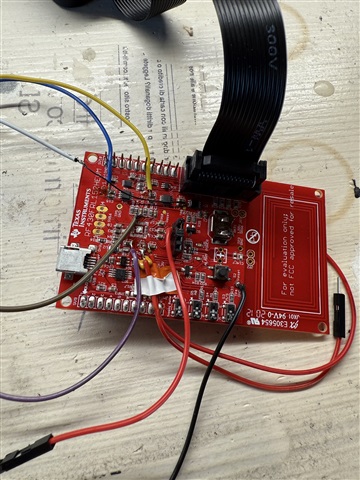
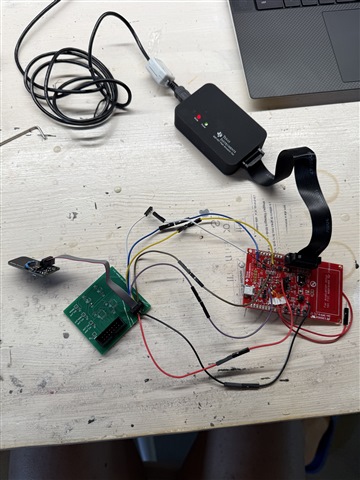
I also tried to remove an RF430FRL152H chip from an evaluation board and to hand-solder wire by wire the following pads: 1.5V, GND, TDO, TDI, TMS, TCK, RST
to our connector. I'm attaching here a couple of pictures for your reference:
Many thanks for your help


  • Hi,

      I'm a bit unclear. On your second screenshot, you have a J1 MSP-FET connector that goes to a level shifter and then connected to the J5 MCU connector. For example, the TCK_MSP from the JT connector will connector as follows:

     J1 MSP-FET TCK_MSP -> 74LV125 tristate buffer -> TXB0104 level shifter -> TCK_uC -> J5 MCU connector

     On your first screen shot you have a J1 JTAG connector that connects directly to RF430FRL152H. 

     What is the difference between J5 MCU connector on the second screenshot and J1 JTAG connector on the first screenshot?

    The JTAG interface on the RF430FRL152H are shred with the GPIO pins which are 1.5V. What voltage are the JTAG signals on the J1 JTAG connector? Please refer to the EVM user's guide for details on the JTAG schematic. 

  • Hello, 
    Many thanks for your fast reply.

    First screenshot >  J1 is the connector placed on the custom board
    Second screenshot > J1 is the connector that connects to the MSP-FET, while J5 is the connector that goes into the J1 connector of the custom board (first screenshot).

  • Hi,


    First screenshot >  J1 is the connector placed on the custom board
    Second screenshot > J1 is the connector that connects to the MSP-FET, while J5 is the connector that goes into the J1 connector of the custom board (first screenshot).

    I suppose originally you were going to connect a cable between J5 MCU on the second screenshot to the J1 JTAG on the first screenshot for programming and debug, correct?

    For your third screenshot, you are trying to use the RF430FRL152HEVM Launchpad to debug your custom board since your custom debug board shown on the second screenshot is not working. Is that correct?

    I also tried to remove an RF430FRL152H chip from an evaluation board and to hand-solder wire by wire the following pads: 1.5V, GND, TDO, TDI, TMS, TCK, RST
    to our connector. I'm attaching here a couple of pictures for your reference:

    Can you probe all the signals (TCK, TDI, TDO, TMS) on the original Launchpad vs. the one that has the RF430 depopulated? Can you also probe the VDDSW to the transponder? Do you measure 1.5V? Please also check the RST/NMI input to the transponder. Is it out of reset?

  • Yes! That's right!

    In our custom setup, i was connecting:
    1) MSP-FET to J1 (MSP-FET) via the provided cable
    2) J5 MCU to J1 JTAG via a standard cable


    About the second attempt, it's a different test.
    I picked an EVALUATION BOARD that was working and flashing my program properly. Then, I just removed the RF430 chip and soldered some cables on the right places. I also checked the continuity of the signals by looking at the RF430 diagram to ensure all the connections were correct. 
    Then, the flying cables are going straight to another connector compatible with the J1 JTAG connector. 
    I checked VDDSW in output of the Evaluation board and is 1.5V. I can check the other signals in the next days.

    Thanks!

  • Hi Enrico,

    I picked an EVALUATION BOARD that was working and flashing my program properly. Then, I just removed the RF430 chip and soldered some cables on the right places. I also checked the continuity of the signals by looking at the RF430 diagram to ensure all the connections were correct. 
    Then, the flying cables are going straight to another connector compatible with the J1 JTAG connector. 

    I still don't understand why it wouldn't work. Please check that VDDSW (1.5V) is supplied to the RF430 and the NRST/NMI pin is HIGH to release RF430 out of reset. I will also suggest you do a sanity check for your custom board with the transponder. Without supplying power to it, it should still work over RF when a reader tries to read it. Does it even work?

  • Hello Charles, 
    Sorry, but I was not in the office and was not able to measure the voltages.

    I tried to connect via transponder (NFC Tools iOS app), and I was able to see the serial number and the TAG type.

    I checked the voltages with the board connected:
    TMS >> 1.490V
    TDO >> 0V
    TDI >> 1.490V
    TCK >> 1.490V
    VDDSW >> 1.490V
    RST >> 1.490V [If I click the reset button on the button, it goes to 0V as expected]
    GND >> 0V

    Just to be sure, I also assembled a minimal board with just the tRF430 transponder and some capacitors. Here you can see the picture. In this case, I checked the continuity pin-to-pin of the wires. To achieve that, I checked the continuity between the RF430 footprint of the evaluation board and the exposed pins of the RF430 soldered on my custom board.

    According to the schematic posted in the first post, VDDB has not been connected to 1.5V on this board. Is that correct?

    Thanks!
    Enrico 

  • I tried to connect via transponder (NFC Tools iOS app), and I was able to see the serial number and the TAG type.

    Thanks for the info. It is a good data point. This means the RF430 is capable of harvesting power from the RF. 

    I checked the voltages with the board connected:
    TMS >> 1.490V
    TDO >> 0V
    TDI >> 1.490V
    TCK >> 1.490V
    VDDSW >> 1.490V
    RST >> 1.490V [If I click the reset button on the button, it goes to 0V as expected]
    GND >> 0V

    This looks fine with me. 

     I also wanted to give you a heads-up that I will be out of office the entire next week. Please expect delay in my response.

  • One thing I notice on the EVM schematic is the NRST_IN input on the pin 6 of the JTAG connector. On your schematic, it is NC. Can you try connecting it to 3.3V or ground. What is the result?

  • Hello Charles, 

    Sure, no worries! And thanks for your help!

    I also tried connecting VDDB to 1.5V or GND, but nothing changed.
    Since we're currently still using the EVALUATION board (like in the last image) to try to flash the chip, I think that the NRST_IN should already be in place. 
    MSP-PROGRAMMER > EVAL > WIRES > CUSTOM BOARD


    PS: Is there a programming adaptor for these kinds of devices? Maybe it can be easier

  • Since we're currently still using the EVALUATION board (like in the last image) to try to flash the chip, I think that the NRST_IN should already be in place. 

    Hi,

      That is true if the TRF chip is still in EVM board. I thought you removed the TRF in the original picture. Without the TRF in the EVM, the NRST_IN is tristated. 

  • Hi Enrico,

      Do you have any update?

  • HI Enrico,

      I have not heard back from you. I will close the thread for now. If you have any update, you can write back to this post and the status will change to OPEN.