This thread has been locked.

If you have a related question, please click the "Ask a related question" button in the top right corner. The newly created question will be automatically linked to this question.

TRxEB software installation

Other Parts Discussed in Thread: CC1190, CC1120, CC2511, CC1200

I am using a 2 X TRxEB boards which I received along with a 2 X ( CC1120 + CC1190 ) evaluation kits. I am a newbie to TI Sub-1.

One of the TRxEB boards have the PER test software on it and the other  has a different software. My intension is to have both boards installed with PER test firmware so that I could do range testing without having to carry my laptop along with the development board. Currently I use Smart RF studio to control the CC1120 chip via USB and it works perfectly.

WIth this intension I downloaded the example and I realized the example project is written to be used with IAR Workbench.  Therefore I downloaded and installed IAR under 30 day evaluation period and successfully compiled the already provided workspace. compilation completed 100% and a bin file was produced but when I try to put this .bin file inside the TRxEB development board, I receive and error. I have attached the error below.

The output I require is to install the software demonstrated in this video by Texas Instruments.  I believe this firmware is called Pre Programmed Packet Error Test (PER Test).

Please note that I do not have a MSP430 programmer and I wish to use the Smart RF programmer.

I also would like to know apart from the CC1120 SOC, if the only firmware running on the TRxEB is running on the MSP430 chip and also if there more than one MSP430 on the board that can accept firmware.

Thank you very much for your responses.

  • CC1120 does not contain a MCU (not a SoC) so you need a MCU to control it. On the TRXEB the MCU is a MSP430 and you need a MSP-FET430 programmer to flash up the TRXEB board with the PER firmware.

    Could you use the PC to control one board and use the PER software on the board you walk around with? Note that the current draw for CC1120+CC1190 is 300 - 400 mA with max output power and you would need a solid battery for testing.
  • Then what is the option available to update firmware via the Smart RF Studio?  I am interested to know the use of  Smart RF Flash Programmer. I see on the users guide that it is used to program the TRxEB. 

    If you could clarify my confusion  I would appreciate it so much.

  • The firmware upgrade option in SmartRF Studio is for the CC2511 on the TRXEB that is used as a USB controller.
  • Thank You very much TER. 

    Kindly correct me if I am wrong, the CC2511 chip in the TRXEB is not used as a RF chip but as a USB controller. It is the only chip that can be programmed via Smart RF Flash programmer in the case when used with TRxEB.

    Could you please tell me procedure I can use to transmit from the computer and receive from the TRxEB development board? I tried to capture the packets sent from the computer via Smart RF studio but I wasn't able to capture them using the other TRxEBs PER firmware. Do you think its possible for you to list down the steps needed to be pressed on the PER test application? I understand how to transmit packets using the Smart RF Studio. What i need is to capture the tesxt sent from the computer controled TRxEB using the stand along TRxEB running the PER test firmware.  This would really help me a lot!

    My other question is , I do have several MSP430 development boards, I am wondering if I am use those boards to program the MSP430 used in the TRx EB board.
    e.g. MSP430 FR57
    MSP430 value line. Is there any launchpad that would be able to program the MSP430 in the TRxEB?

  • Hi,

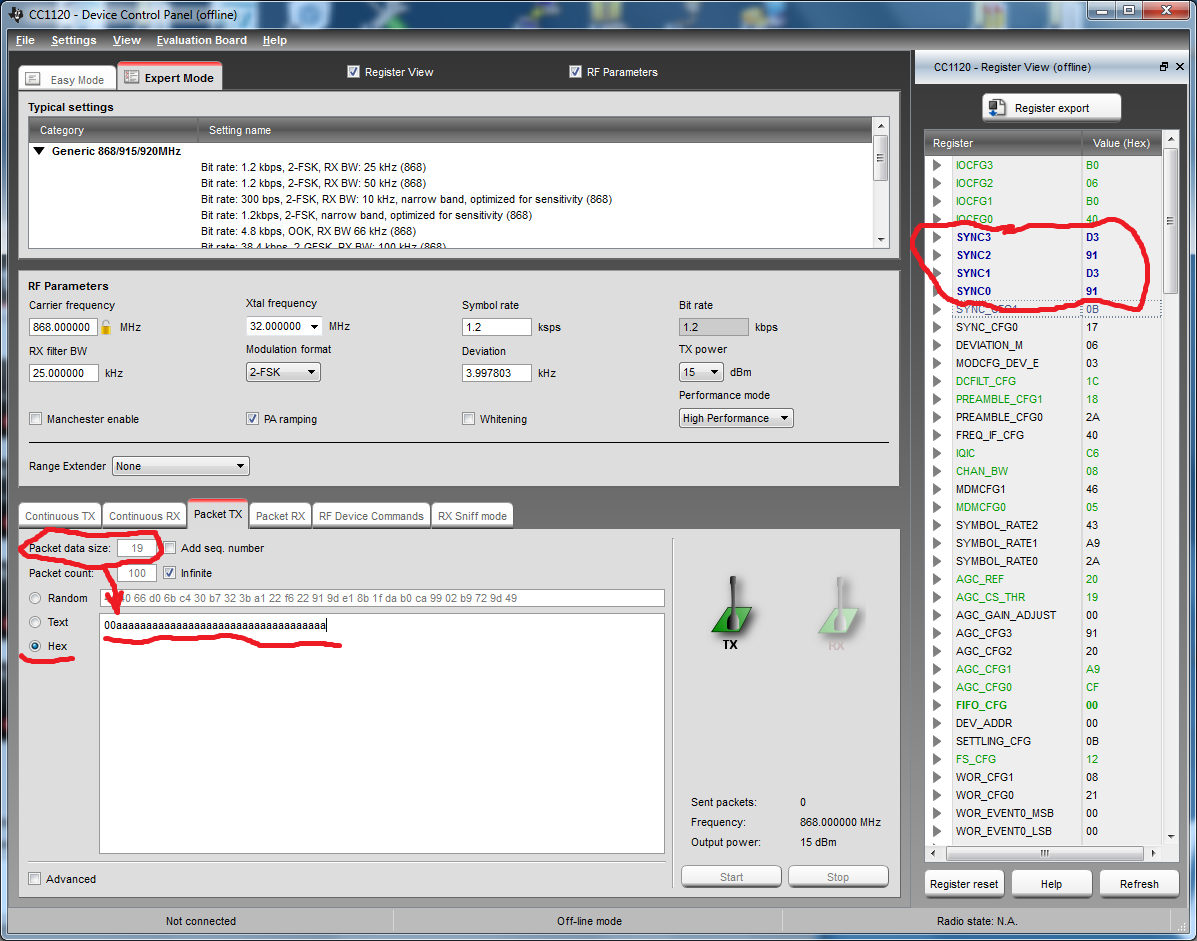
    to use SmartRF Studio as transmitter for TrxEB with PER TEST menu option:

    TrxEB: use EXPERT MODE -> LINK BYPASS MODE -> MASTER

    SmartRF Studio settings like on attached screenshot:

    (SYNC D391D391, Packet length = 19)

    It works for me with CC1200.

  • Thank You Oleg Pushkarev . I appreciate your effort taken to actually test the answer.  I will check this and hopefully this will work for me too! 

    Are there any special settings to enable the highest power in the CC1190 RF front end? I hope choosing 15 dbm in CC1120 is enough. I am having about -30- -40 dBm when both TRxEB are close. About -80dBm 50m away from TX. Is this normal?

    Thanks again!!

  • I never worked with CC1xxx + PA, but It seems to me that -80 dBm at 50 meters is too low RSSI level.
  • Amalinda: Are you using SmartRF Studio to control CC1120+CC1190? If so, select the correct range extender. Anyway, use the PA_CFG settings from Studio, max input power on CC1190 is +10 dBm. Also remember to set the PA_EN and LAN_EN signals on CC1190.
  • Yes I am using CC1120 + CC1190 with the TRxEB but Smart RF Studio does not let me chose the correct range extender and complains it is not supported for my TRxEB Development board. It provides me a list of other boards that supports range extenders :-(


    Thanks for letting me me know about the Max power ratings. I realized PA_CFG registers are used to control output power flowing into the CC1190. Without knowledge i had been feeding in 15dBm to the CC1190 but until now the module works fine. So thans for letting me know about it. Well, lets assume I set it the CC1120 output power to 10dBm using PA_CFG registers, can I assume total output would be going into the CC1190? In that case, how would I feed in power taking into the account the losses that would occur? I suppose feeding in 15dBm can result damaging the CC1190 SOC.

    Could you please explain how it is possible to change setting on the CC1190 soc? I believe I only have access to the CC1120 via smart RF studio to change register values. How could PA_EN and LAN_EN be changed? I noticed they are digital inputs and I believe they cannot be changed via Smart RF. Should I drive them externally perhaps via VDD and GND as required? However I had a range greater than 50m in a very concrete environment and my TX antenna was connected to the CC1190.

    Actually thanks so much for pointing that out! I'm highly doubting if I had used any amplification at all in todays' field !!  I guess not.   I didnt change status of both those pins.

  • As I replied in my previous post, SmartRF Studio has support for CC1120+CC1190 and sets the control signals correctly. Look for the range extender selection button.
  • I may have had lower power output because I had not controlled the PA_EN and LAN_EN pins properly perhaps. Thanks for your input.
  • Actually, the Smart RF Studio does not let me select the range extender. It complains it is not supported for the TRxEB development board. Is it supported for your TRxEB board? It mentions me a different two boards that supports this range extender option.

  • Could be that Sverre sent you an old version of the TRXEB which doesn't support range extender. The CC1120+CC1190 board allows you to hardwire the PA_PD/ LNA_PD signals to VDD/ GND.
  • Its okay the TRxEb was something Sverre added graciously and I've found it to be immensely useful so far to quickly grasp this technology..  I will manually change set output power of CC1120 to a lower value and meanwhile I will also set the proper configurations for the PA_EN and LAN_EN pins. I hope that would do. Thank you so much for your time.

  • Dear Oleg Pushkarev ,

    I did as you advised. I am happy I have about -9dBm receive power :) :) :) :) thank you.

    p.s. How did you find about the packet size ; 19 ? TrXEB PER test does not receive for any other packet size. Its the same case for the sync word? Are both the packet size and sync word hard coded in the TRxEB?

  • Hi, I found out it by receiving TrxEB PER TEST packets by SmartRFStudio (revers engineering :). It's very convinient to use autonomously working TrxEB with RSSI graph for evaluation custom RF boards. So I wish TI provide clear instruction how to do it without digging into PER TEST code. By the way TI did this useful instruction www.ti.com/.../swra468.pdf .

    BR

  • With packet size 19 and SYNC 3,2,1,0 registers D3 91 D3 91 respectively I am able to receive packets sent from PER test using the PC. Thanks