This thread has been locked.

If you have a related question, please click the "Ask a related question" button in the top right corner. The newly created question will be automatically linked to this question.

WL1835MOD: More than 7 devices are not connected to the mesh network

Part Number: WL1835MOD
Other Parts Discussed in Thread: AM3358, , WL1835

Hi

We are checking the WiFi Mesh function with a custom board (AM3358 + WL1835MOD based on Beaglebone Black Wireless).

And we found a problem. If more than 7 mesh devices are activated, the network goes down one by one. Less than 6 works well.

We tested it in several ways. We tried using Wpa_supplicant and iw commands. All the way we used did not solve the problem.

Here is the last test case we did. It is done using the iw commands. We tried to limit participating nodes via plink_action block.

Like this
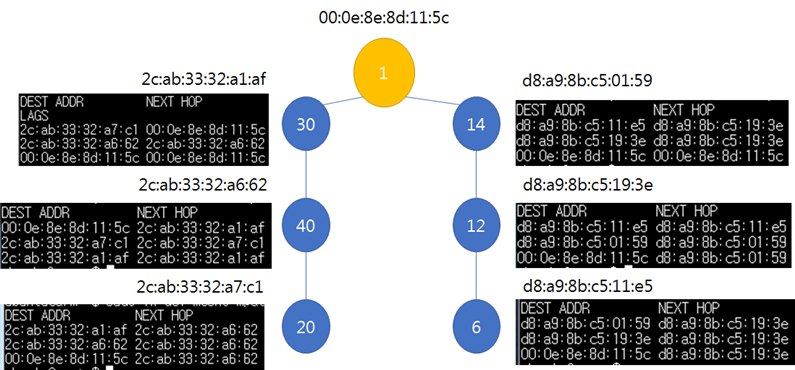
As shown in the figure above, even if we control the table that appears in the mpath dump, all links have problems when the 7th device is activated.

Even if the mesh is automatically connected without controlling as above, the problem is the same.


Is this a limitation of the module? Or is there something wrong with it?

Version information

  • Linux version 4.19.106-bone49
  • Ubuntu 18.04.4 LTS arm ttyS0
  • iw version 4.14
  • wpa_supplicant v2.6
  • firmware version : Rev 8.9.0.0.85

dmesg

[   33.769208] wlan-en-regulator: disabling

[   53.153764] wlcore: wl18xx HW: 183x or 180x, PG 2.2 (ROM 0x11)

[   53.154889] wlcore: WARNING Detected unconfigured mac address in nvs, derive from fuse instead.

[   53.154897] wlcore: WARNING This default nvs file can be removed from the file system

[   53.217664] wlcore: loaded

[   56.604582] wlcore: PHY firmware version: Rev 8.2.0.0.245

[   56.643794] wlcore: firmware booted (Rev 8.9.0.0.85)


Using Wpa_supplicant

ctrl_interface=/var/run/wpa_supplicant

#ctrl_interface_group=adm


# mpm on userspace

user_mpm=1


# open mesh network

network={

        ssid="meshtest"

        mode=5

        frequency=2412

        key_mgmt=NONE

id_str="acasa"

}


Using iw

iw dev wlan0 interface add mesh0 type mp

iw dev wlan0 del

ifconfig mesh0 [IPv4_address]

iw dev mesh0 mesh join meshtest freq 2412

iw dev mesh0 set mesh_param mesh_max_peer_links 3


  • thanks for your reply,

    But it didn't solve the problem. 

    We checked the connection status by ping and the network was down within about 5 minutes.

    The message when the ping connection is lost is as follows.

    ping: sendmsg: No buffer space available or

    From 192.168.123.10 icmp_seq=349 Destination Host Unreachable

    What should we check or do?

    Best regards

    Ahn

  • Hi,

    These patches should have resolved the issue. You will need to rebuild mac80211 and wilink8 drivers.

    We don't see this issue at our end.

    You may need to upgrade Wilink8 driver version to R8.8 : https://www.ti.com/tool/download/WILINK8-WIFI-NLCP

    Best

    Saurabh

  • thanks for your reply
    In the process of patching, our engineers made a mistake, and we are checking again.
    We are faced with a new situation, please check.


    We tested multiple WPEA-325acn and pings in patched kernels and modules. This test confirmed that it does not crash.
    But another problem arose. Devices using WL1835MOD do not ping each other.
    In station dump and mpath dump, devices checked each other, but the MAC address in the arp table was incomplete.

    A problem seems to have occurred in the process of replacing the kernel and module. In particular, there was an error in the wlcore part.

    We used kernel version 4.19.106-bone49, and when it was run with the module created here, the following error occurred.

    [ 34.992373] wlcore: wl18xx HW: 183x or 180x, PG 2.2 (ROM 0x11)
    [ 35.004087] wlcore: WARNING Detected unconfigured mac address in nvs, derive from fuse instead.
    [ 35.004099] wlcore: WARNING This default nvs file can be removed from the file system
    [ 35.133016] wlcore: loaded
    [ 35.133071] wlcore: driver version: R8.8
    [ 36.022751] wlcore: ERROR Your WiFi FW version (8.9.0.0.76) is invalid.
    Please use at least FW 8.9.*.*.83.
    You can get the latest firmwares at:
    git://git.ti.com/wilink8-wlan/wl18xx_fw.git
    [ 36.043789] wlcore: ERROR error getting static data
    [ 36.586515] wlcore: ERROR Your WiFi FW version (8.9.0.0.76) is invalid.
    Please use at least FW 8.9.*.*.83.
    You can get the latest firmwares at:
    git://git.ti.com/wilink8-wlan/wl18xx_fw.git
    [ 36.607566] wlcore: ERROR error getting static data
    [ 37.145427] wlcore: ERROR Your WiFi FW version (8.9.0.0.76) is invalid.
    Please use at least FW 8.9.*.*.83.
    You can get the latest firmwares at:
    git://git.ti.com/wilink8-wlan/wl18xx_fw.git
    [ 37.166465] wlcore: ERROR error getting static data
    [ 37.172950] wlcore: ERROR firmware boot failed despite 3 retries

    In this situation, if wl18xx-fw-4.bin was replaced to upgrade the version, ping between wl1835 did not work. It worked normally with other mesh devices.

    Do we need to use a specific version or is there something we are missing?

    Best regards

    Ahn

  • Hi,

    With WPA3 support added , you will need to upgrade firmware version . Can you pls  upgrade entire release to R8.8 : http://software-dl.ti.com/ecs/WiLink8/R8_8/release_notes_R8_8.html

    Best

    Saurabh

  • Hi,

    thanks for your reply.

    We proceeded with the update as directed by you. And this solved the problem.

    Thank you for everything. 

    Best regards

    Ahn