This thread has been locked.

If you have a related question, please click the "Ask a related question" button in the top right corner. The newly created question will be automatically linked to this question.

CC3220S-LAUNCHXL: I'm stuck making the cloud-ota example work

Part Number: CC3220S-LAUNCHXL


I'm having trouble determining why the cloud-ota example fails for me.

I have downloaded the der file for digicerthighassuranceevrootca.cer from the digi_cert site and renamed it to .der

I have flashed the Launchpad with the certificate structure:
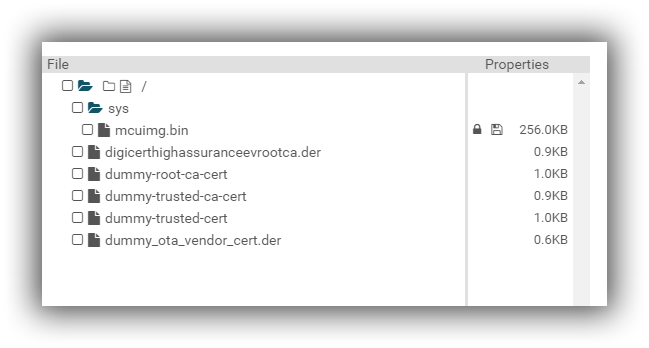
I already had a dropbox app set up, I used the Folder Name from before "VizcoUpdates" and I regenerated the access token and used that.

#elif OTA_SERVER_TYPE == OTA_SERVER_DROPBOX_V2

/* Dropbox V2 server info */
#define OTA_SERVER_NAME "api.dropboxapi.com"
#define OTA_SERVER_IP_ADDRESS 0x00000000
#define OTA_SERVER_SECURED 1

/* Dropbox V2 vendor info */
#define OTA_VENDOR_TOKEN "QJAlx8FQgXAAAAAAAAAAIcFVqgwjz-123456789-ECBpPqSRhEGSOdJuh613Cs4pN" (NOTE slightly modified to keep it a secret)

#ifndef OTA_VENDOR_TOKEN
#error "Please define your personal cloud account token in OTA_VENDOR_TOKEN above"
#endif

#define OTA_SERVER_ROOT_CA_CERT "digicerthighassuranceevrootca.der"
#define OTA_SERVER_AUTH_IGNORE_DATA_TIME_ERROR
#define OTA_SERVER_AUTH_DISABLE_CERT_STORE

However, when I debug the application, It fails at the point where it tries to list the folder contents.

What might I have missed??

HandlePingComplete: PingCounter=2
Pinging GW...!
Ping done. Success rate: 100%

HandlePingComplete: OTA Command arrived
OtaInit: statistics = 0, 0, 0
OtaInit: call Ota_init
OTA_init: sizeof CdnClient=576, sizeof OtaArchive=4956
OTA_init: sizeof OtaLib_t=7736, sizeof OTA_memBlock=7800
OTA_init: OTA lib version = OTA_LIB_2.0.0.7
OtaArchive_Init: OTA archive version = OTA_ARCHIVE_2.0.0.4
OtaConfig: call OTA_set EXTLIB_OTA_SET_OPT_SERVER_INFO, ServerName=api.dropboxapi.com
OtaConfig: call OTA_set EXTLIB_OTA_SET_OPT_VENDOR_ID, VendorDir=VizcoUpdates
OTA_run: call CdnClient_ConnectServer OTA server=api.dropboxapi.com
CdnClient_ConnectServer: HttpClient_Connect api.dropboxapi.com
HttpClient_Connect: IP_ADDR=162.125.5.7
HttpClient_Connect: WARNING Socket Connect, status=-468, Ignored...
OTA_run: CdnClient_ReqOtaDir, VendorDir=VizcoUpdates
CdnDropbox_SendReqDir: uri=/2/files/list_folder
HttpClient_RecvSkipHdr: http error code HTTP/1.1 409
CdnDropbox_ParseRespDir: ERROR HttpClient_RecvSkipHdr, status=-20310
OTA_run: ERROR CdnClient_ReqOtaDir, Status=-20310

Thanks,

Chuck

  • Hi Chuck,

    You've succeeded connecting to Dropbox, but failed on the first HTTP request (requesting the content of the OTA directory).
    From some reason Dropbox responded with HTTP 409 (Conflict) Error for the request.
    This is probably related to the definition of OTA_VENDOR_DIR that is not aligned with what you defined in your Dropbox APP (note that in the Dropbox app you define, the OTA tar file should appear within a directory with the name defined by OTA_VENDOR_DIR).

    Comments:
    1. Try to use the formal certificate catalog (rather than the Playground one). This will enable you to perform full Server authentication (avoiding the "-468" warning shown in your log). This will require that you sign the MCU image with valid Code Signing Certificate.
    2. Please create a new Dropbox App token and keep it private as the one you published here is not safe anymore.

    Learn more about OTA in:
    dev.ti.com/.../

    Br,
    Kobi
  • Kobi,
    Thank you for the response. Excuse my ignorance about digital certificates. What and where is the "formal certificate catalog"? What is a valid Code Signing Certificate? Can I make one of these with openssl or is it something I need to purchase from godaddy or similar vendor? Thanks.
  • Hi Charles,

    The formal certificate catalog is in "<SDK-ROOT>\tools\cc32xx_tools\certificate-catalog\".
    It contains a list of popular root CA certificates signatures (the list can be seen in the Readme file).
    The catalog is manages and signed by TI. It is used to validate the root of trust of file signature or SSL connection.

    For development only, we provide an alternative "dummy" catalog (called Playgroundand available under "<SDK-ROOT>\tools\cc32xx_tools\certificate-playground\"), which only enables the self-signed certificates that are included.
    This catalog should not be used in production as it will not verify the cloud servers' certificates and since the SDK contains the private key that basically enable everyone to sign "verified" content.

    Connecting using SSL/TLS to valid cloud vendor with Playground catalog will produce a security warning (that can be ignored) when the connection is opened.

    MCU image (and other important user files) MUST be signed with a valid certificate that is recognized by the catalog. So either you use the available playground certificates with the playground catalog ( for development only or you lose the device protection), or use the formal catalog with certificate that you purchased from a known root CA (one that is on the list).

    br,
    Kobi