This thread has been locked.

If you have a related question, please click the "Ask a related question" button in the top right corner. The newly created question will be automatically linked to this question.

CC3220S-LAUNCHXL: Use Get Weather example with new HTTP APIs

Part Number: CC3220S-LAUNCHXL
Other Parts Discussed in Thread: CC3220S, CC3200

Hi,

I am trying to use the Get Weather example with my CC3220s, using the HTTP APIs from SDK v2.1. Below is a link to the original "Get Weather" code as well as "my code attempt" to convert it. However, I am unable to do this successfully. Can anyone please help me with this? Thanks.

github.com/.../master

  • Hi Jack,

    Where exactly is your ported code failing? Is there a specific HTTPClient call that fails? If so, what is the error code you get? Have you also tried using the debugger to step through the failing function call and see what is the underlying socket error that causes it to fail?

    Regards,
    Michael
  • I get the error in the below code, which you can see in line 227 of the github link.

    lRetVal = HTTPClient_sendRequest(cli, HTTP_METHOD_GET, acSendBuff,NULL,0,0);
        if (lRetVal < 0)
        {
            //UART_PRINT("Failed to send HTTP 1.1 GET request.\n\r");
            return  SERVER_GET_WEATHER_FAILED;
        }

  • Ok, what is the error code you are getting from HTTPClient_sendRequest()? Also, if you step through that function, what is the underlying error that causes HTTPClient_sendRequest() to fail? To find this, copy httpclient.c from /source/ti/net/http/ in your SDK into your project. You should then be able to fully step through HTTPClient_sendRequest() and find exactly what causes it to fail and debug from there.

    Regards,
    Michael
  •  I get an error code of -3018. The error in the sendRequest function is shown below.

    /* chunked state */
        else
        {
            /* validity check */
            if((flags & HTTPClient_CHUNK_START) || (NULL == body))
            {
                return (HTTPClient_EWRONGAPIPARAMETER);
            }
        }

  • Hi Jack,

    When you call HTTPClient_sendRequest(), have you checked the state of HTTPClient_CB *cli and seen if its member variables make sense?

    I suspect that the following call is incorrectly passing a reference to the HTTPClient_Handle:

    statusCode = GetWeather(&httpClientHandle, &acCityName[0]);

    and that it should instead be

    statusCode = GetWeather(httpClientHandle, &acCityName[0]);

    Give that a try and see if it fixes things.

    Regards,

    Michael

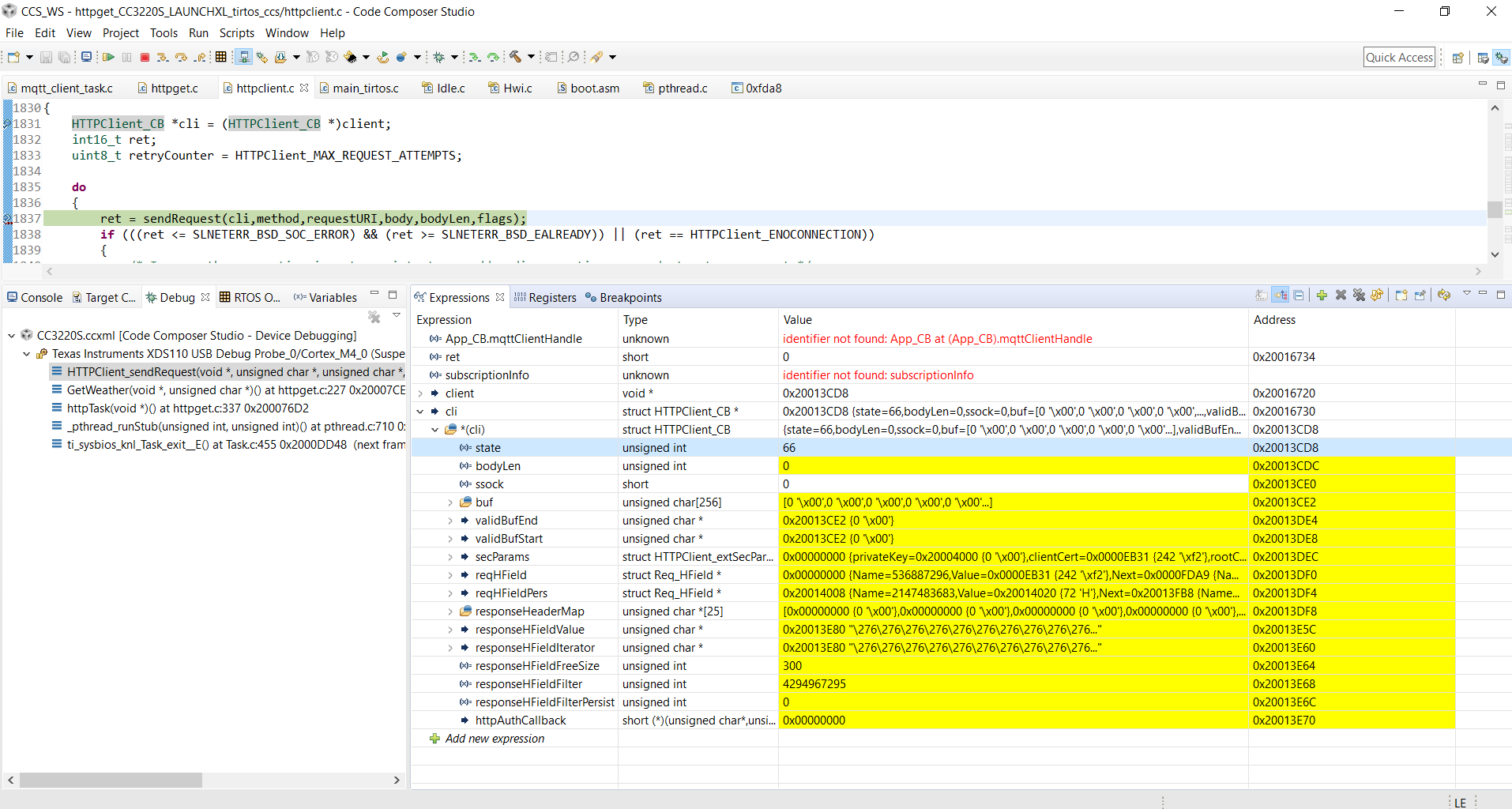
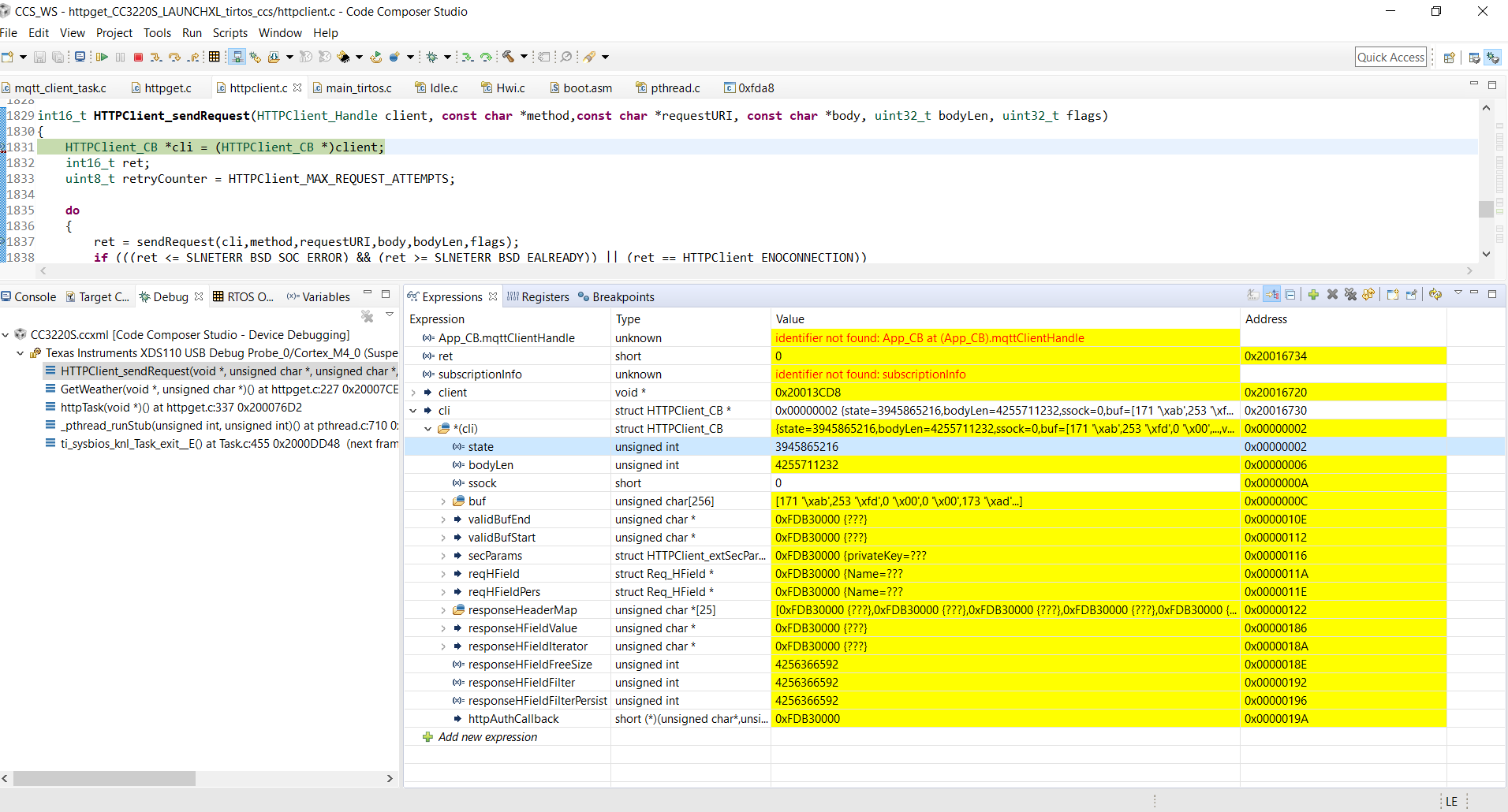
  • I tried your fix, but unfortunately it didn't work. Below are images of the breakpoint on

    HTTPClient_CB *cli = (HTTPClient_CB *)client;

    and a breakpoint after it. Can you tell what the problem might be?

  • Hi Jack,

    Your first screenshot isn't the most useful since you capture the state of cli before it is initialized. When the breakpoint stops on a statement, it is about to execute that statement but has not done so yet.

    Your second screenshot shows that cli is now initialized to something that looks more plausible to me. However, perhaps there is something else within sendRequest() that causes problems. Do you get the same error as before? If you trace and step through sendRequest(), what function call or line throws the error?

    Regards,
    Michael
  • I found that after the problem occurs from the below code. The program just enters the "else" statement, "breaks", and then returns a status of 401.

                if (getCliState(cli,ENABLE_REDIRECT_STATE) && (isRedirect(status)))
                {
                    if (getCliState(cli,LOCATION_ADDED_STATE))
                    {
                        /* If Location header was filtered in internally, remove it from filter list */
                        cli->responseHFieldFilter &= ~(NumberToBitField(HTTPClient_HFIELD_RES_LOCATION));
                        setCliState(cli,LOCATION_ADDED_STATE,false);
                    }
                    if (redirectFlag & INCOMPLETE_LOCATION)
                    {
                        /* Location header is incomplete redirect is imposible */
                        return( HTTPClient_EREDIRECTLOCATIONFAIL );
                    }
                    if (redirectCount < HTTPClient_MAX_REDIRECTION_ATTEMPTS)
                    {
                        ret = redirect(cli,status,method);
                        if (ret < 0)
                        {
                            return(ret);
                        }
                    }
                    redirectCount++;
                }
                else if ((status == HTTP_SC_UNAUTHORIZED) && (cli->httpAuthCallback != NULL))
                {
                    /* Check if the Www-Authenticate is a valid response header */
                    if ((cli->responseHeaderMap[WWW_AUTHENTICATE_HASH_INDEX] != NULL) && (strstr(cli->responseHeaderMap[WWW_AUTHENTICATE_HASH_INDEX],"HTTPClient_ERESPONSEVALUEBUFSMALL") == NULL))
                    {
                        /* Execute the authentication callback which was registered by the user */
                        ret = cli->httpAuthCallback(cli->responseHeaderMap[WWW_AUTHENTICATE_HASH_INDEX],strlen(cli->responseHeaderMap[WWW_AUTHENTICATE_HASH_INDEX]),buf,&bufLen);
                        if (ret < 0 )
                        {
                            return(ret);
                        }
                        /* Add client authorization request header */
                        ret = HTTPClient_setHeader(cli,HTTPClient_HFIELD_REQ_AUTHORIZATION,buf,bufLen,HTTPClient_HFIELD_NOT_PERSISTENT);
                        /* If the used method is HEAD, the server won't send body even if the content-length header is present */
                        if (strcmp(method,HTTP_METHOD_HEAD) != 0)
                        {
                            /* Flush the body of the response if exist        */
                            do
                            {
                                ret = HTTPClient_readResponseBody(cli, buf,HTTPClient_BUF_LEN,&moreFlag);
                                if (ret < 0)
                                {
                                    return (ret);
                                }
                            }while ((ret > 0) && moreFlag);
                        }
                        else
                        {
                            cli->bodyLen = 0;
                        }
                    }
                    /* Stop the do while loop and exit the sendRequest() function in-order to re-send the request
                    with the generated authorization header */
                    break;
                }
                else
                {
                    break;
                }

  • Hi. Any update on this?
  • Hi Jack,

    If you are getting a status 401, that indicates that the http request is completing successfully, but with the status "401 Unauthorized". Somehow, the http server you are contacting is responding to your request by asking your client to provide authentication credentials.

    If the CC3200 example still works, then this would indicate that there is still some misconfiguration of the CC3220 http client on your end. One method you could try to do to pinpoint what might be going wrong is to dump the contents of your HTTP request and the response you get to the UART. If you dump the request you send on the CC3220 and the CC3200 and compare the two, I suspect you will find some difference that explains the error you are getting.

    On the CC3220, the easiest way I see to dump the HTTP request is to modify the sprsend() function in httpclient.c. Just add a Display_printf() call on cli->validBufStart right after the SlNetSock_send() call. That should print out whatever you are sending to the server. On the CC3200 you can do something similar with UART_print().

    If you do not have a CC3200 that you can run this test on, you can also use PC utilities such as curl:
    https://curl.haxx.se/

    Try getting that dump of the request and seeing if there is something obvious that would cause you to get a 401 error from the connected server.

    Regards,
    Michael
  •  

    When you say "If you do not have a CC3200 that you can run this test on, you can also use PC utilities such as curl", what are you asking me to do?

    Below is the message I get from the CC3220. What might be wrong with the request?

    GET /data/2.5/weather?q=Salem&mode=xml&units=imperial&appid=<APP ID> HTTP/1.1
    Host: HTTPClient (ARM; TI-RTOS)¾¾¾¾¾¾¾°k
    Host: api.openweathermap.org
    
    please see openweathermap.org/faq for more info."}

  • Hi Jack,

    So I tested with curl and got this response when I passed in an incorrect API key:

    C:\Users\a0232058\Downloads\curl-7.54.0-win64-mingw\curl-7.54.0-win64-mingw>curl -G "api.openweathermap.org/.../weather --proxy http://wwwgate.ti.com:80/ -v
    *   Trying 10.248.194.19...
    * TCP_NODELAY set
    * Connected to wwwgate.ti.com (10.248.194.19) port 80 (#0)
    > GET api.openweathermap.org/.../weather HTTP/1.1
    > Host: api.openweathermap.org
    > User-Agent: curl/7.54.0
    > Accept: */*
    > Proxy-Connection: Keep-Alive
    >
    < HTTP/1.1 401 Unauthorized
    < Via: 1.1 10.248.194.19 (McAfee Web Gateway 7.6.2.15.0.23891)
    < Date: Mon, 22 Oct 2018 14:33:44 GMT
    < Server: openresty
    < X-Cache: MISS from 10.248.194.19
    < X-Cache-Key: /data/2.5/weather?mode=xml&q=salem&units=imperial
    < Content-Type: application/json; charset=utf-8
    < Content-Length: 107
    < Proxy-Connection: Keep-Alive
    < Access-Control-Allow-Origin: *
    < Access-Control-Allow-Methods: GET, POST
    < Access-Control-Allow-Credentials: true
    <
    {"cod":401, "message": "Invalid API key. Please see openweathermap.org/faq for more info."}* Connection #0 to host wwwgate.ti.com left intact

    This is consistent with the 401 error observed before.

    However, when I signed up and passed in a correct auth key, I got the following output:

    C:\Users\a0232058\Downloads\curl-7.54.0-win64-mingw\curl-7.54.0-win64-mingw>curl -G "api.openweathermap.org/.../weather --proxy http://wwwgate.ti.com:80/ -v
    *   Trying 10.248.194.18...
    * TCP_NODELAY set
    * Connected to wwwgate.ti.com (10.248.194.18) port 80 (#0)
    > GET api.openweathermap.org/.../weather HTTP/1.1
    > Host: api.openweathermap.org
    > User-Agent: curl/7.54.0
    > Accept: */*
    > Proxy-Connection: Keep-Alive
    >
    < HTTP/1.1 200 OK
    < Via: 1.1 10.248.194.18 (McAfee Web Gateway 7.6.2.15.0.23891)
    < Date: Mon, 22 Oct 2018 14:59:40 GMT
    < Server: openresty
    < X-Cache: MISS from 10.248.194.18
    < X-Cache-Key: /data/2.5/weather?APPID=59acd840241603ed1f973173a73072cb&mode=xml&q=dallas&units=imperial
    < Content-Type: application/xml; charset=utf-8
    < Content-Length: 771
    < Proxy-Connection: Keep-Alive
    < Access-Control-Allow-Origin: *
    < Access-Control-Allow-Methods: GET, POST
    < Access-Control-Allow-Credentials: true
    <
    <?xml version="1.0" encoding="UTF-8"?>
    <current><city id="4684888" name="Dallas"><coord lon="-96.8" lat="32.78"></coord><country>US</country><sun rise="2018-10-22T12:37:12" set="2018-10-22T23:45:23"></sun></city><temperature value="50.9" min="48.2" max="53.6" unit="fahrenheit"></temperature><humidity value="93" unit="%"></humidity><pressure value="1024" unit="hPa"></pressure><wind><speed value="7.18" name="Moderate breeze"></speed><gusts></gusts><direction value="143.003" code="SE" name="SouthEast"></direction></wind><clouds value="1" name="clear sky"></clouds><visibility value="16093"></visibility><precipitation mode="no"></precipitation><weather number="800" value="clear sky" icon="01d"></weather><lastupdate value="2018-10-22T14:15:00"></lastupdate></current>* Connection #0 to host wwwgate.ti.com left intact

    I would double-check the API key you are using and make sure that it is provided correctly in your CC3220 example. Do note that it took a little bit of time (~1 hour or so for me) before the API key became active. If you tried using your API key right away, give it another try and see what happens.

    Regards,

    Michael

  • I noticed that your response (with the invalid API key) was longer than mine. Why is this so? Did you do a test on the CC3220 or CC3200?
  • Hi Jack,

    I tested this on my PC with curl.
    The response is quite short actually. The data that is shown in the curl printout is mostly header data. The body of the message is the xml data in the end.
    You are most likely not seeing all of the headers since you filter out the headers that you are not interested in when you use the HTTP library.

    Give my API key a try and see if that helps things.

    Regards,
    Michael
  • Thank you very much. It works now. I gave your API key a try, and then mine. They both work - it probably took some time before my API key worked.