This thread has been locked.

If you have a related question, please click the "Ask a related question" button in the top right corner. The newly created question will be automatically linked to this question.

CCS/LAUNCHXL-CC3235S: cc3235s go to error

Part Number: LAUNCHXL-CC3235S
Other Parts Discussed in Thread: UNIFLASH, CC3235S

Tool/software: Code Composer Studio

hi:

my board is LAUNCHXL-CC3235S, when the code is receiving data from server for about 10 minutes,mycode will into following:

void SimpleLinkFatalErrorEventHandler(SlDeviceFatal_t *slFatalErrorEvent) ,the print infomation is " FATAL ERROR: Abort NWP event detected,AbortType  = 3".

and I found that when I send a lot of data to CC3235 through the serial port (CC3235 forwards the data to sl_Send()), it will enter the error state. If I simulate a thread to send data directly through sl_Send, then Will not enter the error state

here is my  NWP logs:

4760.ReceivedTofile-COM2-2019_10_10_15-24-19.DAT

  • Hi,

    Are you using a CC3235 launchpad, or are you using a custom board? Looking at the NWP logs provided, it seems like the CC3235 NWP encounters a sort of stall state which triggers its built-in watchdog mechanism. It would be interesting to see if that result is reproducible on a launchpad, if you are currently using a custom board.

    Also, in your application, what sort of code are you running? It seems like your code performs very frequent Wi-Fi scans, in addition to the socket receive operations. 

    When you say that you send a lot of data through serial, do you mean that you pass in data through SPI or UART and then pass it to a socket? Or are you referring to something else when you mention serial communications?

    Regards,

    Michael

  • The board what i am using is LAUNCHXL-CC3235S (CC3235 launchpad) from TI.


    Currently I only have the only one CC3235 board.


    My code performs very frequent Wi-Fi scans because I have to keep getting the signal quality of wifi several seconds.


    I think I have to show you my software logic to you:


  • Hi,

    Thank you for providing your explanation of how your code works.

    Investigating the NWP logs provided a bit more, it seems like the cause of the stall -> abort is due to the low-level MAC HW encountering an error. To debug this further, MAC logs will be needed.

    In addition to the NWP logs output on pin 62, there are also low-level MAC logs output on pin60. To mux out the logs, you simply need to call MAP_PinTypeUART(PIN_60,PIN_MODE_1) right after the call to mux out the NWP log as per the instructions here http://processors.wiki.ti.com/index.php/CC3120_%26_CC3220_Capture_NWP_Logs.

    The UART setup is the same as for the NWP logs in terms of baudrate, stop bits, etc, so the logging setup you used for the NWP logs will work for the MAC logs. As with the NWP logs, the output recorded will be a binary that you will need to provide to me for decoding.

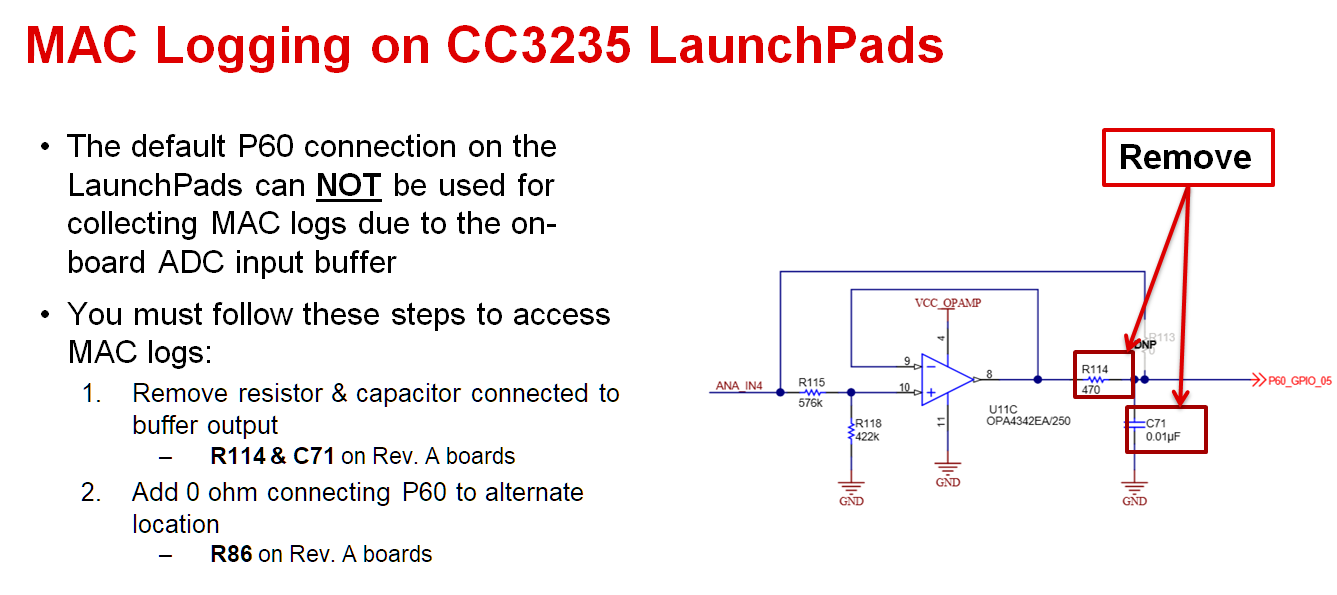
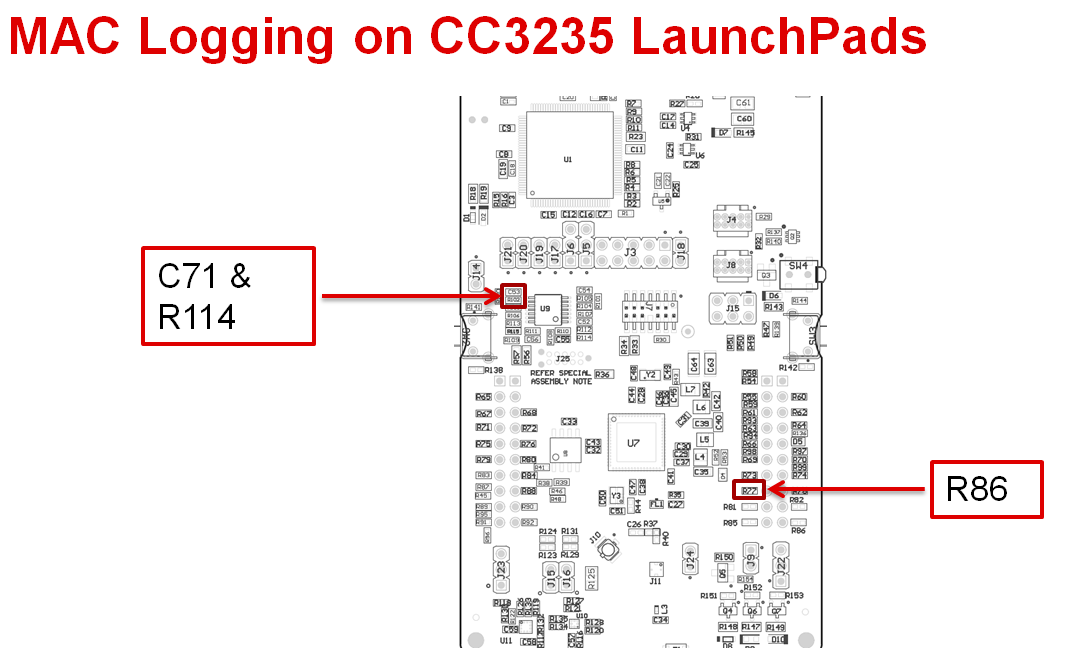
    As you are using the CC3235 launchpad, there are a few hardware mods that are needed for the MAC logs to be output correctly. By default pin60 is used as an ADC input pin, and so it has some filtering circuitry that needs to be disconnected.

    Please follow the instructions below to mod your board:

    Please collect the MAC logs and provide them to me so that I debug your issue further.

    Regards,
    Michael

  • hi,Regards:

        Thank you very much for your analysis, I have already got the low-level MAC logs according to the steps you requested. Please gather the previous content to help me analyze it.

       thank you!

    Regards,
    edisonReceivedTofile-COM2-2019_10_17_9-19-50.DAT

  • Hi Edison,

    Thanks for providing the MAC logs. I have decoded them and seen that there is indeed a hard fault in the MAC hardware that is causing the NWP abort. 

    At this point, I will need some time to investigate the issue. I will update you within the next week on my progress, or if there are additional debug info or tests that I need from you.

    Regards,
    Michael

  • Hi Edison,

    One thing that came to mind that you can try is to use the latest NWP servicepack that was just released. Please download the latest CC32xx SDK version 3.30.01.02:

    http://www.ti.com/tool/download/SIMPLELINK-CC32XX-SDK

    In the SDK, you can find the servicepack in tools/cc32xx_tools/servicepack-cc3x35/

    Please re-run your test with that new servicepack and see if that prevents the abort. If it still results in the same behavior, a set of log captures with that NWP servicepack would be useful.

    Regards,

    Michael

  • HI Michael:     

    thanks  for your help!  

    Look forward to your good news
     
    regards,    
    eidson
  • Hi Edison,

    Were you ever able to run your code with the latest servicepack?

    Also, is it possible for you to provide me with the code you are running on your CC3235 launchpad? If you wish to provide your code to me privately, then you can use the friend request + private message feature to send it to me.

    Regards,

    Michael

  • hi ;

       sure i will send you my code privately.

        I have added you using the friend request + private message feature, please accept my request. Then please send me a message  privately to  let me know that you have passed. i wil send yo my code!

        thanks!

    edison.

  • Hi Edison,

    I've sent you a private message. Please provide me your code through there.

    Thanks,

    Michael

  • Hi Edison,

    I ran your code on my launchpad, but I didn't encounter your NWP assert error case. However, I do not seem to have all of the threads of your code running as described in your diagram.

    I have the CC3235 connected to a TCP server that is sending it data, so thread2 seems to work. The scans don't seem to be occurring as shown in the NWP logs that you have provided though.

    Do you have any extra steps that are required to get the device into that scanning state?

    Regards,
    Michael

  • hi,Michael:

        Attachment is some of my instructions for my program, please take a look!

    Regards,

      Edison

    about codes.doc

  • Hi Edison,

    I took a look at your instructions, but am still unable to replicate what you're seeing.

    What I did was the following:

    1. Change UserInfoDefault() in FileEvent.c with the correct info for my AP and TCP server.
    2. Compile, build and run it on my CC3235 launchpad.
    3. Start a TCP server that listens for the CC3235.
    4. Once the TCP connection is established between the server and the CC3235, send data from the TCP server.
    5. After ~ 1 minute, restart the AP
    6. Wait for the CC3235 to reconnect to Wi-Fi and the TCP server
    7. Repeat 10 times

    Even through I restarted the AP 10 times, I still did not run into the issue you describe. Attached is the output I got from your program. If you could check that and see if there is something missing from the steps I did above that would be useful.

    /cfs-file/__key/communityserver-discussions-components-files/968/11_5F00_7_5F00_2019_5F00_logs.txt

    There is some garbled output, but that was before I changed the baudrate of my terminal to 921600. The logs should still illustrate the steady-state operation of your program correctly.

    Regards,

    Michael

  • HI,  Michael:

         Today I deliberately retested it again, following your process. 

         if the wifi is 2.4G,  There is really no problem.

         if the wifi is 5G,  it will run into the issue following your steps.

        and the data through is as my annex.

    the data .doc

  • Hi,

    I ran your program again, this time with a 5GHz AP but still did not encounter the NWP assert that appears in your logs.

    I have a couple questions about your setup though.

    1. What are you using on the server side to send data to the CC3235? Your diagram shows 'data2' going from the server to the CC3235 TCP socket, but what exactly are you using to send? I am actually using a a CC3235 as the server, due to the ease of programming and setup. 
    2. On the CC3235 side, is it required to provide data through UART to send back to the server? I currently do not have 'data1' going from CC3235 to the server. If this is needed to reproduce the failure case, could you please describe the method you are using to stream the UART data?

    Thanks,
    Michael

  • Hi Michael,

           i send the tool to you ,and my My supplementary explanation

    tcp socket data.docTCP&UDPDebug.rar

  • hi ,Michael

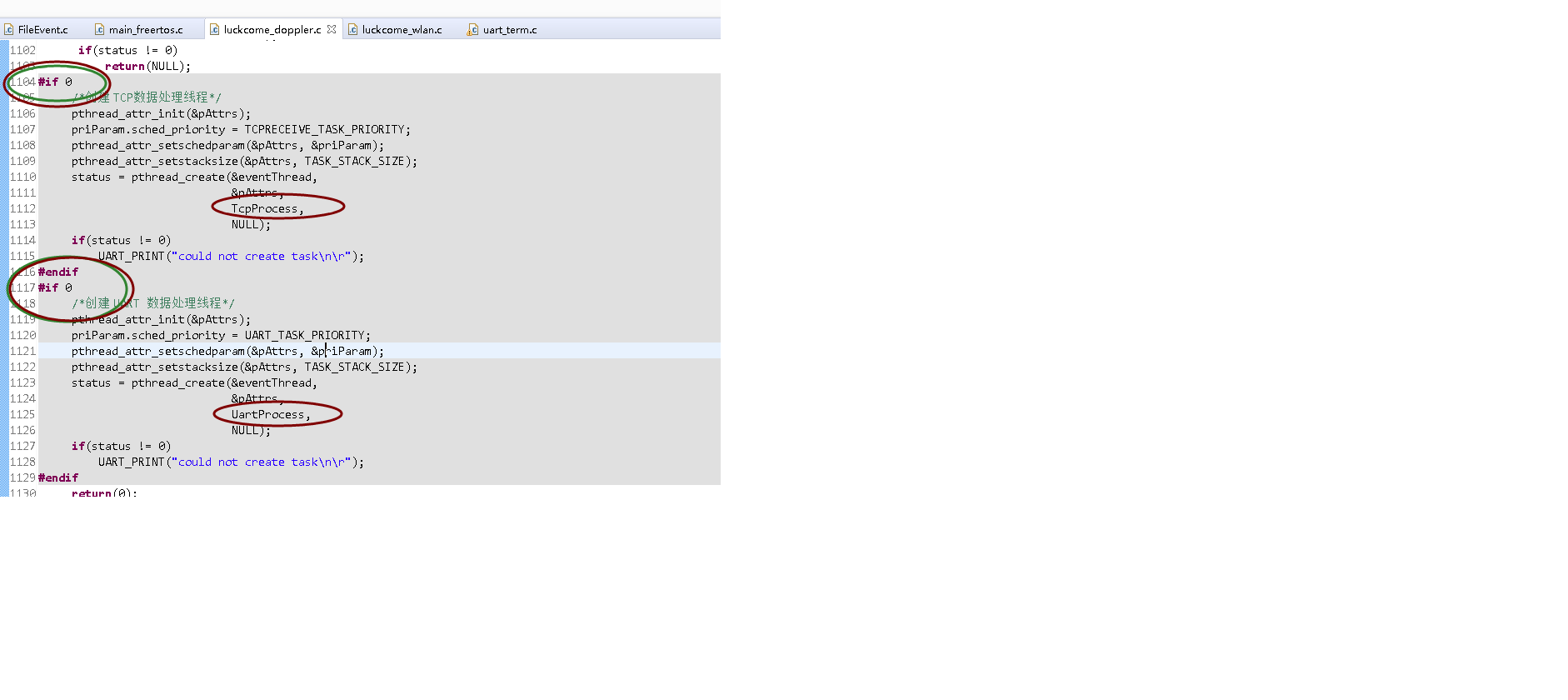
    I ran the program again,  with a 5GHz AP , and i close the tcpProcess thread and UartProcess thread, and i did not send any data through tcp and uart. , also ,i change another AP .................  it still encounter the NWP assert. 

    ReceivedTofile-COM2-2019_11_11_13-52-19.DAT

  • Hi,

    I followed the instructions you provided in your latest word doc, and used the TCP&UDP debug tool that you provided. However, I still do not see the abort.

    Are you able to try to use another CC3235 launchpad? I wonder if the issue you are seeing is specific to your hardware. 

    Regards,

    Michael

  • Hi,

    i will change annother board to test,

    andI have a new guess:

    Is it related to the firmware on my onboard?
    I used to burn the program through the command line tool. The command line program is a .sli file generated by uniflash5.0, but I have never performed an erase operation,than i debug it. I don't know how to erase all programs. I have the following questions:
    1: How to burn the program in the production environment using uniflash, the official methods do not seem to work for cc3235s
    2: How has the chip in "product" mode been erased to erase the firmware inside?

  • Hi,

    Uniflash should perform a full format of the serial flash every time you program the device.

    The CC3235S should be programmable with the methods outlined in the production line guide here: http://www.ti.com/lit/an/swra568/swra568.pdf

    It is not truly possible for the CC3235 to be in an empty state. While it is possible to not program an application binary to the device, and only allow it to run code loaded through JTAG, you will still need files on the serial flash such as the servicepack and root CA catalog for proper device operation.

    Regards,

    Michael

  • After your reminder, I tried another cc3235s board, but this board can't be emulated, so I burned the protocol stack and bin through the serial port. The frustrating thing is that when I restart the wireless router 2 times, the serial port still prints "[ERROR] - FATAL ERROR: Abort NWP event detected: AbortType=3, AbortData=0x0"

    please see my doc as following:

    My process at another cc3235s.doc

  • Hi,

    If your CC3235S is in production mode, then the JTAG port is locked, thus access through the debugger is not possible. If you were to flash a development mode image then you shouldn't have that issue.

    Now that you've tried a different CC3235S LP and confirmed that it isn't a hardware issue specific to your board or CC3235 chip, I will redouble my efforts to reproduce this issue.

    At this point, the best way to ensure that I have the exact same setup as you is to run the same binary as you. While your AP name and IP addresses will be different from what I am using, I can adjust my setup to fit what your binary expects.

    Please send me the binary you are using through private message. It would also be helpful if you exported your Uniflash project to ensure that I have the same settings flashed as well. You can do so by clicking on Manage Projects at the home screen, selecting your project, and then clicking on export:

    Please also provide me the SSID, key, and server IP address in your private message.

    Regards,
    Michael