This thread has been locked.

If you have a related question, please click the "Ask a related question" button in the top right corner. The newly created question will be automatically linked to this question.

TIDC-CC2650STK-SENSORTAG: SensorTag CoAP-DTLS

Part Number: TIDC-CC2650STK-SENSORTAG
Other Parts Discussed in Thread: CC2650

Hello all,

I am currently trying to get CoAP with DTLS running on my SensorTag.

At the moment I using Contiki and have follow the directions given here: http://sunmaysky.blogspot.tw/2015/11/how-to-build-dtls-example-for.html

I have successfully compiled the source file into a .bin. However, this example currently only supports TARGET = srf06-cc26xx (SmartRF06EB+CC2650EM) and not TARGET=srf06-cc26xx BOARD=sensortag/cc26xx (SensorTag).

I still flashed the .bin I created using the configuration for SmartRF06EB+CC2650EM. It was successfully uploaded to the SensorTag but I cant get it to run. Does anyone know what changes I would need to make to make it compatible with the SensorTag? Would you think it would need to be a ton of changes? I do not need sensor readings etc. I just need it to run the program and probably have button access to restart the program/OS.


If this is not possible, has anyone seen any other ways to get CoAP + DTLS working on the SensorTag?

Thank you all for your help! It is greatly appreciated!

  • It should work if you build binary with “TARGET=srf06-cc26xx BOARD=sensortag/cc2650”.

  • Thanks for the input! The compilation and flashing of the device went well with these settings. When I click the side buttons of the SensorTag the Red and Green lights flash. However, I can not get it to show up on the sensor display of 6lbr. In addition, I have only been able to have it print to serial terminal once. Every other time I connect it the debugger and try to get it to print to the serial terminal, the light no longer flash with button pushes. However, once I discount it from the debugger the buttons flash normal again.

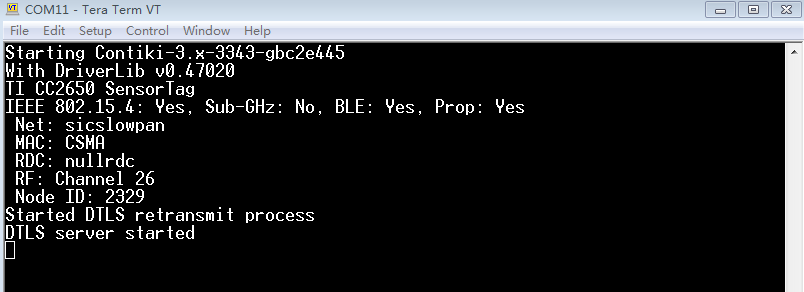
    The one time I did get it to print to serial terminal, it looked like all the necessary processes started up. In addition, it said its Channel was 26 so I confirmed that it was 26 within 6lbr configuration page too.

    Do you have any idea why it might not be acting correctly? Thanks again for the help!

    Update: It allowed for printout again in the serial terminal. Here is what it looks like. However, it still is not showing up on the Sensors list of 6lbr.

  • As I know, DTLS example won’t show up on sensor page of 6lbr.
  • Thanks for all the help YK Chen. I have been able to successfully solve this problem with your help! I ways able to get it to show up if I configured static port mapping correctly within 6lbr! The DTLS Echo example is successfully working. Thank!
  • Cheers!
  • Hello, Jake, i meet the same problem with you .

    For the mote, It allowed for printout in the serial terminal. As thepicture you showed above. However, it still is not showing up on the Sensors list of 6lbr.

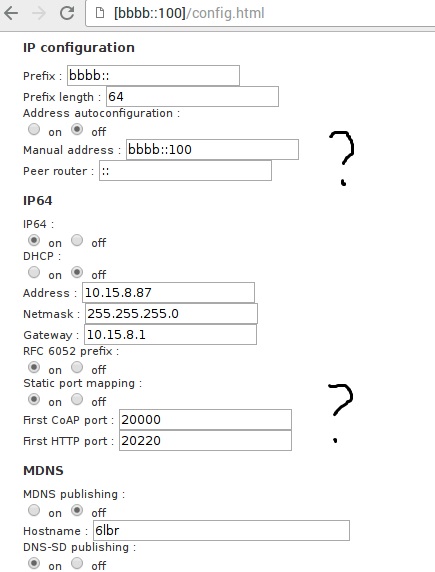
    Could you kindly tell me how to configure static port mapping correctly with 6lbr ?

    Thank you very much for your help !

  • Your sensor is on channel 26. Does your 6lbr on channel 26?
  • yes, i think so .
    In [bbbb::100]/conig.html , "802.15.4 configuration", the" Channel " is set 26. But i cannot find the sensor.
  • Try to use nullrdc on cc26xx-web-demo to test again.
  • "yes, i think so . 
    In [bbbb::100]/conig.html , "802.15.4 configuration", the" Channel " is set 26. But i cannot find the sensor."

    - For some reason editing the Channel within [bbbb:100]/config.html does not work, specifically for a SensorTag flashed as a SLIP radio. I had to make sure that within Contiki before building that I set the correct Channel number for the SLIP radio build. Then flash this build to the device. What is shown on the [bbbb::100]/config.html is not always correct in my experience. 

    I recommend making sure to do the above before and seeing if it works before trying static port mapping!

    To do static port mapping you will need the MAC address of the node. Here is information about how to do static port mapping: https://github.com/cetic/6lbr/wiki/6LBR-Node-Config-FileIf you are using a SensorTag, one easy way to find the MAC address of the device is to launch Ti Flash Programmer 2 and there should be a tab just to the right of "Connected devices" that says "MAC Address". That will get the MAC address of the connected SensorTag device.