This thread has been locked.

If you have a related question, please click the "Ask a related question" button in the top right corner. The newly created question will be automatically linked to this question.

CC2538: How to update CC2538-ZNP Embedded firmware using Gateway Application.

Part Number: CC2538
Other Parts Discussed in Thread: Z-STACK, CC2531

Hello E2E community,

I am working on CC2538 Zigbee Z-stack Embedded firmware. using Gateway Application.

I would like to update the CC2538 ZNP firmware using Gateway Application.

Will you please help me to understand,

Is it possible to update the ZNP firmware from gateway application?

If yes...

How to update the ZNP firmware using gateway application?.

Regards

Shiv Patil.

  • As I know, Z-Stack Linux GW doesn’t provide such capability but it’s possible. I suppose you can use CC2538 serial boot loader to do FW update which you can refer to github.com/.../README.md
  • The sbl_tool is responsible upgrade CC2538ZNP firmware through UART hardware communication.

    the project reside directory Z-Stack_Linux_Gateway-1.0.1-src\Source\Projects\zstack\linux\sbl_tool\project
  • Hello YK Chen,

    Will you please help me for, How do I enable bootloader for CC2538 ZNP Device?.

    Is that as same as we enable for OTA Upgrade?.

    By making changes in Linker > Input tab.

    Regards

    Shiv Patil.

  • Hello behold,

    How to use this to upgrade the ZNP firmware?.
    Is there any document for this?
  • For documentation on OTA, please refer to the following:
    - "OTA Upgrade" section of "Z-Stack Linux Gateway User Guide.pdf" (in Zigbee_3_0_Linux_Gateway_1_0_0/Documents)
    - "Z-Stack OTA Upgrade User's Guide.pdf" (in Z-Stack 3.0.2)
  • I think shiv intends to do FW upgrade to CC2538 ZNP and OTA server is only for device OTA upgrade, right?

  • Yes,

    I need R/W access to the NV Memory of  CC2538 ZNP device to clone the data stored in it.

    Also I wants to push a updated firmware to the CC2538 ZNP device using SBL.

    I have refer this www.ti.com/.../swra466a.pdf

    But I am not able to understand exactly what kind of modifications have to be done in CC2538 ZNP firmware for enabling the SBL. 


    I wants to know what is ARAGO Platform? Is Gateway Application provide SBL support Only for ARAGO platform?

    How we use the sbl_tool.bin to communicate with CC2538 ZNP device using gateway application?.


    Regards,

    Shiv Patil.

  • please read sbl_tool project source code carefully,the application is standalone gateway
    applications
  • For ARAGO platform, you can refer to .

  • Hi,

    The APIs available for communication between the gateway application and the gateway subsystem are listed/detailed in "Documents/Z-Stack Linux Gateway - API document v1.1.pdf".
    There is no API listed that updates the image on the ZNP.

    sbl_tool.bin is meant to be run by the host to load a new image onto the ZNP. Note that when this tool is used, you should make sure none of the servers are running. (See "Serial Bootloader tool" section in the "Z-Stack Linux Gateway User Guide.pdf").

    You could potentially make a script that kills the gateway application and servers, uses sbl_tool.bin to load a new image onto the ZNP, and then restarts the gateway application and servers.

    You can also consider using the ZNP project "with-SBL" configuration from Z-Stack 3.0.2. See "Zigbee_3_0_Linux_Gateway_1_0_0\Firmware\Readme.txt" for other macros to include.


    Regards,
    Toby

  • Hello Toby Pan,

    As per your suggestion, I have studied the documents as follows,

    Z-Stack Linux Gateway User Guide.pdf

    Made the changes/configurations as mentioned in those documents. 

    Now I am facing major problems, which are as follows.

    1. If we ENABLE the BOOTLOADER VALIDATION by commenting the following line from file RemoTI-Linux-master\Projects\tools\LinuxHost\ipclib\server\npi_lnx_ipc.c

    //#define SKIP_BOOTLOADER_VALIDATION
     
    build the Gateway Application & runs the  ./zigbeeHAgw bbb script.
    While initializing ./NPI_lnx_arm_server it sends a  MAC_REALIGNMENT command to CC2538 ZNP device.
    which is defined in mac_api.h
    #define MAC_REALIGNMENT 0xEF   /* A coordinator realignment command has been received */
    CC2538 ZNP device does not respond to it.
    Refer the image given below will help you to understand the problem.

    1. How to enable the boot loader validation on CC2538 ZNP device?.

    2. Is there any way to check if CC2538 ZNP device has successfully enabled the bootloader or not?

    Regards,

    Shiv Patil.

  • Hello YK Chen,

    I have refer this document suggested by you, www.ti.com/.../swra466a.pdf

    But I am not able to understand exactly what configurations have to made in CC2538 ZNP firmware application code to enable serial boot loader.

    Will you please explain it in detail.

    I also refer this python script as you mentioned in previous replies.

    github.com/.../README.md

    In this I am not able to found following definitions In CC2538 ZNP firmware Application Code.


    BOOTLOADER_ENABLE=0xC5
    BL_LEVEL=0x00
    BL_PIN_NUMBER=0x0B
    BL_ENABLE=0xC5


    Why This flags are set with Specific values?...   How do I know about it?....

    Where I am able to find the SBL Functionality in CC2538 ZNP firmware Application code?


    Regards
    Shiv Patil.

  • Can you elaborate which part you don’t understand?
  • Refer Table 1 & 2 From Section 2.1 In www.ti.com/.../swra466a.pdf

    Here ti's mentioned the Configurations to be made for CC2538 ZNP device.

    I am not able to understand where I am able to find the  bootloader configuration byte. so that I can made changes to that variable.


    Also what is the use case of Backdoor Pin which may be configure between PA0 - PA7.

    Is that Pin which may connected to the beagle bone. If Yes what will be the Connection of it with beagle bone.


    Regards,

    Shiv Patil.


  • The bootloader configuration byte is in flash at the address specified in swra466a.pdf .
    Please see the FLASH_CCA defined in CC2538.icf.
    You would only need to change top byte of BOOTLOADER_BACKDOOR_DISABLE macro.
    For example, if you set it to 0xF3FFFFFF the boot loader will be enabled when pin PA3 is pulled low during boot.
    By default BOOTLOADER_BACKDOOR_DISABLE is 0xEFFFFFFF, meaning backdoor bootloader is disabled by default.

    For explanation of backdoor pin, please see section 2.
    If enabled, this is the pin which the bootloader will check on startup to determine whether to initiate the bootload process.

  • Hello Toby Pan,

    As Per your suggestions,

    I have gone through the CC2538-sb.icf & found the FLASH_CCA is defined here,

    // Define a region for Customer Configuration Area in flash.
    define region FLASH_CCA = mem:[from 0x0027FFD4 to 0x0027FFDF];

    also I have modified the BOOTLOADER_BACKDOOR_DISABLE value as follows.

    #define BOOTLOADER_BACKDOOR_DISABLE     0xF3FFFFFF

    I am using the Initial Image for the ZNP with SBL sample code of Z-stack 3.0.2

    & Zigbee Linux Gateway Application 3.0.1 Without any further Modifications.

    Initially,

    I have test the code by running ./zigbeeHAgw bbb script to test that my system is working with UART configurations.

    after that I reset both CC2538 ZNP device & BBB.

    pin PA3 connected to GND then I have started the sbl_tool.bin script using following command,

    ./sbl_tool.bin /home/debian/source/out/misc/CC2531-GW-ZNP_39203.bin /dev/ttyO4 1

    Still I am not able to use sbl_tool.bin to program the CC2538 ZNP device.

    I am sending you a log file, which contains the debug logs for the sbl_tool.bin script.

    ***** TI LPRF ZigBee Serial Bootloader Tool for Linux v. 0.85 *****
    Requested file file: /home/debian/initial_zigbee/source/ERROR__out/misc/CC2531-GW-ZNP_39203.bin
    Requested serial port: /dev/ttyO4
    Debug traces enabled
    UART OUT 2019-05-08 06:59:56 --> 6 Bytes: SOF:FE, Len:01, CMD0:4D, CMD1:07, Payload:01, FCS:4A
    write=6
    Timer created OK
    Timer created OK
    Image size: 239616 bytes
    Press [ENTER] any time to abort downloading image.
    state = 1
    Handshaking:
      Sending reset command
    UART OUT 2019-05-08 06:59:56 --> 6 Bytes: SOF:FE, Len:01, CMD0:41, CMD1:00, Payload:01, FCS:41
    write=6
      Closing port
      Performing HW reset
      Opening port
    UART OUT 2019-05-08 06:59:57 --> 6 Bytes: SOF:FE, Len:01, CMD0:4D, CMD1:07, Payload:01, FCS:4A
    write=6
      Sending handshake command
    UART OUT 2019-05-08 06:59:57 --> 6 Bytes: SOF:FE, Len:01, CMD0:4D, CMD1:04, Payload:02, FCS:4A
    write=6
    zbSocEnableTimeout #0
    ./sbl_tool.bin: waiting for poll()
    Message from the ZigBee SoC
    1.read 2 of 2 bytes: FE:01:
    2.read 4 of 4 bytes: 4D:87:00:CB:
    UART IN  2019-05-08 06:59:57<-- 6 Bytes: SOF:FE, Len:01, CMD0:4D, CMD1:87, Payload:00, FCS:CB
    ./sbl_tool.bin: waiting for poll()
    Message from the ZigBee SoC
    1.read 2 of 2 bytes: FE:0E:
    2.read 17 of 17 bytes: 4D:84:00:01:00:00:00:01:00:08:00:00:00:08:00:00:C7:
    UART IN  2019-05-08 06:59:57<-- 19 Bytes: SOF:FE, Len:0E, CMD0:4D, CMD1:84, Payload:00:01:00:00:00:01:00:08:00:00:00:08:00:00, FCS:C7
    Bootloader firmware revision: unknown
    state = 5
    UART OUT 2019-05-08 06:59:57 --> 7 Bytes: SOF:FE, Len:02, CMD0:4D, CMD1:06, Payload:D8:0D, FCS:9C
    write=7
    zbSocEnableTimeout #0
    ./sbl_tool.bin: waiting for poll()
    Message from the ZigBee SoC
    1.read 2 of 2 bytes: FE:01:
    2.read 4 of 4 bytes: 4D:86:00:CA:
    UART IN  2019-05-08 06:59:57<-- 6 Bytes: SOF:FE, Len:01, CMD0:4D, CMD1:86, Payload:00, FCS:CA
    state = 6
    ./sbl_tool.bin: waiting for poll()
    Timer expired: #0
    -- TIMEOUT --
    state = 6
    ./sbl_tool.bin: waiting for poll()
    Timer expired: #0
    -- TIMEOUT --
    state = 6
    ./sbl_tool.bin: waiting for poll()
    Timer expired: #0
    -- TIMEOUT --
    state = 6
    ./sbl_tool.bin: waiting for poll()
    Timer expired: #0
    -- TIMEOUT --
    state = 6
    ./sbl_tool.bin: waiting for poll()
    Timer expired: #0
    -- TIMEOUT --
    state = 6
    ./sbl_tool.bin: waiting for poll()
    Timer expired: #0
    -- TIMEOUT --
    state = 6
    ./sbl_tool.bin: waiting for poll()
    Timer expired: #0
    -- TIMEOUT --
    state = 6
    ./sbl_tool.bin: waiting for poll()
    Timer expired: #0
    -- TIMEOUT --
    state = 6
    ./sbl_tool.bin: waiting for poll()
    Timer expired: #0
    -- TIMEOUT --
    state = 6
    ./sbl_tool.bin: waiting for poll()
    Timer expired: #0
    -- TIMEOUT --
    state = 6
    ./sbl_tool.bin: waiting for poll()
    Timer expired: #0
    -- TIMEOUT --
    
    Image download aborted due to error (error id: 13)
    Performing HW reset
    UART OUT 2019-05-08 06:59:59 --> 6 Bytes: SOF:FE, Len:01, CMD0:4D, CMD1:07, Payload:01, FCS:4A
    write=6
    ./sbl_tool.bin: waiting for poll()
    Message from the ZigBee SoC
    1.read 2 of 2 bytes: FE:01:
    2.read 4 of 4 bytes: 4D:87:00:CB:
    UART IN  2019-05-08 06:59:59<-- 6 Bytes: SOF:FE, Len:01, CMD0:4D, CMD1:87, Payload:00, FCS:CB
    ./sbl_tool.bin: waiting for poll()
    

    Regards,

    Shiv Patil.

  • The sbl_tool_test.log indicates that you are attempting to flash a CC2531 image.

    I recently came across this related post:
    e2e.ti.com/.../407429
  • Hello Toby Pan,

    The sbl_tool_test.log indicates that you are attempting to flash a CC2531 image.

    Ans :

    I have tested it for CC2538_with_sbl.bin. & getting the same result

    I have gone through this link e2e.ti.com/.../407429 also seen the related post.

    My question is,

    Will it support the Serial Boot Loader Configuration.

    First of all, I would like to make sure that Serial Bootloader is enabled...

    As per your suggestions in earlier posts, I have made the changes,

    But I am unable to Enable the Bootloader.

    WIll you please help me to know,

    How would I am going to make sure that, Serial Boot loader is Enabled on CC2538 ZNP device.

    Regards,

    Shiv Patil.

  • Hello YK Chen,

    I have also referred the Python script for communicate the CC2538 ZNP device using serial boot loader.

    have studied the README & swra466a.pdf.

    The have almost same configurations for the Enabling Serial boot loader On CC2538.

    but when i have run the python script i am getting error given below.

    debian@beaglebone:~/cc2538-bsl-master$ python cc2538-bsl.py -p /dev/ttyO4 -b 115200 -e
    Opening port /dev/ttyO4, baud 115200
    Connecting to target...
    ERROR: Can't connect to target. Ensure boot loader is started. (no answer on synch sequence)

    Will you please help me to know,

    how i would able to know, Serial boot loader is enabled or not.

    Regards,

    Shiv Patil.

  • Hello Toby Pan, Behold & YK Chen,

    Any Update On this?..
  • If you refer to sunmaysky.blogspot.com/.../how-to-use-serial-bootloader-mode-to.html and use Flash Programmer 2 to download firmware to CC2538 using serial boot loader, does it work?
  • Yes,

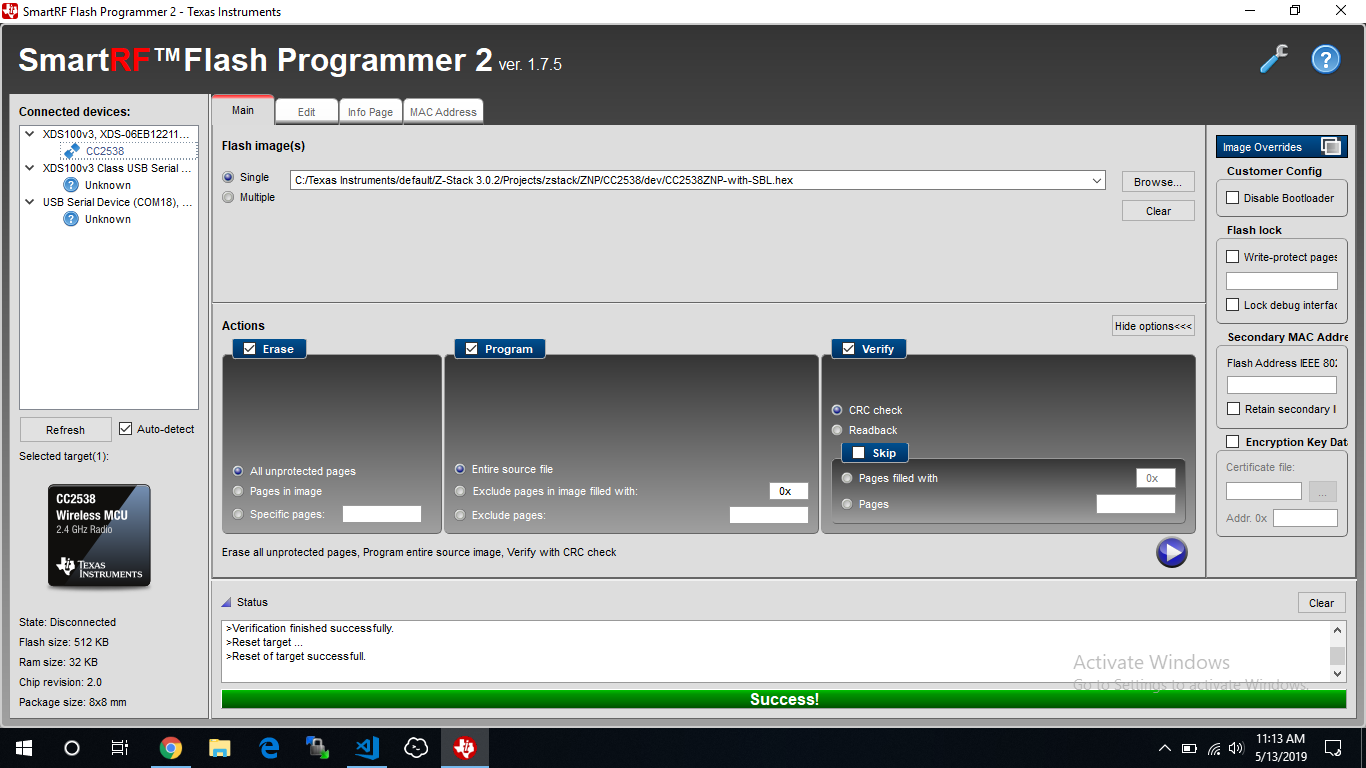
    I am able to flash the code ( i.e. CC2538ZNP-with-SBL.hex file ) to ZNP Device. Using Flash Programmer.

    If I am trying to do with the sbl_too.bin. Its not Working.

    seen attachment given below will let you know that Flash programmer will able to communicate & programm the CC2538 Device.

    Regards,

    Shiv Patil.

  • I mean use Flash Programmer 2 and serial boot loader. Please refer to the steps in sunmaysky.blogspot.com/.../how-to-use-serial-bootloader-mode-to.html
  • I am also able do that using XDS100v3 Class USB Serial,

    Find the attachment given below, 

    1. Connect CC2538 with XDS100v3 Class USB Serial will be succeed.

    2. Flash the bin file to CC2538 Using XDS100v3 Class USB Serial succeed.

    Regards,

    Shiv Patil

  • It looks your CC2538 serial boot loader works perfectly. What problem do you see when you run serial boot loader application on Linux?
  • will you please look over the earlier 4 5  post, I have already mentioned the problems.

    I have studied the Python script suggested by you. github.com/.../README.md

    I have made changes as per the instructions in it.

    also made PA3 to ground @time of reset.

    Debug logs for python script are

    debian@beaglebone:~/cc2538-bsl-master$ python cc2538-bsl.py -p /dev/ttyO4 -b 115200 -e
    Opening port /dev/ttyO4, baud 115200
    Connecting to target...
    ERROR: Can't connect to target. Ensure boot loader is started. (no answer on synch sequence)

    Note : I have tried it for different bauds. 115200, 460800, 921600, 1500000

    How would I am able to know exactly where this application failed.

    OR We need to do something else to configure Serial Boot Loader

    Regards, 

    Shiv Patil

  • Before uploading your image make sure you start the boot loader on the SoC (select + reset on CC2538DK).
  • How I am able to know that CC2538 has enabled the Serial Bootloader Successfully OR not ?
  • You can run "sudo ./cc2538-bsl.py -b 115200 -p /dev/ttyUSB1" to test if it works first. If it works, you should see similar response like the followings:

    yk@yk-VirtualBox:~/cc2538-bsl$ sudo ./cc2538-bsl.py -b 115200 -p /dev/ttyUSB1
    Opening port /dev/ttyUSB1, baud 115200
    Connecting to target...
    CC2538 PG2.0: 512KB Flash, 32KB SRAM, CCFG at 0x0027FFD4
    Primary IEEE Address: 00:12:4B:00:00:E5:00:3E

  • Hello YK Chen,

    I have tried this

    sudo python cc2538-bsl.py -b 115200 -p /dev/ttyO4

    In my case ttyO4 will configure as a UART on BeagleBone Device.

    There are 2 cases I have tested for,

    1. Running python script when there is no image flash on CC2538 Device.

    i.e. I have erase the mass storage of CC2538 forcefully using Flash Programmer 2.

    Result :

    debian@beaglebone:~/cc2538-bsl-master$ sudo python cc2538-bsl.py -b 115200 -p /dev/ttyO4
    Opening port /dev/ttyO4, baud 115200
    Connecting to target...
    CC2538 PG2.0: 512KB Flash, 32KB SRAM, CCFG at 0x0027FFD4
    Primary IEEE Address: 00:12:4B:00:09:DF:40:89
    debian@beaglebone:~/cc2538-bsl-master$ 

    2. Running the python script After flash the CC2538ZNP-with-SBL.hex to CC2538 Device.

    ZNP Configurations.

    1. Enabled the Flow Control pins of UART using BB_ZNP Flag.

    2. Bootloader Backdoor Configurations.

    #if defined OTA_CLIENT
         #define FLASH_START_ADDR                0x0027F800      // page for Image Boot Manager
         #define BOOTLOADER_BACKDOOR_DISABLE     0xF3FFFFFF
    #elif defined SBL_CLIENT                                                                   
         #define FLASH_START_ADDR                0x0027B000     // page for Serial Bootloader.
         #define BOOTLOADER_BACKDOOR_DISABLE     0xF3FFFFFF
    #else 
         #define FLASH_START_ADDR                0x00200000
         #define BOOTLOADER_BACKDOOR_DISABLE     0xF3FFFFFF
    #endif
    

    3. Connected PA3 pin to GND to enable the Bootloader Backdoor.

    Result :

    debian@beaglebone:~/cc2538-bsl-master$ sudo python cc2538-bsl.py -b 115200 -p /dev/ttyO4
    Opening port /dev/ttyO4, baud 115200
    Connecting to target...
    ERROR: Timeout waiting for ACK/NACK after 'Synch (0x55 0x55)'
    debian@beaglebone:~/cc2538-bsl-master$ 

    I am still not getting it why this is happening..

    Why it is working when there is not image flashed on device?...

    What are the Default Configurations to be set when we ERASE the Flash of the CC2538 Device?. 

    Regards,

    Shiv Patil

  • When you run "sudo python cc2538-bsl.py -b 115200 -p /dev/ttyO4", do you press SELECT and RESET button on CC2538DK to make it restart and enter serial boot loader mode?
  • Yes,

    I have Pressed the Select Button & immediately after to it pressed the Reset one.

    While Running the script I am getting same result.

    debian@beaglebone:~/cc2538-bsl-master$ sudo python cc2538-bsl.py -b 115200 -p /dev/ttyO4
    Opening port /dev/ttyO4, baud 115200
    Connecting to target...
    ERROR: Timeout waiting for ACK/NACK after 'Synch (0x55 0x55)'

    Regards,

    Shiv Patil

  • Have test this python script with the CC2538 Module?..
    If yes,
    Which kind of Configurations you have made in ZNP Firmware Application.
  • I test this with Z-Stack 3.0.2 prebuilt CC2538ZNP-without-SBL.bin ZNP FW and it works fine.

    yk@yk-VirtualBox:~/cc2538-bsl$ sudo ./cc2538-bsl.py -b 115200 -p /dev/ttyUSB1 -w ./tests/CC2538ZNP-without-SBL.bin
    Opening port /dev/ttyUSB1, baud 115200
    Reading data from ./tests/CC2538ZNP-without-SBL.bin
    Cannot auto-detect firmware filetype: Assuming .bin
    Connecting to target...
    CC2538 PG2.0: 512KB Flash, 32KB SRAM, CCFG at 0x0027FFD4
    Primary IEEE Address: 00:12:4B:00:00:E5:00:3E
    Writing 503808 bytes starting at address 0x00200000
    Write 120 bytes at 0x0027AF880
        Write done                                

  • Have you flash the CC2538 with CC2538ZNP-with-SBL.hex before doing this?

    While I erased the mass storage of the CC2538 device. i.e. there is no valid image in it.

    I am Also able to flash the code with python script. ( cc2538-bsl.py )

    debian@beaglebone:~/cc2538-bsl-master$ sudo python cc2538-bsl.py -b 115200 -p /dev/ttyO4 -w ./CC2538ZNP-without-SBL.bin 
    Opening port /dev/ttyO4, baud 115200
    Reading data from ./CC2538ZNP-without-SBL.bin
    Firmware file: Raw Binary
    Connecting to target...
    CC2538 PG2.0: 512KB Flash, 32KB SRAM, CCFG at 0x0027FFD4
    Primary IEEE Address: 00:12:4B:00:09:DF:40:89
    Writing 503808 bytes starting at address 0x00200000
    Write 120 bytes at 0x0027AF880
        Write done                                
    debian@beaglebone:~/cc2538-bsl-master$ 

  • No, I don't flash the CC2538 with CC2538ZNP-with-SBL.hex before doing this.
  • So how we will come to know that serial bootloader is supported for CC2538ZNP-with-SBL.hex OR Not?..

    i.e. ZNP application code with SBL configurations.

  • If I am correctly by reading ZNP source code, serial boot loader is disable by default and prebuilt ZNP FW won’t enable it. I suppose you need to enable it inside source code and rebuild your own ZNP binary.
  • Hello YK Chen,

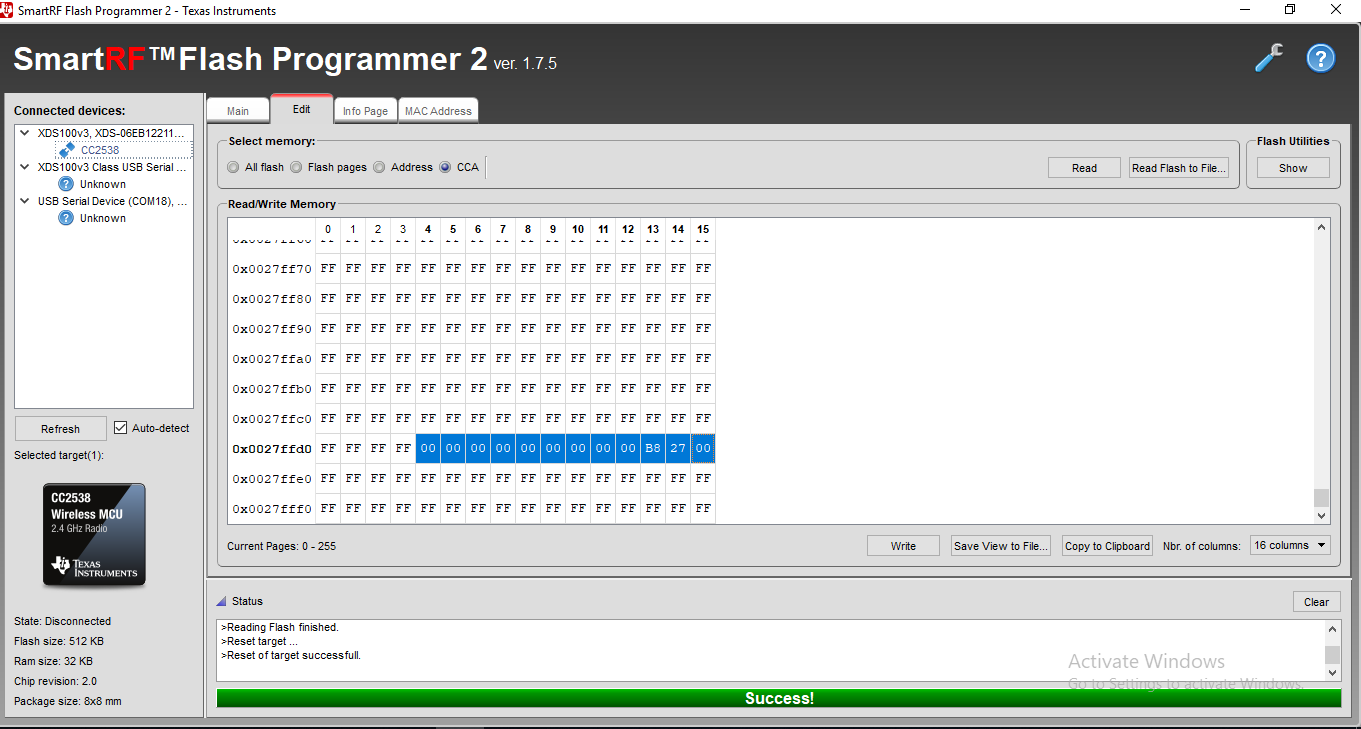
    I have tried to read the FLASH_CCA Area for the CC2538 device & I found something different in it.

    FLASH_CCA  will be highlighted in the images.

    // Define a region for Customer Configuration Area in flash.
    define region FLASH_CCA = mem:[from 0x0027FFD4 to 0x0027FFDF];

    see the following attachments,

    When I erase the flash of CC2538 Device, FLASH_CCA  memory address are as follows.

    But when I flash the CC2538ZNP-with-SBL.hex to CC2538 Device.

    Now,

    we set the configurations for bootloader backdoor is as follows,

    #define FLASH_START_ADDR 0x0027B000 // page for Serial Bootloader.
    #define BOOTLOADER_BACKDOOR_DISABLE 0xF3FFFFFF

    So, 

    values @ 0x0027FFD7 address must be 0xF3FFFFF but its not seems like that.

    I am trying to trace the code but unable to find where those value are written to the flash.

    WIll you please help me to know that.

  • In startup_ewarm.c, try to add the following defines:

    #define FLASH_CCA_BOOTLDR_CFG_ENABLE            0xF0FFFFFF /**< Enable backdoor function */
    #define FLASH_CCA_BOOTLDR_CFG_ACTIVE_HIGH       0x08000000 /**< Selected pin on pad A active high */
    #define FLASH_CCA_BOOTLDR_CFG_PORT_A_PIN_M      0x07000000 /**< Selected pin on pad A mask */
    #define FLASH_CCA_BOOTLDR_CFG_PORT_A_PIN_S      24         /**< Selected pin on pad A shift */
    #define FLASH_CCA_BOOTLDR_CFG (FLASH_CCA_BOOTLDR_CFG_ENABLE \
      | FLASH_CCA_BOOTLDR_CFG_ACTIVE_LEVEL \
      | (FLASH_CCA_CONF_BOOTLDR_BACKDOOR_PORT_A_PIN << FLASH_CCA_BOOTLDR_CFG_PORT_A_PIN_S))

    Then, replace BOOTLOADER_BACKDOOR_DISABLE with FLASH_CCA_BOOTLDR_CFG and rebuild your ZNP binary to enable serial boot loader.

    __root const lockPageCCA_t __cca @ ".cca" =
    {
      FLASH_CCA_BOOTLDR_CFG,  // Bootloader backdoor disabled
      0,                            // Image valid bytes
      FLASH_START_ADDR // Vector table located at flash start address
    };

  • Hello YK Chen,

    FLASH_CCA_BOOTLDR_CFG_ACTIVE_LEVEL
    FLASH_CCA_CONF_BOOTLDR_BACKDOOR_PORT_A_PIN

    This 2 values are not define will you please tell me about those values.

    They might be user configured r8?

  • #define FLASH_CCA_BOOTLDR_CFG_ACTIVE_LEVEL 0
    #define FLASH_CCA_CONF_BOOTLDR_BACKDOOR_PORT_A_PIN 3 /**< Pin PA_3 (Select button) activates the boot loader */
  • I think we need to do some more modifications,
    As I am searching for the enabling the bootloader i have found something,
    I would like to share it with you.

    github.com/.../startup-gcc.c

    will you please look over the link given above & let me know is it helpful in our case or not?..
  • I believe that is the same source, which is Contik source codes.
  • I have tested the Configurations given by you but it also not working.
    should I try Contik source code configurations?
  • Yes, you can try that.

  • Hello YK Chen,

    I have studied this script

    Trying to understand it's working principle.

    I have made following changes to the startup_ewarm.c file.

    #define FLASH_CCA_BOOTLDR_CFG_DISABLE           0xEFFFFFFF /**< Disable backdoor function */
    #define FLASH_CCA_BOOTLDR_CFG_ENABLE            0xF0FFFFFF /**< Enable backdoor function */
    #define FLASH_CCA_BOOTLDR_CFG_ACTIVE_HIGH       0x08000000 /**< Selected pin on pad A active high */
    #define FLASH_CCA_BOOTLDR_CFG_PORT_A_PIN_M      0x07000000 /**< Selected pin on pad A mask */
    #define FLASH_CCA_BOOTLDR_CFG_PORT_A_PIN_S      24         /**< Selected pin on pad A shift */
    
    #define FLASH_CCA_BOOTLDR_CFG_ACTIVE_LEVEL FLASH_CCA_BOOTLDR_CFG_ACTIVE_HIGH
    #define FLASH_CCA_CONF_BOOTLDR_BACKDOOR_PORT_A_PIN 3 /**< Pin PA_3 (Select button) activates the boot loader */
    
    #define FLASH_CCA_BOOTLDR_CFG (FLASH_CCA_BOOTLDR_CFG_ENABLE \
                                   | FLASH_CCA_BOOTLDR_CFG_ACTIVE_LEVEL \
                                   | (FLASH_CCA_CONF_BOOTLDR_BACKDOOR_PORT_A_PIN << FLASH_CCA_BOOTLDR_CFG_PORT_A_PIN_S))
    
    
    #ifdef SBL_CLIENT
    // Create section for Customer configuration area in upper flash page
    #pragma section = ".cca"
    
    typedef struct
    {
        unsigned long ulImageBackdoor;
        unsigned long ulImageValid;
        unsigned long ulImageVectorAddr;
    } lockPageCCA_t;
    
    __root const lockPageCCA_t __cca @ ".cca" =
    {
      FLASH_CCA_BOOTLDR_CFG,  // Bootloader backdoor enabled
      0,                            // Image valid bytes
      (unsigned long)&__vector_table, // Vector table located at flash start address
    };
    
    #endif
    

    Build the code & flash hex file to the CC2538 device.

    Still I am not able to configure serial bootloader.


    There are few doubts in my mind,

     1.  What is the use case of function __root const lockPageCCA_t __cca @ ".cca" =

              is it writing the FLASH_CCA_BOOTLDR_CFG value to the flash address 0x0027FFD04 or Not?.

             because after flashing the code I am getting same values in FLASH_CCA

    2. If you look at the reset_handler(void) in contiki-ng/arch/cpu/cc2538/startup-gcc.c file

    what is the value set to the FLASH Memory.

    /* Copy the data segment initializers from flash to SRAM. */
    rom_util_memcpy(&_data, &_ldata, &_edata - &_data);
    
    /* Zero-fill the bss segment. */
    rom_util_memset(&_bss, 0, &_ebss - &_bss);

    I am unable to trace  _data, _ldata, _edata, _data, _bss, _ebss this values.

    are they related to the SBL configurations.

    Will you please help me to understand this concepts?...

    Regards,

    Shiv Patil.

  • can you provide your opinion on how to correctly enable serial boot loader on CC2538 ZNP project?
  • can’t you help to verify this?