Part Number: CC2652R
Other Parts Discussed in Thread: Z-STACK, UNIFLASH, CC1352P
Tool/software: TI-RTOS
This thread has been locked.
If you have a related question, please click the "Ask a related question" button in the top right corner. The newly created question will be automatically linked to this question.
Previous E2E thread: https://e2e.ti.com/support/wireless-connectivity/zigbee-and-thread/f/158/t/817477
Make sure to closely follow the Z-Stack OTA Upgrade section of the User's Guide: http://dev.ti.com/tirex/explore/node?node=ANbR0LtTwkMnDCiEhygF7A__pTTHBmu__LATEST
I've been able to successfully confirm OtaServer tool operation using the v3.10 SDK. It appears you at least are confirming that the BIM is properly loaded: https://e2e.ti.com/support/wireless-connectivity/zigbee-and-thread/f/158/t/818108
Regards,
Ryan
Hi YK and RYan,
Here are my steps:
Server:
SDK 3.10
1. loaded the zc_ota_server (unmodified because settings already there).
The OTA Server application requires the following compilations flags:
OTA_SERVER=TRUEOTA_HAThe serial interface requires the following flags:
NPINPI_USE_UARTZTOOL_P1MT_TASKMT_APP_FUNCMT_SYS_FUNCMT_ZDO_FUNCMT_ZDO_CB_FUNCMT_NWK_FUNCMT_NWK_CB_FUNCMT_UTIL_FUNCMT_OTA_FUNCOTA Client:
SDK 3.10
1. reset using uniflash
1. loaded the cc26x2r1lp_bim_offchip.hex(unmodifed) using uniflash.
2. loaded the zed_sw_ota_client_CC26X2R1_LAUNCHXL_tirtos_ccs.hex(unmodified) to client using uniflash
Compilation flags:
OTA_CLIENT_CC26XX.OTA_CLIENT=TRUEOTA_HASWITCH_OTApost build:
${TOOLS_OAD_ZIGBEE_DIR}/zOTAfileGen.exe ${PROJECT_LOC}/${ConfigName}/${ProjName}_oad.bin ${PROJECT_LOC}/${ConfigName}/ BEBE 2652 00000001
predefined symbol:
OTA_MANUFACTURER_ID=0xBEBE
OTA_TYPE_ID=0x2652
OTA_APP_VERSION=0x00000001
3. Connect OTA server desktop via uart. Click button-1 of serverand it will show PAN 0xxx (in network)
4 Connect button-1 of client and it will show node 0xxxx unhder PAN network.
5. Created a ota client firmware with OTA_APP_VERSION =0x00000002 then load as file.
6. Right click the PAN Network then click broadcast image notify.
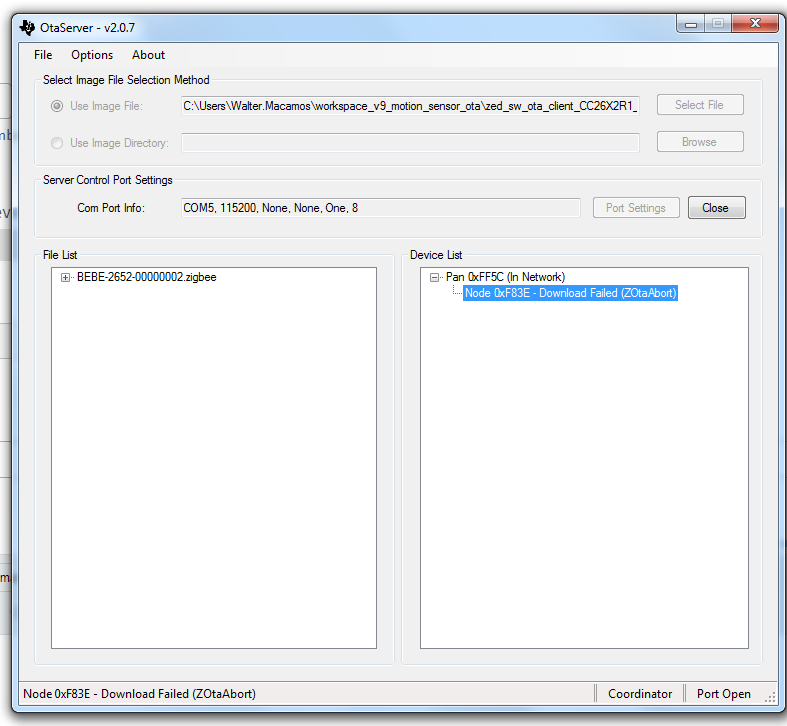
7. It will show up to 0.06% complete then show download failed zota abort. It will retry for multiple times...
Regards,
Walter
https://e2e.ti.com/cfs-file/__key/communityserver-discussions-components-files/158/zota_5F00_abort.7z
Hi YK and Ryan,
I looked around and see this instruction from Toby:
1. In Uniflash, "Settings & Utilities" -> "Erase Entire Flash" (no need to use erase_storage_offchip).
2. Flash cc13x2r1lp_bim_offchip in CCS (using debug, then exit debug).
3. Flash zr_switch_ota in CCS (using debug, you may stay in debug if you'd like).
4. Try the OTA image upgrade.
I have tried the above and it works for the client using the out-of-box examples (no edits necessary).
------------------------
I used the Revision=0x02 to upload in OTA desktop app. But, same problem I'm getting..
Any ideas?
Regards,
Walter
Include network steering in your sniffer log or provide the network key.
Have you been able to get the out-of-box examples working, or are you now encountering a different error? You have to increment the application version of the client project binary (from the post-build steps) to be downloaded or uncheck "Version Check Image File" to skip the version check. Clean rebuilds are important in this instance. http://dev.ti.com/tirex/content/simplelink_cc13x2_26x2_sdk_3_10_01_11/docs/zigbee/html/zigbee/ota_upgrade.html#building-and-downloading-target-applications
Regards,
Ryan
Hi Ryan,
I'm still using out-the-box examples:
1. zc_ota_server - no change
2. zed_sw_ota_client / zr_sw_ota_client - co change except app version.
I have tried unchecking the file version check also but still problem persists.
I noticed this important notice, in the guide. Do I need to load my launchpad to out-of-box with BLE project zero sample app to write will create a default Factory New image into the external flash of the LaunchPad?
Important
SimpleLink CC26x2R1, CC1352R1 and CC1352P_2 LaunchPad boards come out-of-box with BLE project zero sample app flashed. This sample application, as part of its initialization process, will create a default Factory New image into the external flash of the LaunchPad. Zigbee OTA application assumes that any Factory New image exist, as the downloaded image will be stored as the second image available (right after Factory New image). If no Factory New image exists, the OTA Client will abort the upgrade process.
Regards,
Walter
Hi TI Team,
Now it can complete upgrading...
I address this for the OTA client device and server also, erasing all flash (using Uniflash), then flashing ble5stack/project_zero (with CCS).
Then, do the steps 1-4 above.
Is it possible to integrate in sample code, In production, it will be an added step for us.
Regards,
Hi Walter,
I'm glad to hear that you figured out the issue, please refer to the following related threads:
https://e2e.ti.com/support/wireless-connectivity/zigbee-and-thread/f/158/t/773591
https://e2e.ti.com/support/wireless-connectivity/zigbee-and-thread/f/158/t/763735
https://e2e.ti.com/support/wireless-connectivity/zigbee-and-thread/f/158/t/731200
Regards,
Ryan