SMARTRFTRXEBK: Guidance Required for Sending and Receiving Data Using SMARTRFTRXEBK

Part Number: SMARTRFTRXEBK
Other Parts Discussed in Thread: CC1200

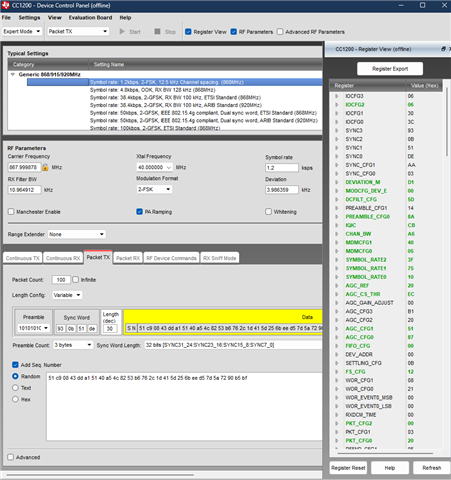
Our company has purchased 2 SMARTRFTRXEBK boards, and we are currently using SmartRF Studio / Device Control Panel for communication testing. We are unable to properly send and receive data packets between the two boards and are getting CRC errors during Packet TX/RX testing.

Could you please guide us on the correct settings/options to use for Packet TX and Packet RX configuration, including sync word, CRC, 802.15.4g mode, and other required parameters? It would also be very helpful if you could share any reference document, example configuration, or tutorial video for successful data transmission and reception.

  • Part Number: SMARTRFTRXEBK

    Hi Team,

    We are working with two CC1200 TrxEB boards using SmartRF Studio / Device Control Panel for Packet TX/RX communication at 433 MHz.

    Current Setup:

    • Device: CC1200

    • Frequency: 432.999878 MHz

    • Modulation: 2-FSK

    • Symbol Rate: 38.5 ksps

    • Bit Rate: 38.4 kbps

    • Deviation: 19.989014 kHz

    • RX Filter BW: 104.166667 kHz

    • Xtal Frequency: 40 MHz

    • TX Power: -3 dBm / 14 dBm tested

    • Performance Mode: Low Power

    • Range Extender: None

    Packet TX Configuration:

    • Packet TX mode enabled

    • Length Config: Fixed

    • Packet Length: 4

    • Data: AA BB CC DD

    • Sync Word: 93 0B 51 DE

    • 802.15.4g Mode: Enabled

    • 4 Byte CRC: Enabled

    • Whitening: Disabled

    • FEC: Disabled

    Packet RX Configuration:

    • Packet RX mode enabled

    • Length Config: Fixed

    • Packet Length: 4

    • 802.15.4g Mode: Enabled

    • 4 Byte CRC: Enabled

    • Whitening: Disabled

    • FEC: Disabled

    Observations:

    1. Continuous TX and Continuous RX are working correctly.

    2. Spectrum analyzer also shows RF transmission correctly around 433 MHz.

    3. Packet RX detects packets intermittently.

    4. We are receiving CRC errors frequently.

    5. “Received OK” increments sometimes, but “Received Not OK” and Packet Error Rate are also increasing.

    6. Sync word settings are confusing in Packet RX UI because we cannot find where to manually configure or verify them clearly on RX side.

    7. We are unsure whether additional register-level synchronization is required between TX and RX.

    Could you please help with:

    • Correct Packet TX/RX configuration procedure

    • Proper sync word configuration method

    • Reason for CRC mismatch/errors

    • Any required hidden register settings

    • Reference project/example configuration

    • Any official video/tutorial/application note for SmartRF Studio Packet TX/RX setup

    We would really appreciate any reference material or step-by-step example for successful CC1200 packet communication.

    Thank you.

  • Part Number: SMARTRFTRXEBK

    Hi Team,

    We are working with two CC1200 TrxEB boards using SmartRF Studio / Device Control Panel for Packet TX/RX communication at 433 MHz.

    Current Setup:

    • Device: CC1200

    • Frequency: 432.999878 MHz

    • Modulation: 2-FSK

    • Symbol Rate: 38.5 ksps

    • Bit Rate: 38.4 kbps

    • Deviation: 19.989014 kHz

    • RX Filter BW: 104.166667 kHz

    • Xtal Frequency: 40 MHz

    • TX Power: -3 dBm / 14 dBm tested

    • Performance Mode: Low Power

    • Range Extender: None

    Packet TX Configuration:

    • Packet TX mode enabled

    • Length Config: Fixed

    • Packet Length: 4

    • Data: AA BB CC DD

    • Sync Word: 93 0B 51 DE

    • 802.15.4g Mode: Enabled

    • 4 Byte CRC: Enabled

    • Whitening: Disabled

    • FEC: Disabled

    Packet RX Configuration:

    • Packet RX mode enabled

    • Length Config: Fixed

    • Packet Length: 4

    • 802.15.4g Mode: Enabled

    • 4 Byte CRC: Enabled

    • Whitening: Disabled

    • FEC: Disabled

    Observations:

    1. Continuous TX and Continuous RX are working correctly.

    2. Spectrum analyzer also shows RF transmission correctly around 433 MHz.

    3. Packet RX detects packets intermittently.

    4. We are receiving CRC errors frequently.

    5. “Received OK” increments sometimes, but “Received Not OK” and Packet Error Rate are also increasing.

    6. Sync word settings are confusing in Packet RX UI because we cannot find where to manually configure or verify them clearly on RX side.

    7. We are unsure whether additional register-level synchronization is required between TX and RX.

    Could you please help with:

    • Correct Packet TX/RX configuration procedure

    • Proper sync word configuration method

    • Reason for CRC mismatch/errors

    • Any required hidden register settings

    • Reference project/example configuration

    • Any official video/tutorial/application note for SmartRF Studio Packet TX/RX setup

    We would really appreciate any reference material or step-by-step example for successful CC1200 packet communication.

    Thank you.

  • Hi Shaik,

    First and foremost, what are you radio settings? Are you using the default sync word, or did you modify it?

    Regards,

    Arthur

  • Hello SHAIK,

    The SMARTRFTRXEBK (SmartRF Transceiver Evaluation Board) requires a transceiver evaluation modules to be connected.  Which variants are you using?

    • CC1101EM*
    • CC11xLEM*
    • CC112xEM*
    • CC1175EM*
    • CC1200EM*
    • CC2500EM
    • CC2520EM

    Here are links to the SmartRF Transceiver Evaluation Board User’s GuideSmartRF Studio 7 Overview, and SmartRF Studio 7 Tutorial.  Please provide screenshots of your current Smart RF Studio 7 configurationsfor the TX and RX boards

    Regards,
    Ryan

  • Hello Ryan,

    Thank you for your response.

    We are using the CC1200EM modules with the SMARTRFTRXEBK boards.

    I have already checked the SmartRF Studio 7 User Guide and tutorials, but I am still unable to clearly understand the exact Packet TX and Packet RX configuration values required for successful communication.

    Currently:

    • Continuous TX and Continuous RX are working correctly.
    • On the spectrum analyzer, I can see the RF waveform/output properly.
    • But in Packet RX mode, I am not receiving the actual message/data sent from Packet TX.
    • Sometimes I receive CRC errors or “Received Not OK”.

    What I mainly need help with is:

    • What exact values/options should be configured in Packet TX and Packet RX
    • Which settings must match exactly between TX and RX
    • How to correctly configure Sync Word, CRC, Packet Length, 802.15.4g mode, Whitening, etc.
    • Where exactly the received packet/message should appear in Packet RX mode
    • Any simple step-by-step reference for sending and receiving a sample packet successfully

    Could you please guide us with a working example configuration or any video/reference specifically for CC1200EM Packet TX/RX communication?

    Regards,
    SHAIK

  • Shaik, 

    You have to stop creating new threads on the same topic. 

    Please post the radio settings that you are using in Smart RF Studio 7. This is important for us to know what could be the issue. As a note, any of those settings should allow you to test reception and transmission, as long as they match between your TRX boards:

    You can export the radio settings by clicking the Register export button.


    Another question though, how far away are your TRX boards from each other? Are they very close? \

    Regards,

    Arthur