This thread has been locked.

If you have a related question, please click the "Ask a related question" button in the top right corner. The newly created question will be automatically linked to this question.

CC2531 with BeagleBoard Bind Devices

Other Parts Discussed in Thread: CC2531, Z-STACK

Hi all,

i've successfully start my new ZigBee project using BeagleBoard + cc2531 USB Dongle. I've successfully started sample applicationd and i'm able to add devices into network.

I've just a question. I've  device

- 1 Energy power socket with power consumption reporting and On/Off switch [NetVox Z800]

After join device into network, i'm able to switch On/Off the socket. Device documentation, about power consumption reportin tell:

Paiting for power consumption reporting (Matching)

When the load is attached to the device,the embedded meter reads the supplied power or
voltage and current drawn overtime. Z800 reports the readings to the matched device or
to the coordinator by default if no device pairing is done.

Matching operation:
1. To send out the matching request,switch the manual switch to its down-position

2. Hold press the binding key for 3 seconds. You should see the LED flash once while it
sends matching request to the air. The indicator will flash 6 times upon successful matching

I've follow instructions, but (i see with packet sniffer) power socket sended packets, but no coordinator response. There is a missing step for this?

  • Hi Francesco,

    In order to have the gateway respond to the match request, it needs to be configured properly. But before we get into this, it seems that this may not even be required, since without matching, the devices is supposed to report the information to the coordinator - which is actually the gateway itself. In order to understand why this does not work, would you please attach the sniffer trace log (it should include all steps from the beginning, including network formation, joining the device, and the device sending its reading over the air as you mentioned? Please also send a screen capture of the sample application at the time the device is reporting the values over the air.

    Best regards,

    OD

  • Dear OD,

    thank for your reply.

    Attached you can find trace log for

    1. Power Socket Join Phease

    3681.JoinPowerSocket.psd

    2. Power Socket On/Off

    3201.OnOffPowerSocket.psd

    3. Pairing for power consumption reporting Phase (matching)

    6204.PairingForPowerConsumptionReporting.psd

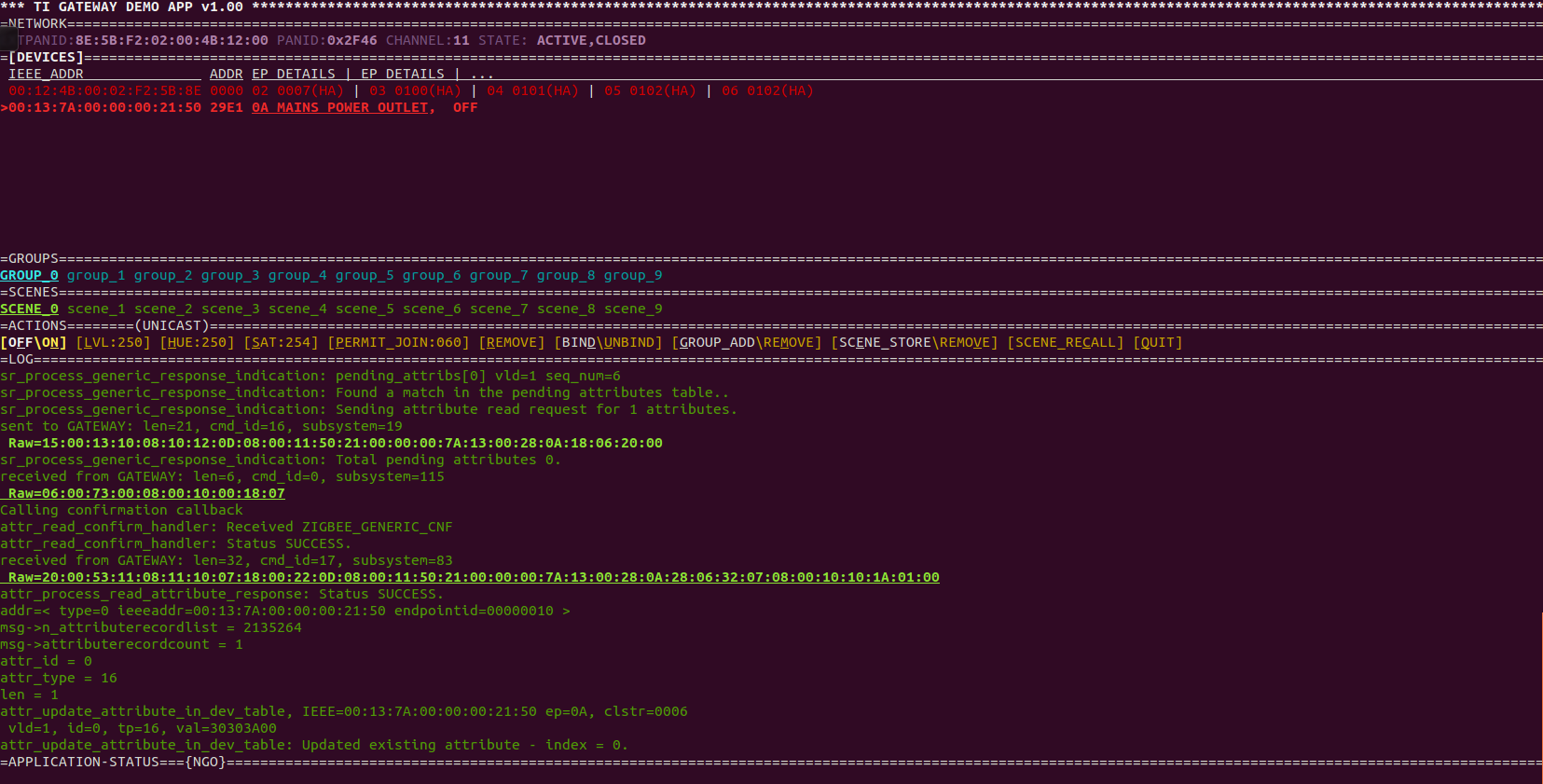
    4. Screen Shot of Sample App on BeagleBoard terminal after Pairing for power consumption reporting Phase execution

  • OD said:

    Hi Francesco,

    In order to have the gateway respond to the match request, it needs to be configured properly. But before we get into this, it seems that this may not even be required, since without matching, the devices is supposed to report the information to the coordinator - which is actually the gateway itself. In order to understand why this does not work, would you please attach the sniffer trace log (it should include all steps from the beginning, including network formation, joining the device, and the device sending its reading over the air as you mentioned? Please also send a screen capture of the sample application at the time the device is reporting the values over the air.

    Best regards,

    OD

    Dear OD,

    any news about my data analisys?

    Best Regards

  • Hi Francesco,

    In the logs that you sent there is no evidence of the device trying to send the power information to the coordinator as a default destination as it should according to your first post.

    Anyway, The gateway can easily be configured to support the match descriptor request that the device send:

    In the log you sent, named 'PairingForPowerConsumptionReporting', you can see in the Match Descriptor Request that there is a single cluster required as an output cluster at the gateway side - ClusterID 0x0702 (Smart Energy / Metering).

    You will need to edit the file gateway_config.tlg, and add the above cluster ID as an output cluster to one of the endpoints that may already be defined there (or add an endpoint of your own).

    Once the tlg is updated, start the gateway (or soft reset it), and then connect the plug to the gateway again (you may need to reset the plug to factory defaults first). The gateway will now automatically respond to the match descriptor request.

    An example of tlg section that defines a combined interface that has the above cluster configured as an output cluster (see highlighted) is below:

    // Device IDs
    #define DeviceID_CombinedInterface 0x0007

    // Cluster IDs
    #define BasicClusterId 0x0000
    #define IdentifyClusterId 0x0003

    // Application endpoints IDs may be in the range 3-254
    // endpoint IDs 0-2 are reserved by the system (ZDO, NwkMgr, GatewayMgr)
    // endpoint ID 14 is reserved as well (OtaMgr)
    // the same endpointdef may be used by more than one endpoint
    // endpoint { ID, EndpointDef, AttrDef }
    endpoint { 4, CombinedInterfaceEpDef, CombinedInterfaceAttrList }

    // endpointdefs define all fields for a simple descriptor (with the exception of the endpoint id)
    // uint16 profileid;
    // uint16 deviceid;
    // uint8 devicever;
    // uint8 n_inputclusters;
    // uint16 *inputclusters;
    // uint8 n_outputclusters;
    // uint16 *outputclusters;
    endpointdef CombinedInterfaceEpDef { ha_profile, DeviceID_CombinedInterface , 0, CombinedInterfaceInputClusters, CombinedInterfaceOutputClusters }

    // clusterlists include a list of clusters
    //
    // the common ZigBee clusters, such as basic, groups can use the symbol, rather than the number (e.g. 0x0006 or onoff)
    clusterlist CombinedInterfaceInputClusters { basic, identify }
    clusterlist CombinedInterfaceOutputClusters { onoff, 0x0702 }

    // attrs include an identifier, data type, and access control
    // uint16 attrid; // in hex (0x050E) or decimal (0, 99, etc..)
    // uint8 datatype; // boolean, uint8, uint16, uint32, or the ZigBee hex equivalent
    // uint8 accesscontrol; // rdonly or rdwr
    // special case: if attribute datatype is charstring or octetstring, a length byte follows the type
    // { 99, charstring, 16, rdwr } // a character string up to 16 bytes
    attr Identify_IdentifyTimeAttr { IdentifyClusterId, 0x0000, uint16, rdwr }
    attr Basic_ZCLVersionAttr { BasicClusterId, 0x0000, uint8, rdonly }
    attr Basic_PowerSourceAttr { BasicClusterId, 0x0007, uint8, rdonly }

    // attrlists are a collection of attributes
    attrlist CombinedInterfaceAttrList { Identify_IdentifyTimeAttr, Basic_ZCLVersionAttr, Basic_PowerSourceAttr }

    Best regards,

    OD

  • OD said:

    Hi Francesco,

    In the logs that you sent there is no evidence of the device trying to send the power information to the coordinator as a default destination as it should according to your first post.

    Anyway, The gateway can easily be configured to support the match descriptor request that the device send:

    In the log you sent, named 'PairingForPowerConsumptionReporting', you can see in the Match Descriptor Request that there is a single cluster required as an output cluster at the gateway side - ClusterID 0x0702 (Smart Energy / Metering).

    You will need to edit the file gateway_config.tlg, and add the above cluster ID as an output cluster to one of the endpoints that may already be defined there (or add an endpoint of your own).

    Once the tlg is updated, start the gateway (or soft reset it), and then connect the plug to the gateway again (you may need to reset the plug to factory defaults first). The gateway will now automatically respond to the match descriptor request.

    An example of tlg section that defines a combined interface that has the above cluster configured as an output cluster (see highlighted) is below:

    // Device IDs
    #define DeviceID_CombinedInterface 0x0007

    // Cluster IDs
    #define BasicClusterId 0x0000
    #define IdentifyClusterId 0x0003

    // Application endpoints IDs may be in the range 3-254
    // endpoint IDs 0-2 are reserved by the system (ZDO, NwkMgr, GatewayMgr)
    // endpoint ID 14 is reserved as well (OtaMgr)
    // the same endpointdef may be used by more than one endpoint
    // endpoint { ID, EndpointDef, AttrDef }
    endpoint { 4, CombinedInterfaceEpDef, CombinedInterfaceAttrList }

    // endpointdefs define all fields for a simple descriptor (with the exception of the endpoint id)
    // uint16 profileid;
    // uint16 deviceid;
    // uint8 devicever;
    // uint8 n_inputclusters;
    // uint16 *inputclusters;
    // uint8 n_outputclusters;
    // uint16 *outputclusters;
    endpointdef CombinedInterfaceEpDef { ha_profile, DeviceID_CombinedInterface , 0, CombinedInterfaceInputClusters, CombinedInterfaceOutputClusters }

    // clusterlists include a list of clusters
    //
    // the common ZigBee clusters, such as basic, groups can use the symbol, rather than the number (e.g. 0x0006 or onoff)
    clusterlist CombinedInterfaceInputClusters { basic, identify }
    clusterlist CombinedInterfaceOutputClusters { onoff, 0x0702 }

    // attrs include an identifier, data type, and access control
    // uint16 attrid; // in hex (0x050E) or decimal (0, 99, etc..)
    // uint8 datatype; // boolean, uint8, uint16, uint32, or the ZigBee hex equivalent
    // uint8 accesscontrol; // rdonly or rdwr
    // special case: if attribute datatype is charstring or octetstring, a length byte follows the type
    // { 99, charstring, 16, rdwr } // a character string up to 16 bytes
    attr Identify_IdentifyTimeAttr { IdentifyClusterId, 0x0000, uint16, rdwr }
    attr Basic_ZCLVersionAttr { BasicClusterId, 0x0000, uint8, rdonly }
    attr Basic_PowerSourceAttr { BasicClusterId, 0x0007, uint8, rdonly }

    // attrlists are a collection of attributes
    attrlist CombinedInterfaceAttrList { Identify_IdentifyTimeAttr, Basic_ZCLVersionAttr, Basic_PowerSourceAttr }

    Best regards,

    OD

    Dear OD,

    thanks a lot for your answer.

    Sorry but i'm newbie on zigbee tecnology. I'm linux specialist.

    I tried to find Cluster ID 0x0702 on my packet sniffer (named PairingForPowerConsumptionReporting), but i'm not able to find it. Please can you could tell me the specific field where i can find it? Is it "APS Cluster Id"? Red coloured?


    I tried to change my gateway_config.tlg as your own, adding "clusterlist CombinedInterfaceOutputClusters { onoff, 0x0702 }" and the other antries as you sample TLG file...but nothing, the behavior is the same.

    Thank you very much for your time

    Francesco

  • Hi OD,

    I bought a SmartSense presence sensor and found it cannot appear in DEVICES list of TI Z-Stack gateway demo app. Do you know how to add endpoint configuration for this kind of sensor? Thanks.

  • If you can provide packet sniffer log, I can have a look on it.
  • I will provide log for you after I got another CC2531 usb dongle. Before that, I have some questions:
    What are the conditions that gateway will list the device? Profile ID, Channel, PAN ID, Device ID and Cluster ID are all essential? Thanks.
  • It is most related to Profile ID, Device ID and Cluster ID.
  • If I can sniffer the packet with channel 13(0x0D), it means the sensor use this channel and I need to set gateway's channel to 13, right? If I don't know the PAN ID of the sensor, can I just set gateway's PAN ID to 0xFFFF?
  • When you use sniffer, you should set channel to your gateway's channel. Device would scan all 16 channels and try to join your gateway. You can set gateway's PANID to any value. If you set it to 0xFFFF, coordinator would generate a random PANID for you.
  • After increasing the seconds of PERMIT_JOIN and trying many times, the sensor appears in devices list. Why does it take long time to appear in devices list? How to make it appear soon? If I remove the battery of sensor, why doesn't it be removed from device list?

  • The speed of joining ZB network is mostly related to device. You cannot do anything to enhance it if you use 3rd party devices. After a device joins GW, GW would keep it on device list until you remove it.
  • After hard reset, the sensor device is removed from device list. I enable PERMIT_JOIN with 255 to make the state always OPEN. I wait long time, the sensor cannot appear in device list. Is this normal? How to check the cause why it doesn't appear in list? Would it be better to set PAN ID to a fixed value?
  • You can use TI packet sniffer to check over the air message.
  • Hi YiKai,

    I got another usb dongle to sniffer the packet. Could you help me check why SmartThings presence sensor cannot appear in device list? Thanks.

    SmartThings_PresenceSensor_06221002.psd

  • I only see a device is doing beacon requests in the sniffer log. There is no coordinator responses to beacon request. Please check if your coordinator is working fine.
  • Hi YiKai,

    How to check the coordinator is working fine? I restart the gateway demo app and power on PIR sensor, then it can appear in devices list. This indicates the coordinator is working fine, right? Then I power down PIR sensor and power on Presence sensor, it still can't appear in devices list. I checked the difference of two sniffer logs. For PIR sensor, there is packet from 0x0000 to 0x5F51. For Presence sensor, there is no packet from 0x0000 to 0xDF7A. This indicates coordinator didn't response to Presence sensor's request? How to debug why coordinator didn't response the request? Thanks.

    PIR_06221124.psd

  • I see ZED (0x5F51) joins your coordinator in sniffer log so there is no problem with your coordinator now. However, I don't see Presence sensor 0xDF7A in your log. Do you do a factory reset to Presence sensor to make it send beacon requests to join your coordinator?
  • After factory reset to Presence sensor, it can appear in device list now. It has endpoint with profile id FC01 and device id 019A. It's customized by SmartThings, not normal id, right? Is "factory reset" a "must" step in ZigBee spec or this is Presence sensor's issue? If I would like to make it disappear in device list when I power down it, I need to modify which part of source code? Thanks.

    SmartThings_PresenceSensor_06221346.psd

  • Yes, it is private profile and format. You can use [REMOVE] on GW to remove the device.
  • I would like to modify code to remove the device automatically when I power down device, do you know how to achieve it? Does TI provide any reference document to illustrate GW source code?
  • The problem is how GW knows device is powered down?
  • The SmartSense Presence sensor lets you receive updates about a person or pet coming and going. And using SmartThings SmartApps lets you customize different actions to take place when these things come in and out of range of the SmartThings Hub.

    "Power down" is not equal to "out of range"? If not, I would like to modify code to remove the device automatically when it's out of range of GW. Do you know how to achieve it? Does TI provide any reference document to illustrate GW source code?
  • "Power down" is not equal to "out of range" but they are the same from GW's point of view. There is no way to tell the difference so I don't think it is a good idea to remove a power down device automatically. Why do you need this?
  • I just want to imitate SmartThings' scenario to show the device come in or out of range of GW. It would be better if there is reference document to illustrate GW source code. Have you ever traced the source code? Could you provide suggestions about how to trace them efficiently?
  • Sorry, I don't trace the source code of GW so I cannot give you any short cut.
  • Hi ,
    I am running the demo app from my ubuntu PC, I flashed the znp firmware(CC2531-GW-ZNP_38724.hex) using cc debuger in CC2531,
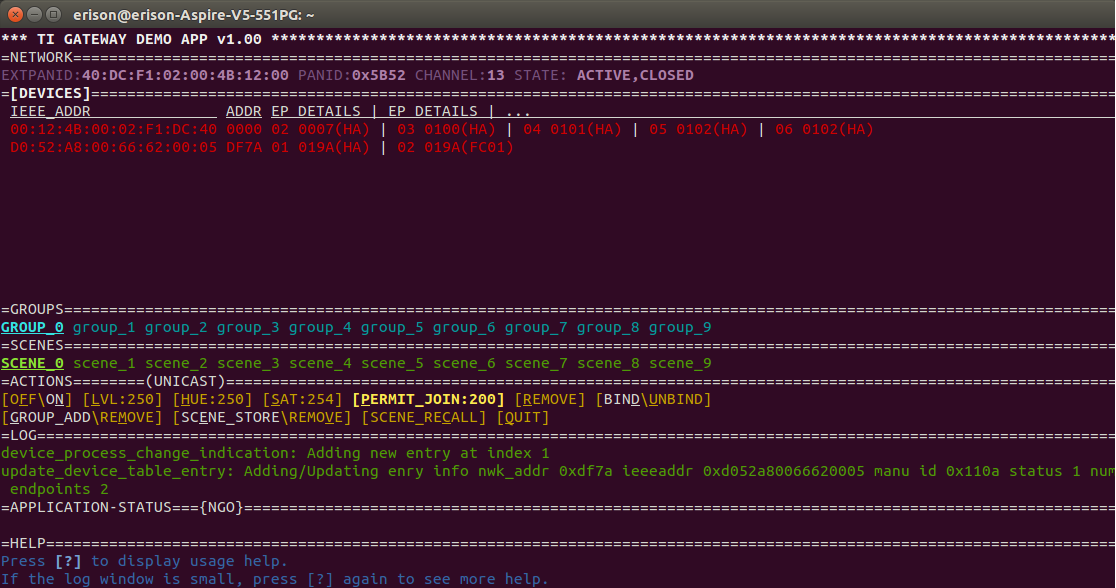
    when i am connecting to the host system and starting application(./ZigbeeHAgw and ./start application), I am able to get the device info. as given in below screenshot.
    drive.google.com/.../view

    Now I am trying to make other cc2531 module as a end device so as given in documents/sample_app_ota_readme.txt I flashed the SampleSwitchRouter_OTA.hex but I am unable to detect this module.

    I tried by binding the device and permitting for 60-100 sec. and also pressed the button(s1 or s2) but i am unable to detect it.

    Please guide me for the same..

    Regards,
    akshay
  • hi francesco,
    Can u please tell me procedure , How did u add the end device in network??
    I am also working on same thing but unable to add end device in a network.

    please suggest me..

    akshay