This thread has been locked.

If you have a related question, please click the "Ask a related question" button in the top right corner. The newly created question will be automatically linked to this question.

CC2564C Multi-Connection

Other Parts Discussed in Thread: CC2564C, CC2564

We have a project with the use of CC2564C, we want to implement the functionality of multiple iPhones connected to one CC2564C device.
  • Yes, CC2564C supports multiple LE connections. Please refer to data sheet : www.ti.com/.../cc2564c.pdf.

    Thanks
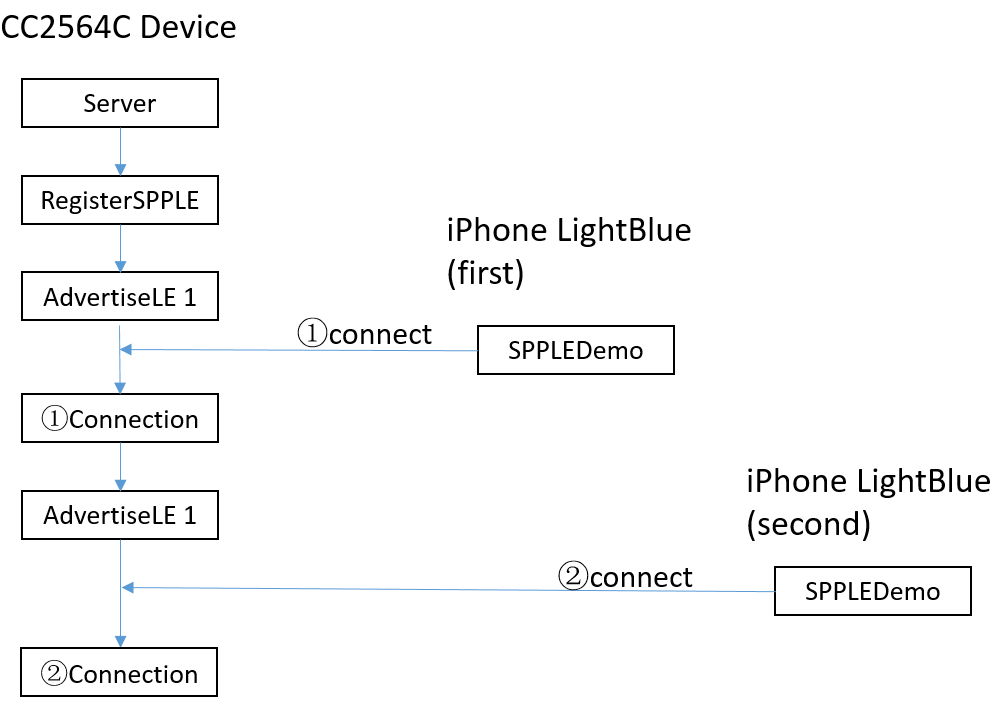
  • In order to realize this function,we try to enable the BLE advertise again when the first iPhone connect to the device successfully,then the second iPhone can connect to the device simultaneously ,is that operation correctly?

     Above operation can realize two or more iPhones' connections,if I try to disconnect one connection ,then I can connect again successfully,that seems to achieve the above requirement.

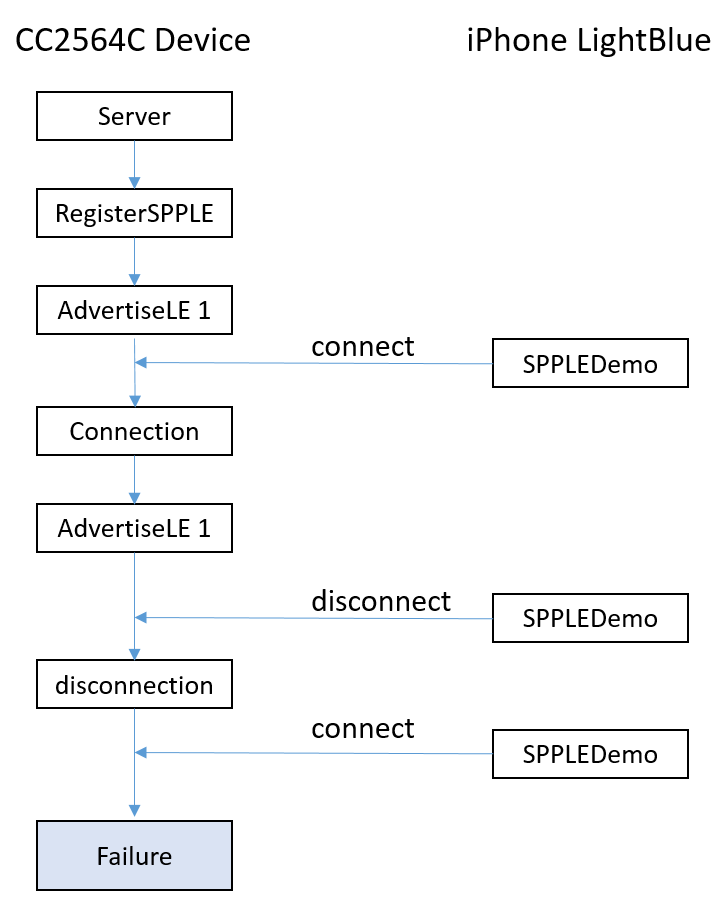
            But,if there is only one connection,then I disconnect this connection,I can never connect again,that is not normal.

            I tried to motify the Bluetopia code,but no solution was found,and above situation seems to have been caused by the patch,so we ask help for you.
            We need to solve the problem of repeated connections on one iPhone as shown in the figure above. You can use Bluetopia SDK Sample to recurrent this situation:
                C:\TI\Connectivity\CC256X BT\CC256x STM32 Bluetopia SDK\v4.2.1.0\NoOS\STM3240G-EVAL\Samples\SPPLEDemo 
            Can you give me some advice about this ?Or,can you show me the correct operation to realize this function?
  • 1.first picture is correctly
    2.second picture , why have not advertise when disconnect state ?
  • Because I have advertise after the first connection.I have tried advertise when disconnection,it's the same situation,I cannot connect the device any more.
  • you can debug it and confirm it's state. if it's state is advertise ,you can connect it.
  • The state is advertise,but I cannot connect it,you can recurrent it.
  • what is it's error information?
  • OpenStack().
    Bluetooth Stack ID: 1
    LOW ENERGY Support initialized.
    Device Chipset: 4.1
    BTPS Version  : 4.2.1.0
    PLAT Version  : 1.0
    App Name      : SPPLEDemo
    App Version   : 0.6
    Project Type  : 6
    FW Version    : 12.26
    Local BD_ADDR: 0x985DAD11CCE6

    ******************************************************************
    * Command Options: Server, Client, Help                          *
    ******************************************************************

    SPP+LE>Server

    ******************************************************************
    * Command Options General: Help, GetLocalAddress, SetBaudRate    *
    *                          Quit,                                 *
    * Command Options BR/EDR:  Inquiry, DisplayInquiryList, Pair,    *
    *                          EndPairing, PINCodeResponse,          *
    *                          PassKeyResponse,                      *
    *                          UserConfirmationResponse,             *
    *                          SetDiscoverabilityMode,               *
    *                          SetConnectabilityMode,                *
    *                          SetPairabilityMode,                   *
    *                          ChangeSimplePairingParameters,        *
    *                          GetLocalName, SetLocalName,           *
    *                          GetClassOfDevice, SetClassOfDevice,   *
    *                          GetRemoteName, SniffMode,             *
    *                          ExitSniffMode, Open, Close, Read,     *
    *                          Write, GetConfigParams,               *
    *                          SetConfigParams, GetQueueParams,      *
    *                          SetQueueParams, Loopback,             *
    *                          DisplayRawModeData, AutomaticReadMode,*
    *                          CBSend                                *
    * Command Options GAPLE:   SetDiscoverabilityMode,               *
    *                          SetConnectabilityMode,                *
    *                          SetPairabilityMode,                   *
    *                          ChangePairingParameters,              *
    *                          SetRandomAddress,                     *
    *                          ResolveRemoteAddress,                 *
    *                          AdvertiseLE, StartScanning,           *
    *                          StopScanning, ConnectLE,              *
    *                          DisconnectLE, CancelConnectLE,        *
    *                          PairLE, UnPairLE, LEPasskeyResponse,  *
    *                          QueryEncryptionMode, SetPasskey,      *
    *                          DiscoverGAPS, GetLocalName,           *
    *                          SetLocalName, GetLERemoteName,        *
    *                          LEUserConfirmationResponse,           *
    *                          EnableSCOnly,                         *
    *                          RegenerateP256LocalKeys,              *
    *                          SCGenerateOOBLocalParams,             *
    *                          SetLocalAppearance,                   *
    *                          GetLocalAppearance,                   *
    *                          GetRemoteAppearance,                  *
    * Command Options SPPLE:   DiscoverSPPLE, RegisterSPPLE, LESend, *
    *                          ConfigureSPPLE, LERead, Loopback,     *
    *                          DisplayRawModeData, AutomaticReadMode *
    ******************************************************************

    SPP+LE>
    SPP+LE>RegisterSPPLE
    Successfully registered SPPLE Service.

    SPP+LE>
    SPP+LE>AdvertiseLE 1 0
       GAP_LE_Advertising_Enable success.

    SPP+LE>
    SPP+LE>
    etLE_Connection_Complete with size 16.
       Status:       0x00.
       Role:         Slave.
       Address Type: Random.
       BD_ADDR:      0x44C19DE42E32.

    SPP+LE>
    etGATT_Connection_Device_Connection with size 16:
       Connection ID:   1.
       Connection Type: LE.
       Remote Device:   0x44C19DE42E32.
       Connection MTU:  23.

    SPP+LE>
    SPP+LE>
    SPP+LE>AdvertiseLE 1 0
       GAP_LE_Advertising_Enable success.

    SPP+LE>
    SPP+LE>
    etGATT_Connection_Device_Disconnection with size 12:
       Connection ID:   1.
       Connection Type: LE.
       Remote Device:   0x44C19DE42E32.

    SPP+LE>
    etLE_Disconnection_Complete with size 9.
       Status: 0x00.
       Reason: 0x13.
       BD_ADDR: 0x44C19DE42E32.

    SPP+LE>
    etLE_Connection_Complete with size 16.
       Status:       0x00.
       Role:         Slave.
       Address Type: Random.
       BD_ADDR:      0x44C19DE42E32.

    SPP+LE>
    etGATT_Connection_Device_Connection with size 16:
       Connection ID:   2.
       Connection Type: LE.
       Remote Device:   0x44C19DE42E32.
       Connection MTU:  23.

    SPP+LE>

  • Please wait e2e ti's gus help us . i don't know it's reason. i am so sorry.....
  • help us ,thanks
  • I am a bit confused.. The 2nd attempt for connection also succeeded above right? Where is the error?
  • The phenomenon is: With the use of CC2564C, if there is only one connection, I disconnect it, I can never re-connect again ; if there is two or more connections, I can disconnect one connection and re-connect it successfully.
  • I tried it on MSP432+CC2564 setup with SPPLE server example. I am able to connect using LightBlue, disconnect and reconnect again without any issue..

    Here is the log:

    SPP+LE>RegistetSPPLE
    Invalid Command: REGISTETSPPLE.

    SPP+LE>registerSPPLE
    Successfully registered SPPLE Service.

    SPP+LE>AdvertiseLE 1
    GAP_LE_Advertising_Enable success.

    SPP+LE>
    etLE_Connection_Complete with size 16.
    Status: 0x00.
    Role: Slave.
    Address Type: Random.
    BD_ADDR: 0x696590F5DF24.

    SPP+LE>
    etGATT_Connection_Device_Connection with size 16:
    Connection ID: 1.
    Connection Type: LE.
    Remote Device: 0x696590F5DF24.
    Connection MTU: 23.

    SPP+LE>
    SPP+LE>
    etGATT_Connection_Device_Disconnection with size 12:
    Connection ID: 1.
    Connection Type: LE.
    Remote Device: 0x696590F5DF24.

    SPP+LE>
    etLE_Disconnection_Complete with size 9.
    Status: 0x00.
    Reason: 0x13.
    BD_ADDR: 0x696590F5DF24.

    SPP+LE>
    SPP+LE>
    SPP+LE>
    SPP+LE>
    SPP+LE>AdvertiseLe 1
    GAP_LE_Advertising_Enable success.

    SPP+LE>
    etLE_Connection_Complete with size 16.
    Status: 0x00.
    Role: Slave.
    Address Type: Random.
    BD_ADDR: 0x696590F5DF24.

    SPP+LE>
    etGATT_Connection_Device_Connection with size 16:
    Connection ID: 2.
    Connection Type: LE.
    Remote Device: 0x696590F5DF24.
    Connection MTU: 23.
  • Before disconnect,I advertise again(to realize two or more connections ,only work with CC2564C,that support BT4.2). Your operation is on CC2564,not CC2564C.

  • Hari,could you do some test on CC2564C board?