This thread has been locked.

If you have a related question, please click the "Ask a related question" button in the top right corner. The newly created question will be automatically linked to this question.

OAD issue on CC2640: OAD block overflows

Other Parts Discussed in Thread: CC2640
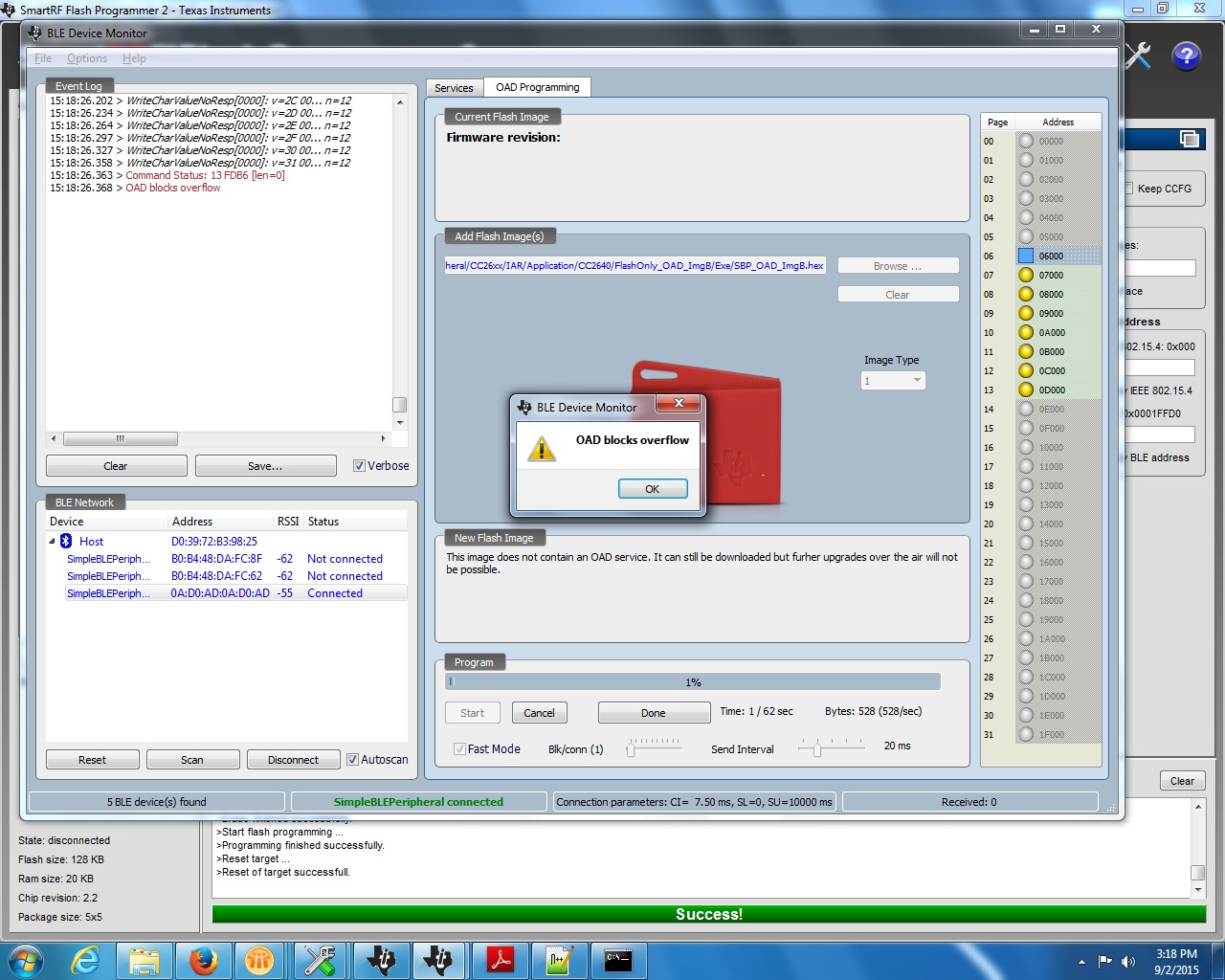
 I have followed all the steps as per the OAD document. But when I press the start button, it shows OAD block overflows warning and everything stops. The device gets disconnected. And it needs to flash again to work.

I am trying to use the Onchip flash and flashing ImageB. My target app resides on CC2650 TI EM 5x5 and downloader is CC2540 USB dongle with BLE device Monitor running .

Chip Rev. 2.2 SDK :2.1

  • Hi,
    Which version of BLE Device monitor are you using? Can you list the steps to reproduce this issue?
  • BLE Device monitor version: 2.0.10

    Followed all the steps for building Image A, BIM, Stack & Image B as given in document CC2640 BLE OAD User's Guide located at C:\ti\simplelink\ble_cc26xx_2_01_00_44423\Documents

    Also I have followed the steps for adjusting stack and application image size as given in the same document.

    Then I have flashed the target application through SmartRFFlashProgrammer  with oad_merge.hex.

    Then connected the usb dongle with with this target device through BLE Device Monitor.

    The OAD services get discovered as soon as I connect to the device.

    Then I click on Program (OAD) option in the FILE menu.

    Then I select the hex file (Image B) and press the start button for download.

    It starts and soon the message pops up that OAD blocks overflows

  • Hi,

    Can you change the Connection parameters to 10ms with slave latency of zero before starting OAD? You can change it in BLE device monitor options->Gap Settings.

    Regards,
    Arun
  • Hello Arun,

    I tried by changing the connection parameters to 10ms but no change.

    Same error, OAD block overflows.

  • Hi Abhijeet,
    Have you tried what's described in section 10.1 of the CC2640 BLE OAD User's Guide?
    - Cetri
  • Yes, I tried as given.

  • Hi Abhiijeet,

    From the screenshot in your original post of this thread, 'Fast mode' is checked. Can you try with it unchecked?

    - Cetri

  • Hi Cetri,

    I am following the steps you are suggesting. But know why, it is not getting worked.
    I have tried with even Fast mode unchecked. But still the same error.
    OAD blocks overflows.
  • I  have  met  the  same  problem !

  • Hi Abhijeet,

    When OAD is in process, is your peripheral doing something else as well or nothing else?

    Can you capture some sniffer log an share here?

    - Cetri

  • Hi Cetri,

    The peripheral is not doing anything else. I have used the default code as in SimpleBLEPeripheral.c

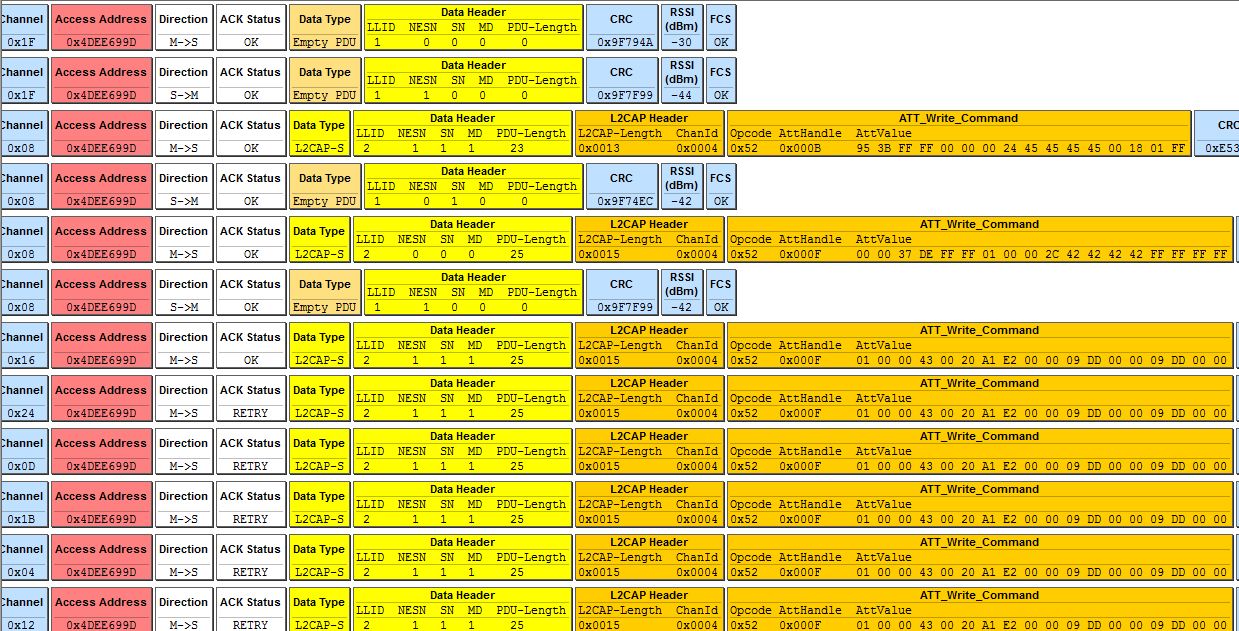
    I have attached the screenshot of the packet sniffer.


    What I had observed is, the same packet it was trying to send from packet no 1754 to packet no 1852 but no ACK status OK was got, instead it was getting ACK status retry


    What does this means?


  • Hi Abhijeet,

    How did you make the image? I thought you were doing "On-chip" OAD, but the header shown in sniffer log indicates that it has the UID "EEEE" which is for "Off-chip" OAD.

    - Cetri

  • Hello Citri,

    Yeah, I am doing On chip OAD and have a preprocessor "FEATURE_OAD_ONCHIP" declared under C/C++ Compiler options.

    I dont know how it is even then showing the header for Off chip OAD

    @edit: Also I have made the configuration of the project as FlashOnly_OAD_ImgB

  • Hello Cetri,

    After multiple trials with failure to perform OAD, I thought to start it again from scratch. The only change I made this time was skipping the step 8.5, Adjusting Stack and Application Sizes (from OAD guide). Now I am able to perform the OAD.

    When the OAD gets completed, it suffers a connection loss. But when I scan again it doest not advertise with the new Image unless and until I gave a hard reset to the device manually.

    Also sometimes it doesnt even loses the connection after the OAD is completed, the connection persists. I have to disconnect the connection and then give the manual reset and then only the new image starts advertising.

    What might be the cause for this behavior?

  • Abhijeet,

    Are you able to set break point and debug at the point where OAD is done and the reset should be triggered?

    Are you sure it's the new image that is run after reset?

    Best Regards

    Joakim

  • Hello Joakim,

    Yeah, I am sure that the image running is new one. (Verified by adv data which is different in both the images)

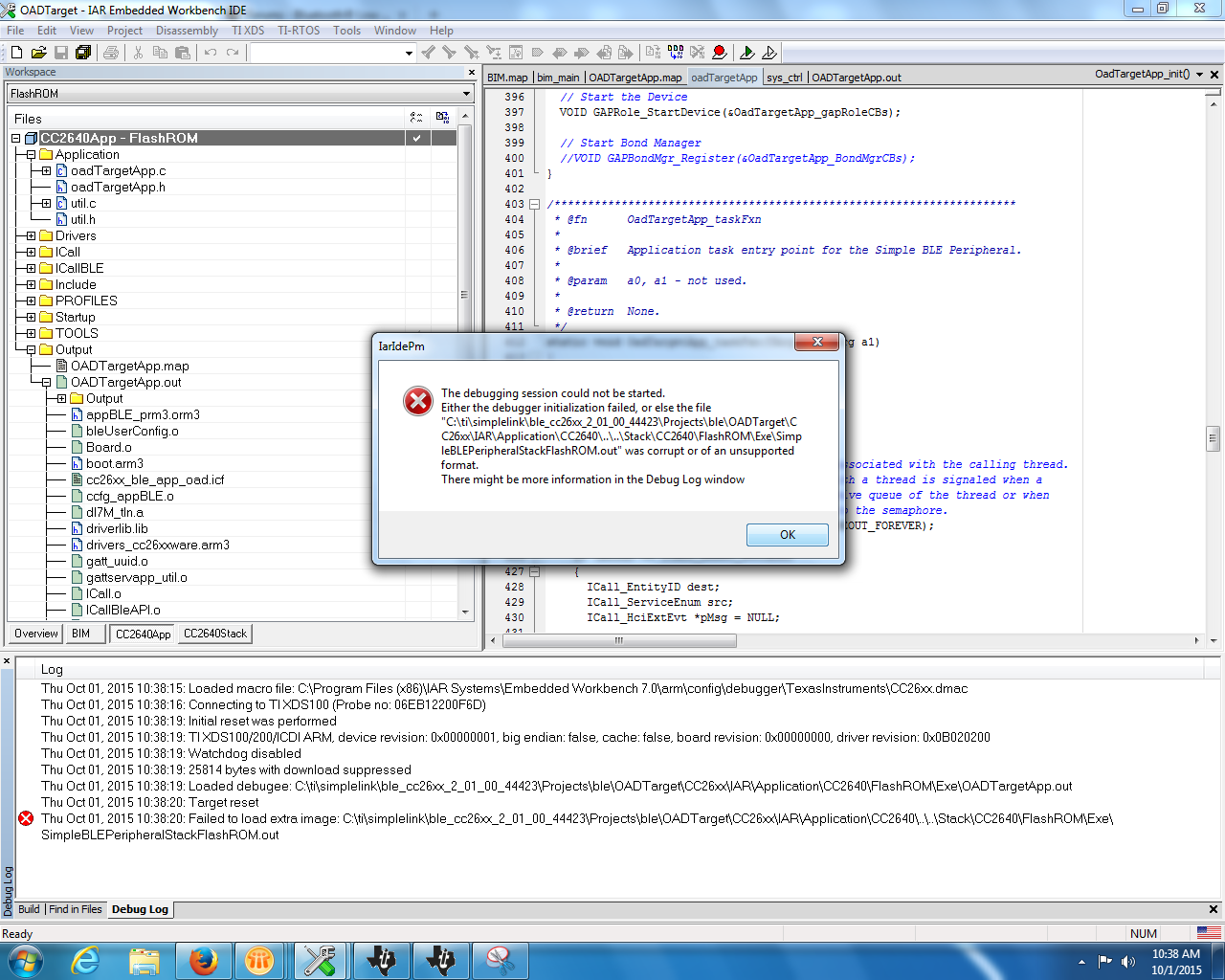
    And I am unable to do a debug session. It shows the following error when I start a debug without download after flashing the oad_merge.hex from SmartRFFlashProgrammer.

    How to start a debug session for this?

  • Hi, 

    It seems like it can't find the SImpleBLEPeripheralStackFlashROM.out, which should be available if you compile the stack code. However, the stack code outputs "OADTargetStackFlashROM.out".

    So you will need to go into CC2640App -> Options -> Debugger -> Images -> download extra image: Path

    here, change to right file (OADTargetStackFlashROM.out)

    Best Regards 

    Joakim

  • Hi Joakim,

    I am now able to do debug session. Thanks for the help.

    It is even coming to the break point where OAD is complete as shown in below screenshot.

    But after executing the next statement, the debug session stops

    But still the the new image doesnt starts immediately.

    I need to give hard reset manually. Then only it starts advertising.

    Thanks & Regards,

    Abhijeet

  • Hello,


    Any update on this?

    I still need to give hard reset to start the Image B.

    Thanks & Regards,

    Abhijeet Kanade

  • Hi Abhijeet,
    I'm not sure to be honest. It's good that you reach that point in debug, and the debug at this point should fail as it's not possible to perform in-code reset while debugging. However the reset should be successfully executed if you don't have a JTAG connected.

    Best Regards
    Joakim
  • Hi Joakim,

    Debug was the attempt only to explore the reset issue. But even without a debug session and with JTAG cable disconnected, I need to give a manual hard reset to start the Image B. Till then the controller halts. On scanning too it doesnt advertises with either Image.
    As soon as I give a manual hard reset it starts advertising with the Image B.

    Thanks & Regards,
    Abhijeet
  • Hi Abhijeet,

    Can you try calling OAD_InvalidateSelf() method here:
     
     void OAD_InvalidateSelf()
    {
    halIntState_t cs;

    HAL_ENTER_CRITICAL_SECTION(cs);

    uint8_t pBuf[4] = {0};

    //Write zeroes to CRC and CRC Shadow to invalidate
    FlashProgram( pBuf, (uint32_t)&_imgHdr - 4, 4 );

    //Reset
    HAL_SYSTEM_RESET();

    //Will not reach this statement
    HAL_EXIT_CRITICAL_SECTION(cs);
    }


    In OAD.c:

      // Check if the OAD Image is complete.

      if (oadBlkNum == oadBlkTot)

      {


        OAD_InvalidateSelf();


    Best wishes

  • Hi Zahid,

    I have tried as you said. But no change in the behaviour. :(

    Still need to give the manual hard reset to start the new Image B.

    I am still not able to trace out what might be the issue.

    Also,

    If I am not missing any preprocessor directive, can you please list the required preprocessors to be declared in the C/C++ compilers option for Image A as well as Image B workspace.

    Thanks & Regards,

    Abhijeet

  • Hi Abhijeet,

    Can you tell the steps you are following to reproduce this issue, what sections in the OAD guide? I am assuming you are trying to do On-chip OAD with SimpleBLEPeripheral with the latest BLE stack 2.1.

  • Hi Abhijeet
    I've done some testing myself on this and I'm able to reproduce what you are seeing. I've made one obesrvation on my part. If you do a manual reset after you have programmed the device with the OADTarget app and then try to do an OAD, I was able to make teh device reset.
    Could you try the same procedure to verify if this happens in your case as well?
    I will continue to try to find the root casue of this behavior.
  • Hello Martin,

    Yeah, I am too seeing the behavior as you mentioned. But in my case the behavior is very random.

    I am following the steps as:

    1) I flash the device with OADTarget generated OAD_merge.hex

    2) Then start the OAD process.

    3) On first OAD complete, I give manual hard reset.

    4) Then it starts running Image B

    5) Then reset the device through reset characteristic running through Image B.

    6) Now it starts running Image A

    7) Now I perform OAD process again

    8) This time the device resets automatically on itself after the OAD has completed.

    But when I repeat the procedure again and again, it doesnt reset each time on its own.

    The behavior is very random. Sometimes it does reset and sometimes it doesnt. And also it doesnt  even loose the connection after the OAD has done.

    I am unable to find any reason for this kind of behavior.

    I am doing OAD onchip with SimpleBLEPeripheral with the latest BLE stack 2.1

  • Did you find the solution for this problem? We are having the same issue.

    Regards
  • Haim Bracha said:
    Did you find the solution for this problem? We are having the same issue.

    Regards

    Dear Haim,

    Unfortunately no. As I was involved in some other project, I was not able to take the followup of the issue. I would glad to know the solution if you find.