This thread has been locked.

If you have a related question, please click the "Ask a related question" button in the top right corner. The newly created question will be automatically linked to this question.

CC2650MODA: Uploading Hex files in CC2650MODA by using XDS110 (Default debugger from sensortag)

Part Number: CC2650MODA
Other Parts Discussed in Thread: CC2650,

Hello all,

From last few days I am playing with CC2650 Sensortag and using default debugger(XDS-110)  which comes with kit.

Now I am want to use CC2650MODA and wish to upload hex files that I have generated.

From schematic I found that I can connect JTAG TMS, TDI, TDO TCK, nreset, VDD and Gnd (Please find attached image for schematic reference).
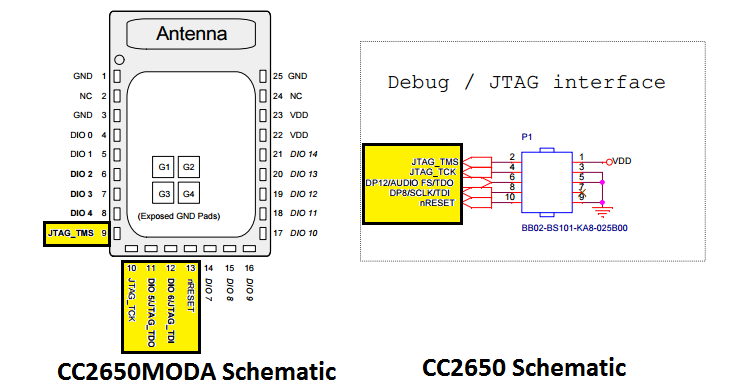
My Question is

1. Except this, what else I have to do in CodeComposerStudio ?

2. How can I change board-type to CC2650MODA?

  • Try to refer to Running Standalone Bluetooth® low energy Applications on CC2650 Module (SWRA534) for porting your project to the CC2650MODA.

  • Hi YK Chen,

    Thanks for your valuable reply. I have gone through document and editing CC2650_LAUNCHXL.c and CC2650_LAUNCHXL.h files for my application.

    Question 1)  In my application I need only I2C peripheral, So is it ok to configure all remaining pines as "PIN_UNASSIGNED"  ?

    Question 2)  I will be using JTAG interface with XDS-110 for debugging, so do I need to assign any pins for this ?

  • 1. If you don't use remaining pins, it's no problem to set them as "PIN_UNASSIGNED".
    2. No need to assign any pin for JTAG.
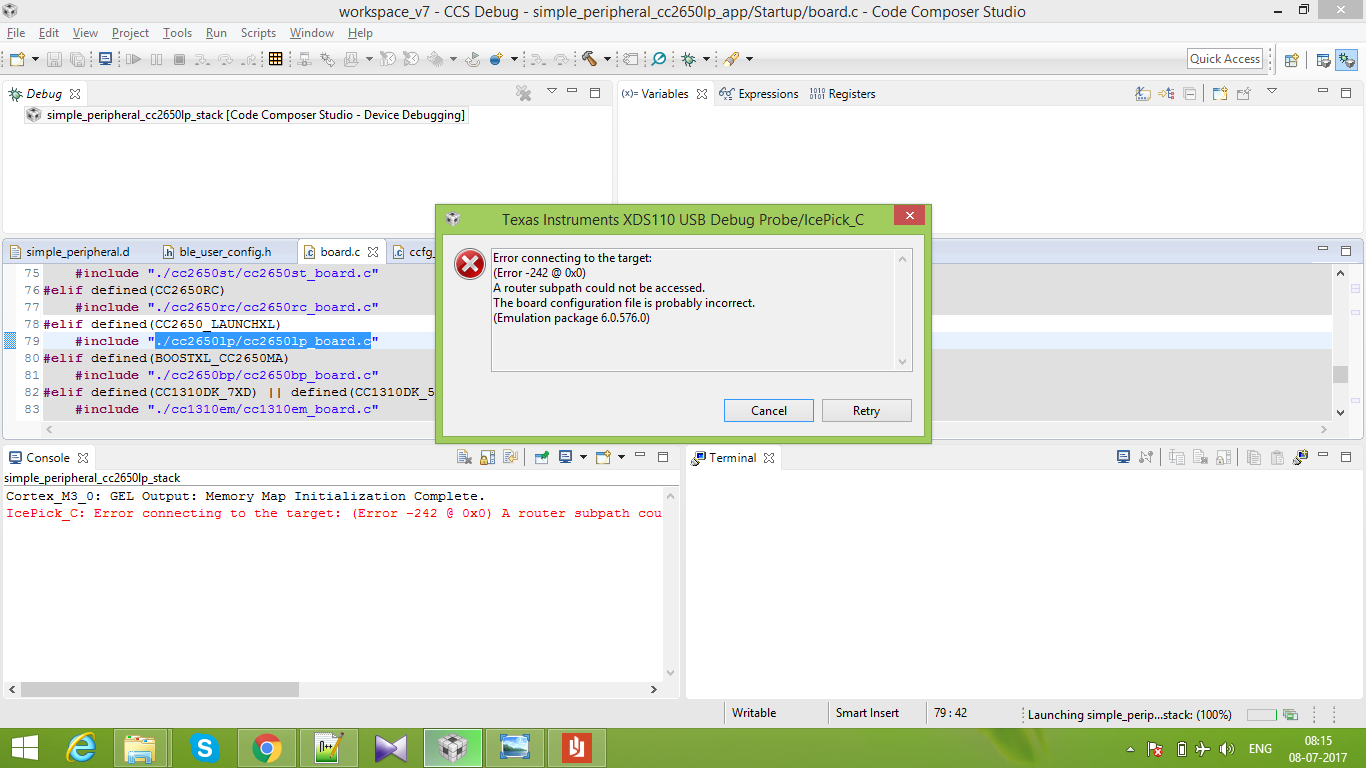
  • Thanks for your quick answer. :) But still I am facing error popup: (Please find attached screenshoot)

    Error connecting to the target:
    (Error -242 @ 0x0)
    A router subpath could not be accessed.
    The board configuration file is probably incorrect.
    (Emulation package 6.0.576.0)


    Console output says:

    Cortex_M3_0: GEL Output: Memory Map Initialization Complete.
    IcePick_C: Error connecting to the target: (Error -242 @ 0x0)
    A router subpath could not be accessed. The board configuration file is probably incorrect. (Emulation package 6.0.576.0)


    Following is process which I followed :

    1) Opened project from path ble_stack_path    -> \examples\cc2650em\simple_peripheral\ccs
    2) Changed board file from path ble_stack_path    -> \src\boards\CC2650_LAUNCHXL\CC2650_LAUNCHXL.h
    Please find attached file, which I am using.

    3348.CC2650_LAUNCHXL.h

    3) Connected XDS110 (Default debugger from sensortag) with CC2650MODA as shown in attached image.   (Please find attached zip folder for images)
    4) Click on Build Stack, (Build successfully) and click on debug.
    ---- Error occured

    Please let me know, if I am missing something, need urgent help for my project.

    ConnectionImages.zip