This thread has been locked.

If you have a related question, please click the "Ask a related question" button in the top right corner. The newly created question will be automatically linked to this question.

OAD of CC2640: read I2C EEPROM from BIM

Other Parts Discussed in Thread: SYSBIOS

Hy there,

During implementing OAD with an external EEPROM on I2C I run into this question:

I successfully wrote the new application into EEPROM after modifying the SensorTag OAD example. So the next step is to read out the EEPROM from BIM and copy the content into internal Flash.
 Unfortunately I am stuck in reading the I2C EEPROM from BIM. So far I have tried a couple of different alternatives, none of which looks promising:

1) Try to integrate the I2C RTOS driver as in the Sensor Tag Example: After including I2C.c and I2CCC26XX.c from tirtos_simplelink_2_13_00_06\packages\ti\drivers and including many header files, I end up with the following linker messages:

error #10099-D: program will not fit into available memory.

and undefined                                               first referenced          
>> Compilation failure
  symbol                                                     in file               
 ---------                                               ----------------          
 PINCC26XX_setMux                                        ./I2C/I2CCC26XX.obj       
 PIN_close                                               ./I2C/I2CCC26XX.obj       
 PIN_open                                                ./I2C/I2CCC26XX.obj       
 ti_sysbios_BIOS_getCpuFreq__E                           ./I2C/I2CCC26XX.obj       
 ti_sysbios_family_arm_cc26xx_Power_registerNotify__E    ./I2C/I2CCC26XX.obj       
 ti_sysbios_family_arm_cc26xx_Power_releaseConstraint__E ./I2C/I2CCC26XX.obj       
 ti_sysbios_family_arm_cc26xx_Power_releaseDependency__E ./I2C/I2CCC26XX.obj       
 ti_sysbios_family_arm_cc26xx_Power_setConstraint__E     ./I2C/I2CCC26XX.obj        etc......

2.) Try to integrate I2C library: I included only file I2C and create my own functions:

#define CPUFREQ 48000000

void at24CM01Init(void) 
{
	I2CMasterIntDisable(I2C0_BASE);
	I2CMasterInitExpClk(I2C0_BASE, CPUFREQ, true);
}
int32_t at24CM01read(uint32_t address, uint32_t len, void * target)
{
	I2CMasterSlaveAddrSet(I2C0_BASE, EEPROM_I2C_ADDRESS + (address & 0xFFFF0000 ? 1 : 0), false);// 
	I2CMasterDataPut(I2C0_BASE,(address & 0xFF));// first address word
	I2CMasterControl(I2C0_BASE, I2C_MASTER_CMD_BURST_SEND_START);// sends a byte..

	while(I2CMasterBusy(I2C0_BASE))
		;

As soon as I jump into the function I2CMasterEnable, line    

HWREG(ui32Base + I2C_O_MCR) |= I2C_MCR_MFE;

from I2CMasterInitExpClk, there is a jump to address 0x1001ca00 (which is not within my BIM range...) and then stops debugging
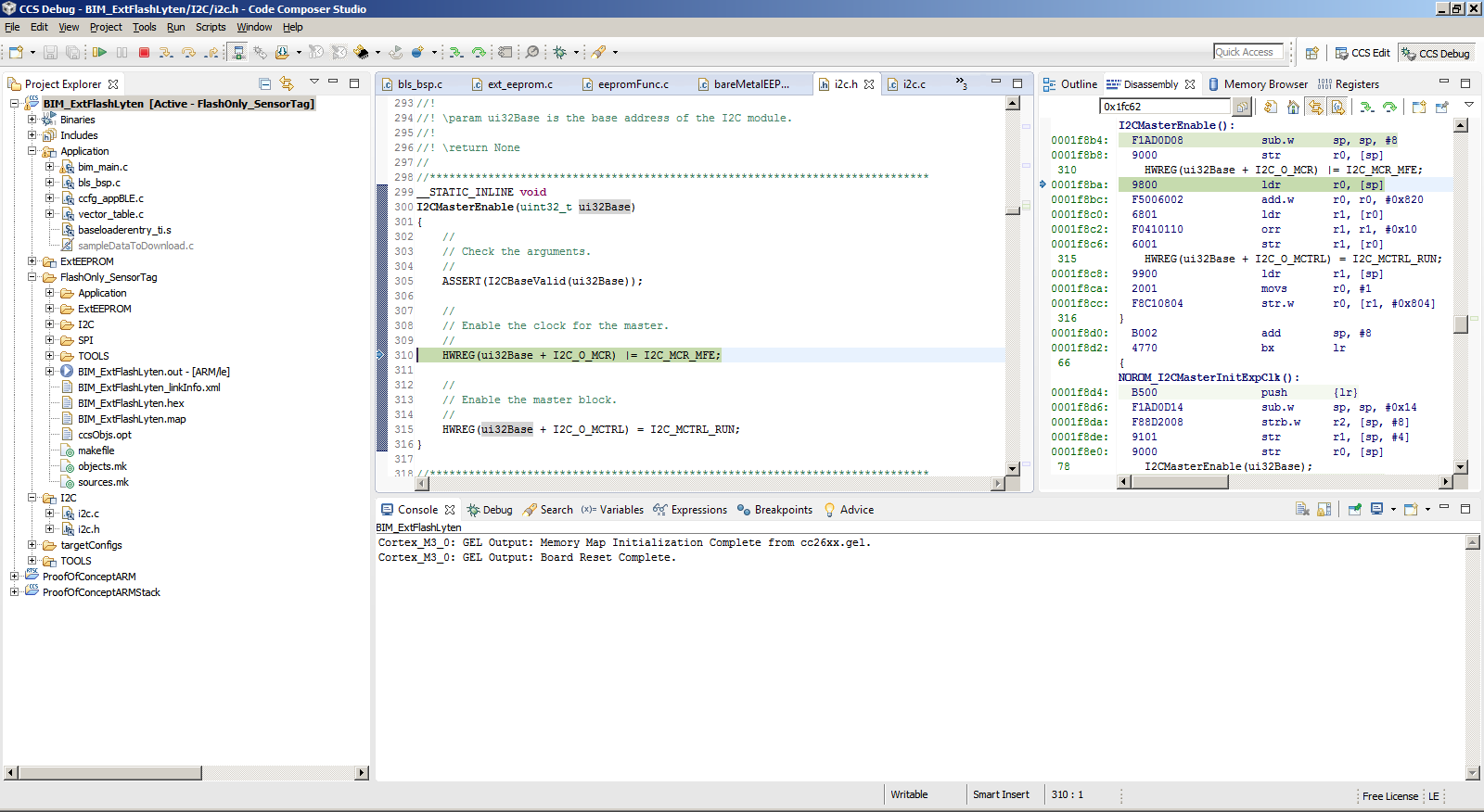

Hopefully you point me into the right direction, I am pretty stuck here...

Regards

Harald

  • Hello Harald,

    You are correct in that you can't use RTOS drivers in the BIM; the BIM page is not large enough to accommodate an instance of the RTOS. You will need to directly access the I2C registers, using CC26XXWARE (driverLib) as an example. The default SPI flash should be an comparable example.

    It looks like you are hitting an HW exception. Have you configured the respective I2C pins accordingly? You'll need to explicitly do this in the BIM as the BIM is a standalone executable. Use the debugger to confirm the respective PIN mux is configured accordingly.

    I think you're on the right track. Please do share with us the I2C enabled BIM when you have it working, I'm sure others will want to use it!

    Best wishes
  • Hy there

    >Please do share with us the I2C enabled BIM when you have it working

    Yes I will. Actually, I kind of have it working already, but only because I cheat: As discussed here and here I use the "Sensor Tag way of OAD", that means I call the "BIM" (which actually is not a BIM any more) at the end of OAD reception, so it is not started after reset as in "SBP way of OAD". So I can rely on the I2C initialization of the application. The only thing I need to do to get it running at the moment is a different way of starting the debug session: After starting a debug session of my BIM project I set a breakpoint on the entry function of the BIM (function Bim_safeStart), perform a CPU reset (Menu Run->Reset-CPU Reset) and wait, until the application calls the BIM entry function. Then, the I2C is initialized already. From that point I implement the access to the I2C EEPROM (at24CM01 1MBit) as follows:

    bareMetalEEPROM.c

    I probably will try to implement the full I2C initialization, any help is welcome...

    Regards, Harald