This thread has been locked.

If you have a related question, please click the "Ask a related question" button in the top right corner. The newly created question will be automatically linked to this question.

Compiler: I can't find this “RF_EventCmdError ”where was defined

Other Parts Discussed in Thread: CC1310

Tool/software: TI C/C++ Compiler

I can't   find this  “RF_EventCmdError ”where was defined  at "C:\ti\simplelink_cc13x0_sdk_1_50_00_08\source\ti\drivers\rf\RF.h"

compiler error:

EasyLink.c
Error[Pe020]: identifier "RF_EventCmdError" is undefined D:\me\code\v1.4\CC1310 FC761_SHT ZS_GRAM_Ver_V104_20161222\EasyLink.c 305
Error[Pe020]: identifier "RF_EventCmdError" is undefined D:\me\code\v1.4\CC1310 FC761_SHT ZS_GRAM_Ver_V104_20161222\EasyLink.c 380
Error[Pe020]: identifier "RF_EventCmdError" is undefined D:\me\code\v1.4\CC1310 FC761_SHT ZS_GRAM_Ver_V104_20161222\EasyLink.c 436
Error[Pe020]: identifier "RF_EventCmdError" is undefined D:\me\code\v1.4\CC1310 FC761_SHT ZS_GRAM_Ver_V104_20161222\EasyLink.c 523
Error[Pe020]: identifier "RF_EventCmdError" is undefined D:\me\code\v1.4\CC1310 FC761_SHT ZS_GRAM_Ver_V104_20161222\EasyLink.c 614
Error[Pe020]: identifier "RF_EventCmdError" is undefined D:\me\code\v1.4\CC1310 FC761_SHT ZS_GRAM_Ver_V104_20161222\EasyLink.c 691
Error[Pe020]: identifier "RF_EventCmdError" is undefined D:\me\code\v1.4\CC1310 FC761_SHT ZS_GRAM_Ver_V104_20161222\EasyLink.c 831
Error[Pe020]: identifier "RF_EventCmdError" is undefined D:\me\code\v1.4\CC1310 FC761_SHT ZS_GRAM_Ver_V104_20161222\EasyLink.c 944
Error[Pe020]: identifier "RF_EventCmdError" is undefined D:\me\code\v1.4\CC1310 FC761_SHT ZS_GRAM_Ver_V104_20161222\EasyLink.c 1040
Error[Pe020]: identifier "RF_EventCmdError" is undefined D:\me\code\v1.4\CC1310 FC761_SHT ZS_GRAM_Ver_V104_20161222\EasyLink.c 1204
Error while running C/C++ Compiler

Done. 10 error(s), 0 warning(s)

my EasyLink.c:

#define EASYLINK_RF_EVENT_MASK ( RF_EventLastCmdDone | RF_EventCmdError | \
RF_EventCmdAborted | RF_EventCmdStopped | RF_EventCmdCancelled )

The code I wrote now is written in 2016. I recently received the code. I don't know the previous sdk version. The compiler I use is iar for arm8.11.1, and the version of sdk is simplelink_cc13x0_sdk_1_50_00_08.

  • If you wrote this code in 2016 you probably used an old version of TI-RTOS. Have you done any porting job on the code to the new SDK? The structure in the old TI-RTOS versions are fairly different from the new SDKs.

    How does the #include section in the smartrf_setting.c file look like in your code?
  • I don't port job on the new SDk?I only import simplelink_cc13x0_sdk_1_50_00_08 at tools->configure custom argument variable
    how do you port job on the new SDk


    code:
    smartrf_setting.c
    #ifndef _SMARTRF_SETTINGS_H_
    #define _SMARTRF_SETTINGS_H_


    //*********************************************************************************
    // These settings have been generated for use with TI-RTOS and cc13xxware
    //
    // Generated by SmartRF Studio version 2.4.0
    // Tested for TI-RTOS version tirtos_simplelink_2_20_xx
    // Device: CC13xx Rev. 2.1
    //
    //*********************************************************************************
    #include <driverlib/rf_mailbox.h>
    #include <driverlib/rf_common_cmd.h>
    #include <driverlib/rf_prop_cmd.h>
    #include <ti/drivers/rf/RF.h>


    // TI-RTOS RF Mode Object
    extern RF_Mode RF_ctmode_prop;
    extern RF_Mode RF_Smode_prop;


    // RF Core API commands
    extern rfc_CMD_PROP_RADIO_DIV_SETUP_t RF_cmdPropRadioDivSetup;
    extern rfc_CMD_FS_t RF_cmdFs;
    extern rfc_CMD_PROP_TX_t RF_cmdPropTx;
    extern rfc_CMD_PROP_RX_t RF_cmdPropRx;


    #endif // _SMARTRF_SETTINGS_H_
  • If you look at TI-RTOS 2.20/ 2.21 the OS project and the application files are in the same project. For the new SDKs, the TI-RTOS related files are a different project linked in.

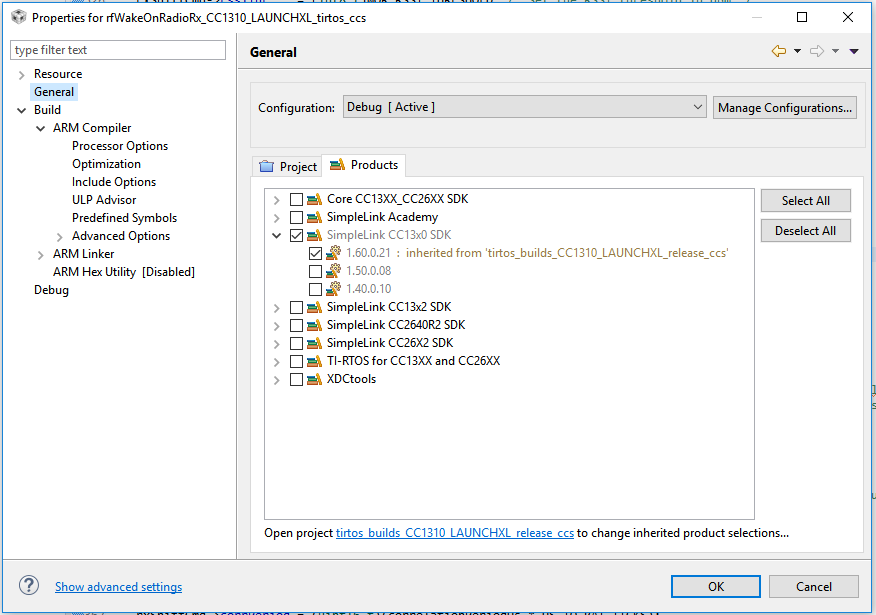
    If you look at the smartrf files from the SDK 1.5 you will see that the #include section is made differently. If you haven't done any porting I suspect that you still are using most files from the old TI-RTOS version but are trying to find them in the new SDK. Without knowing anything about your project it's difficult to be more detailed. Ensure that only one TI-RTOS product is selected in the dialog below. 

  • I find “RF_EventCmdError ” in the C:\ti\simplelink_cc13x0_sdk_1_30_00_06\source\ti\drivers\rf\RF.h
    Is sdk version of my project simplelink_cc13x0_sdk_1_30_00_06?

    And I import this simplelink_cc13x0_sdk_1_30_00_06.
    all the files compiled error

    Variable expansion failed.
    Offending text: "-I$CC13XXWARE$"
    Partial command line: ""D:\me\code\v1.4\CC1310 FC761_SHT ZS_GRAM_Ver_V104_20161222\wm_bus\wm_uart.c" "-D" "DeviceFamily_CC13X0" "-o" "D:\me\code\
    v1.4\CC1310 FC761_SHT ZS_GRAM_Ver_V104_20161222\Debug\Obj" "--debug" "--endian=little" "--cpu=Cortex-M3" "-f" "$PROJ_DIR$/configPkg/compiler.opt.defs"
    "--diag_suppress=Pa050" "-I$CC13XXWARE$" "-Dewarm" "--debug" "--silent" "-I$PROJ_DIR$/smartrf_settings" "-e" "--fpu=None" "--dlib_config" "$TOOLKIT_DIR$\
    INC\c\DLib_Config_Normal.h" "-I" "D:\me\code\v1.4\CC1310 FC761_SHT ZS_GRAM_Ver_V104_20161222\user_api"\ "-I" "D:\me\code\v1.4\CC1310 FC761_SHT
    ZS_GRAM_Ver_V104_20161222\wm_bus"\ "-I" "D:\me\code\v1.4\CC1310 FC761_SHT ZS_GRAM_Ver_V104_20161222\main"\ "-I" "D:\me\code\v1.4\CC1310
    FC761_SHT ZS_GRAM_Ver_V104_20161222\sht"\ "-I" "D:\me\code\v1.4\CC1310 FC761_SHT ZS_GRAM_Ver_V104_20161222\update"\ "-I" "D:\me\code\v1.4\
    CC1310 FC761_SHT ZS_GRAM_Ver_V104_20161222\smartrf_settings"\ "-Oh" "
    Error while running C/C++ Compiler

    Done. 0 error(s), 0 warning(s)

    How to solve it ,TER?
  • Based on software-dl.ti.com/.../index.html you probably used TI-RTOS 2.20 or earlier where RF_EventCmdError also where used.

    You either should use the TI-RTOS version used for the development originally or (preferred) port the code over to the newest SDK. See the migration guide in the SDK documentation on how to migrate to a SDK.
  • thanks,TER.
    Do you have link to IAR Embeded workbench For ARM v7.60.1?
    The build environment before my code was IAR Embeded workbench For ARM 7.60.1.
    I can't find where to download it.
  • You have to check with IAR if it's possible to download an old version. On the other hand I believe that a newer version of IAR will work without any issues.
  • How to check iar v7.6? I'm sure it's a resource that hasn't been downloaded。

    Does iar for arm v8.1 support sdk v1.3?(I don't think this sdk is supported)
    So I downloaded iar for arm v7.7.
    But when I open .eww,a warning pops up.(File->open->workspace ...cc1310.ewp)
    The Warning:The project file "....\cc1310.ewp" was created by a newer version of the product and can not be opened.

    And I open the .ewp file again without any reaction.
    And then I create a new project with the same files and same configuration in the iar for arm v7.6.

    Buf all files have same error:
    Variable expansion failed.
    Offending text: "-I$CC13XXWARE$"
    Partial command line: ""D:\me\code\v1.0\cc1310\main\rtos_main.c" "-D" "NDEBUG" "-D" "DeviceFamily_CC13X0" "-o" "D:\me\code\v1.0\cc1310\Debug\Obj"
    "--no_cse" "--no_unroll" "--no_inline" "--no_code_motion" "--no_tbaa" "--no_clustering" "--no_scheduling" "--debug" "--endian=little" "--cpu=Cortex-M3" "-f"
    "$PROJ_DIR$/configPkg/compiler.opt.defs" "--diag_suppress=Pa050" "-I$CC13XXWARE$" "-Dewarm" "--debug" "--silent" "-I$PROJ_DIR$/smartrf_settings" "-e"
    "--fpu=None" "--dlib_config" "$TOOLKIT_DIR$\INC\c\DLib_Config_Full.h" "-I" "$PROJ_DIR$\wm_bus"\ "-I" "$PROJ_DIR$\main"\ "-I" "$PROJ_DIR$\sht"\ "-I"
    "$PROJ_DIR$\update"\ "-I" "$PROJ_DIR$\smartrf_settings"\ "-Ol" "
    Error while running C/C++ Compiler

    Done. 0 error(s), 0 warning(s)

    this error is as same as before.
  • I have a question. Does this sdk include ti-rtos?
  • Sorry, I didn't see that you had posted two different questions.

    All SDKs should have a dependency section, for SDK 1.6 it could be found here: dev.ti.com/.../release_notes_simplelink_cc13x0_sdk_1_60_00_21.html

    Here you will be able to find the lowest version of IAR or CCS you need to run the code.