This thread has been locked.

If you have a related question, please click the "Ask a related question" button in the top right corner. The newly created question will be automatically linked to this question.

CC3100/CC3200 Disable server certificate validation for RADIUS PEAP MSCHAPv2 server

Other Parts Discussed in Thread: CC3200, CC3100, CC3100SDK

Hi,

Is there any way to  connect to a WPA2 Enterprise server that uses PEAP MSCHAPv2 wihout having to flash the ca.pem file?

In Windows there is an option to disable validation of server certificate. Is that possible with the CC3100/CC3200?

Thanks,

  • Hi Duy,

    No, we don't support that option. It is actually a security breach, I'm surprised that this option is available in windows.

    Can you please elaborate on where do you see the need for it? which environments, systems?


    Thanks,
    Alon

  • Hi Alon,

    We're developing a product that will be connected to our clients' enterprise network. We don't want the clients to have to manually install certificates.

  • Hi Duy,

    Understood. Again, this is a security issue, but it is your decision of course. Unfortunately as of today we don't support it.
    The only thing I can recommend is to add the certificate flashing to your regular provisioning scheme.
    Meaning, in any case you need to configure the WLAN network properties and flash the client certificate. so, using the same process (manual or automated) I would assume that you should be able to flash the ca certificate as well.

    Thanks,
    Alon
  • Hi Duy,

    I am closing the thread, if you have further question on this topic, please open a new thread and add a link to this one for reference

    Thanks,
    Alon
  • Hi Duy,

    There is an update since I've answered this E2E thread.
    In our latest beta2 release, we are supporting the ability to connect to an enterprise network without the need to install a certificate.
    You can download and try the latest Services pack in: www.ti.com/.../cc3100sdk

    Thanks,
    Alon
  • Hi Alon,

    Thank you for the update. Unfortunately, it's still not working for me. I'm using the CC3200 Launchpad Rev4.1. After updating the service pack, I uploaded the dummy cert:

    [11:46:53] INFO: > File name: /cert/ca.pem, Update: true, Erase: true
    [11:46:53] INFO: > Erase File: /cert/ca.pem
    [11:46:53] INFO: erasing file "/cert/ca.pem"
    [11:46:53] INFO: deleting file "/cert/ca.pem"
    [11:46:54] INFO: erase file completed
    [11:46:54] INFO: > Size of file = 1310
    [11:46:54] INFO: > Update File: /cert/ca.pem
    [11:46:54] INFO: Downloading file "/cert/ca.pem" with size 1310
    [11:46:54] INFO: New Token is 0x0
    [11:46:54] INFO: Download complete
    [11:46:54] INFO: > Updated Token value: 0x0

    Then I built and ran the ent_wlan example from sdk1.1.0 with the addition of the codes from the release note:

     //start ent wlan connection
    
        eapParams.EapMethod = SL_ENT_EAP_METHOD_PEAP0_MSCHAPv2;
        eapParams.User = USER_NAME;
        eapParams.UserLen = strlen((const char *)eapParams.User);
        eapParams.AnonUserLen = 0;
    
        g_SecParams.Key = PASSWORD;
        g_SecParams.KeyLen = strlen((const char *)g_SecParams.Key);
        g_SecParams.Type = SL_SEC_TYPE_WPA_ENT;
    
        // disable server authentication
    	unsigned char pValues;
    	pValues = 0;  //0 - Disable the server authentication | 1 - Enable (this is the default)
    	sl_WlanSet(SL_WLAN_CFG_GENERAL_PARAM_ID,19,1,&pValues);
    
        lRetVal = sl_WlanConnect(ENT_NAME,strlen(ENT_NAME),NULL,&g_SecParams, \
                                     &eapParams);
        UART_PRINT("sl_WlanConnect returns: ");
    //    UART_PRINT(lRetVal);
        UART_PRINT("%d \r\n", lRetVal);
        ASSERT_ON_ERROR(lRetVal);
    
        // Wait for WLAN Event
        while((!IS_CONNECTED(g_ulStatus)) || (!IS_IP_ACQUIRED(g_ulStatus)))
        {
            // Toggle LEDs to Indicate Connection Progress
            _SlNonOsMainLoopTask();
            MAP_UtilsDelay(8000000);
            GPIO_IF_LedOn(MCU_RED_LED_GPIO);
            _SlNonOsMainLoopTask();
            MAP_UtilsDelay(8000000);
            GPIO_IF_LedOff(MCU_RED_LED_GPIO);
        }
        GPIO_IF_LedOn(MCU_IP_ALLOC_IND);


    The console output is as below:

    Host Driver Version: 1.0.0.10
    Build Version 2.5.99.2.31.1.4.0.1.1.0.3.34
    Device is configured in default state
    Device started as STATION
    sl_WlanConnect returns: 0
    [WLAN ERROR]Device disconnected from the AP AP: ,BSSID: 0:0:0:0:0:0 on an ERROR..!!
    [WLAN ERROR]Device disconnected from the AP AP: ,BSSID: 0:0:0:0:0:0 on an ERROR..!!

    [WLAN ERROR]Device disconnected from the AP AP: ,BSSID: 0:0:0:0:0:0 on an ERROR..!!
    [WLAN ERROR]Device disconnected from the AP AP: ,BSSID: 0:0:0:0:0:0 on an ERROR..!!
    [WLAN ERROR]Device disconnected from the AP AP: ,BSSID: 0:0:0:0:0:0 on an ERROR..!!
    [WLAN ERROR]Device disconnected from the AP AP: ,BSSID: 0:0:0:0:0:0 on an ERROR..!!

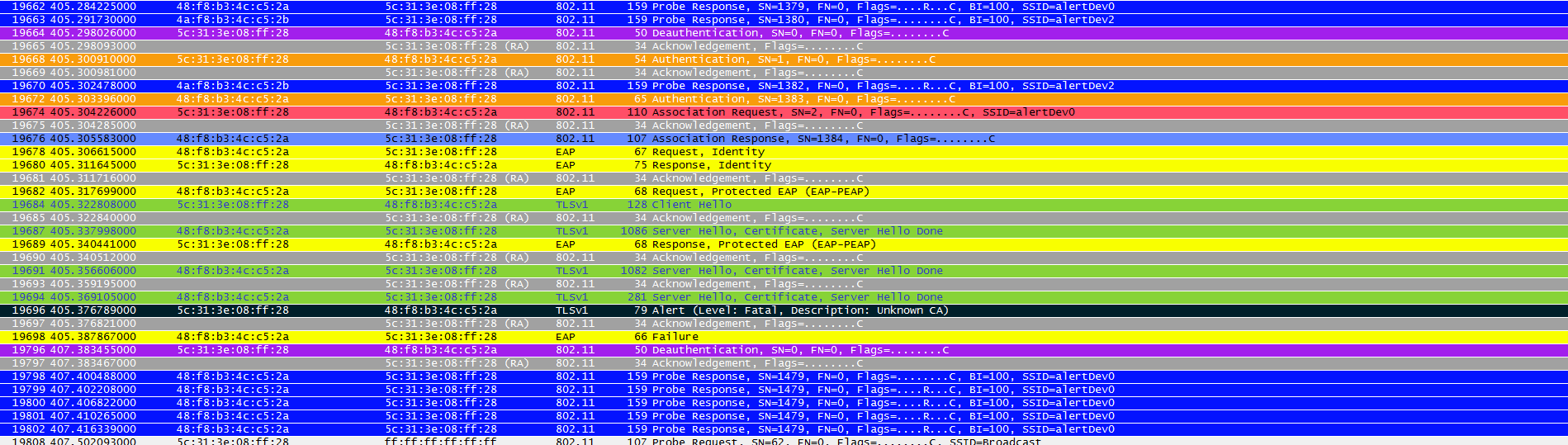
    Here is the wireshark trace:

  • Hello Alon,

    I'm having the same problem here. Our network uses WAP2-Enterprise with PEAP/MS-CHAPv2 protocol which does not require the certificate to authenticate the server. We are able to connect devices with username and password only on Windows and Linux computers by ignoring the absence of the certificate.

    My network admin is being very reluctant in providing me the certificates and I'm unable to connect my CC3200 device to the network.

    I'm using servicepack_1.0.0.10.0 on CC3200. Does this version support skipping checking for the certificate?

    Thank you,

    Caio.