This thread has been locked.

If you have a related question, please click the "Ask a related question" button in the top right corner. The newly created question will be automatically linked to this question.

CC3200 SDK Email - Connecttion with email server failed

Other Parts Discussed in Thread: CC3200

Hi guys, I'm working on the email example, it seems that on my end, I'm not able to send the email due to the following error :

Connection with Email Server Failed, Check Internet Connection and Retry
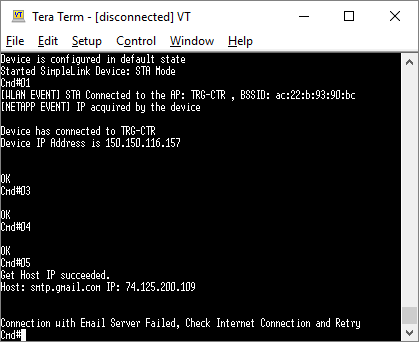
I did some google search and found out these :

I have tried all of the solutions in these 3 links and the WIki for email example, but the outcome is still the same. I have change the sender and receipent email in demo_config.h as well. All of the jumper are as in the wiki page. Pretty please guide me to solve this. thanks in advance.

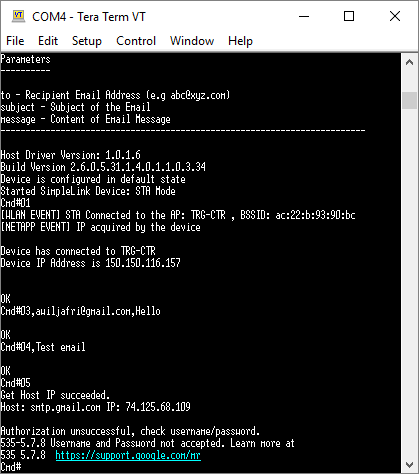
  • So after tweaking the the connection's security type, the previous error no longer show up. But now I'm facing a new one as shown in the picture below :

    I've change the macros inside the demo_config.h as needed, shown below

    //All SMTP defines
    #define SMTP_BUF_LEN 		100
    #define GMAIL_HOST_NAME         "smtp.gmail.com"
    #define GMAIL_HOST_PORT         465
    #define YAHOO_HOST_NAME	        "smtp.mail.yahoo.com"
    #define YAHOO_HOST_PORT			465
    #define USER                    "<techdirectt@gmail.com>" //Set Sender/Source Email Address
    #define USER_RFC                "<techdirectt@gmail.com>" //Set Sender/Source Email Address
    #define PASS                    "<xxxxxxx>"              //Set Sender/Source Email Password
    #define RCPT_RFC                "<awiljafri@gmail.com>"  //Set Recipient Email Password
    #define EMAIL_SUB               "Hello from Simplelink!"

    but still the terminal gave me "Authorization unsuccessful, check username/password.". Can anyone guide me where i've done wrong please.

  • Hi looks like I'm now able to run the email sdk without error. Here's some of the silly mistake i make that causing the errors.

    First in the demo config, remove the angle brackel "<>" from USER, USER_RFC, PASS and RCPT_RFC.

    //All SMTP defines
    #define SMTP_BUF_LEN 		100
    #define GMAIL_HOST_NAME         "smtp.gmail.com"
    #define GMAIL_HOST_PORT         465
    #define YAHOO_HOST_NAME	        "smtp.mail.yahoo.com"
    #define YAHOO_HOST_PORT		465
    #define USER                    "aaaaa@gmail.com" //Set Sender/Source Email Address
    #define USER_RFC                "aaaaa@gmail.com" //Set Sender/Source Email Address
    #define PASS                    "xxxxxx"              //Set Sender/Source Email Password
    #define RCPT_RFC                "bbbbb@gmail.com"  //Set Recipient Email Password
    #define EMAIL_SUB               "Hello from Simplelink!"

    Then for the sw3 button to work, i need to remove the J4 jumper from the board. Otherwise the sw3 won't respond to any push/click. 

  • Hi,

    What are the connection security type changes that you made to make it work? I'm also getting "Connection with email server failed....." error and below are my settings. Kindly help

    //All SMTP defines
    #define SMTP_BUF_LEN 		100
    #define GMAIL_HOST_NAME         "smtp.gmail.com"
    #define GMAIL_HOST_PORT         465
    #define YAHOO_HOST_NAME	        "smtp.mail.yahoo.com"
    #define YAHOO_HOST_PORT		465
    #define USER                    "xxxx@gmail.com" //Set Sender/Source Email Address
    #define USER_RFC                "xxxx@gmail.com" //Set Sender/Source Email Address
    #define PASS                    "password"       //Set Sender/Source Email Password
    #define RCPT_RFC                "harsha@something.com"  //Set Recipient Email Password
    #define EMAIL_SUB               "Hello from Simplelink!"

               lRetVal = Network_IF_GetHostIP(GMAIL_HOST_NAME, &eMailServerSetting.Ip);
                if(lRetVal >= 0)
                {
                    eMailServerSetting.Family = AF_INET;
                    eMailServerSetting.Port = GMAIL_HOST_PORT;
                    eMailServerSetting.SecurityMethod = SL_SO_SEC_METHOD_SSLV3;
                    eMailServerSetting.SecurityCypher = SL_SEC_MASK_SSL_RSA_WITH_RC4_128_MD5;
                    lRetVal = sl_NetAppEmailSet(SL_NET_APP_EMAIL_ID, \
                                            NETAPP_ADVANCED_OPT, \
                                            sizeof(SlNetAppEmailOpt_t), \
                                            (unsigned char*)&eMailServerSetting);
                    ASSERT_ON_ERROR(lRetVal);
                }
                else
                {
                    UART_PRINT("Error:%d GetHostIP.", lRetVal);
                    return -1;
                }

  • Hi Harsha,

    Have you set your router ssid name, password and sec type?

    //
    // Values for below macros shall be modified as per access-point(AP) properties
    // SimpleLink device will connect to following AP when application is executed
    //
    #define SSID_NAME           "TRG-CTR"    /* AP SSID */
    #define SECURITY_TYPE       SL_SEC_TYPE_WPA/* Security type (OPEN or WEP or WPA*/
    #define SECURITY_KEY        "thispasswordisonlyforrnd"              /* Password of the secured AP */
    #define SSID_LEN_MAX        32
    #define BSSID_LEN_MAX       6
    

    Above codes is inside the common.h file that you need to modify accordingly. In my case, I change the security type from WEP to WPA since my router security protocol is in WPA. Hope this help.

    Regards.

  • Hi

    Thanks. Yes I do set SSID_Name and my security type also was WPA. I also tried connecting to my mobile hotspot with security type open. What else might be wrong?

    //
    // Values for below macros shall be modified as per access-point(AP) properties
    // SimpleLink device will connect to following AP when application is executed
    //
    #define SSID_NAME           "Harsha"    /* AP SSID */
    #define SECURITY_TYPE       SL_SEC_TYPE_OPEN /* Security type (OPEN or WEP or WPA*/
    #define SECURITY_KEY        ""//"ZrSUs@uh8hc3W$6%"//"Thought_Focu$"              /* Password of the secured AP */
    #define SSID_LEN_MAX        32
    #define BSSID_LEN_MAX       6  

    Below is the response for above settings..


                    *************************************************

                            CC3200 Email Application
                     ************************************************


    Command Usage
    -------------

    01       - Connect to Preconfigured AP
    03,<to>,<subject>
             - Write Recipient Emailaddress(e.g abc@xyz.com) and Subject
    04,<message>
             - Write Content of the Email
    05       - Send Email
    06       - Connect to AP Using Smart Config

    Parameters
    ----------

    to - Recipient Email Address (e.g abc@xyz.com)
    subject - Subject of the Email
    message - Content of Email Message
    -------------------------------------------------------------------------

    Host Driver Version: 1.0.1.6
    Build Version 2.6.0.5.31.1.4.0.1.1.0.3.34
    Device is configured in default state
    Started SimpleLink Device: STA Mode
    Cmd#01
    [WLAN EVENT] STA Connected to the AP: Harsha , BSSID: 24:da:9b:17:2a:1f
    [WLAN ERROR]Device disconnected from the AP AP: Harsha, BSSID: 24:da:9b:17:2a:1f on an ERROR..!!
    Device could not connect to Harsha


    Please enter the AP(open) SSID name # Harsha

    Trying to connect to AP: Harsha ...
    [WLAN EVENT] STA Connected to the AP: Harsha , BSSID: 24:da:9b:17:2a:1f
    [NETAPP EVENT] IP acquired by the device

    Device has connected to Harsha
    Device IP Address is 192.168.43.188


    OK
    Cmd#03,mpharsha@yahoo.co.in,mail subject

    OK
    Cmd#04,mail message

    OK
    Cmd#05
    Get Host IP succeeded.
    Host: smtp.gmail.com IP: 74.125.200.109


    Connection with Email Server Failed, Check Internet Connection and Retry
    Cmd#05
    Get Host IP succeeded.
    Host: smtp.gmail.com IP: 74.125.200.108


    Connection with Email Server Failed, Check Internet Connection and Retry
    Cmd#05
    Get Host IP succeeded.
    Host: smtp.gmail.com IP: 74.125.200.108


    Connection with Email Server Failed, Check Internet Connection and Retry
    Cmd#


  • Hi Harsha,

    I was having very similar problems to what you are describing above. Followed all the helpful advice from Azwir and the links provided in the first message, other related posts on E2E, and was still not having success! I had even had the demo working previously a few months back and could not figure out what I changed.

    When re-checking the Gmail smtp settings (for the 10th time...) I went to the SSL link under the Gmail SMTP server column and read the note in the last paragraph of the SSL connections overview page which indicates Google Apps is superseding SSL with TLS. At first I didn't think anything of this, but out of curiosity I tried to use TLS instead of SSL and it worked! Same port (465), host name, with the only change made in main.c to the Case 05 routine for SecurityMethod and SecurityCypher. My changes are below.

    eMailServerSetting.SecurityMethod = SL_SO_SEC_METHOD_TLSV1_2;
    eMailServerSetting.SecurityCypher = SL_SEC_MASK_TLS_RSA_WITH_AES_256_CBC_SHA;

    Might be worth a try! As an intriguing side note the TLS required port, 587, did not work for me, but your mileage may vary.

    Best Regards,

    Mark-

  • this helped me too. thanks mark.
  • Hi All,

    I get the following error upon #05 

    Error -163 at line 1144 in function [Network_IF_GetHostIP]

    Error: -163 GetHostIP. Failed to parse the command.

    I'm stuck here. I did what Mark wrote about the TLS change but not working. Also changed the host port to 587,25 and 465. Didn't work

    Please help.

    Thanks