This thread has been locked.

If you have a related question, please click the "Ask a related question" button in the top right corner. The newly created question will be automatically linked to this question.

CC2650 coordinator by using ZNP

Other Parts Discussed in Thread: CC2650, CC2650EMK, Z-STACK

Hi,

I try to use CC2650 as coordinator by using CC2650EM+SmartRF06. I put the znp_coordinator_pro_secure_linkkeyjoin.hex to CC2650 and tried it with Z-tool. It successfully iniatiate the network with my ZHA 1.2 compliant third party endpoint. CC2650 replied its beacon requests, sets network and starts communication by using z-tool.

Then I jump up the Sample Light-ZAP Coordinator application at the "zstack_home_1_02_02a_44539\Projects\zstack\ZAP\HA-SampleLight\EXP5438" folder. Since I dont have 5438 I changed the codes for my 5419A board. I see something is coming from UART channel's RX,TX pins. It seems there is a two way communication occuring after the app starts and periodically when the software hits zap_app.c/zapMonInfo() function.

My problem is, my endpoint is broadcasting beacon requests but nothing happens on my SampleLight-ZAP Coordinator application side. I am waiting my application to setup the network as a coordinator but it seems nothing happens. How can I debug at this point? Do you have any feedback or documents that I can refer for further digging?

Note: I dont have Packet Sniffer yet. I have second CC2650+SmarfRf06 board and using it with SmartRF Studio software. I can see my endpoint's beacon requests  on Channel 11 with this setup.

Thanks. 

  • I would suggest you to use Ubiqua Packet Analyzer to check this first. By the way, do you enable permit join after ZAP-ZNP coordinator forms Zigbee network to allow device to join? You also have to make sure coordinator and device are on the same channel.
  • Hi YK Chen,

    Thank you for your answer. Now I have two SmartRF06 Evaluation Board with CC2650EMK. The new one is working fine as a coordinator. I guess there is something wrong with my old rf06 board.

    Now I have a brand new and well working coordinator. I am using Z-Tool+ZNP configuration with znp-bringup.zjs script. I have a third party ZCL_IAS_ZONE_CONTACT_SWITCH end device and try to integrate it with my coordinator. The ED is successifully joining the network and I get the following responce with UTIL_GET_DEVICE_INFO

    <TX>06:31:12.75 COM6 UTIL_GET_DEVICE_INFO (0x2700)

    <RX>06:31:12.76 COM6 UTIL_GET_DEVICE_INFO_RESPONSE (0x6700)
    Status: SUCCESS (0x0)
    IEEEAddr: 0x00124B0007E19303
    ShortAddress: 0x0000
    DeviceType: COORDINATOR (0x1)
    DeviceState: DEV_ZB_COORD (0x9)
    NumAssocDevices: 0x01
    AssocDevicesList: 0x9DCB

    For the binding process I refered "sunmaysky.blogspot.com.tr/.../how-to-do-device-binding-from-ti-ztool.html and made the binding with the following responces;

    <TX>06:32:45.46 COM6 ZDO_BIND_REQ (0x2521)
    DstAddr: 0x9DCB
    SrcAddress: 0x005043C927317931
    SrcEndpoint: 0x01
    ClusterID: 0x0500
    BindAddrMode: 0x03 (ADDRESS_64_BIT) (0x3)
    BindAddr: .....K.. (0x03, 0x93, 0xE1, 0x07, 0x00, 0x4B, 0x12, 0x00)
    BindEndpoint: 0x07

    <RX>06:32:45.47 COM6 ZDO_BIND_REQ_SRSP (0x6521)
    Status: afStatus_SUCCESS (0x0)

    <RX>06:32:51.12 COM6 ZDO_BIND_RSP (0x45A1)
    SrcAddr: 0x9DCB
    Status: ZDP_SUCCESS (0x0)

    I think every think is OK till here. But my problem is when I release the contact I am waiting an AF_INCOMING_MSG but nothing happens. Also I have some information about the ED from the manufacturer;

    "1、DEVICE ID :IAS Zone (0x0402)
    2、PROFILE ID:0x0104
    3、Endpoint:0x01
    4、ZONE TYPE: ZCL_IAS_ZONE_CONTACT_SWITCH (0x0015)
    5、input cluster :
    a、ZCL_CLUST_BASIC (0x0000):Supported command
    ZCL_ATTR_BASIC_MANUF_NAME = 0x0004 Gesis
    ZCL_ATTR_BASIC_MODEL_ID = 0x0005 (DOOR_TPVXX with Tamper function/DOOR_VXX without tamper)
    ZCL_ATTR_BASIC_PWR_SRC = 0x0007
    b、ZCL_CLUST_PWR_CFG(0x0001):Supported command
    ZCL_ATTR_PWR_CFG_BATT_RATED_VOLT = 0x0034
    ZCL_ATTR_PWR_CFG_BATT_VOLT = 0x0020
    ZCL_ATTR_PWR_CFG_BATT_PERC_REMAIN = 0X0021
    c、ZCL_CLUST_IDENTIFY(0x0003)
    d、ZCL_CLUST_ALARMS(0x0009)
    e、ZCL_CLUST_IAS_ZONE(0x0500):Supported command
    ZCL_ATTR_IAS_ZONE_ZONE_TYPE = 0x0001
    ZCL_ATTR_IAS_ZONE_ZONE_STATUS = 0x0002
    ZCL_ATTR_IAS_ZONE_ZONE_STATE = 0x0000
    ZCL_ATTR_IAS_ZONE_ZONE_ID = 0x0011
    6、output cluster :

    Remark: It upload “zcl_ias_zone_status_change_notify” command when alarm,status is “ZCL_IAS_ZONE_STATUS_RESTORE = 0x0020 | ZCL_IAS_ZONE_STATUS_ALARM1 = 0x0001,It says uploading “ 0x0021” when alarm,Alarm restoration will upload “0x0020”.
    Uploaded status is “RESTORE REPORT| ALARM1 | TAMPER” for with tamper device."


    I don't have a packet analyzer yet. It is on the way. Do you have anysuggestion for this issue.

    Besrt Regards.
    Mumin.
  • The ZED information from manufacturer gives endpoint=1 but you use BindEndPoint:0x07. You should use BindEndPoint=0x01.
  • Hi YiKai,

    Thank you for your feedback. I tried your suggestion with many other different configurations with no success. My values are as follows;

    //--------------------------------------------------------------------

    ZC IEEE Addr: 0x00124B0007E19303

    ZC NwkAddr: 0x0000

    ZC Endpoint: 0x07

    ZED IEEE Addr: 0x005043C927317931

    ZED SrcAddr: 0x230D

    ZED NwkAddr: 0x230D

    ZED Endpoint: 0x01

    //--------------------------------------------------------------------

    and I am filling the ZDO_BIND_REQ params as follows;

    DstAddr = 0x230D(ZED SrcAddr)

    SrcAddress = 0x005043C927317931 (ZED IEEE Addr)

    SrcEndPoint=0x01(ZED Endpoint:)

    ClusterID = 0x500 (IAS Zone)

    BiindAddrMode = 0x03

    BindAddr = (0x03, 0x93, 0xE1, 0x07, 0x00, 0x4B, 0x12, 0x00) (coordinator IEEE adress)

    BindEndpoint = 0x7(ZC Endpoint)

    and my z-tool response for this params is as follows;

    <TX>06:28:43.82 COM6 ZDO_BIND_REQ (0x2521)
    DstAddr: 0x230D
    SrcAddress: 0x005043C927304148
    SrcEndpoint: 0x01
    ClusterID: 0x0500
    BindAddrMode: 0x03 (ADDRESS_64_BIT) (0x3)
    BindAddr: 1y1'.CP. (0x31, 0x79, 0x31, 0x27, 0xC9, 0x43, 0x50, 0x00)
    BindEndpoint: 0x07

    <RX>06:28:43.84 COM6 ZDO_BIND_REQ_SRSP (0x6521)
    Status: afStatus_SUCCESS (0x0)

    <RX>06:28:49.49 COM6 ZDO_BIND_RSP (0x45A1)
    SrcAddr: 0x230D
    Status: ZDP_SUCCESS (0x0)

    //----------------------------------------------------------------------

    Also I noticed a weird thing. When my ZED joins the network Z-Tool gives me this warning. 

    *** WARNING ***
    Unsupported or unformatted message received. Raw data:
    0C 45 CA 0D 23 48 41 30 27 C9 43 50 00 00 00

    <RX>06:26:28.63 COM6 ZDO_END_DEVICE_ANNCE_IND (0x45C1)
    SrcAddr: 0x230D
    NwkAddr: 0x230D
    IEEEAddr: 0x005043C927304148
    Capabilities: 0x84

    But if I make the following;

    <TX>06:31:42.48 COM6 ZDO_IEEE_ADDR_REQ (0x2501)
    ShortAddr: 0x0000
    ReqType: EXTENDED (0x1)
    StartIndex: 0x00

    <RX>06:31:42.5 COM6 ZDO_IEEE_ADDR_REQ_SRSP (0x6501)
    Status: afStatus_SUCCESS (0x0)

    <RX>06:31:42.5 COM6 ZDO_IEEE_ADDR_RSP (0x4581)
    Status: ZDP_SUCCESS (0x0)
    IEEEAddr: 0x00124B0007E19303
    NwkAddr: 0x0000
    StartIndex: 0x00
    NumAssocDev: 0x01
    AssocDevList: 0x230D

    ZED seems to join the network.

    Do you have any suggestion?

    Best Regards.

    Mumin.

  • The log looks OK. I can only suggest you to use Ubiqua Packet Analyzer to check it. Or, try to contact the manufacturer to see why the device doesn't report back after binding.
  • log.zipHi YiKai,

    Finally I got my sniffer. I attached the logs. Do you have any idea about the problem?

    Thanks.

  • The sniffer log shows binding success. No idea why this 3rd party device doesn't report status back.
  • Hi

    I have two SmartRF06 board with CC2650EM

    please guide how to set on Cooridinator and another end device

    which image should i program and how to monitor send and recevie data

    I have smartRF flash programer , Two Eval board setup
  • You can download znp_coordinator_pro_secure_linkkeyjoin.hex to one your CC2650EM+SmartRF06 using Flash Programmer 2 and use ZTool to make it run as Zigbee coordinator. Then, you can build anther CC26xx Z-Stack example, such as SampleSwitch ZED, to run on another CC2650EM+SmartRF06 to act as Zigbee end device to join previous coordinator's Zigbee network.
  • Z tool 2.0 is not available online

    From where to download the Z tool application

    i did.....znp_coordinator_pro_secure_linkkeyjoin.hex to one your CC2650EM+SmartRF06 using Flash Programmer 2

    and checked data sending from CC2650EM+SmartRF06 using smartRF studio to another end device

    But how to confirm ZC ID or PAN ID and end device ID

    ZC sending data , and ZED recevieing data , that i checked using smartRF studio

    i want to corss check it by PAN ID or Netowrk ID

    pls. guide , How and where to check ?
  • If you download and install Z-Stack Home 1.2.2a, you can find ZTool 2.0 under C:\ti\simplelink\zstack_home_1_02_02a_44539\Tools\Z-Tool. You can use Ubiqua Packeyt Analyzer to cross check PANID or Network ID.
  • Hi

    using flash programmer i downloaded the znp file in to CC2650EM, and open the Z tool to set it cooridnator

    but after opening z tool , No device found pop up message appear

    pls. let me know any setting to device found on z tool

  • Try to set baudrate to 115200.
  • Hi
    now connected , How to set coordinator.

    Which command or address used for PAN ID , Device ID and channel number and channel frequency

    i want to set PAN ID- 1900
    Device ID- 0x01
    Channel - 11
    and frequency- 2405 MHz
  • There is a bringup script that you can try to use it.
  • Hi

    In Detail explanation and How to set ZED using Z Tool command 

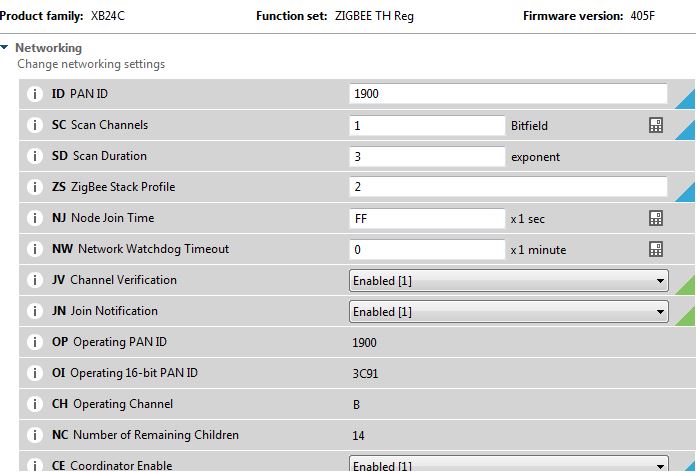
    1. I have XBee-S2C module from Digi international whose setting as below screen shot (support HA profile)

    We have created ZC device using Xbee module- it scan the network for ZED, but how to set ZED

    Now we wanted to connect ZED CC2560EM + SmartRF06EB to Xbee S2C ZC module 

    pls. let me know how to set  ZED device using ZTool2.0

    Where to set and what to set? which commands list ?

    UTIL_SET_PANID?

    UTIL_SET_CHANNELs? or   other commands

    I am hardware design engineer

    so please give me direct command list which i will use to set into CC2560EM using Z Tool

  • You can refer to section 3.1 ZNP startup procedure in Z-Stack ZNP Interface Specification.pdf.
  • Hi

    coordinator found the end device, but after binding end device showing not initialize and not transmit or receive data

    is it required to set destination address, short PAN ID and stack level?

    what is transmit power level in Z tool for CC2650

  • 1. What do you mean "after binding end device showing not initialize and not transmit or receive data?"
    2. Default TX power is set to 0 dbm.
  • XCTU console i.e ZC Xbee-S2C discovered the end device (CC2650)

    But End device could not initialize and no more data exchange

    pls reply with setting at end device side  

  • I am pretty sure CC2650 ZED supports standard Zigbee HA profile 1.2 so it should be something wrong with your ZC settings.