This thread has been locked.

If you have a related question, please click the "Ask a related question" button in the top right corner. The newly created question will be automatically linked to this question.

CC2530: How to write data into NV_RAM using MT API?

Part Number: CC2530
Other Parts Discussed in Thread: CC2531,

 I am trying to write data to NV RAM using SYS_OSAL_NV_WRITE API in z-tool, But with that I am able to write only 128 bits of data. If I want to write more data into same nv_id, how to do it?

Consider I am going to write 10 IEEE addresses in same NV_ID....

Right now in nv_id 0x0401, I am able to write upto 128bits.(0xAA, 0xA4, 0xE9, 0x09, 0x00, 0x4B, 0x12, 0x00, 0x97, 0xA4, 0xE9, 0x09, 0x00, 0x4B, 0x12, 0x00) from z-tool using API.

But I want to write more addresses in same NV_ID, as below..

0xAA, 0xA4, 0xE9, 0x09, 0x00, 0x4B, 0x12, 0x00, 0x97, 0xA4, 0xE9, 0x09, 0x00, 0x4B, 0x12, 0x00,0x2A, 0x3F, 0xA4, 0x0A, 0x00, 0x4B, 0x12, 0x00,0xAA, 0xA4, 0xE9, 0x09, 0x00, 0x4B, 0x12, 0x00, 0x97, 0xA4, 0xE9, 0x09, 0x00, 0x4B, 0x12, 0x00,0x2A, 0x3F, 0xA4, 0x0A, 0x00, 0x4B, 0x12, 0x00

or else like

0xAA, 0xA4, 0xE9, 0x09, 0x00, 0x4B, 0x12, 0x00

0x97, 0xA4, 0xE9, 0x09, 0x00, 0x4B, 0x12, 0x00

0x2A, 0x3F, 0xA4, 0x0A, 0x00, 0x4B, 0x12, 0x00

0xAA, 0xA4, 0xE9, 0x09, 0x00, 0x4B, 0x12, 0x00

0x97, 0xA4, 0xE9, 0x09, 0x00, 0x4B, 0x12, 0x00

0x2A, 0x3F, 0xA4, 0x0A, 0x00, 0x4B, 0x12, 0x00

  • Can you show me how you use SYS_OSAL_NV_WRITE?

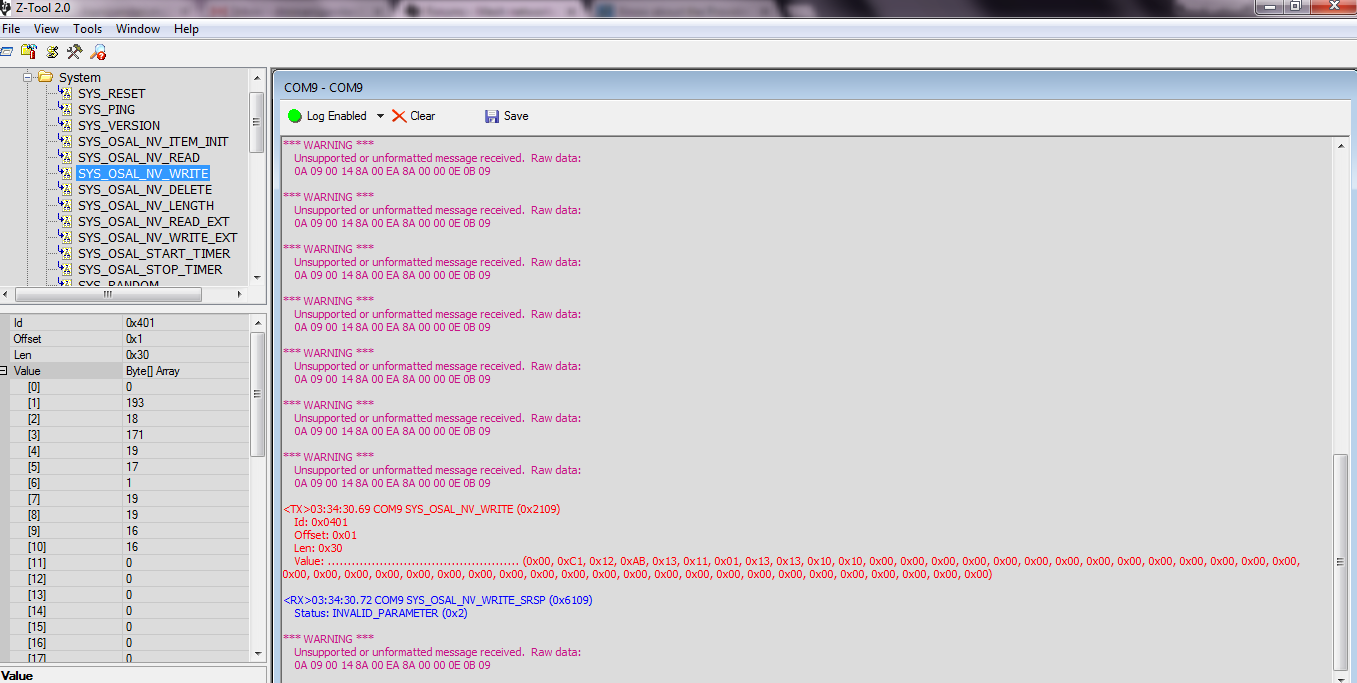
  • I have given nv_id as 0x0401, offset=1, length= 30, and corresponding data.

    if the length is beyond 16, then it is giving INVALID PARAMETER . 

  • You input length as 0x30 which is 48 bytes in decimal so do you input 48 bytes data?
  • Actual data size of IEEE address is 8 byte. If I want to store multiple IEEE addresses means I have to increase the length right?
    If it is not correct way means how to write more addresses.
  • Yes, you can increase length when you want to store multiple IEEE addresses.
  • But I am not able to write that much data. It is taking only 16bytes. That is the issue..
    Can you check this?
  • I don't have my CC2530DK to verify this now. If you can only write 16 bytes at one time, you can write 16 bytes at a time and offset 16 bytes to write another 16 bytes. And, keep moving on in this way.
  • As you said,I have tried to write data by incrementing the offset value. But it is not going beyond 16bytes.

    See the log below..

  • I can try it when I can access to my CC2530DK.
  • Can you please suggest anyone else to check this?
  • You can try to send PM to see if JasonB can help you.
  • Hi Arun,

    Make sure to initialize the item as the total length of the Nv Item, otherwise if you initialize it as 16 bytes, you will not be able to write further than that.

    I did the following test on ZNP device CC2531, you should be able to get the same on your device.

    Initialize item as 250 length, only providing 16 bytes to initialize it

    <TX>11:36:16.9 COM10 SYS_OSAL_NV_ITEM_INIT (0x2107)
    Id: 0x0451
    Len: 0x00FA
    InitLen: 0x10
    InitValue: ................ (0x00, 0x01, 0x02, 0x03, 0x04, 0x05, 0x06, 0x07, 0x08, 0x09, 0x0A, 0x0B, 0x0C, 0x0D, 0x0E, 0x0F)

    <RX>11:36:17.26 COM10 SYS_OSAL_NV_ITEM_INIT_SRSP (0x6107)
    Status: 9 (0x9)

    Read the item written to make sure it did work

    <TX>11:36:25.59 COM10 SYS_OSAL_NV_READ (0x2108)
    Id: 0x0451
    Offset: 0x00

    Notice that not the complete length was given here, for this you can adjust the offset (this is because of limit size of the serial buffer size)

    <RX>11:36:25.61 COM10 SYS_OSAL_NV_READ_SRSP (0x6108)
    Status: SUCCESS (0x0)
    Len: 0xF6
    Value: ...................................................................................................................................................................................................................................................... (0x00, 0x01, 0x02, 0x03, 0x04, 0x05, 0x06, 0x07, 0x08, 0x09, 0x0A, 0x0B, 0x0C, 0x0D, 0x0E, 0x0F, 0xFF, 0xFF, 0xFF, 0xFF, 0xFF, 0xFF, 0xFF, 0xFF, 0xFF, 0xFF, 0xFF, 0xFF, 0xFF, 0xFF, 0xFF, 0xFF, 0xFF, 0xFF, 0xFF, 0xFF, 0xFF, 0xFF, 0xFF, 0xFF, 0xFF, 0xFF, 0xFF, 0xFF, 0xFF, 0xFF, 0xFF, 0xFF, 0xFF, 0xFF, 0xFF, 0xFF, 0xFF, 0xFF, 0xFF, 0xFF, 0xFF, 0xFF, 0xFF, 0xFF, 0xFF, 0xFF, 0xFF, 0xFF, 0xFF, 0xFF, 0xFF, 0xFF, 0xFF, 0xFF, 0xFF, 0xFF, 0xFF, 0xFF, 0xFF, 0xFF, 0xFF, 0xFF, 0xFF, 0xFF, 0xFF, 0xFF, 0xFF, 0xFF, 0xFF, 0xFF, 0xFF, 0xFF, 0xFF, 0xFF, 0xFF, 0xFF, 0xFF, 0xFF, 0xFF, 0xFF, 0xFF, 0xFF, 0xFF, 0xFF, 0xFF, 0xFF, 0xFF, 0xFF, 0xFF, 0xFF, 0xFF, 0xFF, 0xFF, 0xFF, 0xFF, 0xFF, 0xFF, 0xFF, 0xFF, 0xFF, 0xFF, 0xFF, 0xFF, 0xFF, 0xFF, 0xFF, 0xFF, 0xFF, 0xFF, 0xFF, 0xFF, 0xFF, 0xFF, 0xFF, 0xFF, 0xFF, 0xFF, 0xFF, 0xFF, 0xFF, 0xFF, 0xFF, 0xFF, 0xFF, 0xFF, 0xFF, 0xFF, 0xFF, 0xFF, 0xFF, 0xFF, 0xFF, 0xFF, 0xFF, 0xFF, 0xFF, 0xFF, 0xFF, 0xFF, 0xFF, 0xFF, 0xFF, 0xFF, 0xFF, 0xFF, 0xFF, 0xFF, 0xFF, 0xFF, 0xFF, 0xFF, 0xFF, 0xFF, 0xFF, 0xFF, 0xFF, 0xFF, 0xFF, 0xFF, 0xFF, 0xFF, 0xFF, 0xFF, 0xFF, 0xFF, 0xFF, 0xFF, 0xFF, 0xFF, 0xFF, 0xFF, 0xFF, 0xFF, 0xFF, 0xFF, 0xFF, 0xFF, 0xFF, 0xFF, 0xFF, 0xFF, 0xFF, 0xFF, 0xFF, 0xFF, 0xFF, 0xFF, 0xFF, 0xFF, 0xFF, 0xFF, 0xFF, 0xFF, 0xFF, 0xFF, 0xFF, 0xFF, 0xFF, 0xFF, 0xFF, 0xFF, 0xFF, 0xFF, 0xFF, 0xFF, 0xFF, 0xFF, 0xFF, 0xFF, 0xFF, 0xFF, 0xFF, 0xFF, 0xFF, 0xFF, 0xFF, 0xFF, 0xFF, 0xFF, 0xFF, 0xFF, 0xFF, 0xFF, 0xFF, 0xFF, 0xFF, 0xFF, 0xFF, 0xFF, 0xFF)

    Write NV item after initialize

    <TX>11:37:14.51 COM10 SYS_OSAL_NV_WRITE (0x2109)
    Id: 0x0451
    Offset: 0x00
    Len: 0x10
    Value: ...&..D.X..v.... (0x08, 0x12, 0x02, 0x26, 0x04, 0x05, 0x44, 0x07, 0x58, 0x09, 0x0A, 0x76, 0x0C, 0x8A, 0x94, 0x9E)

    <RX>11:37:14.54 COM10 SYS_OSAL_NV_WRITE_SRSP (0x6109)
    Status: SUCCESS (0x0)

    Write Nv item with an offset

    <TX>11:37:42.38 COM10 SYS_OSAL_NV_WRITE (0x2109)
    Id: 0x0451
    Offset: 0x10
    Len: 0x10
    Value: ........X..v.... (0x00, 0x00, 0x00, 0x00, 0x00, 0x00, 0x00, 0x07, 0x58, 0x09, 0x0A, 0x76, 0x0C, 0x8A, 0x94, 0x9E)

    <RX>11:37:42.41 COM10 SYS_OSAL_NV_WRITE_SRSP (0x6109)
    Status: SUCCESS (0x0)

    Read the item to see the changes

    <TX>11:37:47.39 COM10 SYS_OSAL_NV_READ (0x2108)
    Id: 0x0451
    Offset: 0x00

    <RX>11:37:47.41 COM10 SYS_OSAL_NV_READ_SRSP (0x6108)
    Status: SUCCESS (0x0)
    Len: 0xF6
    Value: ...&..D.X..v............X..v.......................................................................................................................................................................................................................... (0x08, 0x12, 0x02, 0x26, 0x04, 0x05, 0x44, 0x07, 0x58, 0x09, 0x0A, 0x76, 0x0C, 0x8A, 0x94, 0x9E, 0x00, 0x00, 0x00, 0x00, 0x00, 0x00, 0x00, 0x07, 0x58, 0x09, 0x0A, 0x76, 0x0C, 0x8A, 0x94, 0x9E, 0xFF, 0xFF, 0xFF, 0xFF, 0xFF, 0xFF, 0xFF, 0xFF, 0xFF, 0xFF, 0xFF, 0xFF, 0xFF, 0xFF, 0xFF, 0xFF, 0xFF, 0xFF, 0xFF, 0xFF, 0xFF, 0xFF, 0xFF, 0xFF, 0xFF, 0xFF, 0xFF, 0xFF, 0xFF, 0xFF, 0xFF, 0xFF, 0xFF, 0xFF, 0xFF, 0xFF, 0xFF, 0xFF, 0xFF, 0xFF, 0xFF, 0xFF, 0xFF, 0xFF, 0xFF, 0xFF, 0xFF, 0xFF, 0xFF, 0xFF, 0xFF, 0xFF, 0xFF, 0xFF, 0xFF, 0xFF, 0xFF, 0xFF, 0xFF, 0xFF, 0xFF, 0xFF, 0xFF, 0xFF, 0xFF, 0xFF, 0xFF, 0xFF, 0xFF, 0xFF, 0xFF, 0xFF, 0xFF, 0xFF, 0xFF, 0xFF, 0xFF, 0xFF, 0xFF, 0xFF, 0xFF, 0xFF, 0xFF, 0xFF, 0xFF, 0xFF, 0xFF, 0xFF, 0xFF, 0xFF, 0xFF, 0xFF, 0xFF, 0xFF, 0xFF, 0xFF, 0xFF, 0xFF, 0xFF, 0xFF, 0xFF, 0xFF, 0xFF, 0xFF, 0xFF, 0xFF, 0xFF, 0xFF, 0xFF, 0xFF, 0xFF, 0xFF, 0xFF, 0xFF, 0xFF, 0xFF, 0xFF, 0xFF, 0xFF, 0xFF, 0xFF, 0xFF, 0xFF, 0xFF, 0xFF, 0xFF, 0xFF, 0xFF, 0xFF, 0xFF, 0xFF, 0xFF, 0xFF, 0xFF, 0xFF, 0xFF, 0xFF, 0xFF, 0xFF, 0xFF, 0xFF, 0xFF, 0xFF, 0xFF, 0xFF, 0xFF, 0xFF, 0xFF, 0xFF, 0xFF, 0xFF, 0xFF, 0xFF, 0xFF, 0xFF, 0xFF, 0xFF, 0xFF, 0xFF, 0xFF, 0xFF, 0xFF, 0xFF, 0xFF, 0xFF, 0xFF, 0xFF, 0xFF, 0xFF, 0xFF, 0xFF, 0xFF, 0xFF, 0xFF, 0xFF, 0xFF, 0xFF, 0xFF, 0xFF, 0xFF, 0xFF, 0xFF, 0xFF, 0xFF, 0xFF, 0xFF, 0xFF, 0xFF, 0xFF, 0xFF, 0xFF, 0xFF, 0xFF, 0xFF, 0xFF, 0xFF, 0xFF, 0xFF, 0xFF, 0xFF, 0xFF, 0xFF, 0xFF, 0xFF, 0xFF, 0xFF, 0xFF, 0xFF, 0xFF, 0xFF, 0xFF, 0xFF, 0xFF, 0xFF)

    Note that the Nv pages are 2k, which means that in theory you should be able to write Nv items up to 2k, in practice you do not because the pages requires some headers and bytes to manage the nv memory, nv memory can only be written from 0's to 1's (or vice versa, I'm not sure), which means that changes in the values often means that the Nv memory needs to be reset, for small items the Nv manager uses the remaining space in the same page and duplicates the nv item with the new values, marking the old item. When the complete page is used an Nv operation will trigger to reset the complete page. If you use Nv items large enough and change the value of these items often you will trigger these pages reset pretty often which might affect the performance of your device, for which is advice you have relatively small nv items (256 bytes are a good number, perhaps even smaller to make it fit in a single nv read operation from MT interface).

    Hope this helps!

  • Cool. Thanks for helping and verifying this.
  • Thanks for the brief expalanation...

    Previously  I have implemented the whitelist functionality as below..

    uint8 ZMacAssociateRsp( ZMacAssociateRsp_t *pData )
    {

    uint16 nv_test=0x0401;

    uint8 Write[NV_WRITE_STORED_DEVICES][Z_EXTADDR_LEN] =
    {
    { 0xC5, 0x4E, 0xA4, 0x0A, 0x00, 0x4B, 0x12, 0x00 },
    { 0x97, 0xA4, 0xE9, 0x09, 0x00, 0x4B, 0x12, 0x00 },
    { 0x2A, 0x3F, 0xA4, 0x0A, 0x00, 0x4B, 0x12, 0x00 },
    };
    uint8 *restricted[NV_WRITE_STORED_DEVICES];
    uint8 index;
    uint8 status;

    /* TBD: set security to zero for now. Require Ztool change */
    pData->Sec.SecurityLevel = false;


    osal_nv_item_init(nv_test, 1, NULL);
    osal_nv_item_init(nv_test, 1, NULL);
    osal_nv_write(nv_test, 0, 8, &Write);
    //osal_nv_read(nv_test, 0, 8, &Write);


    for ( index = 0; index < NV_WRITE_STORED_DEVICES; index++ )
    {
    restricted[index] = Write[index];

    if ( AddrMgrExtAddrEqual( restricted[index], pData-> DeviceAddress) == TRUE )
    {
    // return as unknown device in regards to validation
    return ( MAC_MlmeAssociateRsp( (macMlmeAssociateRsp_t *) pData ) );
    }
    }
    }


    But now I am writing the values of nv_id through the API SYS_OSAL_NV_WRITE (as you explained). But the problem is, how to compare the value in code? What are the changes required to compare the IEEE address.. 


  • You can use osal_nv_read to read the same NV ID and offset from Flash.
  • But the data will be like "0x08, 0x12, 0x02, 0x26, 0x04, 0x05, 0x44, 0x07, 0x58, 0x09, 0x0A, 0x76, 0x0C, 0x8A, 0x94, 0x9E, 0x00, 0x00, 0x00, 0x00, 0x00, 0x00, 0x00, 0x07, 0x58, 0x09, 0x0A, 0x76, 0x0C, 0x8A, 0x94, 0x9E, 0xFF, 0xFF, 0xFF, 0xFF, 0xFF, 0xFF, 0xFF, 0xFF, 0xFF, 0xFF, 0xFF, 0xFF, 0xFF, 0xFF, 0xFF, 0xFF, 0xFF, 0xFF, 0xFF, 0xFF, 0xFF, 0xFF, 0xFF, 0xFF, 0xFF, 0xFF, 0xFF, 0xFF, 0xFF, 0xFF, 0xFF, 0xFF, 0xFF, 0xFF, 0xFF, 0xFF, 0xFF, 0xFF, 0xFF, 0xFF, 0xFF, 0xFF, 0xFF, 0xFF, 0xFF, 0xFF, 0xFF, 0xFF, 0xFF, 0xFF, 0xFF, 0xFF, 0xFF, 0xFF, 0xFF, 0xFF, 0xFF, 0xFF, 0xFF, 0xFF, 0xFF, 0xFF, 0xFF, 0xFF, 0xFF, 0xFF, 0xFF, 0xFF, 0xFF, 0xFF, 0xFF, 0xFF, 0xFF, 0xFF, 0xFF, 0xFF, 0xFF, 0xFF, 0xFF, 0xFF, 0xFF, 0xFF, 0xFF, 0xFF, 0xFF, 0xFF, 0xFF, 0xFF, 0xFF, 0xFF, 0xFF, 0xFF, 0xFF, 0xFF, 0xFF, 0xFF, 0xFF, 0xFF, 0xFF, 0xFF, 0xFF, 0xFF, 0xFF, 0xFF, 0xFF, 0xFF, 0xFF, 0xFF, 0xFF, 0xFF, 0xFF, 0xFF, 0xFF, 0xFF, 0xFF, 0xFF, 0xFF, 0xFF, 0xFF, 0xFF, 0xFF, 0xFF, 0xFF, 0xFF, 0xFF, 0xFF, 0xFF, 0xFF, 0xFF, 0xFF, 0xFF, 0xFF, 0xFF, 0xFF, 0xFF, 0xFF, 0xFF, 0xFF, 0xFF, 0xFF, 0xFF, 0xFF, 0xFF, 0xFF, 0xFF, 0xFF, 0xFF, 0xFF, 0xFF, 0xFF, 0xFF, 0xFF, 0xFF, 0xFF, 0xFF, 0xFF, 0xFF, 0xFF, 0xFF, 0xFF, 0xFF, 0xFF, 0xFF, 0xFF, 0xFF, 0xFF, 0xFF, 0xFF, 0xFF, 0xFF, 0xFF, 0xFF, 0xFF, 0xFF, 0xFF, 0xFF, 0xFF, 0xFF, 0xFF, 0xFF, 0xFF, 0xFF, 0xFF, 0xFF, 0xFF, 0xFF, 0xFF, 0xFF, 0xFF, 0xFF, 0xFF, 0xFF, 0xFF, 0xFF, 0xFF, 0xFF, 0xFF, 0xFF, 0xFF, 0xFF, 0xFF, 0xFF, 0xFF, 0xFF, 0xFF, 0xFF, 0xFF, 0xFF, 0xFF, 0xFF, 0xFF, 0xFF, 0xFF, 0xFF"


    Comparing by using offset will not be helpful i think. And How it will check, byte by byte or address by address( whole 8 byte at a time)?

    It may require the data to be arranged in an array which should have only 8 byte. Then it is easy to check with the incoming router  address...

  • Can you elaborate how you write IEEE into NV and how do you want them to be read out? If you write IEEE address one by one, you should be able to read out one by one to compare.
  • I will be writing the IEEE address into the NV_RAM by giving offset value ( like 0,8,....). After writing all the addresses into nv_ram, I will be reading the data using SYS_OSAL_NV_READ API, it will display all the values from the particular offset. If I am giving offset is 0x18 and total legth of nv_id will be 0xFA, it will display the values from offset 0x18 to the end 0xFA. From this How to know that particular byte is belongs to particular address. If 8 bytes are seperated by new line means it is easy to understand, but it is not like that.

    This is the actual problem. If I am going to access also it will remain the same. If I am hardcoding the data means the it is giving the data as it is like "0xC5, 0x4E, 0xA4, 0x0A, 0x00, 0x4B, 0x12, 0x00". In case of API's it is not like that.
  • I couldn't understand your problem and question. Since you write write every IEEE address with 8 bytes offset, you should be able to read 8 bytes out one by one to compare, don't you?

  • No, I can't read the data one by one.
  • Hi Arun,

    osal_nv_read takes as parameters: NvId, ndx which is the offset, the length of the bytes you want to retrieve from the Nv and the buffer where to write the data being retrieved.

    You need to create a function to which you can pass the IEEE of the joining device and will search in the NvItem for this IEEE, if it is there, then you may process it, otherwise you don't (assuming this is for the whitelist)

    for comparing you will have to use osal_nv_read, NvID is fixed to your ID or changing if you needed to have multiple Index to store all your devices, the offset will start in 0 and increasing by 8, and the length will be fixed to 8 as you only want to retrieve 8 bytes, the buffer can be local variable of 8 bytes.

    For comparing you can use osal_memcmp(const void GENERIC *src1, const void GENERIC *src2, unsigned int len), as parameters you put in there the IEEE address of the joining device, the address being retrieved from the Nv and the length of the buffers, which would be 8.

    Hope this helps!

  • I have code is .

    uint8 ZMacAssociateRsp( ZMacAssociateRsp_t *pData )
    {

    uint8 *restricted[NV_WRITE_STORED_DEVICES];
    uint8 index,b[8];
    uint8 status;
    int x=0;
    uint8 uart_data[NV_WRITE_STORED_DEVICES][Z_EXTADDR_LEN];

    /* TBD: set security to zero for now. Require Ztool change */
    pData->Sec.SecurityLevel = false;


    osal_nv_read(0x0402, 0, 8, &uart_data);

    for ( index = 0; index < NV_WRITE_STORED_DEVICES; index++ )
    {

    restricted[index] = uart_data[index];

    if ( AddrMgrExtAddrEqual( restricted[index], pData-> DeviceAddress) == TRUE )
    {
    // return as unknown device in regards to validation
    return ( MAC_MlmeAssociateRsp( (macMlmeAssociateRsp_t *) pData ) );
    }

    }
    }


    And the NV_RAM Data is 

    TX>03:24:55.6 COM9 SYS_OSAL_NV_READ (0x2108)
    Id: 0x0402
    Offset: 0x00

    <RX>03:24:55.67 COM9 SYS_OSAL_NV_READ_SRSP (0x6108)
    Status: SUCCESS (0x0)
    Len: 0x78
    Value: .....K.......K.......................................................................................................... (0x93, 0xA4, 0xE9, 0x09, 0x00, 0x4B, 0x12, 0x00, 0x93, 0xA4, 0xE9, 0x09, 0x00, 0x4B, 0x12, 0x00, 0xFF, 0xFF, 0xFF, 0xFF, 0xFF, 0xFF, 0xFF, 0xFF, 0xFF, 0xFF, 0xFF, 0xFF, 0xFF, 0xFF, 0xFF, 0xFF, 0xFF, 0xFF, 0xFF, 0xFF, 0xFF, 0xFF, 0xFF, 0xFF, 0xFF, 0xFF, 0xFF, 0xFF, 0xFF, 0xFF, 0xFF, 0xFF, 0xFF, 0xFF, 0xFF, 0xFF, 0xFF, 0xFF, 0xFF, 0xFF, 0xFF, 0xFF, 0xFF, 0xFF, 0xFF, 0xFF, 0xFF, 0xFF, 0xFF, 0xFF, 0xFF, 0xFF, 0xFF, 0xFF, 0xFF, 0xFF, 0xFF, 0xFF, 0xFF, 0xFF, 0xFF, 0xFF, 0xFF, 0xFF, 0xFF, 0xFF, 0xFF, 0xFF, 0xFF, 0xFF, 0xFF, 0xFF, 0xFF, 0xFF, 0xFF, 0xFF, 0xFF, 0xFF, 0xFF, 0xFF, 0xFF, 0xFF, 0xFF, 0xFF, 0xFF, 0xFF, 0xFF, 0xFF, 0xFF, 0xFF, 0xFF, 0xFF, 0xFF, 0xFF, 0xFF, 0xFF, 0xFF, 0xFF, 0xFF, 0xFF, 0xFF, 0xFF, 0xFF, 0xFF)

    My problem is..

    When the ZR's address is matching with first 8 byte, then only it is connecting. 

    If Incoming address is "0x93, 0xA4, 0xE9, 0x09, 0x00, 0x4B, 0x12, 0x00" the first 8 byte of particular nv_id should be "0x93, 0xA4, 0xE9, 0x09, 0x00, 0x4B, 0x12, 0x00" .

    If it is "0x03, 0xA4, 0xE9, 0x09, 0x00, 0x4B, 0x12, 0x00, 0x93, 0xA4, 0xE9, 0x09, 0x00, 0x4B, 0x12, 0x00", means from offset 8, ZC is not accepting ZR.

    Please check any more code changes is required or any logic issue is there..

  • Hi Arun,

    You only read the first Address entry of the Nv, you have to include your Osal_nv_read function inside of the 'for' loop and increase the offset by 8 each time you compare an IEEE address.
  • I have an issue after the reset in CC2530. After the powerup of the board, application is starting after one minute but after doing SYS_RESET, directly it is going to the application instead of going to the bootloader. Now I want to fix this issue, so that whenever I am doing Soft_reset it should go to the bootloader first and then to the application.

    I have posted as a separate query in e2e.ti.com/.../591999 . Please Reply..