This thread has been locked.

If you have a related question, please click the "Ask a related question" button in the top right corner. The newly created question will be automatically linked to this question.

Code Composer 5.1.07001 GDB causes processor to crash while command line does not

Expert 2220 points


Hello I am running a variant of the VC3 demo on DM8168 using code composer 5.1.07001. I am trying to debug the demo and am having partial success. I can connect and step through code in general. If i simply connect using GDB in code composer and click 'Run' the processor will crash after a certain point in the program. There is no error information from either the command line or the console window. It simply stops responding and I have to powercycle. If i use GDB from the command line and tell it to run, it works fine. What does code composer do differently that command line GDB that couuld cause it crash?


Thanks,

Ben

  • Ben,

    Unfortunately it is hard to tell what may be going on, as there are no error messages. Therefore I can provide some suggestions at this time.  

    Assuming you are pointing to the exact same GDB from Eclipse and command-line and using the same parameters (are you using a .gdbinit command file?), the only thing I would suspect is a runtime constraint that causes the application to fail, as the underlying software is identical (GDB in both cases). Eclipse may execute things a bit slower than the command-line version, as the IDE does a lot of command passing and data transfers depending on which views are open (Expressions, Disassembly, Memory, etc.). Therefore I would close all views and see if the issue still happens.

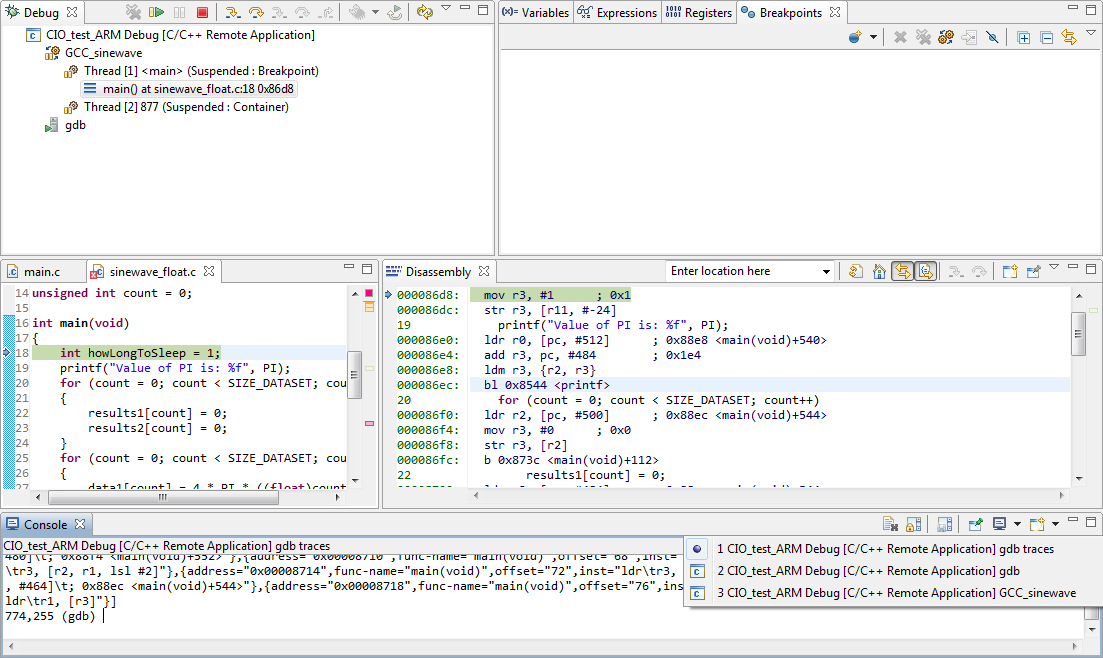
    You can also check what is being exactly sent to and from the GDB server by looking at the GDB traces in the console window (check the attached screen). Maybe you can copy and paste the commands exactly to the command-line version and see where it is breaking the execution.

    As for details about the commands themselves, I am not an expert but you surely can find good references in the web.

    Hope this helps,

    Rafael


  • Thanks for the help. I believe that the problem was being caused by some files being compiled improperly (O2 and O3) so there was no debug information. Should this cause it to crash? I am used to being able to optimize some files while leaving other unoptimized so that I can debug them easily. 

    I am currently being faced with one more issue. Debugging in general is working fine now. I can put in breakpoints and step through code. However I am unable to debug any of the tasks that get created. The tasks are running and outputting data, but GDB does not seem to be aware of them. If I pause, the tasks continue to run. If i try to put a breakpoint in the task, the whole processor crashes at that breakpoint. I checked to see if I am using multi threaded GDB by typing "info threads" and it responded with thread information verifying that i am. Any ideas would be greatly appreciated. 

  • Ben,

    I am not sure why GDB is causing CCS to crash, but I will keep investigating this (couldn't reproduce it here when I have a printf or other support library call).

    I haven't used GDB for multithread apps yet, but I found an interesting thread at stackoverflow that may help you with some tutorials:

    http://stackoverflow.com/questions/1695268/multi-threaded-debugging-tutorial-for-gdb-and-c

    Hope this helps,

    Rafael

  • Perhaps I mispoke. It doesn't make code composer crash, it makes the application crash and puts the processor in a state that has to be restarted. I was able to recreate the problem in a much simpler environment. I am using the codesourcery arm-none-linux-gnueabi toolchain running on dm8168.I build the following c file (I had to name it txt to post it)

    /*
     * thread.c
     *
     *  Created on: Oct 31, 2011
     *      Author: root
     */
    
    
    #include <stdio.h>
    #include <pthread.h>
    #include <stdlib.h>


    void *print_message_function( void *ptr );
    
    
    int main(int argc, char** argv)
    
    {
    
        pthread_t thread1, thread2;
    
         char *message1 = "Thread 1";
    
         char *message2 = "Thread 2";
         int  iret1, iret2;


        /* Create independent threads each of which will execute function */


         iret1 = pthread_create( &thread1, NULL, print_message_function, (void*) message1);
    
         iret2 = pthread_create( &thread2, NULL, print_message_function, (void*) message2);


         /* Wait till threads are complete before main continues. Unless we  */
    
         /* wait we run the risk of executing an exit which will terminate   */
    
         /* the process and all threads before the threads have completed.   */


         pthread_join( thread1, NULL);
         pthread_join( thread2, NULL);


         printf("Thread 1 returns: %d\n",iret1);
    
         printf("Thread 2 returns: %d\n",iret2);
    
         exit(0);
    
    }


    void *print_message_function( void *ptr )
    
    {
    
         char *message;
    
         message = (char *) ptr;
    
         printf("%s \n", message);
    
    }
    

    and use the "-lpthread" linker option to load the multithreaded module. Then I try to debug it using gdbserver over ethernet. If i put a breakpoint in the print_message_function the application dies when it hits it. 

    Please let me know if you have any insights on how to debug this process. Thanks


    Ben

  • So I found the answer to my question yesterday. The compiler/GDB version I was using simply did not support multi-threaded debugging. I am using codeSourcery 2009 q3, the required compiler for DM8168 EZSDK.  I downloaded newer codeSourcery tools and I was able to debug tasks with no problem. When I say that the gdb i was using did not support multi-threaded debug it is because the newer version just worked. Perhaps the older one also works but it is not being set up right by CCS? 

  • BenM,

    Thank you for reporting this. I am not entirely sure why the GDB was not working, but I imagine that CCS was probably setting it up correctly as it worked with the new one (usually the parameters used by the open source tools change minimally across the versions).

    In any case, I couldn't yet test the small app you sent, but I will check how well this works with the GDB debugger supplied with CodeSourcery (I also use the 2009q3).

    Regards,

    Rafael

  • So once again i have to take back what I said earlier. I was using the gdbserver that is supplied with the target file system, not the codeSourcery tool. Once i copied the gdbserver from the codeSourcery to my nfs multithreaded debug worked.

  • Hello,

    Same case for me,

    Trying to debug multi-threaded in DM8148 EZSDK, I have encountered issues.

    Replacing the gdbserver bin in the target filesystem solved the problem.

    so now I am able to debug multi-threaded apps.

  • Hi Jonathan,

    I have the same problem when I try  to debug multi-threaded applications on DM8148 EVM

    What version of CodeSourcery do you use?

    I just tried replacing the gdbserver bin on the target filesystem with the one in "CodeSourcery/Sourcery_G++_Lite/arm-none-linux-gnueabi/libc/usr/bin" in CodeSourcery 2009q1 and I'm still having the same problem.

    Thank you

    Simon